android定位:获取当前位置的经纬度
Android定位主要使用的是基于位置服务(Location Based Service)技术,有了 Android 系统作为载体,我们可以利用定位出的位置进行许多丰富多彩的操作,比如定位城市,根据我们当前的位置,查找要去的目的地的路线等等,因此,现在几乎开发的每一款互联网app产品都有定位功能,好了,现在我们开始学习简单的定位。
效果图:
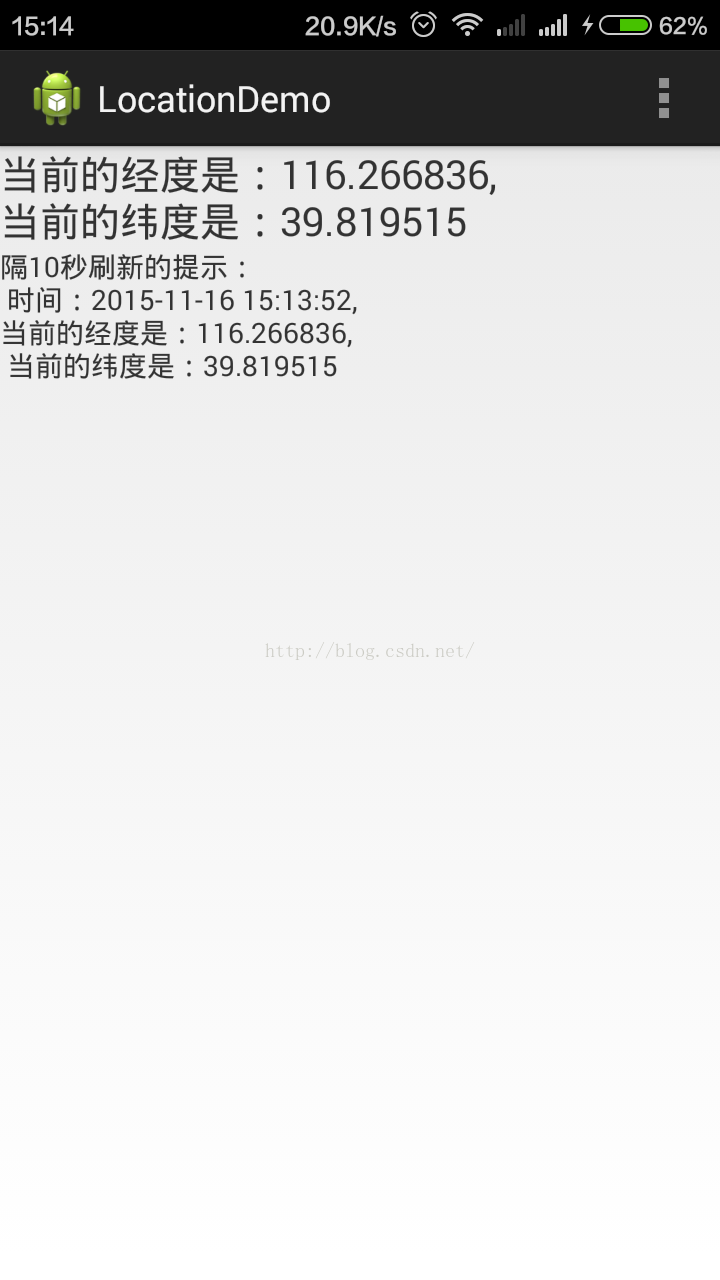
代码:
activity_main.xml中的代码:
<LinearLayout xmlns:android="http://schemas.android.com/apk/res/android"
    android:layout_width="fill_parent"
    android:layout_height="fill_parent"
    android:orientation="vertical" >

    <TextView
        android:id="@+id/position_text"
        android:layout_width="wrap_content"
        android:layout_height="wrap_content"
        android:textSize="20sp"
        android:text="经纬度"
        />
    <TextView
        android:id="@+id/tipInfo"
        android:layout_width="wrap_content"
        android:layout_height="wrap_content"
        android:text="提示信息"
        />

</LinearLayout>
MainActivity.java中的代码:
package com.test.locationdemo;

import java.text.SimpleDateFormat;
import java.util.Calendar;
import java.util.Date;
import java.util.List;

import android.app.Activity;
import android.content.Context;
import android.location.Location;
import android.location.LocationListener;
import android.location.LocationManager;
import android.os.Bundle;
import android.view.Menu;
import android.widget.TextView;
import android.widget.Toast;

public class MainActivity extends Activity {

	private TextView positionText;// 存放经纬度的文本
	private TextView tipInfo;// 提示信息

	private LocationManager locationManager;// 位置管理类

	private String provider;// 位置提供器

	SimpleDateFormat sdf = new SimpleDateFormat("yyyy-MM-dd HH:mm:ss");

	@Override
	protected void onCreate(Bundle savedInstanceState) {
		super.onCreate(savedInstanceState);
		setContentView(R.layout.activity_main);
		positionText = (TextView) findViewById(R.id.position_text);
		tipInfo = (TextView) findViewById(R.id.tipInfo);
		// 获得LocationManager的实例
		locationManager = (LocationManager) getSystemService(Context.LOCATION_SERVICE);

		// 获取所有可用的位置提供器
		List<String> providerList = locationManager.getProviders(true);
		if (providerList.contains(LocationManager.GPS_PROVIDER)) {
			//优先使用gps
			provider = LocationManager.GPS_PROVIDER;
		} else if (providerList.contains(LocationManager.NETWORK_PROVIDER)) {
			provider = LocationManager.NETWORK_PROVIDER;
		} else {
			// 没有可用的位置提供器
			Toast.makeText(MainActivity.this, "没有位置提供器可供使用", Toast.LENGTH_LONG)
					.show();
			return;
		}

		Location location = locationManager.getLastKnownLocation(provider);
		if (location != null) {
			// 显示当前设备的位置信息
			String firstInfo = "第一次请求的信息";
			showLocation(location, firstInfo);
		} else {
			String info = "无法获得当前位置";
			Toast.makeText(this, info, 1).show();
			positionText.setText(info);
		}

		// 更新当前位置
		locationManager.requestLocationUpdates(provider, 10 * 1000, 1,
				locationListener);

	}

	protected void onDestroy() {
		super.onDestroy();
		if (locationManager != null) {
			// 关闭程序时将监听器移除
			locationManager.removeUpdates(locationListener);
		}

	};

	LocationListener locationListener = new LocationListener() {

		@Override
		public void onStatusChanged(String provider, int status, Bundle extras) {
			// TODO Auto-generated method stub
		}
		@Override
		public void onProviderEnabled(String provider) {
			// TODO Auto-generated method stub
		}
		@Override
		public void onProviderDisabled(String provider) {
			// TODO Auto-generated method stub
		}
		@Override
		public void onLocationChanged(Location location) {
			// 设备位置发生改变时,执行这里的代码
			String changeInfo = "隔10秒刷新的提示:\n 时间:" + sdf.format(new Date())
					+ ",\n当前的经度是:" + location.getLongitude() + ",\n 当前的纬度是:"
					+ location.getLatitude();
			showLocation(location, changeInfo);
		}
	};

	/**
	 * 显示当前设备的位置信息
	 *
	 * @param location
	 */
	private void showLocation(Location location, String changeInfo) {
		// TODO Auto-generated method stub
		String currentLocation = "当前的经度是:" + location.getLongitude() + ",\n"
				+ "当前的纬度是:" + location.getLatitude();
		positionText.setText(currentLocation);
		tipInfo.setText(changeInfo);
	}

	@Override
	public boolean onCreateOptionsMenu(Menu menu) {
		// Inflate the menu; this adds items to the action bar if it is present.
		getMenuInflater().inflate(R.menu.main, menu);
		return true;
	}

}
<?xml version="1.0" encoding="utf-8"?>
<manifest xmlns:android="http://schemas.android.com/apk/res/android"
    package="com.test.locationdemo"
    android:versionCode="1"
    android:versionName="1.0" >

    <uses-sdk
        android:minSdkVersion="14"
        android:targetSdkVersion="18" />
    <!--获取设备当前位置的权限 -->
    <uses-permission android:name="android.permission.ACCESS_FINE_LOCATION" />

    <application
        android:allowBackup="true"
        android:icon="@drawable/ic_launcher"
        android:label="@string/app_name"
        android:theme="@style/AppTheme" >
        <activity
            android:name="com.test.locationdemo.MainActivity"
            android:label="@string/app_name" >
            <intent-filter>
                <action android:name="android.intent.action.MAIN" />

                <category android:name="android.intent.category.LAUNCHER" />
            </intent-filter>
        </activity>
    </application>

</manifest>
项目demo下载:
理论讲解:
Android的定位功能使用的技术是:基于位置的服务(Location Based Service)。
以上定位功能实现的步骤如下:
1、获得LocationManager的实例
LocationManager locationManager = (LocationManager)getSystemService(Context.LOCATION_SERVICE);
2、使用位置提供器,确定当前Android设备的位置
Android中有三种位置提供器,分别是:
a、GPS_PROVIDER:使用GPS定位,精准度比较高,但是非常耗电;
b、NETWORK_PROVIDER:使用网络定位,精准度稍差,但是耗电量比较小;
c、PASSIVE_PROVIDER:很少使用(可以暂不考虑)
3、将选择好的位置提供器传入到getLastKnownLocation方法中,就可以得到一个Location对象
String provider = LocationManager.NETWORK_PROVIDER;
Location location = locationManager.getLastKnownLocation(provider);
这个 Location 对象中包含了经度、纬度、海拔等一系列的位置信息。
4、当设备位置发生改变的时候获取到最新的位置信息,使用LocationManager 的 requestLocationUpdates()方
法,同时接收四个参数,分别是:
第一个参数是位置提供器的类型;
第二个参数是监听位置变化的时间间隔,以毫秒为单位;
第三个参数是监听位置变化的距离间隔,以米为单位;
第四个参数则是 LocationListener监听器。
代码如下:
locationManager.requestLocationUpdates(LocationManager.GPS_PROVIDER, 5000, 10,
	new LocationListener() {
	@Override
	public void onStatusChanged(String provider, int status, Bundle extras) {

	}
	@Override
	public void onProviderEnabled(String provider) {

	}
	@Override
	public void onProviderDisabled(String provider) {

	}
	@Override
	public void onLocationChanged(Location location) {
		//设备位置发生改变的时候,执行这里的代码
	}
});
代码解释:LocationManager每隔5秒钟(第二个参数)会检测一下位置的变化情况,当移动距离超过 10米(第三个参数)的时候,
就会调用 LocationListener的 onLocationChanged()方法,并把新的位置信息作为参数传入。
获取设备当前的位置信息是要声明权限的, 在AndroidManifest.xml中添加代码:
<manifest xmlns:android="http://schemas.android.com/apk/res/android"
package="com.example.locationtest"
android:versionCode="1"
android:versionName="1.0" >
……
<!--获取设备当前位置的权限 -->
<uses-permission android:name="android.permission.ACCESS_FINE_LOCATION" />
……
</manifest>
--------------------------------------------------------------------------------------------------------------------------------------------------
上面的定位有问题,补充一个最新的demo如下:
最近有朋友提出上面这个demo下载下来不能够定位,给想使用定位的朋友造成了困惑,再此表示抱歉,由于上面的步骤写的还是很详细的,所以,上面的就不改了,把最新的定位代码放到下面,作为补充。
下面这个代码的功能是:
用来获得定位信息,然后定时传给服务器做记录的,这个定位是直接使用gps定位的,gps在建筑物里或建筑物几种的地方,信息不太好,到了屋外一般信息还是很强的。能同时获得几十甚至几百个卫星定位
想使用的朋友可以按照自己的业务需求改一下,
MainActivity代码:
package com.example.gpsactivity;

import java.text.SimpleDateFormat;
import java.util.Date;
import java.util.Iterator;

import android.app.Activity;
import android.content.Context;
import android.content.Intent;
import android.location.Criteria;
import android.location.GpsSatellite;
import android.location.GpsStatus;
import android.location.Location;
import android.location.LocationListener;
import android.location.LocationManager;
import android.location.LocationProvider;
import android.os.Bundle;
import android.provider.Settings;
import android.util.Log;
import android.view.View;
import android.view.View.OnClickListener;
import android.widget.Button;
import android.widget.TextView;
import android.widget.Toast;

import com.lidroid.xutils.HttpUtils;
import com.lidroid.xutils.exception.HttpException;
import com.lidroid.xutils.http.ResponseInfo;
import com.lidroid.xutils.http.callback.RequestCallBack;
import com.lidroid.xutils.http.client.HttpRequest.HttpMethod;

public class MainActivity extends Activity {
	private TextView logText;
	private TextView currentTime;
	private TextView urlInfoId;
	private TextView resultInfoId;
	private TextView editUrl;
	private TextView editTime;
	private Button commitBtn;

	private LocationManager lm;
	private static final String TAG = "MainActivity";
	private long minTime = 1000 * 5;
	private float minDistance = 0;

	private static int period = 1000 * 5; // 5s
	private String url = "";// 提交的接口url
	private long lastMillis = 0;// 上一次提交的时间

	private String longitude = ""; // 经度
	private String latitude = ""; // 维度

	SimpleDateFormat format = new SimpleDateFormat("yyyy年mm月dd日 HH:mm:ss");

	@Override
	protected void onDestroy() {
		super.onDestroy();
		lm.removeUpdates(locationListener);
	}

	private void setLog(String txt) {
		setLogInfo(txt);
	}

	private void setLogInfo(String txt) {

		logText.setText("\n当前时间:" + format.format(new Date()) + "\n" + txt);
	}

	@Override
	public void onCreate(Bundle savedInstanceState) {
		super.onCreate(savedInstanceState);
		setContentView(R.layout.gps_demo);

		currentTime = (TextView) this.findViewById(R.id.currentTime);
		urlInfoId = (TextView) this.findViewById(R.id.urlInfoId);
		resultInfoId = (TextView) this.findViewById(R.id.resultInfoId);
		logText = (TextView) this.findViewById(R.id.logText);
		editUrl = (TextView) findViewById(R.id.editUrlId);
		editTime = (TextView) findViewById(R.id.editTimeId);
		commitBtn = (Button) findViewById(R.id.commitId);

		getLocation();

		/**
		 * 提交
		 */
		commitBtn.setOnClickListener(new OnClickListener() {

			@Override
			public void onClick(View v) {
				String m = "";
				url = editUrl.getText().toString();
				if (!"".equals(url)) {
					url = url + "&lgt=${lgt}&lat=${lat}";
					m = "提交url是:" + url + "\n";
				}
				String time = editTime.getText().toString();
				if (!"".equals(time) && time != null) {
					boolean isNum = time.matches("[0-9]+");
					if (isNum) {
						period = Integer.valueOf(time) * 1000;
						m = m + "时间间隔是:" + editTime.getText().toString() + "秒";
					}
				}
				if (!"".equals(m)) {
					Toast.makeText(MainActivity.this, m, Toast.LENGTH_LONG)
							.show();
				}
			}
		});


	}


	private void getLocation() {
		lm = (LocationManager) getSystemService(Context.LOCATION_SERVICE);
		// 判断GPS是否正常启动
		if (!lm.isProviderEnabled(LocationManager.GPS_PROVIDER)) {
			Toast.makeText(this, "请开启GPS导航...", Toast.LENGTH_SHORT).show();
			setLog("请开启GPS导航...");
			// 返回开启GPS导航设置界面
			Intent intent = new Intent(Settings.ACTION_LOCATION_SOURCE_SETTINGS);
			startActivityForResult(intent, 0);
			return;
		}

		// 为获取地理位置信息时设置查询条件
		String bestProvider = lm.getBestProvider(getCriteria(), true);
		// 获取位置信息
		// 如果不设置查询要求,getLastKnownLocation方法传人的参数为LocationManager.GPS_PROVIDER
		Location location = lm.getLastKnownLocation(bestProvider);
		updateView(location);
		/**
		 * 监听状态
		 */
		lm.addGpsStatusListener(listener);

		/**
		 * 绑定监听,有4个参数 参数1,设备:有GPS_PROVIDER和NETWORK_PROVIDER两种 参数2,位置信息更新周期,单位毫秒
		 * 参数3,位置变化最小距离:当位置距离变化超过此值时,将更新位置信息 参数4,监听
		 * 备注:参数2和3,如果参数3不为0,则以参数3为准;参数3为0,则通过时间来定时更新;两者为0,则随时刷新。
		 * 1秒更新一次,或最小位移变化超过1米更新一次;
		 * 注意:此处更新准确度非常低,推荐在service里面启动一个Thread,在run中sleep
		 * (10000);然后执行handler.sendMessage(),更新位置
		 */

		if (lm.getProvider(LocationManager.GPS_PROVIDER) != null) {
			Log.d("GPS_PROVIDER执行:", "GPS方法执行。。。。。。。。");
			lm.requestLocationUpdates(LocationManager.GPS_PROVIDER, minTime,
					minDistance, locationListener);
		} else if (lm.getProvider(LocationManager.NETWORK_PROVIDER) != null) {
			Log.d("NETWORK执行:", "NETWORK方法执行。。。。。。。。");
			lm.requestLocationUpdates(LocationManager.NETWORK_PROVIDER,
					minTime, minDistance, locationListener);
		}
	}

	// 位置监听
	private LocationListener locationListener = new LocationListener() {

		/**
		 * 位置信息变化时触发
		 */
		public void onLocationChanged(Location location) {
			setLog("经度:" + location.getLongitude() + "\n纬度:"
					+ location.getLatitude());
			updateView(location);
		}

		/**
		 * GPS状态变化时触发
		 */
		public void onStatusChanged(String provider, int status, Bundle extras) {
			switch (status) {
			// GPS状态为可见时
			case LocationProvider.AVAILABLE:
				Log.i(TAG, "当前GPS状态为可见状态");

				setLog("当前GPS状态为可见状态");
				break;
			// GPS状态为服务区外时
			case LocationProvider.OUT_OF_SERVICE:
				Log.i(TAG, "当前GPS状态为服务区外状态");
				setLog("当前GPS状态为服务区外状态");
				break;
			// GPS状态为暂停服务时
			case LocationProvider.TEMPORARILY_UNAVAILABLE:
				Log.i(TAG, "当前GPS状态为暂停服务状态");
				setLog("当前GPS状态为暂停服务状态");
				break;
			}
		}

		/**
		 * GPS开启时触发
		 */
		public void onProviderEnabled(String provider) {
			Location location = lm.getLastKnownLocation(provider);
			updateView(location);
		}

		/**
		 * GPS禁用时触发
		 */
		public void onProviderDisabled(String provider) {
			updateView(null);
		}

	};

	// 状态监听
	GpsStatus.Listener listener = new GpsStatus.Listener() {
		public void onGpsStatusChanged(int event) {
			switch (event) {
			// 第一次定位
			case GpsStatus.GPS_EVENT_FIRST_FIX:
				Log.i(TAG, "第一次定位");
				setLog("第一次定位");
				break;
			// 卫星状态改变
			case GpsStatus.GPS_EVENT_SATELLITE_STATUS:
				long currenMillis = System.currentTimeMillis();// 当前时间
				if ((currenMillis - lastMillis) > period) {
					uploadUrl();
					lastMillis = currenMillis;
					// 获取当前状态
					GpsStatus gpsStatus = lm.getGpsStatus(null);
					// 获取卫星颗数的默认最大值
					int maxSatellites = gpsStatus.getMaxSatellites();
					// 创建一个迭代器保存所有卫星
					Iterator<GpsSatellite> iters = gpsStatus.getSatellites()
							.iterator();
					int count = 0;
					while (iters.hasNext() && count <= maxSatellites) {
						count++;
					}
					Log.i(TAG, "卫星状态改变,搜索到:" + count + "颗卫星");
					setLog("卫星状态改变,搜索到:" + count + "颗卫星 \n经度:" + longitude
							+ "\n纬度:" + latitude);
				}
				break;
			// 定位启动
			case GpsStatus.GPS_EVENT_STARTED:
				Log.i(TAG, "定位启动");
				setLog("定位启动");
				break;
			// 定位结束
			case GpsStatus.GPS_EVENT_STOPPED:
				Log.i(TAG, "定位结束");
				setLog("定位结束");
				break;
			}
		}

		private void uploadUrl() {
			if (!"".equals(url) && url != null) {
				if (!"".equals(longitude) && !"".equals(latitude)) {
					uploadHttp();
				}
			}
		};
	};

	/**
	 * 实时更新文本内容
	 *
	 * @param location
	 */
	private void updateView(Location location) {
		if (location != null) {
			longitude = String.valueOf(location.getLongitude());
			latitude = String.valueOf(location.getLatitude());

			Log.i(TAG, String.valueOf(location.getLongitude()));
		} else {
			Log.i(TAG, "未获取");
		}
		// editText.append("\n更新时间:" + new Date());
	}

	private void uploadHttp() {
		url = url.replace("${lgt}", longitude).replace("${lat}", latitude);
		urlInfoId.setText(url);
		HttpUtils http = new HttpUtils();
		http.send(HttpMethod.GET, url, new RequestCallBack<String>() {

			@Override
			public void onFailure(HttpException arg0, String arg1) {
				resultInfoId.setText("失败:\n" + arg1);
			}

			@Override
			public void onSuccess(ResponseInfo<String> arg0) {
				currentTime.setText("当前时间是:" + format.format(new Date()));
				resultInfoId.setText("成功:\n"+arg0.result);
			}
		});
	}

	/**
	 * 返回查询条件
	 *
	 * @return
	 */
	private Criteria getCriteria() {
		Criteria criteria = new Criteria();
		// 设置定位精确度 Criteria.ACCURACY_COARSE比较粗略,Criteria.ACCURACY_FINE则比较精细
		criteria.setAccuracy(Criteria.ACCURACY_FINE);
		// 设置是否要求速度
		criteria.setSpeedRequired(false);
		// 设置是否允许运营商收费
		criteria.setCostAllowed(false);
		// 设置是否需要方位信息
		criteria.setBearingRequired(false);
		// 设置是否需要海拔信息
		criteria.setAltitudeRequired(false);
		// 设置对电源的需求
		criteria.setPowerRequirement(Criteria.POWER_LOW);
		return criteria;
	}

}
gps_demo.xml代码:
<?xml version="1.0" encoding="utf-8"?>
<ScrollView xmlns:android="http://schemas.android.com/apk/res/android"
    android:layout_width="fill_parent"
    android:layout_height="fill_parent" >

    <LinearLayout
        android:layout_width="fill_parent"
        android:layout_height="fill_parent"
        android:orientation="vertical" >

        <TextView
            android:id="@+id/logText"
            android:layout_width="fill_parent"
            android:layout_height="wrap_content"
            android:layout_marginBottom="25px"
            android:layout_marginTop="15px"
            android:background="#F0E68C"
            android:minHeight="100dp"
            android:text="显示定位坐标信息" />

        <EditText
            android:id="@+id/editUrlId"
            android:layout_width="match_parent"
            android:layout_height="wrap_content"
            android:hint="输入接口地址" >
        </EditText>

        <EditText
            android:id="@+id/editTimeId"
            android:layout_width="match_parent"
            android:layout_height="wrap_content"
            android:hint="输入时间间隔(如1秒,输入1),默认5秒" />

        <Button
            android:id="@+id/commitId"
            android:layout_width="match_parent"
            android:layout_height="wrap_content"
            android:text="提交" />

        <TextView
            android:id="@+id/currentTime"
            android:layout_width="fill_parent"
            android:layout_height="wrap_content"
            android:layout_marginTop="20px"
            android:background="#FFFFE0"
            android:text="时间" />

        <TextView
            android:layout_width="fill_parent"
            android:layout_height="wrap_content"
            android:layout_marginTop="15px"
            android:text="提交地址信息:" />

        <TextView
            android:id="@+id/urlInfoId"
            android:layout_width="fill_parent"
            android:layout_height="wrap_content"
            android:layout_marginTop="15px"
            android:background="#71C671" />

        <TextView
            android:layout_width="fill_parent"
            android:layout_height="wrap_content"
            android:layout_marginTop="20px"
            android:text="返回信息:" />

        <TextView
            android:id="@+id/resultInfoId"
            android:layout_width="fill_parent"
            android:layout_height="wrap_content"
            android:layout_marginBottom="50px"
            android:layout_marginTop="20px"
            android:background="#F08080" />
    </LinearLayout>

</ScrollView>
项目demo下载地址:
app定位+定时提交坐标信息到服务器(新)

北京人形旗下天工造物具身智能开源社区,聚焦具身天工与慧思开物两大平台
更多推荐
 2
2 0
0- 0


 已为社区贡献4条内容

所有评论(0)