点云关键点检测Harris3D(传统方法)
·
点云关键点检测Harris3D(传统方法)
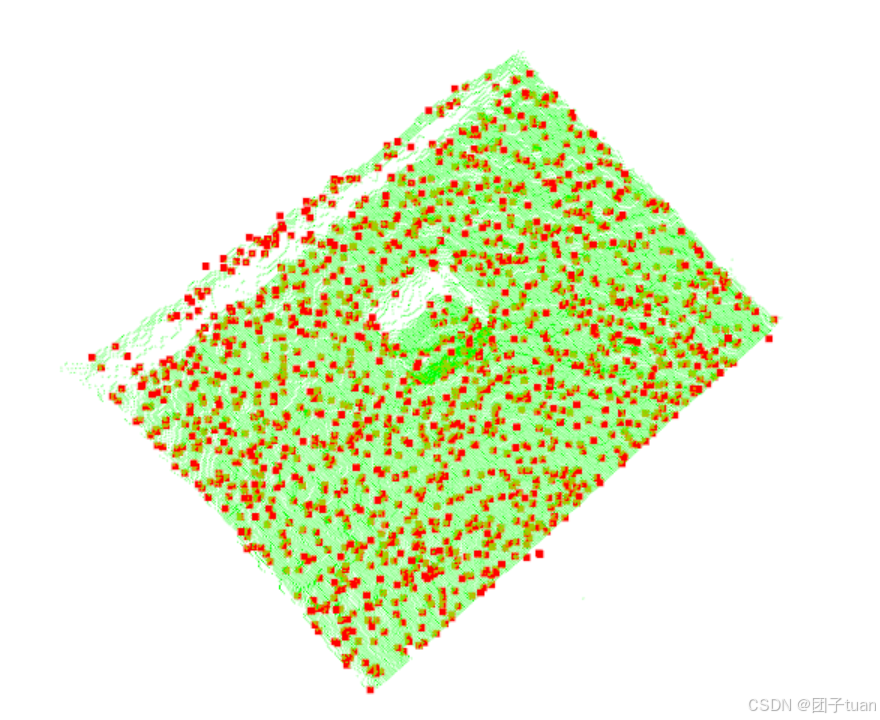
附带检测结果
# 点云关键点检测Harris3D(传统方法)
#include <iostream>
#include <pcl/io/pcd_io.h>
#include <pcl/point_types.h>
#include <pcl/keypoints/harris_3d.h>
#include <pcl/visualization/pcl_visualizer.h>

typedef pcl::PointCloud<pcl::PointXYZRGBA> PointCloud;

// 可视化函数
void visualize_pcd(PointCloud::Ptr model, pcl::PointCloud<pcl::PointXYZI>::Ptr keypoints)
{
    pcl::visualization::PCLVisualizer viewer("Harris3D Keypoint Viewer");
    pcl::visualization::PointCloudColorHandlerCustom<pcl::PointXYZRGBA> model_color(model, 0, 255, 0);
    pcl::visualization::PointCloudColorHandlerCustom<pcl::PointXYZI> keypoint_color(keypoints, 255, 0, 0);
    viewer.setBackgroundColor(255, 255, 255);
    viewer.addPointCloud(model, model_color, "model");
    viewer.addPointCloud(keypoints, keypoint_color, "keypoints");
    viewer.setPointCloudRenderingProperties(pcl::visualization::PCL_VISUALIZER_POINT_SIZE, 5, "keypoints");

    while (!viewer.wasStopped())
    {
        viewer.spinOnce(100);
    }
}

int main(int argc, char** argv)
{
    // 读取点云数据
    pcl::PointCloud<pcl::PointXYZRGBA>::Ptr cloud(new pcl::PointCloud<pcl::PointXYZRGBA>());
    if (pcl::io::loadPCDFile("D:\\Program Files\\OpenGL\\Test2\\0011.pcd", *cloud) < 0)
    {
        PCL_ERROR("Could not read file\n");
        return -1;
    }
    std::cout << "Loaded point cloud with " << cloud->points.size() << " points." << std::endl;

    // Harris 3D 关键点检测
    pcl::HarrisKeypoint3D<pcl::PointXYZRGBA, pcl::PointXYZI> harris;
    harris.setInputCloud(cloud);
    harris.setNonMaxSupression(true);
    harris.setRadius(0.02);
    harris.setThreshold(0.001f);

    // 输出带有强度信息的关键点
    pcl::PointCloud<pcl::PointXYZI>::Ptr keypoints(new pcl::PointCloud<pcl::PointXYZI>());
    harris.compute(*keypoints);
    std::cout << "Number of keypoints detected: " << keypoints->points.size() << std::endl;

    // 保存关键点
    pcl::io::savePCDFile("keypoints_harris_3d.pcd", *keypoints, true);

    // 可视化点云和关键点
    visualize_pcd(cloud, keypoints);

    return 0;
}
参数修改
1.setNonMaxSupression:是否开启非最大值抑制。默认值:true
2.setRadius:用于邻域搜索的半径,影响邻域内计算协方差矩阵的范围。半径越大,考虑的邻域越广,适合低分辨率或稀疏点云;半径越小,适合高分辨率或密集点云。
3.setThreshold:用于过滤低显著性的点,仅保留强度超过此阈值的点。控制关键点的显著性,阈值越高,检测到的关键点越少。
4.setRefine:是否启用关键点位置的细化。false
在高精度需求下,可以设置为 true 来进一步细化关键点位置,但会增加计算时间。默认关闭即可,除非需要非常高精度的关键点位置。

北京人形旗下天工造物具身智能开源社区,聚焦具身天工与慧思开物两大平台
更多推荐
 4
4 0
0- 0


 已为社区贡献1条内容

所有评论(0)