点击flutter 的组件怎么跳转到SingleChildScrollView的固定位置
·
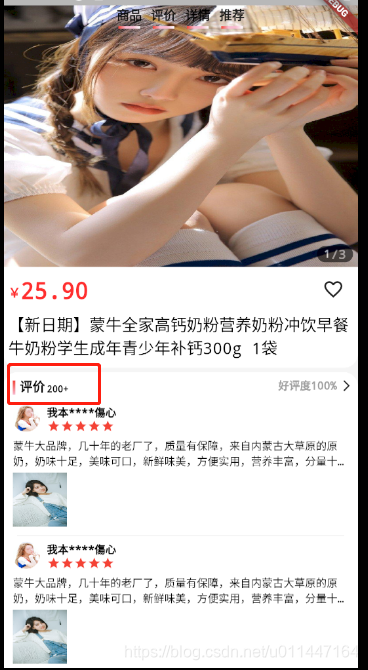
如上图,当我点击评价的时候让评价滑动到顶部。
其实在写评价的时候,在组件中加入key,然后当点击评价的时候使用Scrollable.ensureVisible(key2.currentContext)移动到该指定位置即可
GlobalKey key1=GlobalKey();
  GlobalKey key2=GlobalKey();
  GlobalKey key3=GlobalKey();
  GlobalKey key4=GlobalKey();
评价模块部分
//评价
                      Container(
                        key: key2,
                        width: deviceWidth,
                        margin: EdgeInsets.only(top: 5),
                        padding: EdgeInsets.all(5),
                        decoration: BoxDecoration(
                            color: Colors.white,
                            borderRadius:
                                BorderRadius.all(Radius.circular(15))),
                        child: Column(
                        .........
上边的评价按钮
GestureDetector(
                      child: Container(
                        //color: Colors.blue,
                        margin: EdgeInsets.symmetric(horizontal: 5),
                        child: Column(
                          mainAxisSize: MainAxisSize.max,
                          mainAxisAlignment: MainAxisAlignment.center,
                          children: [
                            Text(
                              "评价",
                              style: TextStyle(
                                fontSize: 14,
                                color: Colors.black87,
                                decoration: TextDecoration.none,
                                //fontWeight: FontWeight.w500
                              ),
                            ),
                            Container(
                              margin: EdgeInsets.only(top: 3),
                              height: 3,
                              width: 24,
                              decoration: BoxDecoration(
                                  shape: BoxShape.rectangle,
                                  gradient: LinearGradient(colors: [
                                    Colors.red,
                                    Colors.pink[100],
                                    Colors.pink[100],
                                    Colors.white
                                  ])),
                            )
                          ],
                        ),
                      ),
                      onTapDown: (TapDownDetails details){
                        print("评价");
                        Scrollable.ensureVisible(key2.currentContext);
                      },
                    )

北京人形旗下天工造物具身智能开源社区,聚焦具身天工与慧思开物两大平台
更多推荐
 0
0 0
0- 0


 已为社区贡献1条内容

所有评论(0)