使用mexcuda编译.cu文件报错的解决:The selected C++ compiler is not supported for CUDA compilation.
文章目录
问题描述
我想使用mexcuda编译一个.cu文件
我的环境:
MATLAB R2022b, Visual Studio 2022, CUDA11.7, RTX 3090.
主要问题:MATLAB2022b不支持Visual studio 2022
2024年解决方法:对于MATLAB 2024a以及之前的,装Visual studio 2019
2025年解决方法:对于MATLAB2024b以及之后的,可以装Visual studio 2019
报错1: 没有编译的xml文件
警告: The selected C++ compiler is not supported for CUDA compilation.
Searching for a supported compiler.
位置:mexcuda (第 96 行)
错误使用 mex
未检测到支持的编译器。有关选项,请访问
https://www.mathworks.com/support/compilers。
出错 mexcuda (第 168 行)
[varargout{1:nargout}] = mex(mexArguments{:});
思考
查看了matlab与cuda的版本:matlab与cuda版本信息
https://ww2.mathworks.cn/help/parallel-computing/mexcuda.html
发现我的有一些超前了,建议的是cuda11.2, 而我是11.7。不是说一定不能用,但是可能会遇到bug。
猜测nvcc编译器设置错误,需要手动设置。
于是使用Everything搜索nvcc.exe,右键复制路径和文件名,将其手动添加到路径。

在matlab命令行中键入:
setenv( "MW_NVCC_PATH" , "C:\Program Files\NVIDIA GPU Computing Toolkit\CUDA\v11.7\bin" )
仍然不行。
于是上网把报错信息搜索一下,从以下博客获得了灵感:
-
解决matlab错误使用 mex 未找到支持的编译器或 SDK一系列问题
原因可能是像下图一样,缺一个msvcpp2022的编译xml文档
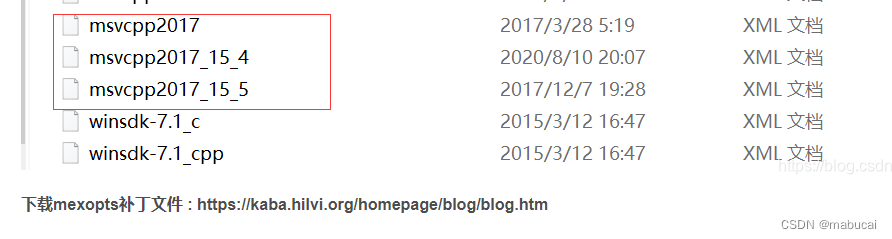
-
matlab cuda混合编程6,Matlab与CUDA C的混合编程配置出现的问题及解决方案
使用测试例程,在matlab命令行键入:mexcuda mexGPUExample.cu,发现我连例程都过不了哈哈。
不过另外提供了一个解决方法:虽然没有nvcc_msvcpp2015.xml,但有nvcc_msvcpp2013.xml啊,照猫画虎,硬写一个,相比里面的参数大多就是改版本号和路径。 -
Windows 10系统下MATLAB2018b调用CUDA 10.1和NVCC
这位大佬发现CUDA的版本超前了,于是硬改xml文件以及编译脚本。还解决了一些编译的bug。 -
低版本Matlab(2020b)与高版本Visual Studio(VS2022)实现M、C/C++混合编程(调试)
这位大佬按照msvcpp2019.xml写了一个msvcpp2022.xml。并且给了详尽的编译过程、思路代码、参考资料。
尝试自写nvcc_msvcpp2022.xml
上述博客已经实现了自写nvcc_msvcpp2015.xml、nvcc_msvcpp2017.xml、msvcpp2022.xml了,最后一个博客差点就要实现nvcc_msvcpp2022.xml了。
看来得接着传承一下,我来写nvcc_msvcpp2022.xml了。
首先使用Everything找到nvcc_msvcpp2017.xml的位置:
C:\Program Files\MATLAB\R2022b\toolbox\parallel\gpu\extern\src\mex\win64
按照上述博客,改了第7行:HostCompiler=“MSVCPP170”。
将所有的【[16.0,17.0)】改为【[17.0,18.0)】保存,一共替换了12个。然后重试mexcuda编译:
(我写的这个文件不一定能用,最终也不是靠这个方法解决的。等matlab再更新更新,就能适配Visual studio 2022,自然就会有这个文件了)
报错2: MATLAB只支持visual studio 2017-2019
使用 ‘NVIDIA CUDA Compiler’ 编译。
错误使用 mex
nvcc warning : The 'compute_35', 'compute_37', 'compute_50', 'sm_35', 'sm_37' and 'sm_50' architectures are deprecated, and may be
removed in a future release (Use -Wno-deprecated-gpu-targets to suppress warning).
mexGPUExample.cu

C:\Program Files\MATLAB\R2022b\sys\cuda\win64\cuda\include\crt/host_config.h(160): fatal error C1189: #error:  -- unsupported
Microsoft Visual Studio version! Only the versions between 2017 and 2019 (inclusive) are supported! The nvcc flag
'-allow-unsupported-compiler' can be used to override this version check; however, using an unsupported host compiler may cause
compilation failure or incorrect run time execution. Use at your own risk.


出错 mexcuda (第 168 行)
    [varargout{1:nargout}] = mex(mexArguments{:});
提示我对于CUDA的功能,matlab 2022b只支持2017至2019。但是也可以强行配置,在nvcc_msvcpp2022.xml第42行加入一个命令,覆盖版本核验。但是自己看着风险来。如果要求可靠性高的程序,那就应该下visual studio2019了。但我这个例程是一个尝试,不用多高的安全性,所以那就强制覆盖。
不进行版本核验
在nvcc_msvcpp2022.xml中加入红圈命令
-allow-unsupported-compiler

报错3: Visual studio 2022提示CUDA版本过低
使用 'NVIDIA CUDA Compiler' 编译。
错误使用 mex
D:\Program Files\Microsoft Visual Studio\2022\Community\VC\Tools\MSVC\14.35.32215\include\yvals_core.h(801): error STL1002:
Unexpected compiler version, expected CUDA 11.6 or newer.
D:\Program Files\Microsoft Visual Studio\2022\Community\VC\Tools\MSVC\14.35.32215\include\yvals_core.h(801): error: static
assertion failed with "Error in C++ Standard Library usage."
D:\Program Files\Microsoft Visual Studio\2022\Community\VC\Tools\MSVC\14.35.32215\include\xtr1common(169): error: identifier
"__builtin_is_constant_evaluated" is undefined
2 errors detected in the compilation of "C:/Program Files/MATLAB/R2022b/toolbox/parallel/gpu/extern/src/mex/mexGPUExample.cu".
nvcc warning : The 'compute_35', 'compute_37', 'compute_50', 'sm_35', 'sm_37' and 'sm_50' architectures are deprecated, and may be
removed in a future release (Use -Wno-deprecated-gpu-targets to suppress warning).
mexGPUExample.cu


出错 mexcuda (第 168 行)
    [varargout{1:nargout}] = mex(mexArguments{:});
我的CUDA版本是11.7啊,怎么还没有11.6新?
于是在matlab命令行使用,查看GPU信息
gpuDevice
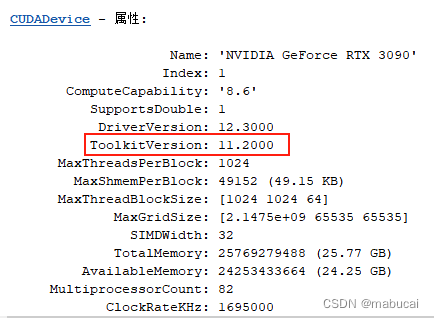
怎么版本是CUDA11.2???我的CUDA11.7呢,看来得重配了。。。
这里是matlab的内置CUDA toolkit版本信息:MATLAB官网
原来虽然我在系统安装的是CUDA11.7, 但是matlab 2022b的内置CUDA是11.2,而Visual studio 2022仅支持11.6以上的版本。
最终解决方法:
1. 要么更新matlab至2024b及以后(2025年12月修改此处)
2. 要么下一个visual studio至2019版本。
由于不清楚matlab2023a和b是否兼容visual studio2022,有没有写好的nvcc_msvcpp2022.xml。我选了第二个路,再下一个visual studio 2019吧。(2024年2月3日,发现MATLAB R2023a支持Visual Studio2017和2019,但不支持2022)
下载好后,需要在matlab里编译
先初始化,以下均在matlab命令行里运行:
mex -setup -v
结果
.. 正在查找注册表设置 'HKLM\SOFTWARE\Wow6432Node\Microsoft\Windows Kits\Installed Roots' KitsRoot10...是('D:\Windows Kits\10\')。
... 正在执行命令 'echo off&set "sdkversion="&(for /f %a IN ('dir "D:\Windows Kits\10\include\" /b /ad-h /on') do ( @if exist "D:\Windows Kits\10\include\%a\ucrt\" set "sdkversion=%a" ))&call echo %sdkversion%'...是('10.0.22000.0')。
找到已安装的编译器 'Microsoft Visual C++ 2022 (C)'。
MEX 配置为使用 'Microsoft Visual C++ 2022 (C)' 以进行 C 语言编译。

要选择不同的 C 编译器,请从以下选项中选择一种命令:
Microsoft Visual C++ 2019 (C)  mex -setup:'C:\Program Files\MATLAB\R2022b\bin\win64\mexopts\msvc2019.xml' C
Microsoft Visual C++ 2022 (C)  mex -setup:C:\Users\pku\AppData\Roaming\MathWorks\MATLAB\R2022b\mex_C_win64.xml C

要选择不同的语言,请从以下选项中选择一种命令:
 mex -setup C++
 mex -setup FORTRAN
选择Visual studio 2019作为C程序编译器:
mex -setup:'C:\Program Files\MATLAB\R2022b\bin\win64\mexopts\msvc2019.xml' C
结果
已将 options 文件 'C:\Users\pku\AppData\Roaming\MathWorks\MATLAB\R2022b\mex_C_win64.xml' 重命名为 'C:\Users\pku\AppData\Roaming\MathWorks\MATLAB\R2022b\mex_C_win64_backup.xml'。
MEX 配置为使用 'Microsoft Visual C++ 2019 (C)' 以进行 C 语言编译。
选择Visual studio 2019作为C++程序编译器
mex -setup:'C:\Program Files\MATLAB\R2022b\bin\win64\mexopts\msvcpp2019.xml' C++
尝试编译例程
mexcuda "C:\Program Files\MATLAB\R2022b\toolbox\parallel\gpu\extern\src\mex\mexGPUExample.cu"
终于:
使用 'NVIDIA CUDA Compiler' 编译。
MEX 已成功完成。
ok现在可以用了。

北京人形旗下天工造物具身智能开源社区,聚焦具身天工与慧思开物两大平台
更多推荐
 14
14 0
0- 0


 已为社区贡献2条内容

所有评论(0)