基于 React + Ant Design实现一个可拖拽布局的低代码编辑器渲染引擎(支持碰撞检测)
·
🚀 基于 React + Ant Design 实现一个可拖拽布局的低代码编辑器渲染引擎(支持碰撞检测)
本文基于 React + Ant Design 打造一个类似 PagePluge 的组件拖拽布局渲染引擎,支持组件面板、画布编辑区、右侧配置区,并实现了
碰撞检测、虚线拖影、组件属性配置等交互细节。
✨ 实现目标
- 拖拽组件到画布
- 拖动已放置的组件
- 吸附到网格背景(视觉提示)
- 拖动时碰撞检测、边界判断
- 右侧配置面板实时编辑组件属性
- 支持删除组件(键盘 Delete)
🧱 技术栈
- React(18+)
- Ant Design
- TypeScript
- Tailwind CSS(用于快速布局)
- 拖拽:原生
DragEvent
🎨 组件面板(左侧)
我们定义了一个组件面板,支持三种拖拽组件:
const iconMap = {
  Button: <PlusOutlined />,
  Input: <EditOutlined />,
  DatePicker: <CalendarOutlined />,
};

{(['Button', 'Input', 'DatePicker'] as CompType[]).map((type) => (
  <div
    draggable
    onDragStart={(e) => handleDragStartFromPanel(e, type)}
    ...
  >
    {iconMap[type]}
  </div>
))}
核心:拖拽开始时设置 e.dataTransfer.setData(‘type’, ‘new’) 和组件类型。
🎯 拖拽放置逻辑(中间画布)
🧩 画布布局
使用 absolute 定位来实现组件在画布中的自由布局。
<div
  ref={canvasRef}
  className="relative border-dashed border-2"
  onDragOver={handleCanvasDragOver}
  onDrop={handleCanvasDrop}
>
  {comps.map(item => (
    <div style={{
      position: 'absolute',
      transform: `translate(${item.position.x}px, ${item.position.y}px)`,
    }} />
  ))}
</div>
🧮 拖拽碰撞检测算法
当组件被拖动时,我们计算其与其他组件的重叠面积:
function getIntersectionArea(rectA, rectB) {
  const x_left = Math.max(rectA.x1, rectB.x1);
  const y_top = Math.max(rectA.y1, rectB.y1);
  const x_right = Math.min(rectA.x2, rectB.x2);
  const y_bottom = Math.min(rectA.y2, rectB.y2);

  if (x_right > x_left && y_bottom > y_top) {
    return (x_right - x_left) * (y_bottom - y_top);
  }
  return 0;
}
所有已放置组件都会进行一轮碰撞检测,生成一个 isOverlaps 列表。
若存在碰撞或越界,将设置非法拖拽标志位 isInvalidDrop,阻止更新位置。
🌈 拖影视觉反馈
为提升 UI,我们自定义了一个“虚线拖影”效果:
function createCustomDragImageBySize(width, height) {
  const dragEl = document.createElement('div');
  dragEl.style.border = '2px dashed #1890ff';
  ...
  document.body.appendChild(dragEl);
  return dragEl;
}
然后通过 e.dataTransfer.setDragImage(dragEl, offsetX, offsetY) 来替代原始拖影。
🛠 组件属性配置(右侧面板)
选中组件后,可在右侧实时编辑其属性(如按钮文字、输入框占位符):
<Form
  form={form}
  onValuesChange={(changed, allValues) => {
    setComps(prev => prev.map(c => c.id === selectedId ? {...c, props: allValues} : c))
  }}
>
  {selectedComp?.compName === 'Button' && (
    <Form.Item name="children" label="按钮文字">
      <Input />
    </Form.Item>
  )}
</Form>
🧹 删除功能(Delete 键)
useEffect(() => {
  const handleKeyDown = (e: KeyboardEvent) => {
    if ((e.key === 'Delete') && selectedCompId && canvasFocused) {
      setComps((prev) => prev.filter((c) => c.id !== selectedCompId));
    }
  };
  window.addEventListener('keydown', handleKeyDown);
  return () => window.removeEventListener('keydown', handleKeyDown);
}, [selectedCompId, canvasFocused]);
💻 完整代码示例
import React, { useState, useRef, useEffect } from 'react';
import { Button, Input, DatePicker, Form, Drawer, Space } from 'antd';
import 'antd/dist/reset.css';
import './App.css';
// 顶部添加 icon 引入
import { PlusOutlined, EditOutlined, CalendarOutlined } from '@ant-design/icons';

const iconMap: Record<CompType, React.ReactNode> = {
  Button: <PlusOutlined style={{ fontSize: 24 }} />,
  Input: <EditOutlined style={{ fontSize: 24 }} />,
  DatePicker: <CalendarOutlined style={{ fontSize: 24 }} />,
};

type CompType = 'Button' | 'Input' | 'DatePicker';

interface CompItem {
  id: string;
  compName: CompType;
  props: {
    children?: string;
    placeholder?: string;
    [key: string]: any;
  };
  position: {
    x: number;
    y: number;
  };
}
interface IsOverlap {
  id: string,
  isOverlap: boolean
}
const componentsMap: Record<CompType, React.ComponentType<any>> = {
  Button,
  Input,
  DatePicker,
};

export default function App() {
  const [comps, setComps] = useState<CompItem[]>([]);
  const [editingComp, setEditingComp] = useState<CompItem | null>(null);
  const [form] = Form.useForm<CompItem['props']>();
  //拖拽目标
  const [selectedCompId, setSelectedCompId] = useState<string | null>(null);
  //非法拖拽状态
  const [isInvalidDrop, setIsInvalidDrop] = useState(false);
  //画布聚焦
  const [canvasFocused, setCanvasFocused] = useState(false);
  //碰撞标志
  const [isOverlaps, setIsOverlaps] = useState<IsOverlap[]>([])
  //拖影位置偏移量
  const offsetRef = useRef<{ offsetX: number; offsetY: number }>({ offsetX: 0, offsetY: 0 });
  //拖动标志
  const [dragging, setDragging] = useState(false);
  // 使用 Map 存储 DOM 引用(更规范的键管理)
  const itemRefs = useRef<Map<string, HTMLElement | null>>(new Map());
  const defaultSizeMap = {
    Button: { width: 64, height: 32 },
    Input: { width: 200, height: 32 },
    DatePicker: { width: 150, height: 32 },
  };
  useEffect(() => {
    // 组件挂载后测试获取
    return () => {
      itemRefs.current.clear();
    };
  }, []);


  const selectedComp = comps.find((c) => c.id === selectedCompId);

  const handleDragStartFromPanel = (e: React.DragEvent, compName: CompType) => {
    e.dataTransfer.setData('type', 'new');
    e.dataTransfer.setData('compName', compName);
  };


  const openConfig = (comp: CompItem) => {
    setEditingComp(comp);
    form.setFieldsValue(comp.props);
  };

  const handleConfigOk = () => {
    const values = form.getFieldsValue();
    setComps((prev) =>
      prev.map((c) => (c.id === editingComp?.id ? { ...c, props: values } : c))
    );
    setEditingComp(null);
  };

  // 中间编辑区
  const canvasRef = useRef<HTMLDivElement | null>(null);
  const [draggingCompId, setDraggingCompId] = useState<string | null>(null);
  interface Box {
    x: number;
    y: number;
    width: number;
    height: number;
  }

  interface Rect {
    x1: number;
    y1: number;
    x2: number;
    y2: number;
  }

  function convertBoxToRect(box: Box): Rect {
    return {
      x1: box.x,
      y1: box.y,
      x2: box.x + box.width,
      y2: box.y + box.height,
    };
  }

  function getIntersectionArea(rectA: Rect, rectB: Rect): number {
    const x_left = Math.max(rectA.x1, rectB.x1);
    const y_top = Math.max(rectA.y1, rectB.y1);
    const x_right = Math.min(rectA.x2, rectB.x2);
    const y_bottom = Math.min(rectA.y2, rectB.y2);

    if (x_right > x_left && y_bottom > y_top) {
      return (x_right - x_left) * (y_bottom - y_top);
    }

    return 0;
  }

  function getBoxIntersectionArea(boxA: Box, boxB: Box): number {
    const rectA = convertBoxToRect(boxA);
    const rectB = convertBoxToRect(boxB);
    return getIntersectionArea(rectA, rectB);
  }
  const handleCanvasDragOver = (e: React.DragEvent) => {
    e.preventDefault();
    const canvasRect = canvasRef.current!.getBoundingClientRect();
    const rawX = e.clientX - canvasRect.left;
    const rawY = e.clientY - canvasRect.top;
    const { offsetX, offsetY } = offsetRef.current;
    const draggingRef = itemRefs.current.get(draggingCompId as string);
    if (!draggingRef) return;
    const ghostWidth = draggingRef.clientWidth;
    const ghostHeight = draggingRef.clientHeight;
    //碰撞值
    const isOverlapValue = comps.map(e => {
      const BoxA = {
        x: rawX - offsetX,
        y: rawY - offsetY,
        width: ghostWidth,
        height: ghostHeight
      }
      const { width: widthB, height: heightB } = defaultSizeMap[e.compName];
      const BoxB = {
        x: e.position.x,
        y: e.position.y,
        width: widthB,
        height: heightB
      }
      return {
        id: e.id,
        isOverlap: getBoxIntersectionArea(BoxA,
          BoxB) > 0
      }
    }).filter(e => e.id !== draggingCompId)
    setIsOverlaps(isOverlapValue)
    //检查 是否超出边界
    const isOutOfBounds =
      rawX - offsetX < 0 ||
      rawY - offsetY < 0 ||
      rawX - offsetX > canvasRect.width - ghostWidth || // 预估组件宽度
      rawY - offsetY > canvasRect.height - ghostHeight; // 预估组件高度


    setIsInvalidDrop(isOutOfBounds);

  };

  //拖拽放置事件
  const handleCanvasDrop = (e: React.DragEvent) => {
    e.preventDefault();
    //碰撞标志
    const isOverlapFlag = isOverlaps?.some(e => {
      return e.isOverlap
    })
    //拖拽完成后,如果是非法放置,忽略更新
    if (isInvalidDrop || isOverlapFlag) {
      setDraggingCompId(null);
      setIsInvalidDrop(false);
      return; // 直接返回,不更新位置
    }

    const type = e.dataTransfer.getData('type');
    const canvasRect = canvasRef.current!.getBoundingClientRect();
    const rawX = e.clientX - canvasRect.left;
    const rawY = e.clientY - canvasRect.top;

    //同步 拖影和组件放置位置
    const { offsetX, offsetY } = offsetRef.current;
    // const { x, y } = snapToGrid(rawX - offsetX, rawY - offsetY);
    const x = rawX - offsetX;
    const y = rawY - offsetY

    if (type === 'new') {
      const compName = e.dataTransfer.getData('compName') as CompType;
      const id = `${compName}_${Date.now()}`;
      const { width, height } = defaultSizeMap[compName];

      const maxX = canvasRect.width - width;
      const maxY = canvasRect.height - height;

      // 限制在画布内
      const safeX = Math.min(Math.max(0, x), maxX);
      const safeY = Math.min(Math.max(0, y), maxY);
      setComps((prev) => [
        ...prev,
        {
          id,
          compName,
          props: {},
          position: { x: safeX, y: safeY },
        },
      ]);
    } else if (type === 'move' && draggingCompId) {
      setComps((prev) =>
        prev.map((item) =>
          item.id === draggingCompId ? { ...item, position: { x, y } } : item
        )
      );
    }

    setDraggingCompId(null);
    setIsInvalidDrop(false);
  };
  //拖拽动作开始
  const handleCanvasDragStart = (e: React.DragEvent) => {
    setIsOverlaps(false)
    setDragging(true);
  };
  //拖拽动作结束
  const handleCanvasDragEnd = (e: React.DragEvent) => {
    setDragging(false);

  };

  //虚线拖影渲染器
  function createCustomDragImageBySize(width: number, height: number): HTMLElement {
    const dragEl = document.createElement('div');
    dragEl.style.width = `${width}px`;
    dragEl.style.height = `${height}px`;
    dragEl.style.border = '2px dashed #1890ff';
    dragEl.style.backgroundColor = 'rgba(24, 144, 255, 0.1)';
    dragEl.style.boxSizing = 'border-box';
    dragEl.style.position = 'absolute';
    dragEl.style.pointerEvents = 'none';
    dragEl.style.zIndex = '9999';
    dragEl.style.transition = 'opacity 0.2s ease';
    document.body.appendChild(dragEl);
    requestAnimationFrame(() => {
      dragEl.style.opacity = '1';
    });
    return dragEl;
  }


  //拖拽开始移动事件
  const handleExistingCompDragStart = (e: React.DragEvent, id: string) => {
    setDraggingCompId(id);
    e.dataTransfer.setData('type', 'move');

    const target = e.currentTarget as HTMLElement;
    const rect = target.getBoundingClientRect();
    const offsetX = e.clientX - rect.left;
    const offsetY = e.clientY - rect.top;
    //同步 拖影和组件位置
    offsetRef.current = { offsetX, offsetY };

    //创建拖影
    const customImage = createCustomDragImageBySize(rect.width, rect.height);
    e.dataTransfer.setDragImage(customImage, offsetX, offsetY);

    //清除拖影
    requestAnimationFrame(() => {
      customImage.remove();
    });
  };


  useEffect(() => {
    const handleKeyDown = (e: KeyboardEvent) => {
      if ((e.key === 'Delete') && selectedCompId && canvasFocused) {
        setComps((prev) => prev.filter((c) => c.id !== selectedCompId));
        setSelectedCompId(null);
      }
    };

    window.addEventListener('keydown', handleKeyDown);
    return () => {
      window.removeEventListener('keydown', handleKeyDown);
    };
  }, [selectedCompId, canvasFocused]);

  return (
    <div className="flex h-screen w-screen">
      {/* 左侧组件面板 */}
      <div className="w-1/6 p-4 bg-gray-100 border-r">
        <div className="grid grid-cols-3 gap-4">
          {(['Button', 'Input', 'DatePicker'] as CompType[]).map((type) => (
            <div
              key={type}
              draggable
              onDragStart={(e) => handleDragStartFromPanel(e, type)}
              className="flex flex-col items-center justify-center p-2 bg-white rounded shadow cursor-pointer hover:shadow-lg transition"
            >
              {iconMap[type]}
              <span className="mt-1 text-[12px]">{type}</span>
            </div>
          ))}
        </div>
      </div>

      {/* 中间编辑区 */}
      <div className="w-4/6 flex flex-col p-4">
        <div className="flex justify-between items-center mb-4">
          <h3>编辑区(Canvas布局)</h3>
        </div>

        <div
          ref={canvasRef}
          className="relative w-full flex-1 min-h-[400px] border-dashed border-2 border-gray-300 bg-[#F6F6F6]"
          onDragOver={handleCanvasDragOver}
          onDrop={handleCanvasDrop}
          onDragStart={handleCanvasDragStart}
          onDragEnd={handleCanvasDragEnd}
          tabIndex={0}
          onFocus={() => setCanvasFocused(true)}
          onBlur={() => setCanvasFocused(false)}
          style={{
            backgroundImage:
              dragging ? 'radial-gradient(circle, #D4D4D4 1px, transparent 1px)' : 'none',
            backgroundSize: '20px 20px',
          }}
        >
          {comps.map((item) => {
            const style: React.CSSProperties = {
              position: 'absolute',
              // left: item.position?.x || 0,
              // top: item.position?.y || 0,
              transform: `translate(${item.position.x}px, ${item.position.y}px)`,
              width: defaultSizeMap[item.compName]['width'],
              height: defaultSizeMap[item.compName]['height'],
              opacity: item.id === draggingCompId && dragging ? 0 : 1, // 👈 拖拽中透明
            };
            return (
              <div
                key={item.id}
                data-key={item.id}
                ref={el => {
                  // 使用 Map 存储/删除引用
                  if (el) {
                    itemRefs.current.set(item.id, el);
                  } else {
                    itemRefs.current.delete(item.id);
                  }
                }}
                draggable
                onDragStart={(e) => handleExistingCompDragStart(e, item.id)}
                style={style}
                className={`p-0 border border-gray-300 rounded bg-white cursor-move ${draggingCompId === item.id ? 'dragging' : ''
                  } ${item.id === selectedCompId ? 'border-blue-500' : ''} `}
                onClick={() => setSelectedCompId(item.id)}
              >
                <CompWrapper
                  item={item}
                  isSelected={item.id === selectedCompId}
                  onConfigClick={() => setSelectedCompId(item.id)}
                />
              </div>
            );
          })}
        </div>
      </div>

      {/* 右侧配置栏 */}
      <div className="w-1/6 p-4 bg-gray-100 border-l">
        <h3 className="mb-4">组件配置</h3>
        <div>
          {selectedComp ? (
            <Form
              form={form}
              layout="vertical"
              initialValues={selectedComp.props}
              onValuesChange={(changedValues, allValues) => {
                setComps((prev) =>
                  prev.map((c) =>
                    c.id === selectedCompId ? { ...c, props: allValues } : c
                  )
                );
              }}
            >
              {selectedComp?.compName === 'Button' && (
                <Form.Item name="children" label="按钮文字">
                  <Input />
                </Form.Item>
              )}
              {selectedComp?.compName === 'Input' && (
                <Form.Item name="placeholder" label="占位符">
                  <Input />
                </Form.Item>
              )}
              {selectedComp?.compName === 'DatePicker' && <p>暂无配置项</p>}
            </Form>
          ) : (
            <div>
              <p>请选择一个组件以进行配置</p>
            </div>
          )}
        </div>
      </div>

      {/* 配置弹窗 */}
      <Drawer
        title="配置组件"
        placement="right"
        width={320}
        open={!!editingComp}
        onClose={() => setEditingComp(null)}
        footer={
          <div className="text-right">
            <Space>
              <Button onClick={() => setEditingComp(null)}>取消</Button>
              <Button type="primary" onClick={handleConfigOk}>确定</Button>
            </Space>
          </div>
        }
      >
        <Form form={form} layout="vertical">
          {editingComp?.compName === 'Button' && (
            <Form.Item name="children" label="按钮文字">
              <Input />
            </Form.Item>
          )}
          {editingComp?.compName === 'Input' && (
            <Form.Item name="placeholder" label="占位符">
              <Input />
            </Form.Item>
          )}
          {editingComp?.compName === 'DatePicker' && <p>暂无可配置项</p>}
        </Form>
      </Drawer>
    </div>
  );
}

const CompWrapper = ({ item, isSelected, onConfigClick }: { item: CompItem; isSelected: boolean; onConfigClick: () => void }) => {
  const Comp = componentsMap[item.compName];
  return (
    <>
      <Comp {...item.props} onClick={onConfigClick} className={isSelected ? 'border-2 border-blue-500' : ''}>
        {item.compName === 'Button' ? item.props.children || '按钮' : null}
      </Comp>
    </>
  );
};
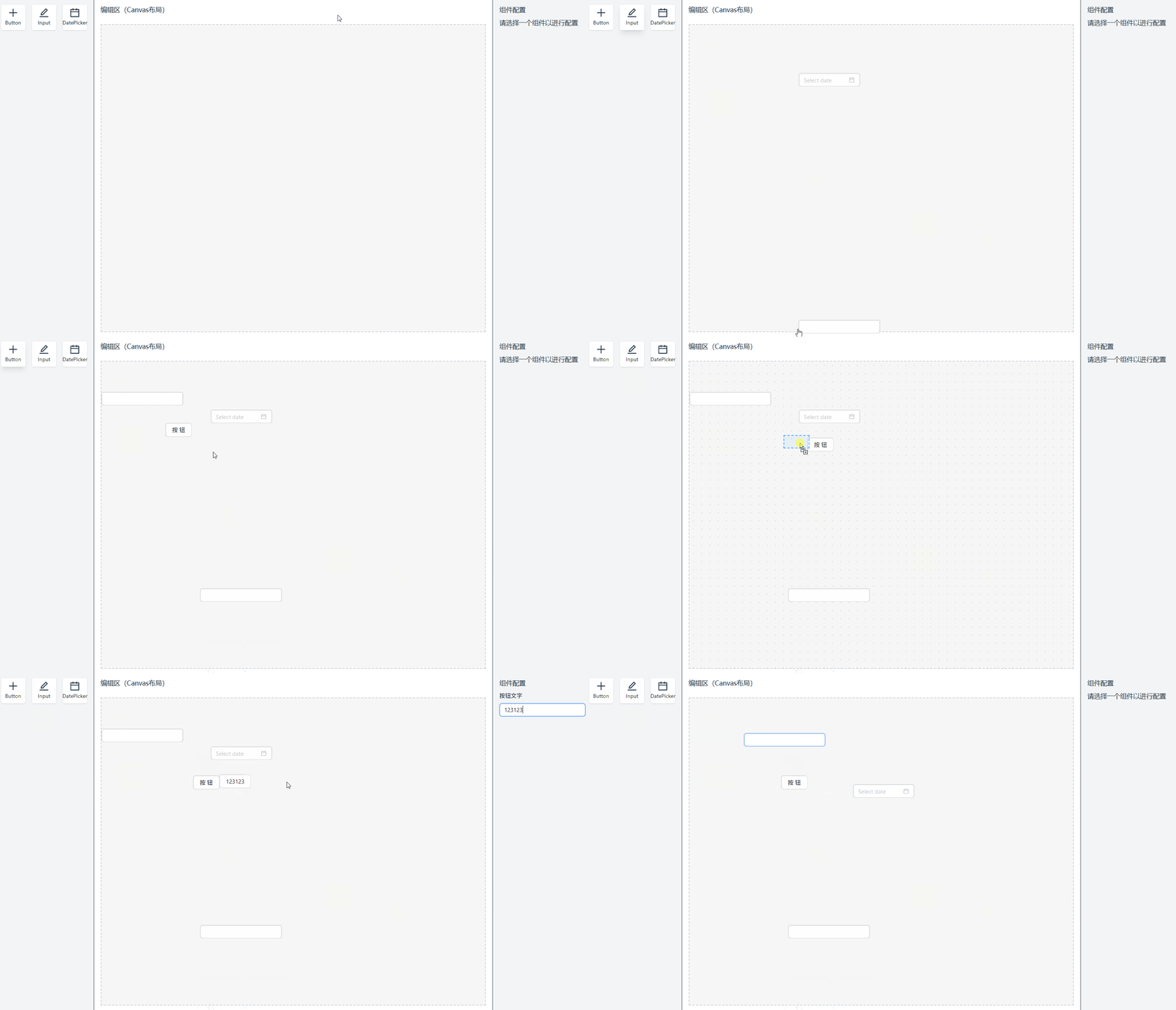
📸 效果展示
- 拖入组件有吸附感
- 拖动已放置组件支持位置更新
- 拖动中有透明虚影与虚线反馈
- 不可放置区域(重叠/越界)阻止更新
- 支持快捷键删除
- 属性实时配置更新
📚 参考资料

北京人形旗下天工造物具身智能开源社区,聚焦具身天工与慧思开物两大平台
更多推荐
 23
23 0
0- 0


 已为社区贡献1条内容

所有评论(0)