css的z-index、position、overflow属性混合时Safari的兼容问题,fixed定位+z-index同时使用不生效问题
·
~~~转前端啦~~~
问题:position: fixed和z-index同时使用在Safari浏览器中不生效???

场景1: fixed定位+z-index属性+tranform3D变化同时使用
先看代码:
// css部分
<style>
   .header {
     width: 100%;
     height: 50px;
     background-color: #ccc;
     position: fixed; // 1、重点在这里
     top: 0;
     left: 0;
     z-index: 90;  // 2、在这里
   }
   .sider {
     width: 200px;
     height: 600px;
     background-color: #3136d8;
     position: fixed;  // 3、这里
     top: 30px;
     left: 30px;
     z-index: 100;  // 4、还有这里
     transform: perspective(1000px) rotateY(45deg);
     // 5、还有最后这一句---重中之重
   }
</style>
// html
 <div class="header"></div>
 <div class="sider"></div>
正常来讲,sider的一部分会盖住header。
打开谷歌瞅一眼,很好,和预想的结果是一样子的
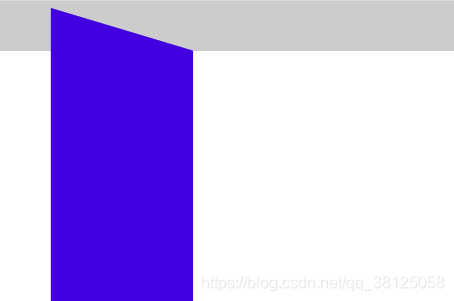
接下来,用Safari打开试一下,瞅一下效果看下面
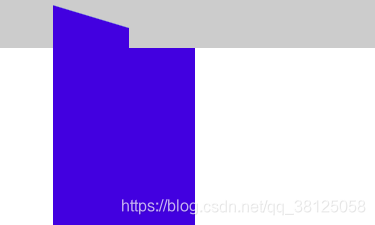
居然不一样!!!
场景1的解决方案
1、 在变换的元素身上套上一层父元素
上代码~
// html结构
<div class="header"></div>
<div class="containter">  // 在这里--多套了一层结构
    <div class="sider">
</div>
// css
.header {
   width: 100%;
   height: 50px;
   background-color: #ccc;
   position: fixed;
   top: 0;
   left: 0;
   z-index: 90;
}
.containter {       // 变化的点在这里----
    width: 200px;
    height: 600px;
    position: fixed;
    top: 30px;
    left: 30px;
    z-index: 100;
   /* overflow: hidden; */
}
.sider {  // 还有这里,也稍微改了哦
    background-color: #3136d8;
    width: 100%;
    height: 100%;
    transform: perspective(1000px) rotateY(45deg);
}
瞅一眼效果~OK,正常了
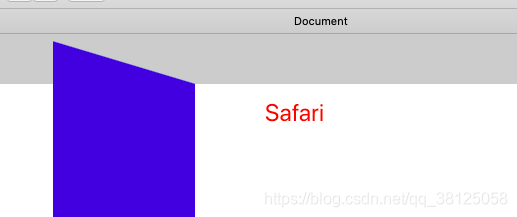
2、给需要在后面的元素设置负的translateZ
看代码~
// css
.header {
   width: 100%;
    height: 50px;
    background-color: #ccc;
    position: fixed;
    top: 0;
    left: 0;
    z-index: 90;
    transform: translateZ(-100px);  // 重点在这里
}
.sider {
    width: 200px;
    height: 600px;
    position: fixed;
    top: 30px;
    left: 30px;
    z-index: 100;
    /* overflow: hidden; */
    background-color: #3136d8;
    transform: perspective(1000px) rotateY(45deg);
}
// html结构不变
    <div class="header"></div>
    <div class="sider"></div>
瞅一眼效果~!也很棒
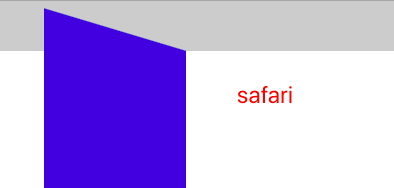
场景2 Safari下子元素fixed定位会被父级overflow:hidden给隐藏掉
看下问题先~
// html结构
 <div class="header"></div>
 <div class="sider">
     <div class="sider-child"></div>
 </div>
 // css
 .header {
   width: 100%;
   height: 50px;
   background-color: #ccc;
   position: fixed;
   top: 0;
   left: 0;
   z-index: 90;  // 这里
}
.sider {
   width: 200px;
   height: 600px;
   position: fixed;
   top: 30px;
   left: 30px;
   z-index: 100;
   overflow: hidden; // 这里
   background-color: #3136d8;
}
.sider-child {
   background-color: red;
   width: 50px;
   height: 50px;
   margin: 0 auto;
   z-index: 100;  // 这里
   position: fixed; // 这里
   top: 10px;
   left: 10px;
}
看一眼谷歌效果~
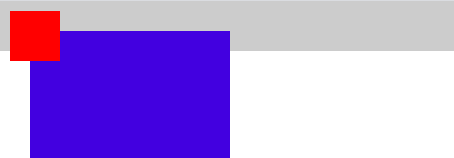
然后!safari中如下图,父元素的hidden把子元素的fixed给盖住了

场景2的解决方案
1、去掉父元素的overflow:hidden,如果有需要,在子元素上添加
2、放弃使用left和top等进行布局,采用padding和margin将元素进行撑开,就避开了overflow的隐藏

北京人形旗下天工造物具身智能开源社区,聚焦具身天工与慧思开物两大平台
更多推荐
 0
0 0
0- 0


 已为社区贡献1条内容

所有评论(0)