setuptools编译cuda扩展
·
# 我需要在python端调用c++ cuda接口,使用pybind11 实现
# cuda 接口需要图像宽度,高度和numpy array的图像数据作为参数, 返回numpy array 类型, 定义接口如下:
py::array_t<unsigned int> faster_label(size_t image_width, size_t image_height, py::array_t<unsigned char>& input_image);
# 该接口在binding.cu 里面这是一个cuda文件
# binding.cu 完整定义如下:
#include <iostream>
#include <vector>
#include "timer.h"
#include "CCL.cuh"
#include "utils.hpp"
#include <pybind11/pybind11.h>
#include<pybind11/numpy.h>
#include <pybind11/stl.h>
namespace py = pybind11;
using namespace std;
void checkCudaErrors(cudaError_t result) {
if (result != cudaSuccess) {
cerr << "CUDA Runtime Error: " << cudaGetErrorString(result) << endl;
exit(EXIT_FAILURE);
}
}
py::array_t<unsigned int> faster_label(size_t image_width, size_t image_height, py::array_t<unsigned char>& input_image) {
auto buf = input_image.request();
unsigned char* image_data = static_cast<unsigned char*>(buf.ptr);
size_t numPixels, numRows, numCols;
numCols = image_width;
numRows = image_height;
numPixels = numRows*numCols;
// Allocate GPU data
unsigned int* device_labels;
cudaMallocManaged(&device_labels, numPixels * sizeof(int));
checkCudaErrors(cudaGetLastError());
// Allocate and copy the original image data to GPU memory
unsigned char* gpu_image;
cudaMallocManaged(&gpu_image, numPixels * sizeof(char));
checkCudaErrors(cudaGetLastError());
cudaMemcpy(gpu_image, image_data, numPixels * sizeof(char), cudaMemcpyHostToDevice);
checkCudaErrors(cudaGetLastError());
GpuTimer timer;
timer.Start();
connectedComponentLabeling(device_labels, gpu_image, numCols, numRows);
cudaDeviceSynchronize();
unsigned int* label;
label = new unsigned int[numPixels];
cudaMemcpy(label, device_labels, numPixels * sizeof(int), cudaMemcpyDeviceToHost);
py::array_t<unsigned int> out({image_height, image_width});
auto out_buf = out.request();
memcpy(static_cast<unsigned int*>(out_buf.ptr), label, out_buf.size * out_buf.itemsize);
timer.Stop();
cout << "GPU code ran in: " << timer.Elapsed() << "ms" << endl;
unsigned int components = util::countComponents(device_labels, numPixels);
cout << "Number of components: " << components << endl;
// Free memory
cudaFree(gpu_image);
cudaFree(device_labels);
return out;
}
void release_mem(const unsigned int* ptr) {
delete [] ptr;
}
PYBIND11_MODULE(faster_ccl, m) {
m.doc() = "Example bindings for CUDA CCL";
m.def("faster_label", &faster_label, "Perform connected component labeling on an image.", py::arg("image_data"), py::arg("image_width"), py::arg("image_height"));
m.def("release_mem", &release_mem, "Release memory allocated by faster_label.");
}
# 我们使用pybind11 定义了接口以及参数
# 接下来需要定义setup.py 文件定义如何编译cuda扩展
from setuptools import setup
from torch.utils.cpp_extension import BuildExtension, CUDAExtension
ext_modules = [CUDAExtension('faster_ccl', ['binding.cu', 'CCL.cu',])]
setup(
name='cuda ccl python extension',
version='0.1',
author='404NotFound',
description='A Python extension using PyBind11',
ext_modules=ext_modules,
cmdclass={'build_ext': BuildExtension},
zip_safe=False,
)
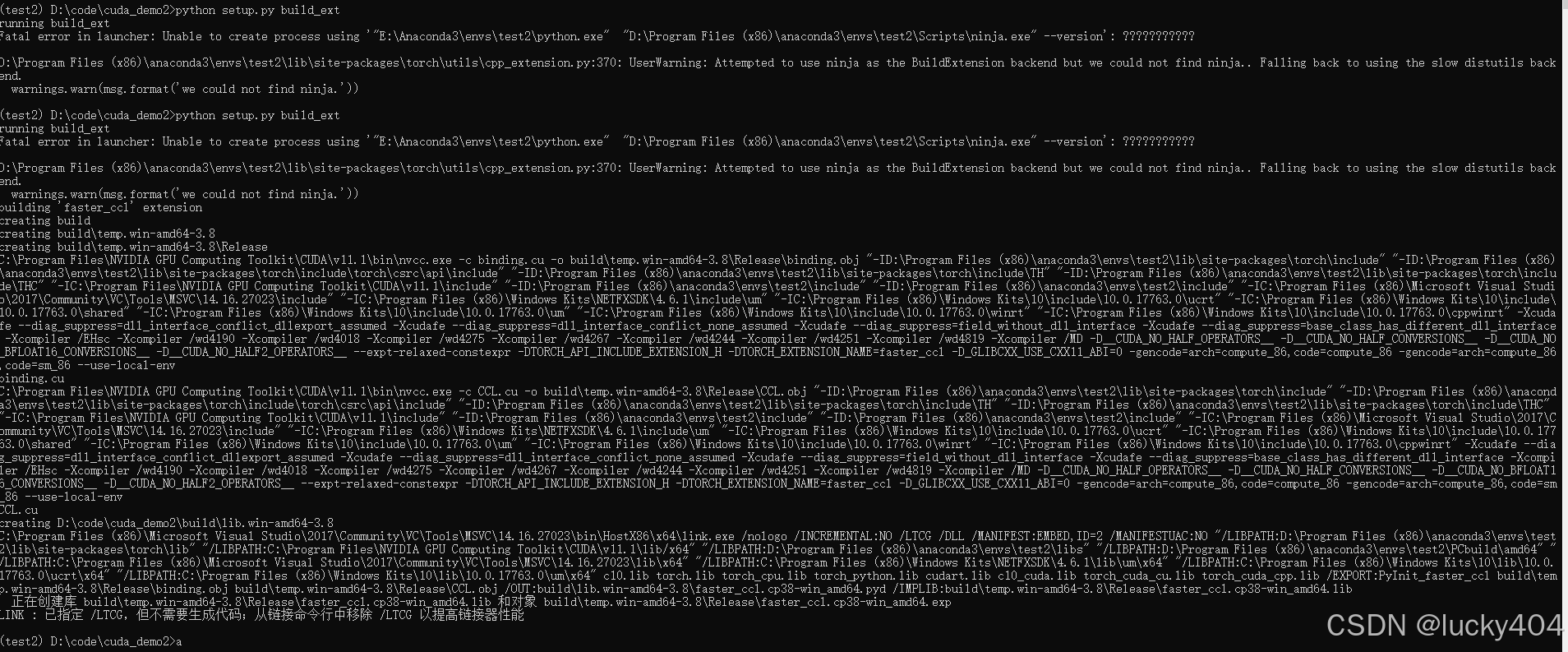
编译成功后生成的pyd 直接import 调用即可
import cv2
from skimage import measure
import faster_ccl
import time
image = cv2.imread('2.png', cv2.IMREAD_GRAYSCALE)
image_h, image_w = image.shape[:2]
label = faster_ccl.faster_label(image_w, image_h, image)
start = time.time()
regions = measure.regionprops(label)
for (j, i) in enumerate(regions):
(min_row, min_col, max_row, max_col) = i.bbox
end = time.time()
cost = end - start
print("cost -------->", cost)

北京人形旗下天工造物具身智能开源社区,聚焦具身天工与慧思开物两大平台
更多推荐
 3
3 0
0- 0


 已为社区贡献1条内容

所有评论(0)