安卓开发之布局学习(1)相对定位
·
约束布局ConstraintLayout 是一个ViewGroup,可以在Api9以上的Android系统使用它。
为了解决布局嵌套过多的问题,以灵活的方式定位和调整小部件。
ConstraintLayout使用起来比RelativeLayout更灵活,性能更出色!还有一点就是ConstraintLayout
可以按照比例约束控件位置和尺寸,能够更好地适配屏幕大小不同的机型。
需要在app/build.gradle文件中添加ConstraintLayout的依赖。
implementation 'com.android.support.constraint:constraint-layout:2.0.4' //版本号可能不同

相对定位的常用属性:
layout_constraintLeft_toLeftOf              左边对齐到左边
layout_constraintLeft_toRightOf             左边对齐到右边
layout_constraintRight_toLeftOf             右边对齐到左边
layout_constraintRight_toRightOf            右边对齐到右边
layout_constraintTop_toTopOf                顶端对齐到顶端
layout_constraintTop_toBottomOf             顶端对齐到底端
layout_constraintBottom_toTopOf             底端对齐到顶端
layout_constraintBottom_toBottomOf          底端对齐到底端
layout_constraintBaseline_toBaselineOf      基线对齐到基线
layout_constraintStart_toEndOf              左边界对齐右边界
layout_constraintStart_toStartOf            左边界对齐
layout_constraintEnd_toStartOf              右边界对齐左边界
layout_constraintEnd_toEndOf                右边界对齐
当使用如下定位后,则像css中的定位一样,将控件到位在了父对象中的正中间
app:layout_constraintBottom_toBottomOf="parent" app:layout_constraintLeft_toLeftOf="parent" app:layout_constraintRight_toRightOf="parent" app:layout_constraintTop_toTopOf="parent"
各定位属性之间的组合关系如下图。不指定任何定位属性时,控件在左上角(l-l t-t)
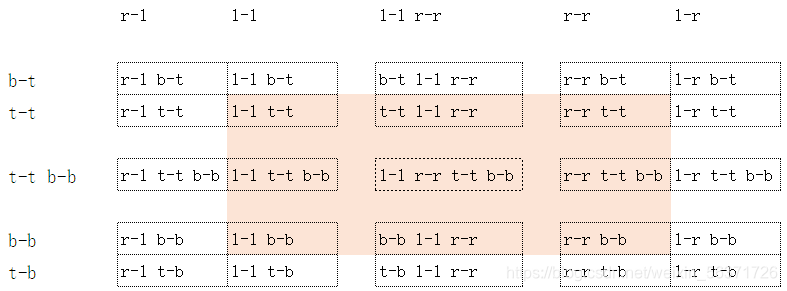
横行纵列对应起来,取定位属性的交集就是实际对应的位置。

北京人形旗下天工造物具身智能开源社区,聚焦具身天工与慧思开物两大平台
更多推荐
 0
0 0
0- 0


 已为社区贡献2条内容

所有评论(0)