Kafka安全认证-SASL
·
Zookeeper开启认证
- 新建
zk_server_jaas.conf文件到zookeeper安装目录conf下
Server {
    org.apache.zookeeper.server.auth.DigestLoginModule required
    username=admin
    password=admin
    user_kafka=admin
    user_producer=admin;
};
QuorumServer {
       org.apache.zookeeper.server.auth.DigestLoginModule required
       user_zookeeper="zookeeper@password";
};
QuorumLearner {
       org.apache.zookeeper.server.auth.DigestLoginModule required
       username="zookeeper"
       password="zookeeper@password";
};
- 在zookeeper安装目录
conf下新建zoo.cfg文件如下
# The number of milliseconds of each tick
tickTime=2000
# The number of ticks that the initial
# synchronization phase can take
initLimit=10
# The number of ticks that can pass between
# sending a request and getting an acknowledgement
syncLimit=5
# the directory where the snapshot is stored.
# do not use /tmp for storage, /tmp here is just
# example sakes.
dataDir=/usr/zookeeper-3.4.6/zkdata
# the port at which the clients will connect
clientPort=2181
# the maximum number of client connections.
# increase this if you need to handle more clients
#maxClientCnxns=60
#
# Be sure to read the maintenance section of the
# administrator guide before turning on autopurge.
#
# http://zookeeper.apache.org/doc/current/zookeeperAdmin.html#sc_maintenance
#
# The number of snapshots to retain in dataDir
#autopurge.snapRetainCount=3
# Purge task interval in hours
# Set to "0" to disable auto purge feature
#autopurge.purgeInterval=1

authProvider.1=org.apache.zookeeper.server.auth.SASLAuthenticationProvider
requireClientAuthScheme=sasl
jaasLoginRenew=3600000
quorum.auth.enableSasl=true
quorum.auth.learnerRequireSasl=true
quorum.auth.serverRequireSasl=true
quorum.auth.learner.loginContext=QuorumLearner
quorum.auth.server.loginContext=QuorumServer
quorum.cnxn.threads.size=20
- 修改
zkServer.sh启动脚本,新增如下配置
SERVER_JVMFLAGS="-Djava.security.auth.login.config=/usr/zookeeper-3.4.6/conf/zk_server_jaas.conf"
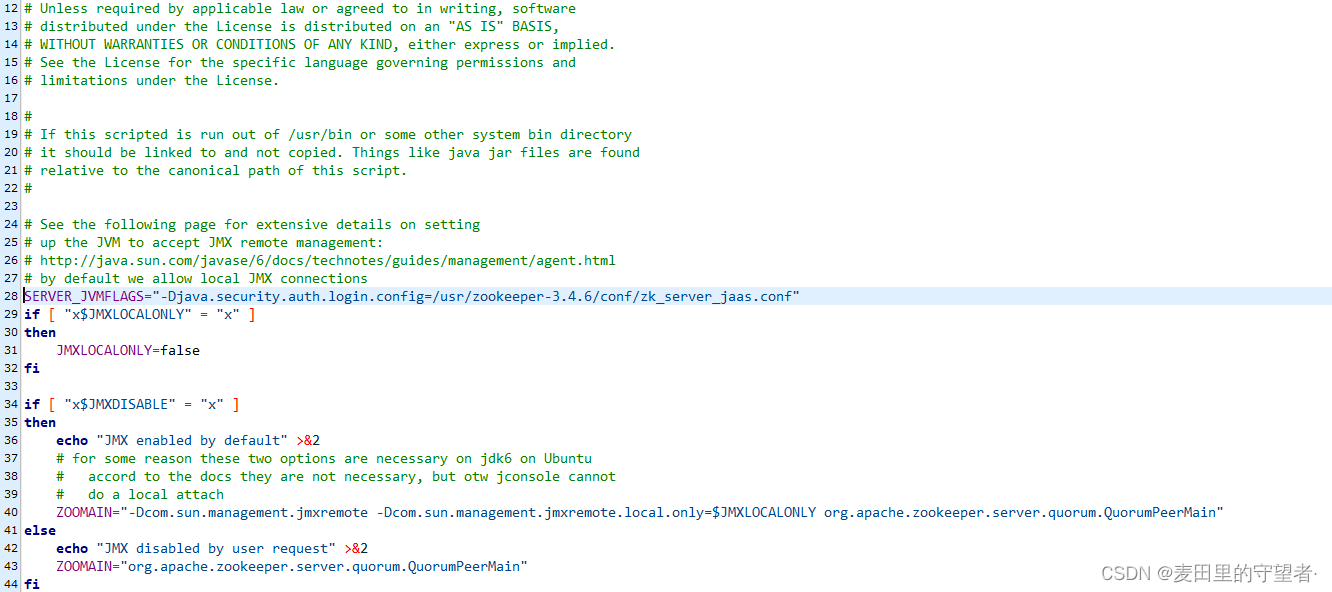
修改完成够启动zkServer.sh start zoo.cfg服务
kafka开启认证
- 在kafka安装目录下的conf新建
kafka_server_jaas.conf配置文件
KafkaServer {
    org.apache.kafka.common.security.plain.PlainLoginModule required
        username="admin"
        password="admin"
        user_admin="admin"
        user_alice="alice";

};
Client {
    org.apache.kafka.common.security.plain.PlainLoginModule required
    username="kafka"
    password="admin";
};
- 修改server.properties
# Licensed to the Apache Software Foundation (ASF) under one or more
# contributor license agreements.  See the NOTICE file distributed with
# this work for additional information regarding copyright ownership.
# The ASF licenses this file to You under the Apache License, Version 2.0
# (the "License"); you may not use this file except in compliance with
# the License.  You may obtain a copy of the License at
#
#    http://www.apache.org/licenses/LICENSE-2.0
#
# Unless required by applicable law or agreed to in writing, software
# distributed under the License is distributed on an "AS IS" BASIS,
# WITHOUT WARRANTIES OR CONDITIONS OF ANY KIND, either express or implied.
# See the License for the specific language governing permissions and
# limitations under the License.

# see kafka.server.KafkaConfig for additional details and defaults

############################# Server Basics #############################

# The id of the broker. This must be set to a unique integer for each broker.
broker.id=0

############################# Socket Server Settings #############################

# The address the socket server listens on. It will get the value returned from
# java.net.InetAddress.getCanonicalHostName() if not configured.
#   FORMAT:
#     listeners = listener_name://host_name:port
#   EXAMPLE:
#     listeners = PLAINTEXT://your.host.name:9092
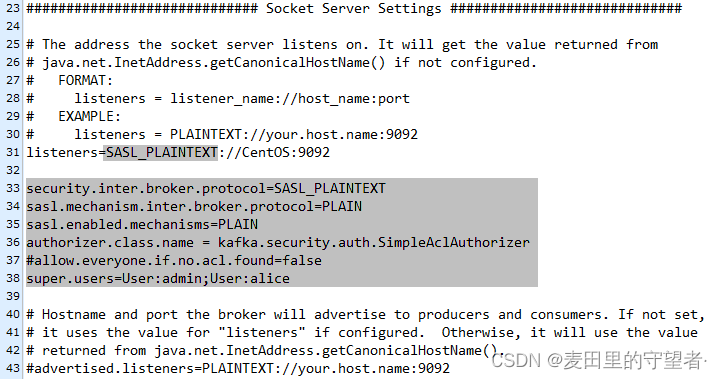
listeners=SASL_PLAINTEXT://CentOS:9092

security.inter.broker.protocol=SASL_PLAINTEXT
sasl.mechanism.inter.broker.protocol=PLAIN
sasl.enabled.mechanisms=PLAIN
authorizer.class.name = kafka.security.auth.SimpleAclAuthorizer
#allow.everyone.if.no.acl.found=false
super.users=User:admin;User:alice

# Hostname and port the broker will advertise to producers and consumers. If not set,
# it uses the value for "listeners" if configured.  Otherwise, it will use the value
# returned from java.net.InetAddress.getCanonicalHostName().
#advertised.listeners=PLAINTEXT://your.host.name:9092

# Maps listener names to security protocols, the default is for them to be the same. See the config documentation for more details
#listener.security.protocol.map=PLAINTEXT:PLAINTEXT,SSL:SSL,SASL_PLAINTEXT:SASL_PLAINTEXT,SASL_SSL:SASL_SSL

# The number of threads that the server uses for receiving requests from the network and sending responses to the network
num.network.threads=3

# The number of threads that the server uses for processing requests, which may include disk I/O
num.io.threads=8

# The send buffer (SO_SNDBUF) used by the socket server
socket.send.buffer.bytes=102400

# The receive buffer (SO_RCVBUF) used by the socket server
socket.receive.buffer.bytes=102400

# The maximum size of a request that the socket server will accept (protection against OOM)
socket.request.max.bytes=104857600


############################# Log Basics #############################

# A comma separated list of directories under which to store log files
log.dirs=/usr/kafka_2.11-2.2.0/kafka-logs

# The default number of log partitions per topic. More partitions allow greater
# parallelism for consumption, but this will also result in more files across
# the brokers.
num.partitions=1

# The number of threads per data directory to be used for log recovery at startup and flushing at shutdown.
# This value is recommended to be increased for installations with data dirs located in RAID array.
num.recovery.threads.per.data.dir=1

############################# Internal Topic Settings  #############################
# The replication factor for the group metadata internal topics "__consumer_offsets" and "__transaction_state"
# For anything other than development testing, a value greater than 1 is recommended for to ensure availability such as 3.
offsets.topic.replication.factor=1
transaction.state.log.replication.factor=1
transaction.state.log.min.isr=1

############################# Log Flush Policy #############################

# Messages are immediately written to the filesystem but by default we only fsync() to sync
# the OS cache lazily. The following configurations control the flush of data to disk.
# There are a few important trade-offs here:
#    1. Durability: Unflushed data may be lost if you are not using replication.
#    2. Latency: Very large flush intervals may lead to latency spikes when the flush does occur as there will be a lot of data to flush.
#    3. Throughput: The flush is generally the most expensive operation, and a small flush interval may lead to excessive seeks.
# The settings below allow one to configure the flush policy to flush data after a period of time or
# every N messages (or both). This can be done globally and overridden on a per-topic basis.

# The number of messages to accept before forcing a flush of data to disk
#log.flush.interval.messages=10000

# The maximum amount of time a message can sit in a log before we force a flush
#log.flush.interval.ms=1000

############################# Log Retention Policy #############################

# The following configurations control the disposal of log segments. The policy can
# be set to delete segments after a period of time, or after a given size has accumulated.
# A segment will be deleted whenever *either* of these criteria are met. Deletion always happens
# from the end of the log.

# The minimum age of a log file to be eligible for deletion due to age
log.retention.hours=168

# A size-based retention policy for logs. Segments are pruned from the log unless the remaining
# segments drop below log.retention.bytes. Functions independently of log.retention.hours.
#log.retention.bytes=1073741824

# The maximum size of a log segment file. When this size is reached a new log segment will be created.
log.segment.bytes=1073741824

# The interval at which log segments are checked to see if they can be deleted according
# to the retention policies
log.retention.check.interval.ms=300000

############################# Zookeeper #############################

# Zookeeper connection string (see zookeeper docs for details).
# This is a comma separated host:port pairs, each corresponding to a zk
# server. e.g. "127.0.0.1:3000,127.0.0.1:3001,127.0.0.1:3002".
# You can also append an optional chroot string to the urls to specify the
# root directory for all kafka znodes.
zookeeper.connect=CentOS:2181

# Timeout in ms for connecting to zookeeper
zookeeper.connection.timeout.ms=6000


############################# Group Coordinator Settings #############################

# The following configuration specifies the time, in milliseconds, that the GroupCoordinator will delay the initial consumer rebalance.
# The rebalance will be further delayed by the value of group.initial.rebalance.delay.ms as new members join the group, up to a maximum of max.poll.interval.ms.
# The default value for this is 3 seconds.
# We override this to 0 here as it makes for a better out-of-the-box experience for development and testing.
# However, in production environments the default value of 3 seconds is more suitable as this will help to avoid unnecessary, and potentially expensive, rebalances during application startup.
group.initial.rebalance.delay.ms=0
- 修改
kafka-run-class.sh脚本添加如下配置
KAFKA_SASL_OPTS='-Djava.security.auth.login.config=/usr/kafka_2.11-2.2.0/config/kafka_server_jaas.conf'

启动kafka服务./bin/kafka-server-start -daemon conf/server.proeprties即可
- 代码验证
        Properties props = new Properties();
        //10.222.24.73 8085
        props.put(AdminClientConfig.BOOTSTRAP_SERVERS_CONFIG,"192.168.74.134:9092");

        props.put("sasl.mechanism","PLAIN");
        props.put("security.protocol","SASL_PLAINTEXT");
        props.put("sasl.jaas.config","org.apache.kafka.common.security.plain.PlainLoginModule required username=\"admin\" password=\"admin\";");

        AdminClient adminClient= KafkaAdminClient.create(props);
        ListTopicsResult topics = adminClient.listTopics();
        try {
            topics.names()
                    .get()
                    .stream()
                    .forEach((topic)-> System.out.println(topic));
        } catch (Exception e) {
            e.printStackTrace();
        }
        //关闭连接
        adminClient.close();

北京人形旗下天工造物具身智能开源社区,聚焦具身天工与慧思开物两大平台
更多推荐
 0
0 0
0- 0


 已为社区贡献1条内容

所有评论(0)