激活远程虚拟环境后,发现定位到的pip是全局的pip,并且PATH首位也不是该环境的bin目录
我的系统是Ubuntu,在激活远程虚拟环境后使用pip在该环境下下载包,运行代码发现找不到对应的包。
经过反复卸载下载包,我发现包下载的地址并不是我设置的~/.conda/pkgs,而是在~/.local/的python中,这很奇怪,因为按道理来说应该使用的是虚拟环境下的python和pip。我运行which pip,得到的是~/.local/bin/pip。运行echo $PATH,得到的结果是~/.local/bin:~/.conda/envs/cyc_p2p/bin:/usr/local/anaconda3/condabin:/usr/local/cuda-11.8/bin:/usr/local/anaconda3/bin:/usr/local/sbin:/usr/local/bin:/usr/sbin:/usr/bin:/sbin:/bin:/usr/games:/usr/local/games:/snap/bin。简单地说就是系统自动将~/.local/bin/目录设置为了PATH的首选路径(而不是该环境的bin目录)。
我排查了~/.bashrc和~/.condarc,实在没发现什么问题,最后我在~/.profile中发现了
# ~/.profile: executed by the command interpreter for login shells.
# This file is not read by bash(1), if ~/.bash_profile or ~/.bash_login
# exists.
# see /usr/share/doc/bash/examples/startup-files for examples.
# the files are located in the bash-doc package.

# the default umask is set in /etc/profile; for setting the umask
# for ssh logins, install and configure the libpam-umask package.
#umask 022

# if running bash
if [ -n "$BASH_VERSION" ]; then
    # include .bashrc if it exists
    if [ -f "$HOME/.bashrc" ]; then
	. "$HOME/.bashrc"
    fi
fi

# set PATH so it includes user's private bin if it exists
if [ -d "$HOME/bin" ] ; then
    PATH="$HOME/bin:$PATH"
fi

# set PATH so it includes user's private bin if it exists
if [ -d "$HOME/.local/bin" ] ; then
    PATH="$HOME/.local/bin:$PATH"
fi
只有这里出现了PATH="$HOME/.local/bin:$PATH"这样的语句,可以看到它在. "$HOME/.bashrc"的后面,也就是会在运行~/.bashrc后再将~/.local/bin/添加到PATH的开头。不管怎么说,还是有简单粗暴的解法,就是将PATH="$HOME/.local/bin:$PATH"和. "$HOME/.bashrc"位置换一下:
# ~/.profile: executed by the command interpreter for login shells.
# This file is not read by bash(1), if ~/.bash_profile or ~/.bash_login
# exists.
# see /usr/share/doc/bash/examples/startup-files for examples.
# the files are located in the bash-doc package.

# the default umask is set in /etc/profile; for setting the umask
# for ssh logins, install and configure the libpam-umask package.
#umask 022

# set PATH so it includes user's private bin if it exists
if [ -d "$HOME/bin" ] ; then
    PATH="$HOME/bin:$PATH"
fi


# set PATH so it includes user's private bin if it exists
if [ -d "$HOME/.local/bin" ] ; then
    PATH="$HOME/.local/bin:$PATH"
fi


# if running bash
if [ -n "$BASH_VERSION" ]; then
    # include .bashrc if it exists
    if [ -f "$HOME/.bashrc" ]; then
	. "$HOME/.bashrc"
    fi
fi
但问题是这个问题是突然出现的,而我之前肯定是没有修改过~/.profile文件,所以非常奇怪,我个人认为应该有一些其他原因,求大佬解惑。
后来用vscode连远程时又出现了这个问题,这个是因为之前"~/.vscode-server/"目录下的vscode配置文件没有随着~/.profile一起改变。这个可以根据vscode的bash窗口发现其配置文件位置:
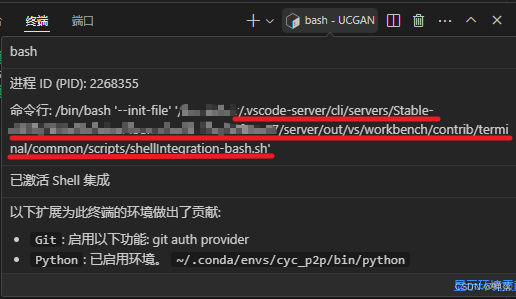
这种东西显然不必手动去改,最简单粗暴的做法是直接把"~/.vscode-server/"整个删掉,然后重新vscode连接服务器,万能的vscode会帮你重新配置的。

北京人形旗下天工造物具身智能开源社区,聚焦具身天工与慧思开物两大平台
更多推荐
 9
9 0
0- 0


 已为社区贡献1条内容

所有评论(0)