简单有效的实例分割CenterNet+InstanceFCN
·
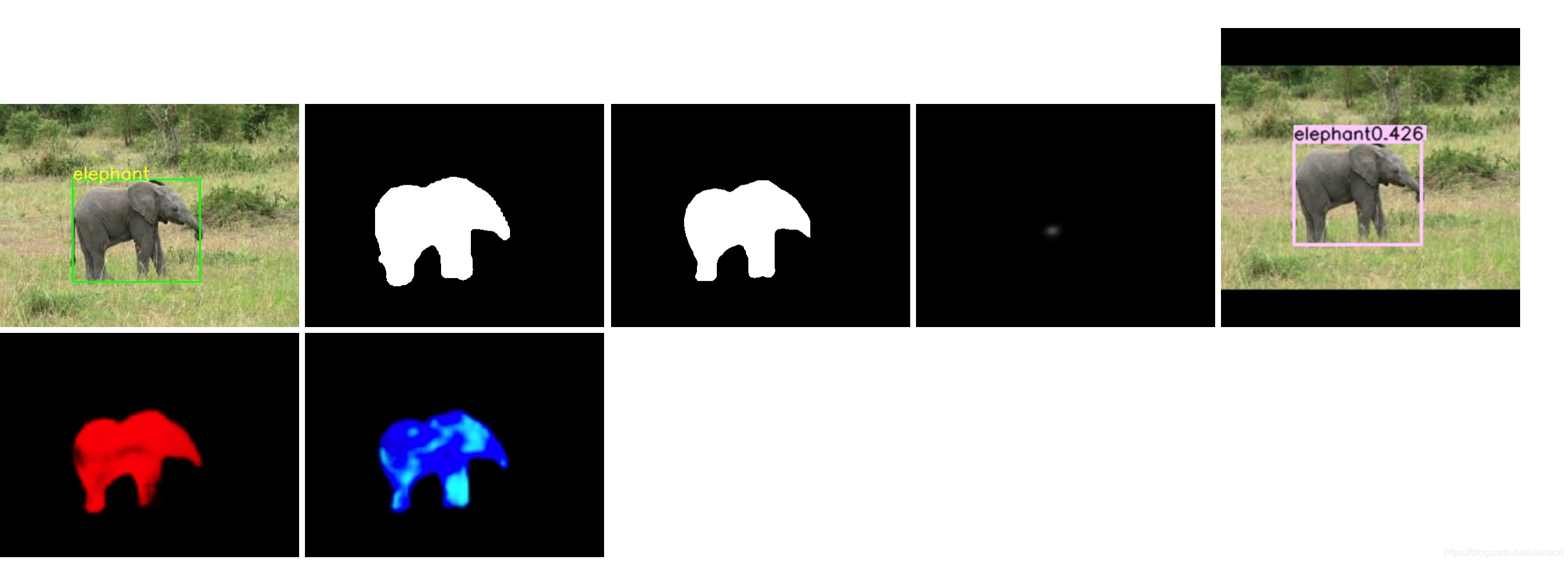
在上一篇博文的基础上,尝试了一种简单有效的实例分割方法,InstanceFCN作为一种全卷积网络的实例(不分类)分割方案,简单有效。CenterNet做分类+bounding box检测,加上一个InstanceFCN实例输出分支,可以实现单阶段分类+bounding box检测+mask输出的有效方案,便于移动端落地。代码: https://github.com/xuduo35/CenterUnet
CenterUnet
CenterNet Unet Version. Base on https://github.com/xingyizhou/CenterNet. But remove focal loss convolution magic number and sigmoid clamp trick. Easier to do training and debuging. Flexible to replace backbone due to using qubel's segmentation models framework.
@inproceedings{zhou2019objects,
  title={Objects as Points},
  author={Zhou, Xingyi and Wang, Dequan and Kr{\"a}henb{\"u}hl, Philipp},
  booktitle={arXiv preprint arXiv:1904.07850},
  year={2019}
}
Major Changes
1. Turn ground truth to binary values for focal loss. Very effective for dealing with positive and negtive samples inbalance issue. Experiments show that Gaussian Distribution center point still can be learned after this change.
2. Add draw_elipse_gaussian for adaptive width/height.
3. Support unet framework, easy to add fpn and linknet which are supported by qubvel's framework.
4. One decoder for center point, one decoder for box and offset prediction. These two decoders share one encoder.
5. Output instance mask using InstanceFCN method.
6. Add instance box area size level as label. Total 6 classes, but every size has two adjacent size level labels.
Install
python3 -m pip install torch==1.4.0
python3 -m pip install torchvision==0.4.2
python3 -m pip install pretrainedmodels==0.7.4
python3 -m pip install opencv-python
python3 -m pip install numpy
python3 -m pip install pytorch
python3 -m pip install pycocotools
python3 -m pip install cython
python3 -m pip install matplotlib
python3 -m pip install progress
python3 -m pip install numba
cd external; make
cd models/py_utils/_cpools/; python3 setup.py install --user
Prepare data
1. Download coco 2017 dataset, unzip to your local directory.
2. mkdir data and setup symlink 'coco' to it.
3. Or just unzip it under data directory, depends on your choice. Like below:

(base) ubuntu@ubuntu:~/Training/CenterUnet/data/coco$ tree -L 1
.
├── annotations
├── test2017
├── train2017
├── val2017
Training
Example
Center phase train:
  python3 -u main.py --network_type unetobj --backbone resnet34 --batch_size 10 --train_phase pre_train_center --lr 0.001
Box phase train:
  python3 -u main.py --network_type unetobj --backbone resnet34 --batch_size 10 --train_phase pre_train_box --lr 0.0001 --resume
Check Result
Check ./results for temporary training results. Try ./http.sh and open http://yourip:8000
Example for inferencing one image: python3 testimg.py --without_gpu --network_type unetobj --backbone resnet34 --nms --center_thresh 0.25 --image ./testsamples/horse.jpg
Most code from:
https://github.com/xingyizhou/CenterNet
https://github.com/Duankaiwen/CenterNet
https://github.com/qubvel/segmentation_models.pytorch
https://github.com/yxlijun/Pelee.Pytorch
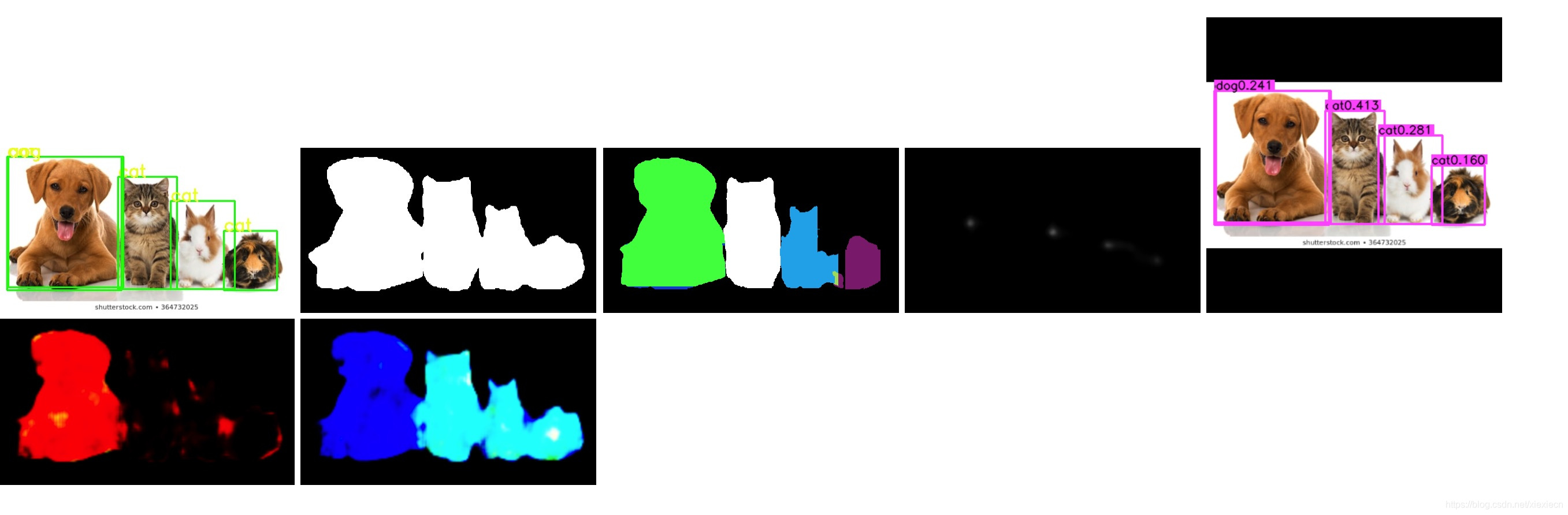
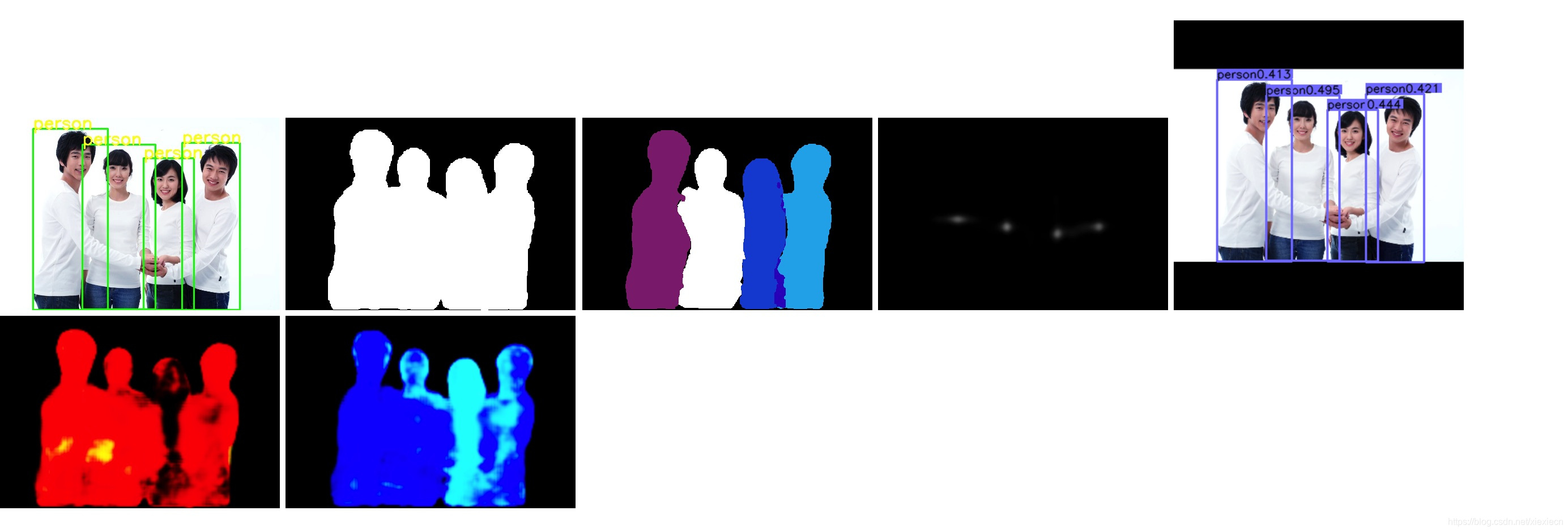
结果:

北京人形旗下天工造物具身智能开源社区,聚焦具身天工与慧思开物两大平台
更多推荐
 0
0 0
0- 0


 已为社区贡献3条内容

所有评论(0)