H5、PC端实现打卡定位 (基于高德地图)
·
📖 前言
随着移动办公的普及,外勤打卡、现场签到 等场景已成为企业数字化管理的刚需。如何在移动端精准获取用户位置,并判断是否在允许打卡的范围内,是这类功能的核心技术之一。
一、获取高德地图 key 与安全密钥
创建新应用, 创建好后, 点击 添加key, 根据提示消息填写好, 提交即可, 这样就能获取 key 与安全密钥啦。
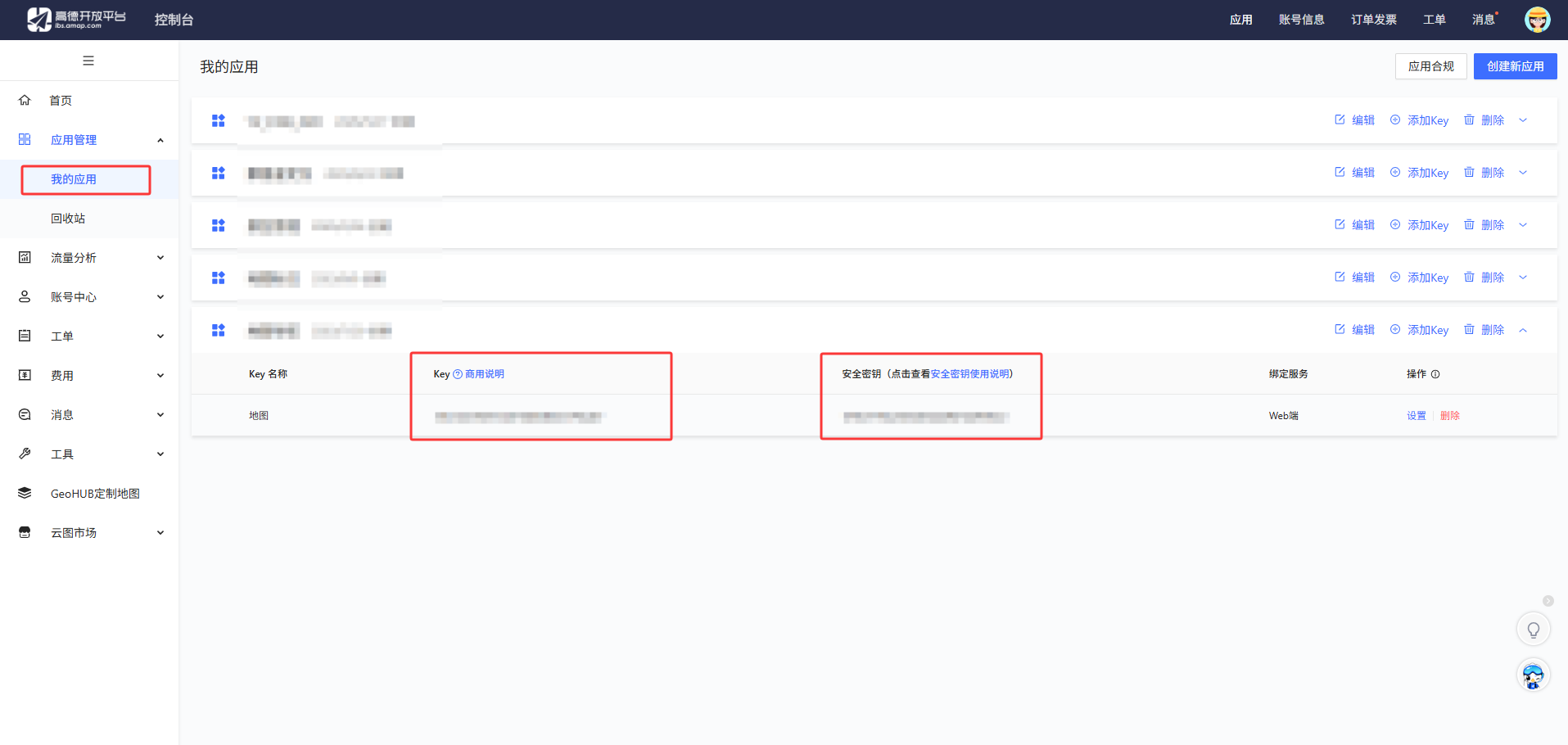
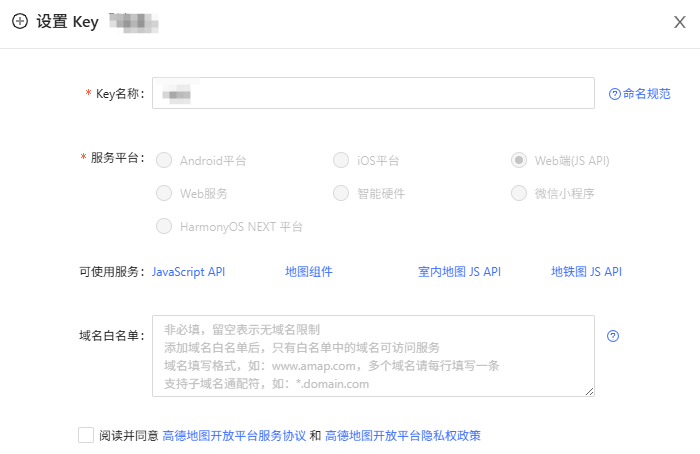
注意(域名白名单, 记住不要填写端口)
域名白名单: 地图控制台通常限制了可调用 API 的域名。开发环境常用的 localhost、127.0.0.1 或本地 IP 需要添加到平台的白名单中,否则 geocoder.getAddress (逆地理编码用)会返回权限错误。
二、代码实现
高德地图的key和安全密钥
export const settings: Settings = {
  amapKey: '你的key',
  amapSecurityCode: '你的安全秘钥'
};
计算两点距离
/**
 * 计算两点距离
 * @param start 起点坐标
 * @param end 终点坐标
 * @returns 距离(米)
 */
export function calculateDistance(start: Location, end: Location): number {
  const { latitude: lat1, longitude: lng1 } = start;
  const { latitude: lat2, longitude: lng2 } = end;

  const R = 6378137; // 地球半径(米)
  const dLat = toRad(lat2 - lat1);
  const dLng = toRad(lng2 - lng1);

  const a =
    Math.sin(dLat / 2) * Math.sin(dLat / 2) +
    Math.cos(toRad(lat1)) * Math.cos(toRad(lat2)) * Math.sin(dLng / 2) * Math.sin(dLng / 2);

  const c = 2 * Math.atan2(Math.sqrt(a), Math.sqrt(1 - a));

  return R * c;
}
动态创建 <script> 标签加载高德地图(第三方脚本),你也可以使用npm 包引入, 根据自己的情况来, 动态加载高德地图, 只在需要时加载,减少首屏资源体积, 封装为 Promise 便于异步等待加载完成。
 loadAMapScript(): Promise<void> {
   return new Promise((resolve, reject) => {
    if ((window as any).AMap) {
      resolve();
      return;
    }

    (window as any)._AMapSecurityConfig = {
      securityJsCode: settings.amapSecurityCode // 请在高德控制台查看
    };

    const script = document.createElement('script');
    script.type = 'text/javascript';
    script.src = `https://webapi.amap.com/maps?v=2.0&key=${settings.amapKey}&plugin=AMap.Geolocation,AMap.Geocoder`;
    script.onload = () => {
      resolve();
      console.log('高德地图加载成功');
    };
    script.onerror = () => {
      reject(new Error('高德地图加载失败'));
      this.$toast.fail('高德地图加载失败');
    };
    document.head.appendChild(script);
   });
}这里使用AMap.plugin动态加载高德地图 API 插件, 这里加载高德定位插件(AMap.Geolocation), 用于按需加载地图功能插件,避免一次性加载所有功能导致性能问题。获取当前定位信息后, 使用calculateDistance方法计算离打卡规定地点的距离, 判断是否在打卡范围内。
  // 获取位置信息
  getLocation() {
    this.isLoading = true;
    this.$toast.loading({
      message: '定位中...',
      forbidClick: true
    });

    if (!(window as any).AMap) {
      this.$toast.fail('高德地图未加载');
      this.isLoading = false;
      return;
    }

    // 使用高德定位插件
    (window as any).AMap.plugin('AMap.Geolocation', () => {
      const geolocation = new (window as any).AMap.Geolocation({
        enableHighAccuracy: true, // 是否使用GPS等高精度定位,默认:true
        timeout: 10000, // 超过指定时间未获取到位置则失败
        maximumAge: 0, // 可接受缓存位置的最大时间,0 表示不使用缓存
        convert: true, // true: 转为高德坐标 (GCJ-02);false: 返回原始坐标 (WGS-84)
        panToLocation: false, // 定位成功后地图是否平移到该位置
        zoomToAccuracy: false // 定位成功后地图是否缩放到精度范围
      });

      geolocation.getCurrentPosition((status: string, result: any) => {
        this.isLoading = false;
        this.$toast.clear();

        if (status === 'complete') {
          this.longitude = result.position.lng.toFixed(6);
          this.latitude = result.position.lat.toFixed(6);
          const position1 = { longitude: Number(this.longitude), latitude: Number(this.latitude ) };
          const position2 = { longitude: 120.214215, latitude: 30.250422 };
          const distance = calculateDistance(position1, position2);
          this.$toast.fail({
              message: `距离打卡规定地点:${distance} 米`,
              duration: 6000
          });
          this.reverseGeocode(this.longitude, this.latitude);
        } else {
          this.$toast.fail(`定位失败:${result.message || '请检查定位权限'}`);
          console.error('定位错误:', result);
        }
      });
    });
}逆地理编码是打卡功能的核心环节,将抽象的经纬度转化为具体地址。
  // 逆地理编码
  reverseGeocode(lng: string, lat: string) {

    (window as any).AMap.plugin('AMap.Geocoder', () => {
      const geocoder = new (window as any).AMap.Geocoder({
        city: 'national',  // 全国
        radius: 1000
      });

      geocoder.getAddress([lng, lat], (status: string, result: any) => {
        if (status === 'complete' && result.regeocode) {
          this.address = result.regeocode.formattedAddress;
          this.isLocated = true;
          this.$toast.success('定位成功');
        } else {
          this.address = `( 经度:${lng}, 纬度:${lat} )`;
          this.isLocated = true;
          this.$toast.fail({
            message: `${JSON.stringify(status)}, 定位失败:${JSON.stringify(result)}`,
            duration: 30000
          });
        }
      });
    });
  }
总结
定位功能实现还是比较简单的, 希望这篇文章能帮助你在类似场景中少走弯路,快速落地可靠的打卡定位功能, 相信看完这篇, 你也基本会了, 自己动手试一下吧 !!!
如果对你有帮助,可以帮忙点个赞👍👍😊非常感谢🦀🦀

北京人形旗下天工造物具身智能开源社区,聚焦具身天工与慧思开物两大平台
更多推荐
 3
3 0
0- 0


 已为社区贡献1条内容

所有评论(0)