uni-app微信小程序实现足迹,定位功能
实现定位打卡,打卡记录形成足迹,进行足迹连线有动画效果
1.配置manifest.json,在mp-weixin中配置定位信息
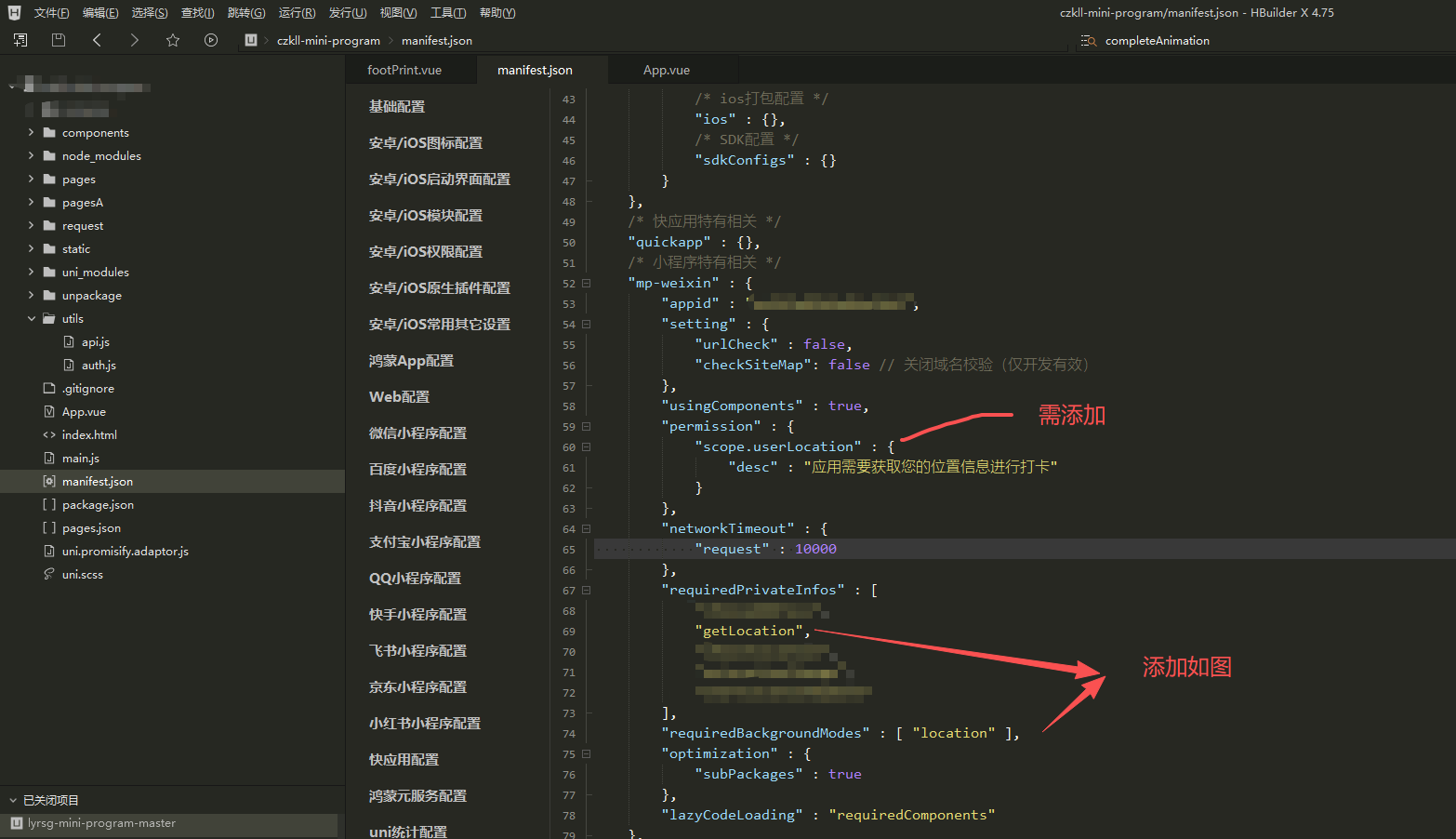
2.因为打卡需要获取当前打卡的地点,这里选择使用了高德地图,进行详细信息获取。去高德官网https://lbs.amap.com/ 控制台中添加信息获取key
3.下载amap-wx.130.js 页面中导入js,初始化map后使用getRegeo获取准确地址,其中amapKey为高德官网申请的key,打卡在打卡点500米范围内便弹出打卡提示,超出范围不弹出打卡提示。
导入高德js
import AMapWX from '../../common/amap-wx.130';
获取当前定位:
uni.getLocation({
type: 'gcj02', // 中国标准坐标系
altitude: true, // 获取高度信息
accuracy: 'best', // 高精度定位模式
timeout: 10000, // 超时时间10秒
highAccuracyExpireTime: 60000, // 高精度定位有效期60秒
geocode: true, // 直接获取经纬度对应的地址信息
success: (res) => {
//登录才判断是否需要打卡
if(this.openid){
this.judgeSfCheckIn(res)
}
},
fail(err) {
console.error('获取位置失败', err);
if (err.errMsg.indexOf('deny')!== -1) {
uni.showModal({
title: '权限提示',
content: '您拒绝了位置权限,是否去设置中开启?',
success: (res) => {
if (res.confirm) {
uni.openSetting({
success: (res) => {
if (res.authSetting['scope.userLocation']) {
this.navigateToScenicSpot();
}
}
});
}
}
});
} else {
console.log('获取位置失败,请稍后重试');
uni.showToast({
title: '获取位置失败,请稍后重试',
icon: 'none'
});
}
}
});
判断当前位置是否在打卡范围:
judgeSfCheckIn(data) {
console.log(data)
// 计算距离
let minDistance = 40041470 ;
for (let index in this.targetAttraction) {
const target = this.targetAttraction[index]
const distance = this.calculateDistance(data.latitude, data.longitude, target.checkLatitude,target.checkLongitude);
console.log(distance)
if(minDistance > distance) {
minDistance = distance
this.targetScence = target
}
}
console.log(this.targetScence)
// 显示打卡提示
this.showCheckInModal = minDistance <= 500;
this.currentPosition = {
latitude: data.latitude,
longitude: data.longitude
};console.log(this.showCheckInModal)
},
/**
* 使用Haversine公式计算两点间距离(推荐使用)
*/
calculateDistance(lat1, lng1, lat2, lng2) {
const R = 6371000; // 地球半径(米)
const dLat = this.toRadians(lat2 - lat1);
const dLng = this.toRadians(lng2 - lng1);
const a = Math.sin(dLat / 2) * Math.sin(dLat / 2) +
Math.cos(this.toRadians(lat1)) * Math.cos(this.toRadians(lat2)) *
Math.sin(dLng / 2) * Math.sin(dLng / 2);
const c = 2 * Math.atan2(Math.sqrt(a), Math.sqrt(1 - a));
return Math.round(R * c); // 返回整数米数
},
/**
* 角度转弧度
*/
toRadians(degrees) {
return degrees * (Math.PI / 180);
},
点击确认打卡按钮:
// 确认打卡
async confirmCheckIn() {
// 1. 立即显示加载提示,防止重复点击
uni.showLoading({ title: '打卡中...', mask: true });
try {
const app = getApp();
const amapKey = app.globalData?.userInfo?.AMAP_KEY;
// 2. 先校验必要参数,避免后续接口无效调用
if (!amapKey) {
throw new Error('地图配置错误,请联系管理员');
}
if (!this.currentPosition) {
throw new Error('未获取到您的位置,请重试');
}
if (!this.participantId || !this.openid) {
throw new Error('登录状态失效,请重新登录');
}
const finalLongitude = this.currentPosition.longitude;
const finalLatitude = this.currentPosition.latitude;
//key为高德地图上申请的key
const aMapWX = new AMapWX.AMapWX({ key: amapKey });
// 3. 调用高德地图逆地理编码(完善失败处理)
const regeoRes = await new Promise((resolve, reject) => {
aMapWX.getRegeo({
location: `${finalLongitude},${finalLatitude}`, // 高德坐标顺序:经度,纬度
extensions: 'all',
success: (res) => {
// 校验高德返回数据有效性
if (!res || !res[0]) {
reject(new Error('获取地址信息失败,请重试'));
return;
}
resolve(res[0]); // 传递有效数据
},
// 新增:高德接口失败回调(关键修复)
fail: (err) => {
console.error('高德地图接口失败:', err);
reject(new Error('获取位置信息失败,请检查网络'));
}
});
});
// 4. 调用打卡接口(用await+try-catch捕获异常,替代.then)
const checkInRes = await submitCheckIn({
method: 'post',
data: {
participantId: this.participantId,
openId: this.openid,
location: regeoRes.name, // 使用高德返回的有效地址
latitude: regeoRes.latitude, //实际打卡经纬度
longitude: regeoRes.longitude, //实际打卡经纬度
checkIn: this.targetScence.checkName, //需要打卡的地点名
checkInLatitude: this.targetScence.checkLatitude,//需要打卡的地点对应的经纬度
checkInLongitude: this.targetScence.checkLongitude //需要打卡的地点对应的经纬度
}
});
// 5. 打卡成功:更新状态+提示+跳转
if (checkInRes.success) {
this.checkInNum += 1;
uni.hideLoading(); // 先关闭加载
// 显示打卡结果弹窗
uni.showModal({
title: '打卡成功',
showCancel: false,
icon: 'success',
success: (res) => {
if (res.confirm) {
// 延迟跳转,确保用户看到提示
setTimeout(() => {
uni.navigateTo({ url: '/pagesA/my/footPrint' });
this.hideCheckInModal(); // 关闭模态框
}, 1000);
}
}
});
} else {
// 6. 打卡业务失败(如已打卡)
throw new Error(checkInRes.message || '打卡失败,请稍后重试');
}
} catch (error) {
// 7. 捕获所有异常(参数错误/接口失败/网络问题)
uni.hideLoading();
uni.showToast({
title: error.message || '打卡异常,请重试',
icon: 'none',
duration: 2000
});
// 异常时也关闭模态框,避免卡死
this.hideCheckInModal();
}
},
4.绘制足迹
<template>
<view class="container">
<!-- 顶部标题栏 -->
<view class="header">
<view class="title">我的足迹</view>
</view>
<!-- 地图区域 -->
<view class="map-container">
<map id="myMap" class="map" :latitude="latitude" :longitude="longitude" :markers="markers" :scale="16"
:polyline="polylines" @markertap="onMarkerTap"></map>
</view>
<!-- 底部足迹列表 -->
<view class="footprint-list" v-if="footprintList.length > 0">
<view class="list-header">
<text class="list-title">我的足迹</text>
<text class="list-count">{{ footprintList.length }} 个地点</text>
</view>
<scroll-view scroll-y class="list-content">
<view class="footprint-item" v-for="(item, index) in footprintList" :key="index"
@tap="centerToLocation(item.checkInLatitude, item.checkInLongitude, index)">
<view class="item-icon">
<image src="/static/achievement/red_flag.png" mode="aspectFit" class="flag-icon"></image>
</view>
<view class="item-info">
<view class="item-name">{{ item.checkIn }}</view>
<view class="item-address">{{ item.location }}</view>
<view class="item-time">{{ formatTime(item.createTime) }}</view>
</view>
</view>
</scroll-view>
</view>
<!-- 空状态提示 -->
<view class="empty-state" v-if="footprintList.length === 0">
<image src="/static/achievement/red_flag.png" mode="aspectFit" class="empty-icon"></image>
<text class="empty-text">暂无足迹记录</text>
<text class="empty-hint">去打卡添加足迹吧</text>
</view>
</view>
</template>
<script>
import {
footPrint
} from '../../request/api.js'
export default {
data() {
return {
// 地图相关数据
latitude: 0,
longitude: 0,
polylines: [],
markers: [],
mapContext: null,
// 足迹数据
footprintList: [],
// 地图动画数据
mapData: {}
};
},
onLoad() {
// 隐藏原生tabBar
uni.hideTabBar();
},
onReady() {
// 获取地图上下文
this.mapContext = wx.createMapContext('myMap');
// 加载用户足迹
this.loadFootprints();
},
// 页面卸载时清理
onUnload() {
// 清理标记和折线
this.markers = [];
this.polylines = [];
// 清理移动定时器
if (this.mapData.moveTimer) clearInterval(this.mapData.moveTimer);
},
methods: {
// 在加载足迹数据后调用启动动画
onFootprintLoaded() {
if (this.footprintList && this.footprintList.length == 1) {
this.onlyOneMarker()
} else if (this.footprintList && this.footprintList.length >= 2) {
//多点 则动画
this.initMapAnimation();
this.startWalkingAnimation(this.footprintList);
}
},
// 加载用户足迹
async loadFootprints() {
try {
// 显示加载提示
uni.showLoading({
title: '加载中'
});
// 尝试从API获取数据
const openId = uni.getStorageSync('openId');
const res = await footPrint({
data: {
openId
}
});
if (res && res.success && res.data && res.data.length > 0) {
this.footprintList = res.data;
// 定位到最新足迹点
this.latitude = res.data[this.footprintList.length-1].checkInLatitude;
this.longitude = res.data[this.footprintList.length-1].checkInLongitude;
// 提取所有足迹点经纬度
const allPoint = this.footprintList.map(item => ({
latitude: item.checkInLatitude,
longitude: item.checkInLongitude
}));
console.log(allPoint);
// 缩放到所有足迹点视野
this.zoomToAllPoints(allPoint);
// 启动动画
this.onFootprintLoaded();
} else {
// 无足迹时定位当前位置
this.loadUserPosition();
}
} catch (error) {
console.error('加载足迹数据失败:', error);
} finally {
// 隐藏加载提示
uni.hideLoading();
}
},
// 地图标记点点击事件
onMarkerTap(e) {
const markerId = e.markerId;
console.log('点击了标记点:', markerId);
},
// 只有一个足迹点时直接标点(定位图标缩小至1/2 + 初始用user.png)
onlyOneMarker() {
const latitude = this.footprintList[0].checkInLatitude;
const longitude = this.footprintList[0].checkInLongitude;
// 添加足迹标记
this.markers.push({
id: 1,
latitude,
longitude,
iconPath: '/static/achievement/round_flag.png',
width: 40,
height: 40,
callout: {
content: this.footprintList[0].checkIn,
display: 'ALWAYS',
padding: 5
}
});
},
// 没有足迹时定位到当前位置
loadUserPosition() {
uni.getLocation({
type: 'gcj02', // 中国标准坐标系
altitude: true, // 获取高度信息
accuracy: 'best', // 高精度定位模式
timeout: 10000, // 超时时间10秒
highAccuracyExpireTime: 60000, // 高精度定位有效期60秒
geocode: true, // 直接获取经纬度对应的地址信息
success: (res) => {
this.longitude = res.longitude;
this.latitude = res.latitude;
console.log(res);
},
fail(err) {
console.error('获取位置失败', err);
if (err.errMsg.indexOf('deny') !== -1) {
uni.showModal({
title: '权限提示',
content: '您拒绝了位置权限,是否去设置中开启?',
success: (res) => {
if (res.confirm) {
uni.openSetting({
success: (res) => {
if (res.authSetting[
'scope.userLocation']) {
this.navigateToScenicSpot();
}
}
});
}
}
});
} else {
console.log('获取位置失败,请稍后重试');
uni.showToast({
title: '获取位置失败,请稍后重试',
icon: 'none'
});
}
}
});
},
// 地图缩放到所有标记点视野范围
zoomToAllPoints(allPoints) {
if (!this.mapContext) {
console.error("地图上下文未初始化");
return;
}
if (!allPoints || allPoints.length === 0) {
console.error("无足迹点数据");
return;
}
// 调用 includePoints 方法,自动适配所有点的范围
this.mapContext.includePoints({
points: allPoints, // 所有需要显示在视野内的足迹点
padding: [80, 80, 280, 80], // 下侧预留较大边距(适配底部列表)
success: () => {
console.log("地图已缩放至包含所有足迹点的区域");
},
fail: (err) => {
console.error("地图缩放失败", err);
}
});
},
// 定位到指定足迹点
centerToLocation(latitude, longitude) {
this.mapContext.moveToLocation({
latitude,
longitude,
success: () => {}
});
},
// 初始化地图动画数据
initMapAnimation() {
this.mapData = {
routePoints: [], // 足迹点经纬度数组(按时间排序)
currentSegment: 0, // 当前行走的段索引
moveTimer: null, // 移动动画定时器
completedLines: [], // 已完成的路径线段
currentLine: null // 当前正在绘制的线段
};
},
// 启动整个动画流程
startWalkingAnimation(footprintList) {
// 1. 准备路径数据(按时间排序足迹点)
this.prepareRouteData(footprintList);
// 2. 初始化地图元素
this.initMapElements();
// 3. 开始第一段路径动画
this.startNextSegment();
},
// 准备路径数据(按时间排序)
prepareRouteData(footprintList) {
const sortedFootprints = [...footprintList].sort(
(a, b) => new Date(a.createTime) - new Date(b.createTime)
);
// 提取经纬度和名称
this.mapData.routePoints = sortedFootprints.map(item => ({
latitude: Number(item.checkInLatitude),
longitude: Number(item.checkInLongitude),
name: item.checkIn
}));
},
// 初始化地图元素
initMapElements() {
const {
routePoints
} = this.mapData;
this.markers = [];
// 1. 添加所有足迹点标记
routePoints.forEach((point, index) => {
this.markers.push({
id: index,
latitude: point.latitude,
longitude: point.longitude,
iconPath: '/static/achievement/round_flag.png',
//rotate: 45,
width: 40,
height: 40,
callout: {
content: point.name,
display: 'ALWAYS',
padding: 5
}
});
});
// 2. 添加定位标记
this.markers.push({
id: 99, // 定位标记固定ID
latitude: routePoints[0].latitude,
longitude: routePoints[0].longitude,
iconPath: '/static/achievement/user.png', // 移动过程中显示的图标
width: 18, // 缩小后宽度
height: 22, // 缩小后高度
anchor: {
x: 0.5,
y: 1
} // 底部中心对齐(避免位置偏移)
});
// 3. 初始化路径线段(起点=终点,动画开始后逐步延伸)
this.mapData.currentLine = {
points: [routePoints[0], routePoints[0]],
color: '#5A97FF',
width: 4,
borderColor: '#fff',
borderWidth: 1
};
// 初始化折线数组
this.polylines = [...this.mapData.completedLines, this.mapData.currentLine];
},
// 开始下一段路径动画
startNextSegment() {
const {
routePoints,
currentSegment
} = this.mapData;
// 检查是否已完成所有段
if (currentSegment >= routePoints.length - 1) {
return;
}
// 获取当前段的起点和终点
const startPoint = routePoints[currentSegment];
const endPoint = routePoints[currentSegment + 1];
// 启动当前段的移动和画线
this.moveAlongSegment(startPoint, endPoint, () => {
// 合并已完成的线段(减少覆盖物数量)
if (this.mapData.completedLines.length === 0) {
// 初始创建多段线
this.mapData.completedLines.push({
points: [startPoint, endPoint],
color: '#5A97FF',
width: 4,
borderColor: '#fff',
borderWidth: 1,
multi: true // 标记为多段线
});
} else {
// 后续追加新点(形成连续线段)
this.mapData.completedLines[0].points.push(endPoint);
}
// 更新段索引
this.mapData.currentSegment++;
// 准备下一段的当前线段(起点=当前段终点)
this.mapData.currentLine = {
...this.mapData.currentLine,
points: [endPoint, endPoint]
};
// 更新折线视图
this.polylines = [...this.mapData.completedLines, this.mapData.currentLine];
// 延迟500ms开始下一段(提升体验)
setTimeout(() => this.startNextSegment(), 500);
});
},
// 核心:沿线段移动定位标记(始终正立)
moveAlongSegment(startPoint, endPoint, onComplete) {
// 计算经纬度差值
const latDiff = endPoint.latitude - startPoint.latitude;
const lngDiff = endPoint.longitude - startPoint.longitude;
// 计算总距离(控制动画时长,避免过快/过慢)
const totalDistance = Math.sqrt(latDiff ** 2 + lngDiff ** 2);
if (totalDistance <= 0) {
onComplete();
return;
}
// 动画参数(根据距离动态调整时长)
const duration = Math.max(1000, Math.min(5000, totalDistance * 80000));
const frameRate = 30; // 帧率(每秒30帧,流畅度适中)
const totalFrames = duration / frameRate;
let currentFrame = 0;
let currentMoveMarker = null; // 定位标记实例
// 清除旧的移动定时器(避免重复)
if (this.mapData.moveTimer) {
clearInterval(this.mapData.moveTimer);
}
// 启动移动定时器
this.mapData.moveTimer = setInterval(() => {
currentFrame++;
// 计算当前动画进度(0-1)
const progress = Math.min(currentFrame / totalFrames, 1);
// 计算当前定位标记的位置(仅更新位置,不旋转)
const currentLat = startPoint.latitude + latDiff * progress;
const currentLng = startPoint.longitude + lngDiff * progress;
// 1. 更新定位标记位置
if (!currentMoveMarker) {
currentMoveMarker = this.markers.find(marker => marker.id === 99);
}
if (currentMoveMarker) {
currentMoveMarker.latitude = currentLat;
currentMoveMarker.longitude = currentLng;
}
// 2. 实时更新当前线段的终点(实现"边走边画"效果)
this.mapData.currentLine.points[1] = {
latitude: currentLat,
longitude: currentLng
};
// 更新折线视图(只更新最后一段,提升性能)
this.polylines[this.polylines.length - 1].points = this.mapData.currentLine.points;
// 到达终点,完成当前段
if (progress === 1) {
clearInterval(this.mapData.moveTimer);
onComplete();
}
}, frameRate);
},
// 格式化时间
formatTime(time) {
try {
const date = new Date(time);
const now = new Date();
const diff = now - date;
// 计算天、小时、分钟
const days = Math.floor(diff / (1000 * 60 * 60 * 24));
const hours = Math.floor((diff % (1000 * 60 * 60 * 24)) / (1000 * 60 * 60));
const minutes = Math.floor((diff % (1000 * 60 * 60)) / (1000 * 60));
if (days > 0) {
return days + '天前';
} else if (hours > 0) {
return hours + '小时前';
} else if (minutes > 0) {
return minutes + '分钟前';
} else {
return '刚刚';
}
} catch (error) {
console.error('时间格式化错误:', error);
return '未知时间';
}
}
}
};
</script>
<style lang="scss" scoped>
$primary-color: #e63946;
$secondary-color: #1d3557;
$light-color: #f8f9fa;
$shadow-medium: 0 6rpx 30rpx rgba(0, 0, 0, 0.1);
$border-radius: 16rpx;
.container {
width: 100%;
height: 100vh;
display: flex;
flex-direction: column;
background-color: $light-color;
}
.header {
height: 90rpx;
background-color: $primary-color;
display: flex;
align-items: center;
justify-content: center;
position: relative;
z-index: 10;
box-shadow: $shadow-medium;
.title {
font-size: 36rpx;
color: #fff;
font-weight: 500;
}
}
.map-container {
flex: 1;
position: relative;
overflow: hidden;
}
.map {
width: 100%;
height: 100%;
}
.map-controls {
position: absolute;
right: 30rpx;
bottom: 240rpx;
display: flex;
flex-direction: column;
gap: 20rpx;
z-index: 10;
}
.control-btn {
width: 80rpx;
height: 80rpx;
background-color: #fff;
border-radius: 50%;
display: flex;
align-items: center;
justify-content: center;
box-shadow: $shadow-medium;
opacity: 0.9;
transition: all 0.3s ease;
&:active {
transform: scale(0.95);
opacity: 1;
}
}
.control-icon {
width: 40rpx;
height: 40rpx;
}
.location-tip {
position: absolute;
top: 20rpx;
left: 50%;
transform: translateX(-50%);
background-color: rgba(0, 0, 0, 0.7);
color: #fff;
padding: 16rpx 32rpx;
border-radius: 50rpx;
font-size: 28rpx;
z-index: 20;
box-shadow: $shadow-medium;
animation: fadeInUp 0.3s ease;
}
.footprint-list {
height: 400rpx;
background-color: #fff;
border-top-left-radius: $border-radius;
border-top-right-radius: $border-radius;
box-shadow: 0 -4rpx 20rpx rgba(0, 0, 0, 0.05);
animation: slideUp 0.5s ease;
}
.list-header {
height: 80rpx;
display: flex;
align-items: center;
justify-content: space-between;
padding: 0 30rpx;
border-bottom: 1rpx solid #f0f0f0;
}
.list-title {
font-size: 32rpx;
font-weight: 500;
color: $secondary-color;
}
.list-count {
font-size: 28rpx;
color: #999;
}
.list-content {
height: 220rpx;
}
.footprint-item {
height: 110rpx;
display: flex;
align-items: center;
padding: 0 30rpx;
border-bottom: 1rpx solid #f5f5f5;
transition: background-color 0.2s ease;
&:last-child {
border-bottom: none;
}
&:active {
background-color: #f8f8f8;
}
}
.item-icon {
width: 60rpx;
height: 60rpx;
margin-right: 20rpx;
}
.flag-icon {
width: 100%;
height: 100%;
animation: flagWave 2s ease-in-out infinite;
}
.item-info {
flex: 1;
overflow: hidden;
}
.item-name {
font-size: 30rpx;
color: $secondary-color;
margin-bottom: 4rpx;
white-space: nowrap;
overflow: hidden;
text-overflow: ellipsis;
}
.item-address {
font-size: 24rpx;
color: #666;
margin-bottom: 4rpx;
white-space: nowrap;
overflow: hidden;
text-overflow: ellipsis;
}
.item-time {
font-size: 22rpx;
color: #999;
}
.empty-state {
flex: 1;
display: flex;
flex-direction: column;
align-items: center;
justify-content: center;
padding: 100rpx 0;
}
.empty-icon {
width: 200rpx;
height: 200rpx;
margin-bottom: 30rpx;
opacity: 0.6;
}
.empty-text {
font-size: 32rpx;
color: #666;
margin-bottom: 10rpx;
}
.empty-hint {
font-size: 26rpx;
color: #999;
}
/* 动画定义 */
@keyframes fadeInUp {
from {
opacity: 0;
transform: translate(-50%, 20rpx);
}
to {
opacity: 1;
transform: translate(-50%, 0);
}
}
@keyframes slideUp {
from {
transform: translateY(100%);
}
to {
transform: translateY(0);
}
}
@keyframes flagWave {
0%,
100% {
transform: rotate(-5deg);
}
50% {
transform: rotate(5deg);
}
}
/* 标记点动画 */
@keyframes markerBounce {
0%,
100% {
transform: translateY(0);
}
50% {
transform: translateY(-10rpx);
}
}
</style>
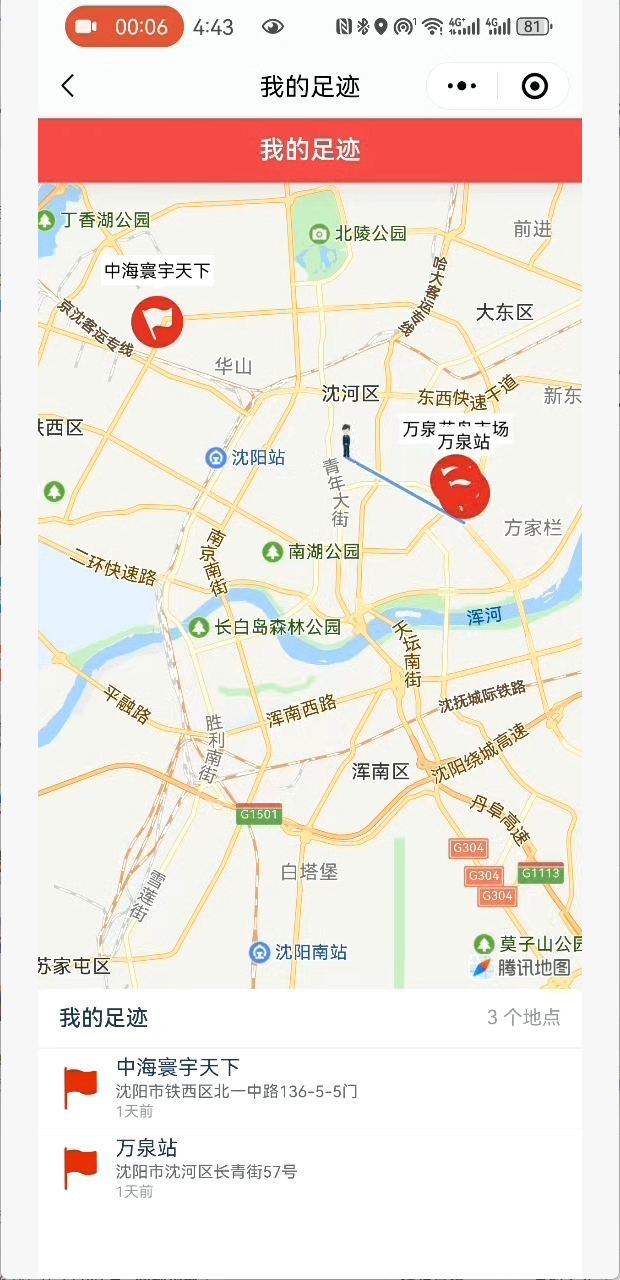
5.效果,小人边走边画线
微信小程序中合法域名中配置https://restapi.amap.com
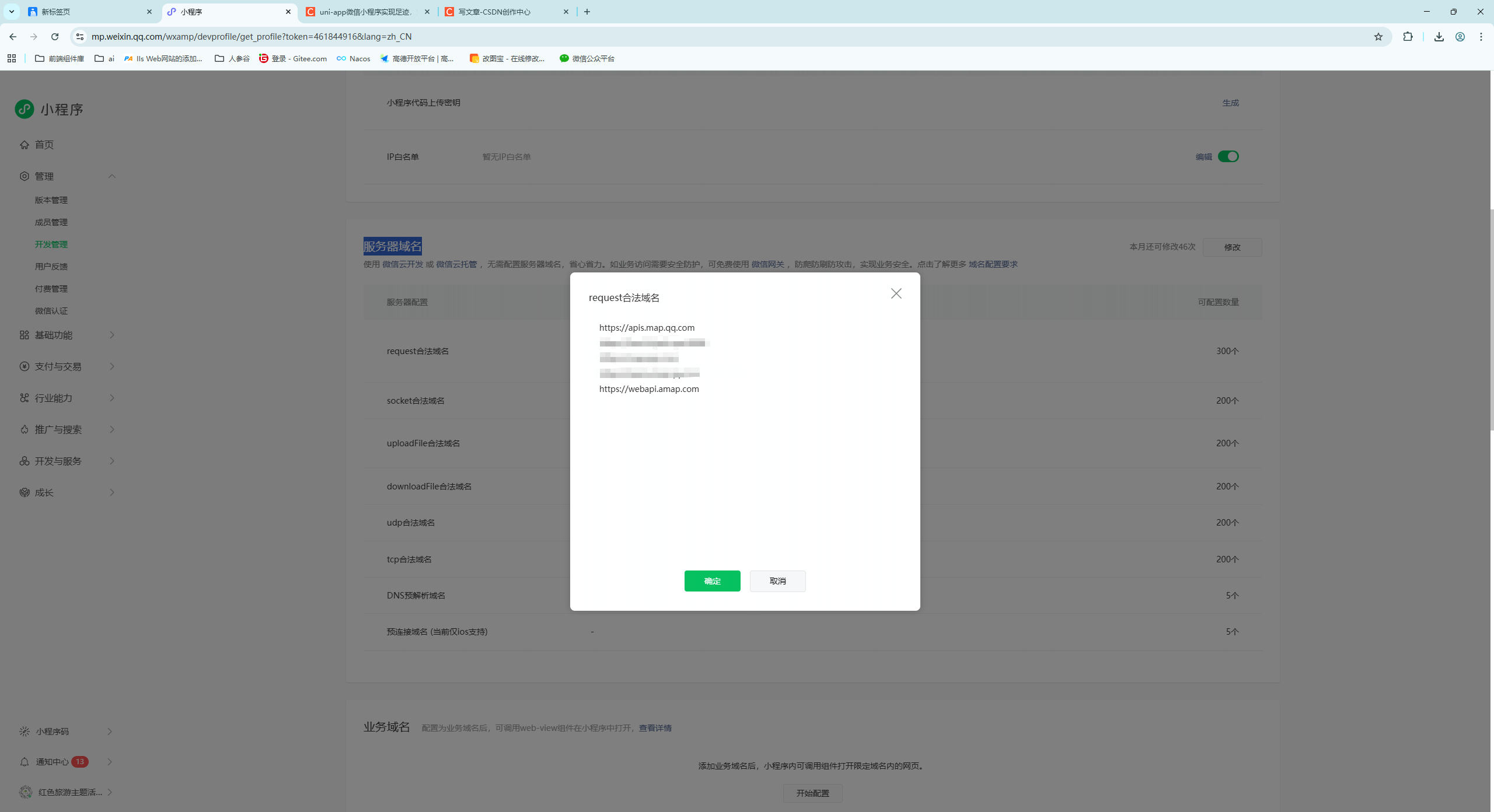
- uploadFile合法域名 中添加:https://pr.map.qq.com

北京人形旗下天工造物具身智能开源社区,聚焦具身天工与慧思开物两大平台
更多推荐
 16
16 0
0- 0


 已为社区贡献3条内容

所有评论(0)