Css fixed和absolute定位区别
fixed:固定定位
absolute:绝对定位
区别很简单:
1、没有滚动条的情况下没有差异
2、在有滚动条的情况下,fixed定位不会随滚动条移动而移动,而absolute则会随滚动条移动
可以这么理解,fixed:固定在当前window不动, absolute:会随参照对象元素的高度和宽度变化而变化
一般fixed用在遮盖层和固定在页面某个位置,如固定在顶端的菜单栏,又如弹出提示框居中显示
下面例子可是简单测试两者之间的区别,注意拖动滚动条看差异
<!DOCTYPE html>
<html xmlns="http://www.w3.org/1999/xhtml">
<head>
<meta http-equiv="Content-Type" content="text/html; charset=utf-8"/>
<title></title>
<style>
body {
height:1000px;/*让窗体出现滚动条*/
}
.fixed {
position: fixed;
left: 100px;
right: 100px;
top: 100px;
bottom: 100px;
width: auto;
height: auto;
border: 1px solid blue;
}
.absolute {
position: absolute;
left: 100px;
right: 100px;
top: 100px;
bottom: 100px;
width: auto;
height: auto;
border: 1px solid red;
}
</style>
</head>
<body>
<div class="fixed">fixed定位</div>
<div class="absolute">absolute定位</div>
</body>
</html>
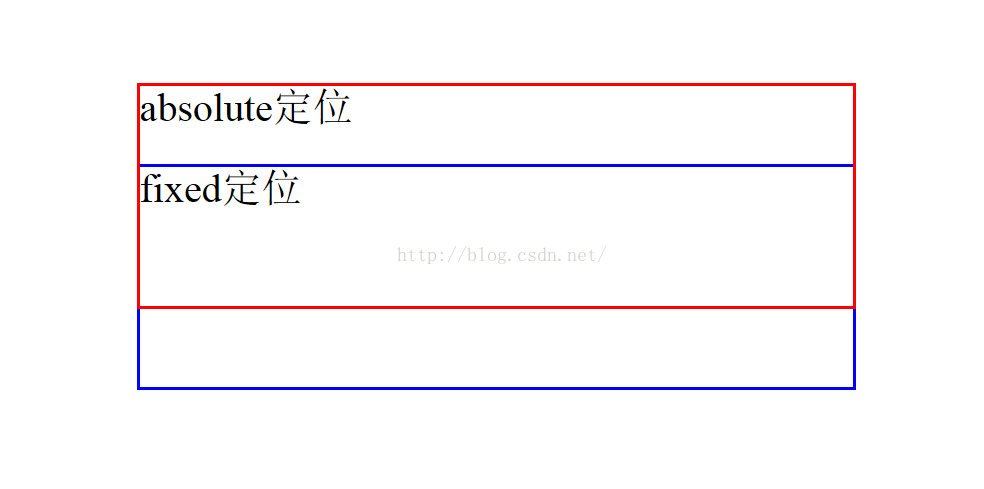
效果如下:当滚动条下拉时,absolute层会上移,fixed层不动

北京人形旗下天工造物具身智能开源社区,聚焦具身天工与慧思开物两大平台
更多推荐
 8
8 0
0- 0


 已为社区贡献1条内容

所有评论(0)