百度地图开发探索 angular7 (typescript) 添加参考点、定位点与自定义弹窗
·
添加参考点并获取位置
话不多说,看图说话
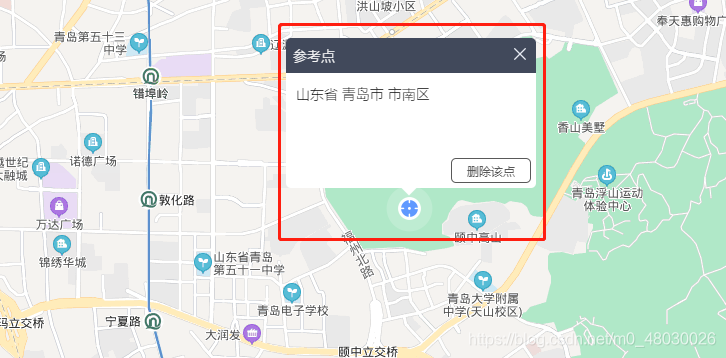
分析一下此点和弹窗的组成:
1、上图的蓝色图标为一个marker
2、生成一个marker需要point,生成point需要两个坐标(经纬度)
3、上方的弹窗是依赖于marker生成的(弹窗自定义样式下面会有整理)
// 参考点
  referencePoint(e: any) {
    const point = new BMap.Point(e.point.lng, e.point.lat); // 创建point
    const poiIcon = new BMap.Icon(
      '../../../../../assets/font/poi_marker.png',
      new BMap.Size(50, 50)
    ); // 增加图标图
    const marker = new BMap.Marker(point, {
      width: '40px',
      height: '40px',
      offset: new BMap.Size(0, 0),
      icon: poiIcon,
    }); // 创建marker
    this.refPoint.push(point); // 记录的方法,忽略
    this.refMarker.push(marker); // 记录的方法,忽略
    this.map.addOverlay(marker); // 将标注添加到地图中
    // 绑定图标的点击事件,当点击时弹出弹窗
    marker.addEventListener('click', (ev: any) => {
      this.refMarker.forEach((el: any, index: number) => {
        if (el === marker) {
          this.refPointPop(index);  // 弹窗事件(在下方)
        }
      });
    });
    this.refMarker.forEach((el: any, index: number) => {
      if (el === marker) {
        this.refPointPop(index); // 弹窗事件(在下方)
      }
    });
  }
注意:Size属性要慎用,参考点的Size(50,50) 平移了很小范围还好,如果大了的话 在地图上会有阴影遮盖,会导致点不到地图。
弹窗:
// 添加参考点的弹窗
  refPointPop(clickIndex: number) {
    // 创建地址解析器实例
    const myGeo = new BMap.Geocoder();
    myGeo.getLocation(this.refPoint[clickIndex], (rs: any) => {
      const address_ref =
        rs.addressComponents.province +
        ' ' +
        rs.addressComponents.city +
        ' ' +
        rs.addressComponents.district +
        ' ' +
        rs.addressComponents.street;
      const content = `<div class="title_ref">
      <span>参考点</span></div>
  <div class="address_ref">${address_ref}</div>
  <button id="del_button_ref" class="button">删除该点</button>`;
  	  // 让弹窗单例展示
      if (this.refInfoWindow) {
        this.refMarker.forEach((ele: any) => {
          this.refInfoWindow.close(ele);
        });
      }
      this.refInfoWindow = new BMapLib.InfoBox(this.map, content, {
        boxStyle: {
          background: '#fff',
          borderRadius: '5px',
          width: '250px',
          height: '150px',
        },
        closeIconUrl: '../../../../../assets/font/close.png',
        closeIconMargin: '10px 10px 0 0',
        align: INFOBOX_AT_TOP,
        offset: new BMap.Size(0, 20),
      }); // 创建信息窗口对象
      this.refInfoWindow.open(this.refMarker[clickIndex]);

      setTimeout(() => {
        const delBtn = document.getElementById('del_button_ref');
        // 删除参考点按钮监听
        delBtn.addEventListener('click', (event: any) => {
          this.map.removeOverlay(this.refMarker[clickIndex]); // 移除点
          this.refMarker.splice(clickIndex, 1);
          this.refPoint.splice(clickIndex, 1);
          this.refInfoWindow.close();
        });
      });
    });
  }
Geocoder:用于获取用户的地址解析。也就是我们框框中的地址
myGeo.getLocation的回调中有点击点的坐标,但不是精确坐标,如果需要精确坐标需要后台解析,或前端另外解析。
content :里面放着弹窗的内容,弹窗的样式如果在自己的.scss文件中无法修改,到总得css文件中修改样式
BMapLib.InfoBox:使用infoBox生成的弹窗是可以自定义样式的。 是需要引入的
<script src="http://api.map.baidu.com/library/InfoBox/1.2/src/InfoBox.js"></script>
InfoBox的使用详解请点击
offset:偏移值,不建议修改过多,会有阴影影响点击
弹窗中的事件需要用原生js来写获取,弹窗加载到页面上会有延迟,所以使用了个setTimeout来处理,可能会有更好的方式。

北京人形旗下天工造物具身智能开源社区,聚焦具身天工与慧思开物两大平台
更多推荐
 1
1 0
0- 0


 已为社区贡献1条内容

所有评论(0)