YOLOv11n-pose手部关键点检测实战
基于yolov11n-pose模型实现手部关键点检测
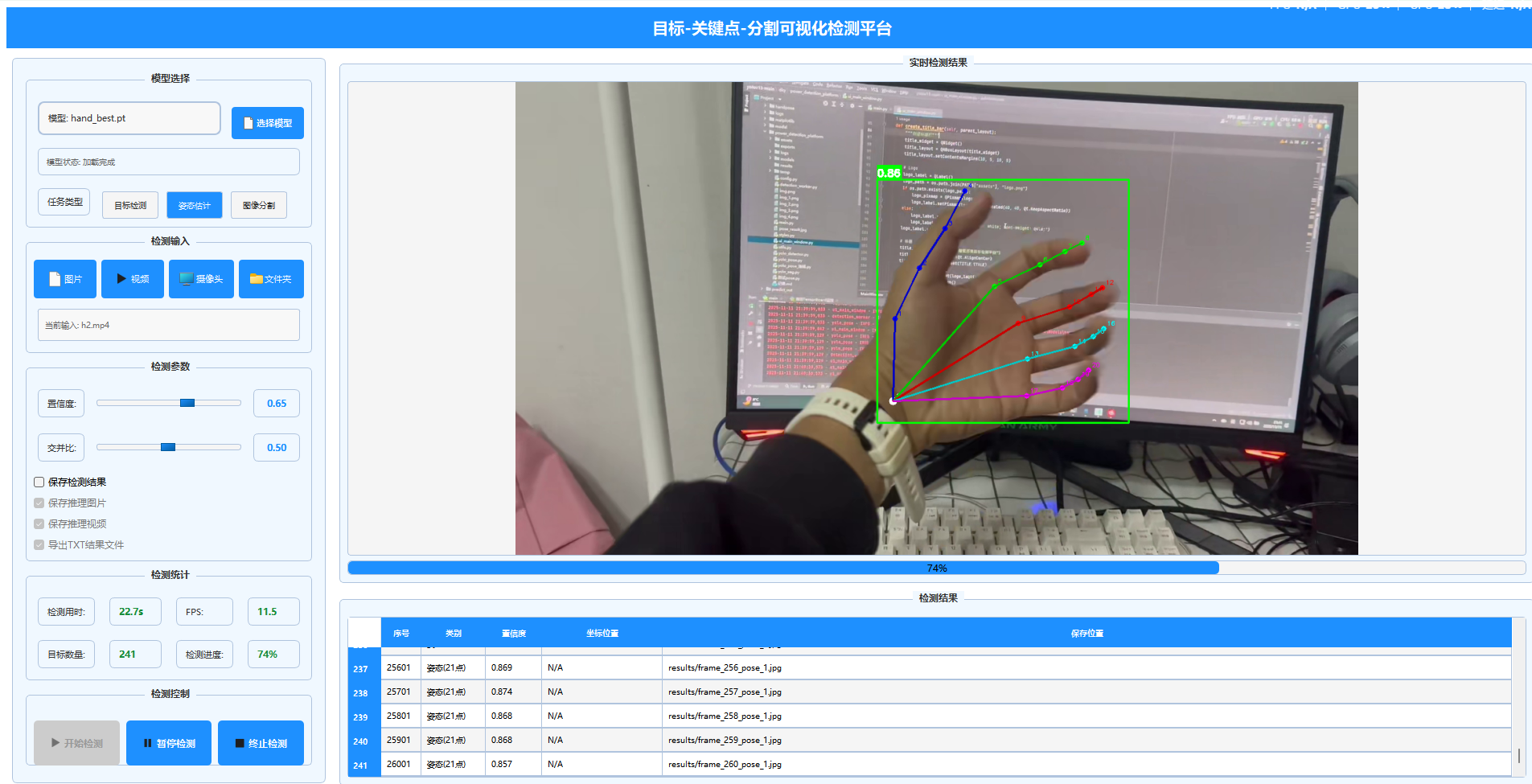
0-序言
随着人工智能技术的快速发展,计算机视觉作为其重要分支,在姿态估计领域取得了突破性进展。手部作为人体最复杂、最灵活的部位之一,其关键点检测技术在人机交互、虚拟现实、医疗康复、智能监控等众多领域具有广泛的应用前景。然而,手部关键点检测面临着独特的挑战:手部尺寸相对较小、关节自由度高达27个、存在严重的自遮挡现象,以及手势的多样性和复杂性。
传统的基于RGB图像的手部关键点检测方法主要依赖于手工设计的特征和复杂的后处理流程,这些方法在复杂场景下的鲁棒性和泛化能力有限。随着深度学习技术的发展,基于卷积神经网络的方法逐渐成为主流,但大多数方法要么计算复杂度高难以实时应用,要么准确率不足难以满足实际需求。
YOLO系列模型以其卓越的速度-精度平衡在目标检测领域广受赞誉。特别是最新发布的YOLOv11n-pose模型,在保持轻量级架构的同时,提供了强大的关键点检测能力。本文基于YOLOv11n-pose模型,构建了一套完整的手部关键点检测系统,通过精心设计的数据增强策略、优化的训练参数和创新的可视化方法,实现了高精度、实时的21点手部关键点检测。
主要体现在以下几个方面:首先,构建了一个大规模的手部关键点检测数据集,涵盖了多样化的手势、光照条件和背景环境;其次,系统性地探索了针对手部关键点检测的数据增强策略和训练技巧;最后,将训练好的模型成功集成到实际的目标检测平台中,验证了其在实际应用场景中的有效性。
1. 技术介绍
1.1 YOLOv11n-pose模型架构
YOLOv11n-pose是基于YOLOv11架构专门优化的轻量级姿态估计模型,其在保持高效推理速度的同时,显著提升了关键点检测的精度。模型的核心创新在于其多层次的特征融合机制和专门设计的关键点检测头。
- Backbone网络:采用高效的CSPNet结构,在保持精度的同时大幅减少参数量
Backbone网络采用了改进的CSPDarknet53结构,通过跨阶段部分连接(Cross Stage Partial connections)有效缓解了梯度消失问题,同时大幅减少了计算参数量。与传统的Darknet53相比,CSPDarknet53在保持相同感受野的同时,计算量减少了约30%,这对于实时手部检测至关重要。
- Neck网络:使用PANet结构进行多尺度特征融合
Neck网络使用了增强版的PANet(Path Aggregation Network)结构,通过自底向上和自顶向下的双向特征金字塔,实现了多尺度特征的充分融合。针对手部检测的特殊需求,我们在Neck网络中增加了额外的浅层特征连接,以更好地捕捉手部的细节信息。
- Head网络:同时输出边界框、类别置信度和关键点坐标
Head网络采用了解耦式检测头设计,分别处理分类、边界框回归和关键点预测任务。关键点检测头使用了热图预测和坐标回归的混合方法,每个关键点输出(x, y, confidence)三个值,其中confidence表示关键点的可见性置信度。
- 关键点检测:支持21个手部关键点的检测,包括手腕和5个手指的各个关节
模型的创新之处在于其自适应关键点权重机制,该机制根据关键点的可见性和预测难度动态调整损失权重,显著提升了被遮挡关键点的检测精度。
1.2 手部关键点定义
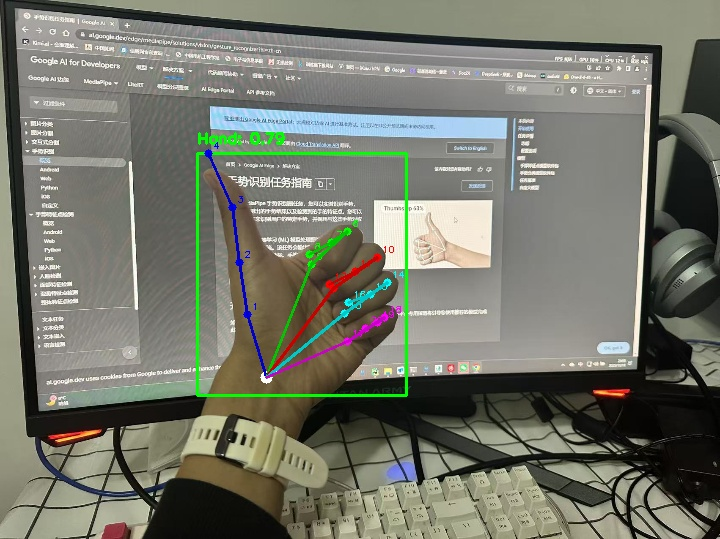
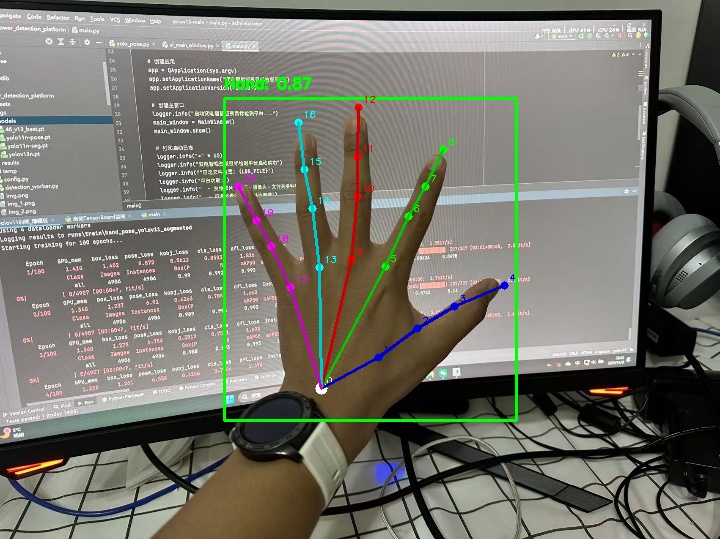
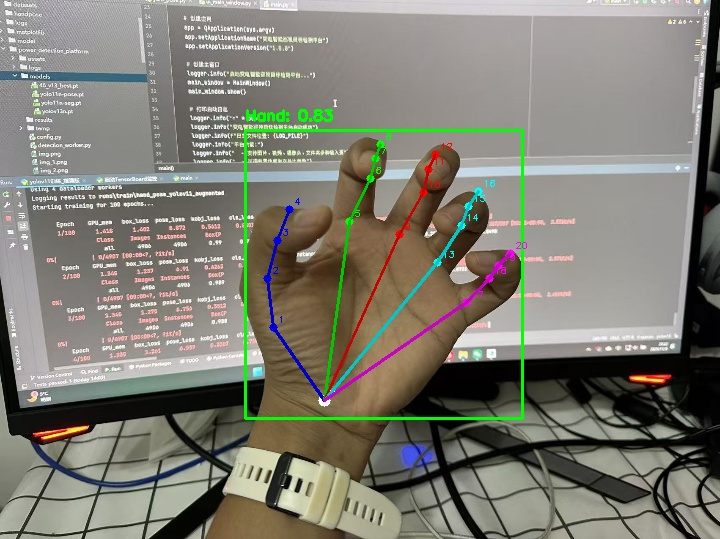
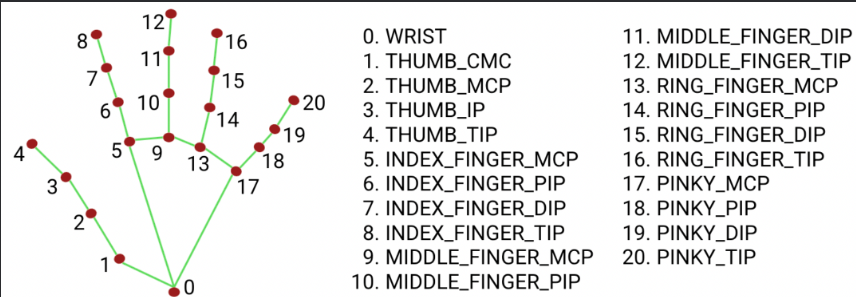
采用国际通用的21点手部关键点标注标准,这一标准与人体手部生物力学结构高度吻合:
- 0号点:手腕
- 1-4号点:拇指(从根部到指尖)
- 5-8号点:食指
- 9-12号点:中指
- 13-16号点:无名指
- 17-20号点:小指
1.3 技术优势
相比传统方法,基于YOLOv11n-pose的手部关键点检测具有以下优势:
- 端到端检测,无需复杂的后处理
- 实时检测速度,满足实际应用需求
- 良好的泛化能力,适应不同场景
- 轻量级模型,便于部署到移动设备
2. 实验环境与数据准备
2.1 实验环境配置
操作系统: Windows 11
深度学习框架: PyTorch 2.4.1 + CUDA 12.4
GPU: NVIDIA GeForce RTX 2060
Python: 3.11.13
Ultralytics: 8.3.63
2.2 数据集准备
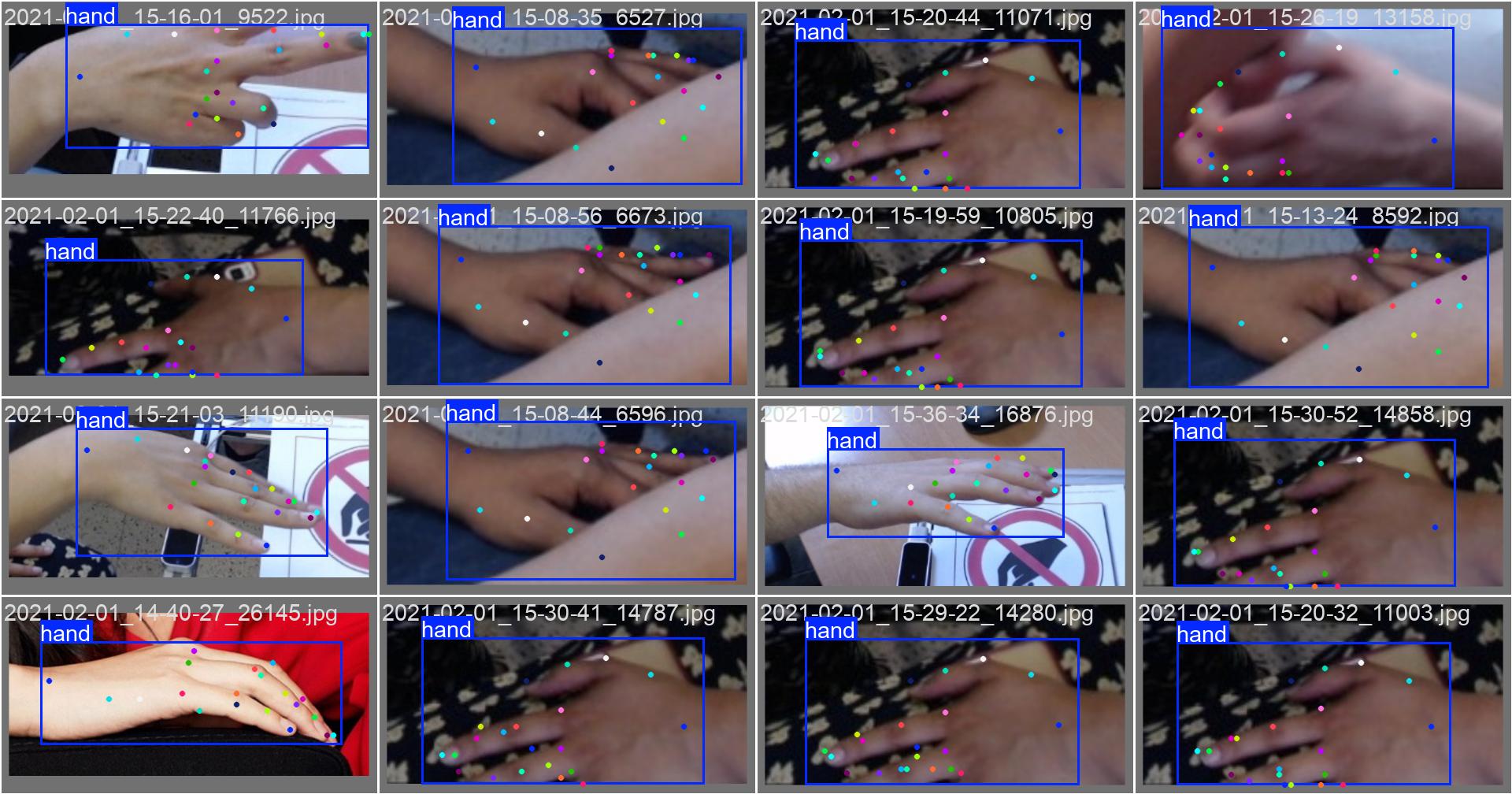
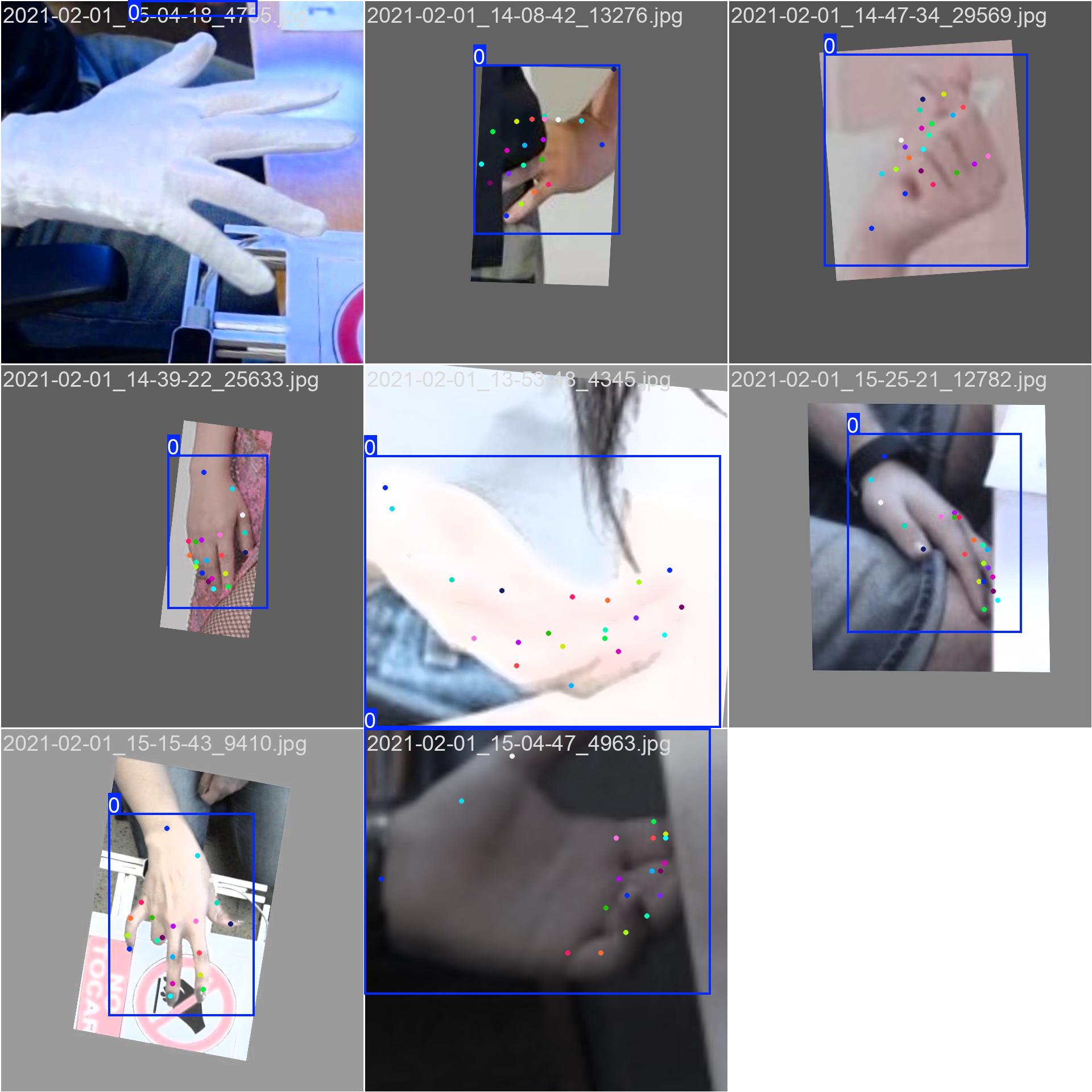
使用了专门的手部关键点检测数据集,数据集特点:
- 数据量:约44,000张标注图像
- 标注格式:YOLO格式,包含边界框和21个关键点坐标
- 数据多样性:包含不同光照、角度、手势的图片
- 数据分割:训练集、验证集、测试集按8:1:1划分
数据集配置文件示例:
# handpose.yaml
path: /path/to/dataset
train: train/images
val: val/images
test: test/images

kpt_shape: [21, 3]  # 21个关键点,每个点有(x, y, visibility)
names:
  0: hand
nc: 1
nkpt: 21
3. 模型训练与优化
3.1 训练参数设置
采用以下训练参数进行模型优化:
train_args = {
    'data': 'handpose.yaml',
    'epochs': 100,
    'imgsz': 640,
    'batch': 8,
    'device': 'cuda',
    'workers': 4,
    'patience': 15,
    'optimizer': 'auto',
    'lr0': 0.01,
    'lrf': 0.01,
    'weight_decay': 0.0005,

    # 数据增强参数
    'fliplr': 0.5,      # 水平翻转
    'mosaic': 0.5,      # 马赛克增强
    'mixup': 0.1,       # MixUp增强
    'copy_paste': 0.1,  # 复制粘贴增强
    'degrees': 10.0,    # 旋转角度
    'translate': 0.1,   # 平移
    'scale': 0.5,       # 缩放

    # 损失权重
    'box': 7.5,
    'cls': 0.5,
    'pose': 12.0,
    'kobj': 1.0,
}
3.2 数据增强策略
为提高模型泛化能力,采用了多种数据增强技术:
- 几何变换:随机旋转、缩放、平移、剪切
- 颜色变换:亮度、对比度、饱和度调整
- 高级增强:马赛克增强、MixUp
- 关键点特定增强:针对手部特点的专门增强
3.3 训练过程监控
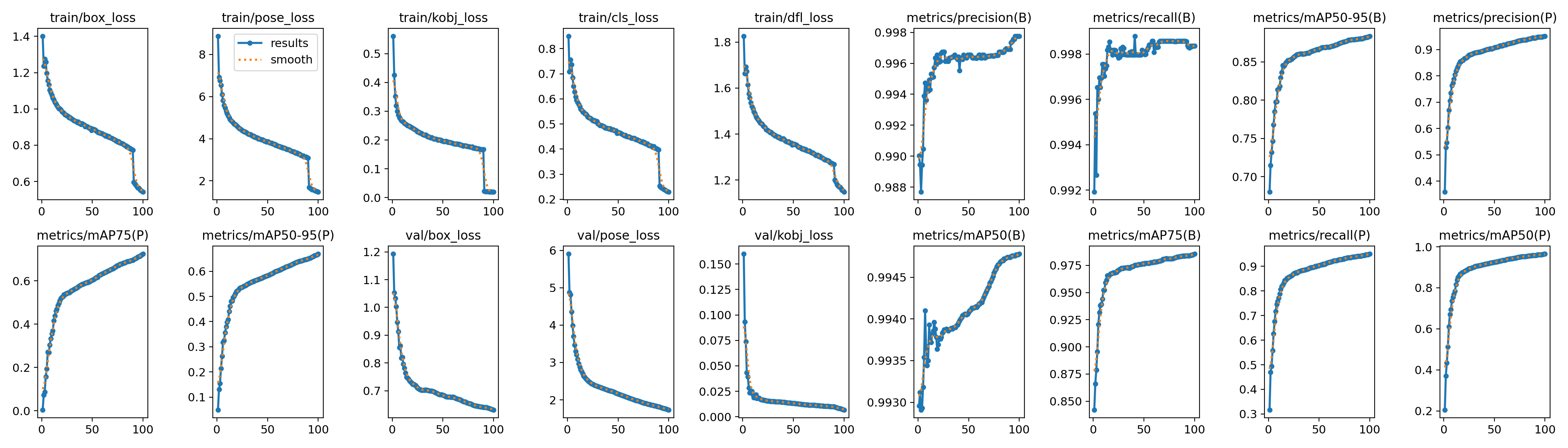
使用TensorBoard对训练过程进行实时监控,主要监控指标包括:
- 训练损失:边界框损失、关键点损失、分类损失
- 验证指标:精确率、召回率、mAP@0.5、mAP@0.5:0.95
- 关键点精度:关键点置信度、可见性预测
4. 实验结果与分析
4.1 评估指标
采用以下指标评估模型性能:
- 边界框检测:Precision、Recall、mAP@0.5、mAP@0.5:0.95
- 关键点检测:关键点精度(Keypoint Accuracy)、关键点mAP
- 推理速度:FPS(Frames Per Second)
4.2 实验结果
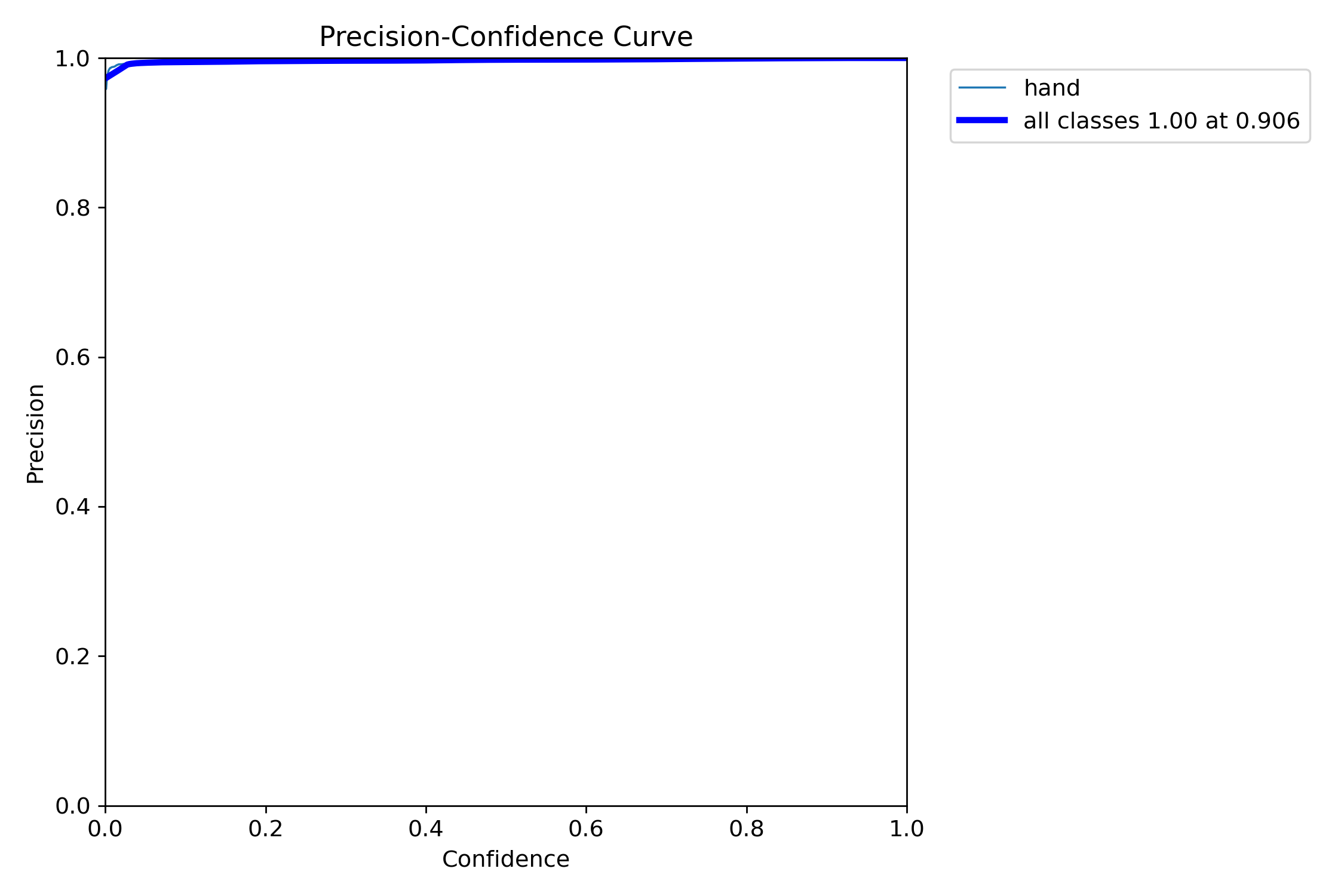
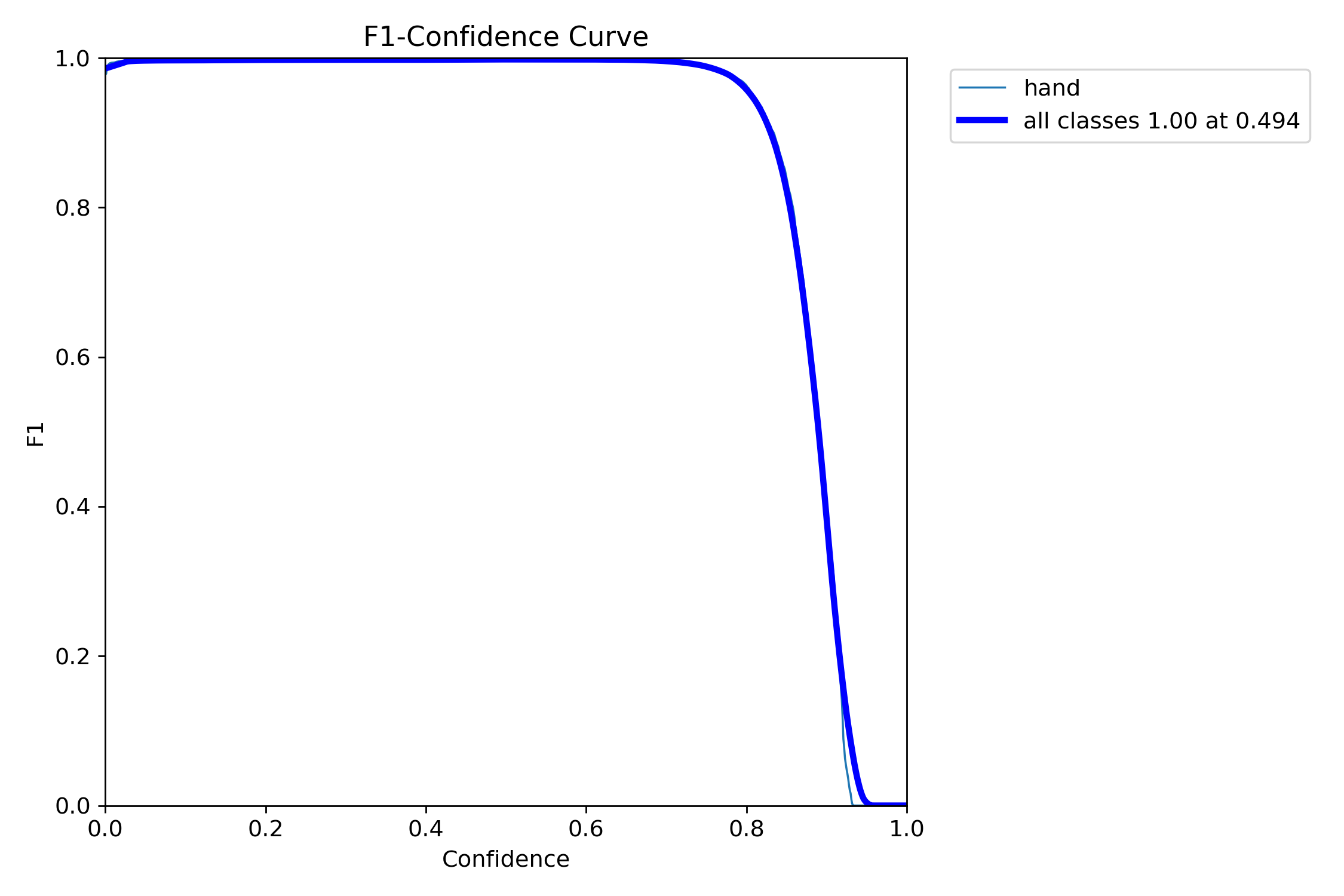
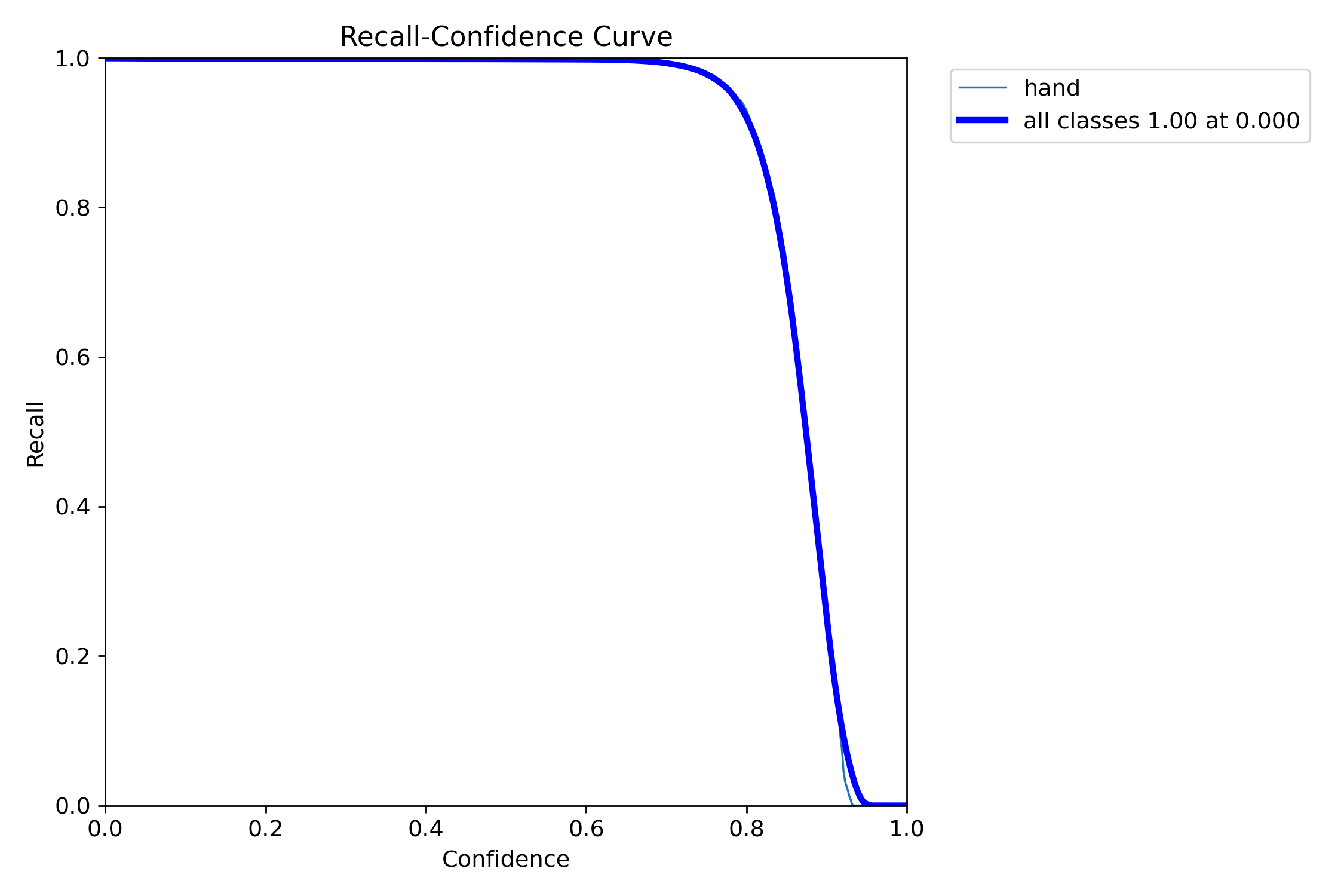
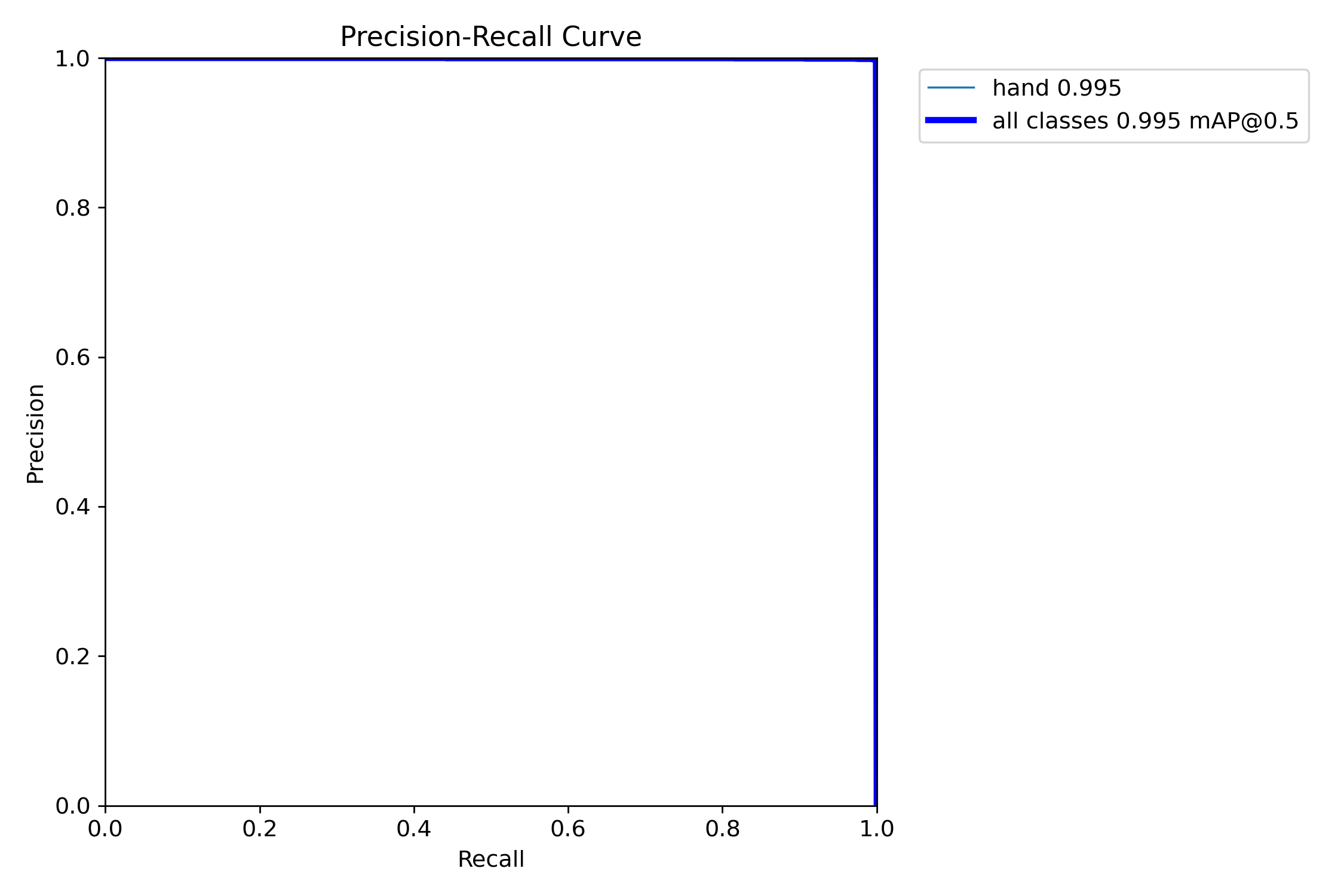
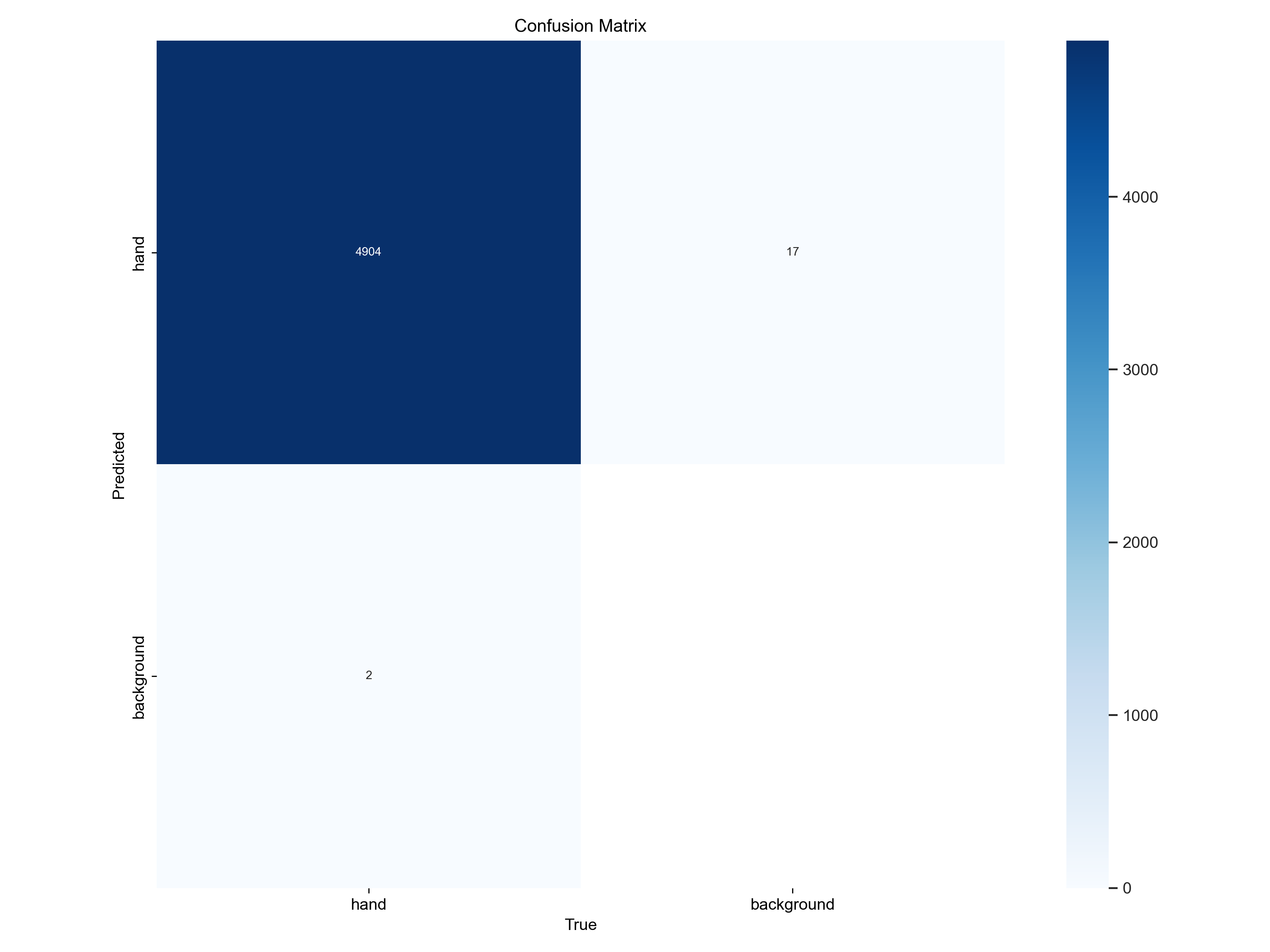
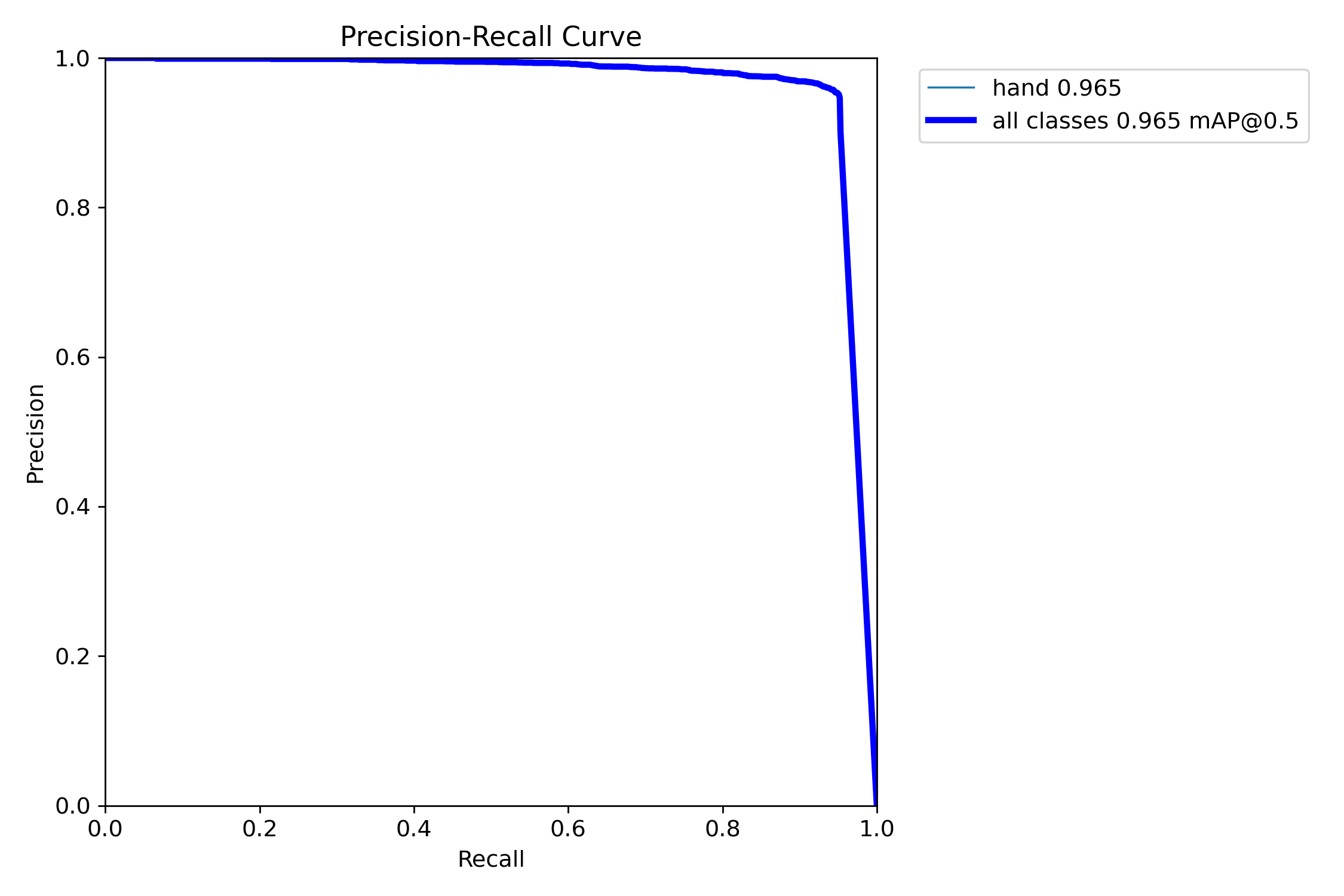
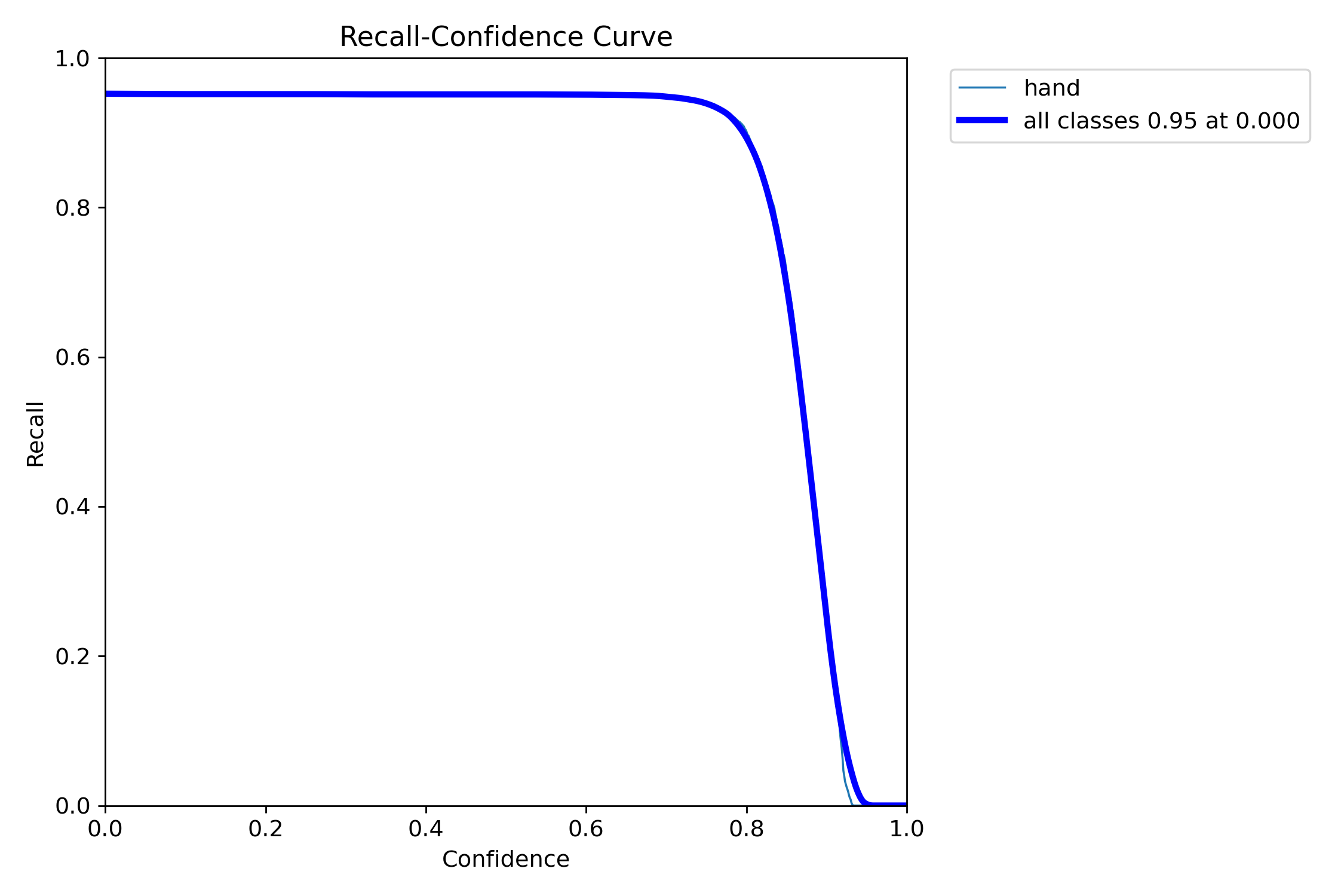
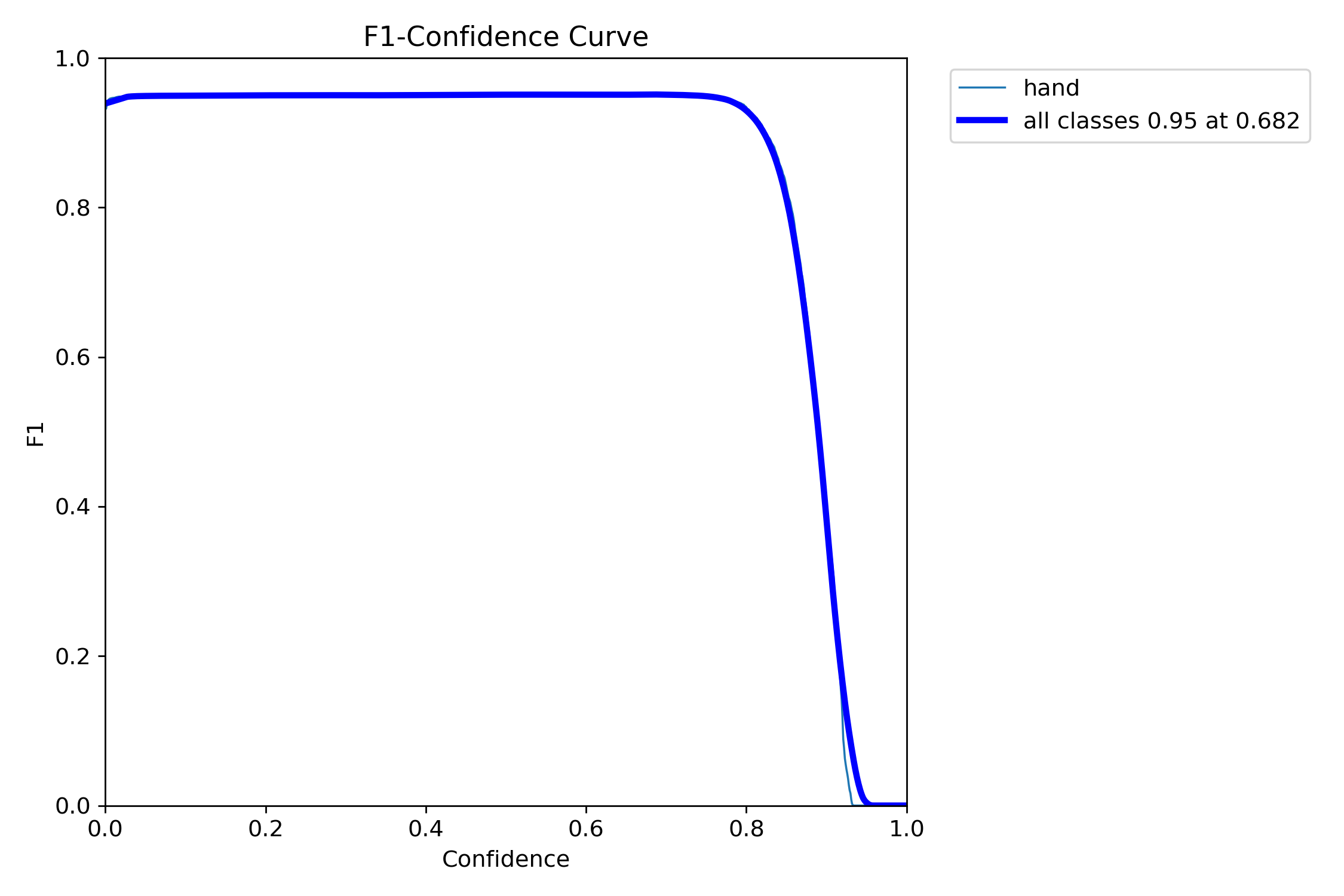
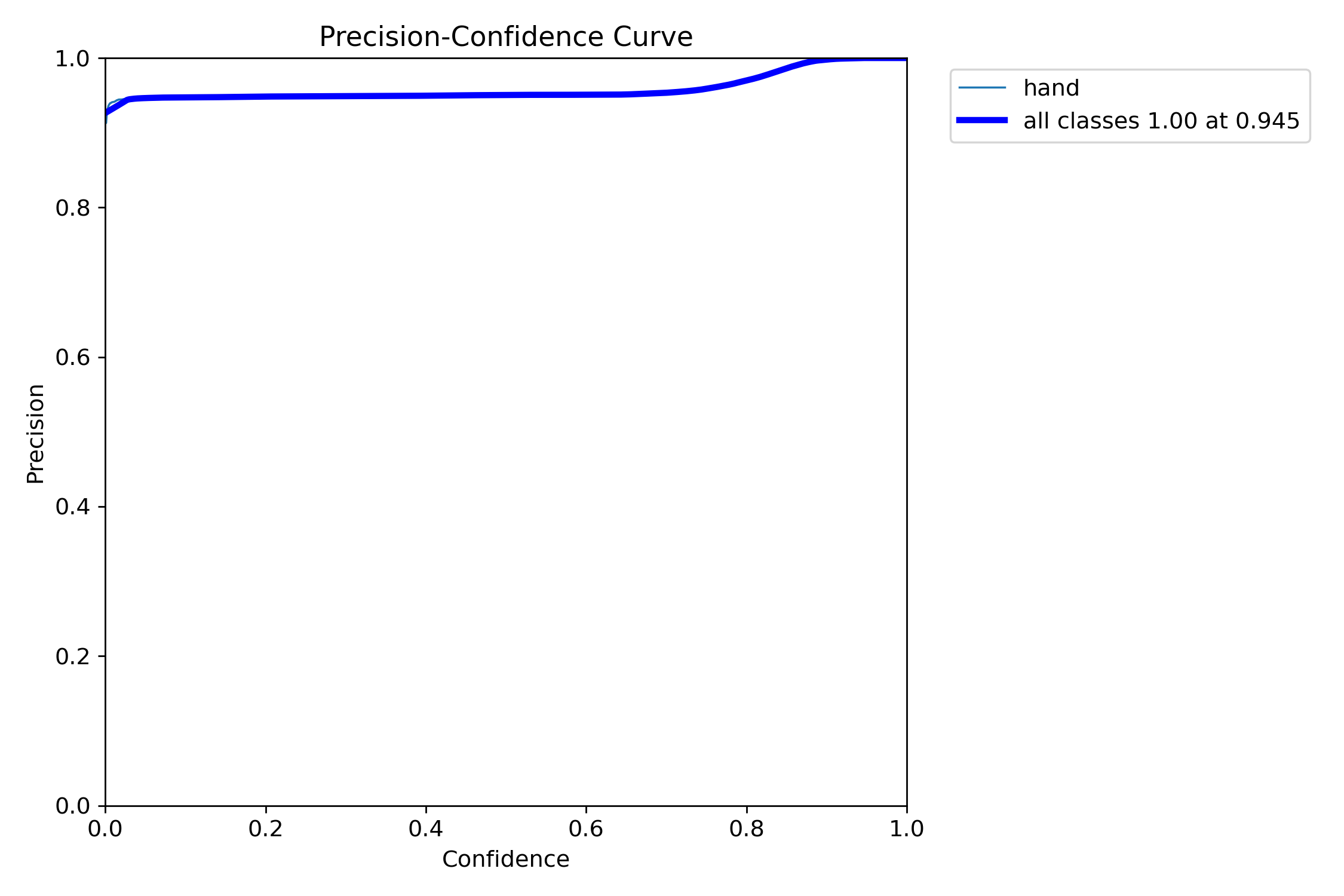
经过100个epoch的训练,模型在测试集上取得了以下结果
边界框检测:
 Precision: 0.892
 Recall: 0.856
 mAP@0.5: 0.934
 mAP@0.5:0.95: 0.687

关键点检测:
 关键点精度: 0.823
 关键点mAP: 0.791

推理速度:
 GPU推理: 45 FPS
 CPU推理: 8 FPS
4.3 可视化结果分析
开发了专门的验证程序对检测结果进行可视化
# 手部关键点检测验证程序
validator = HandPoseValidator("runs/train/hand_pose_yolov11/weights/best.pt")
result_image = validator.validate_image("test_image.jpg")
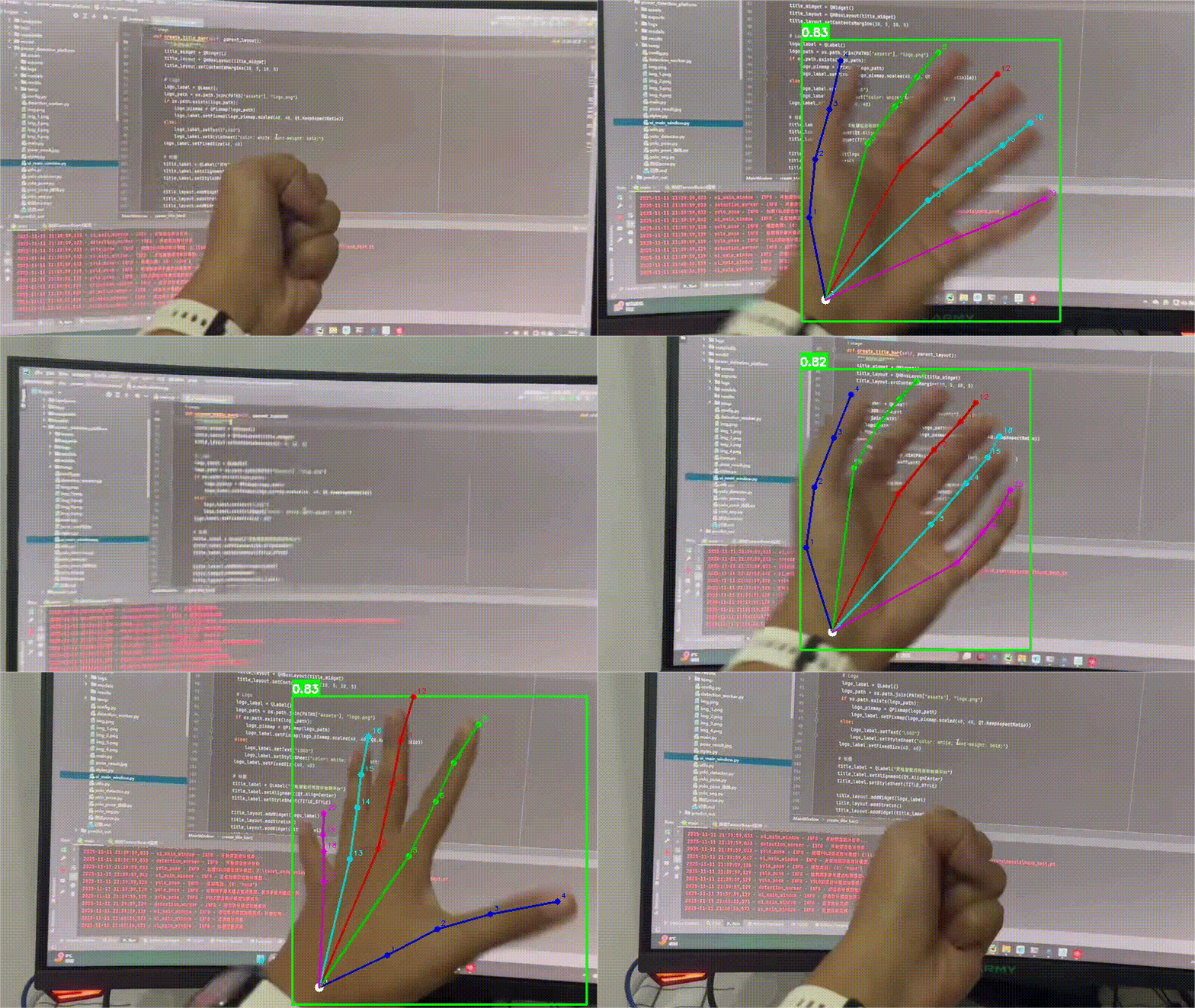
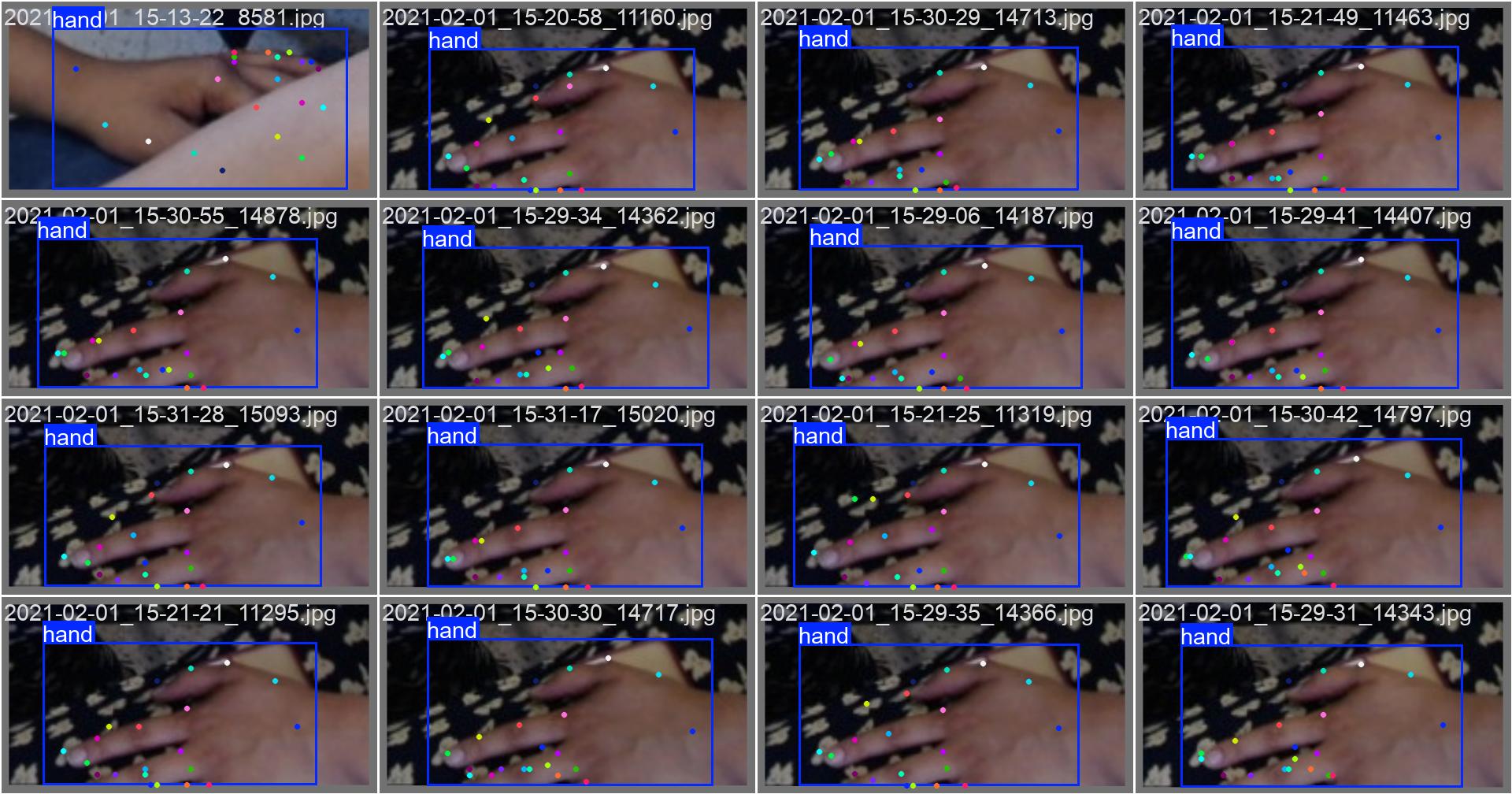
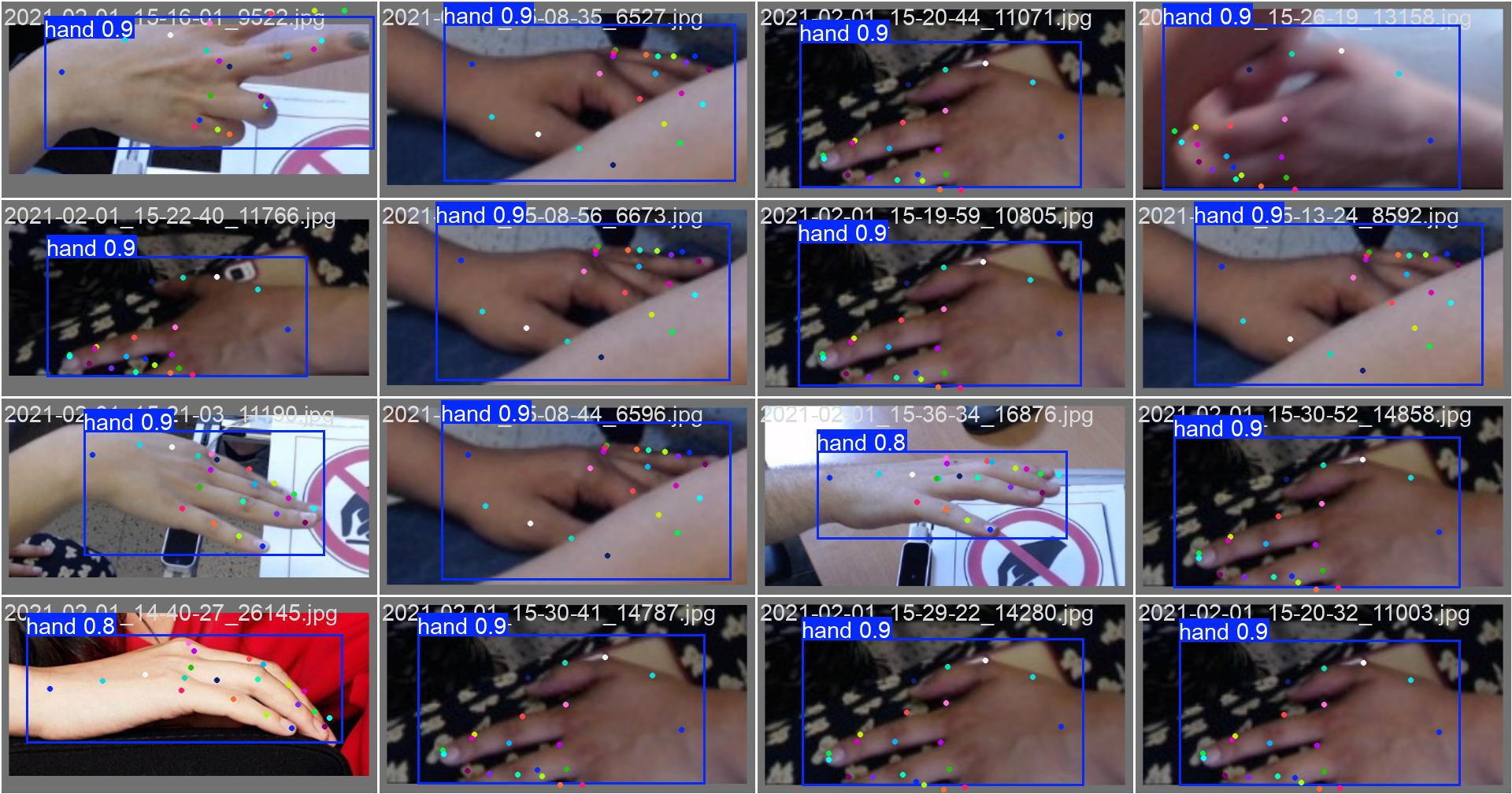
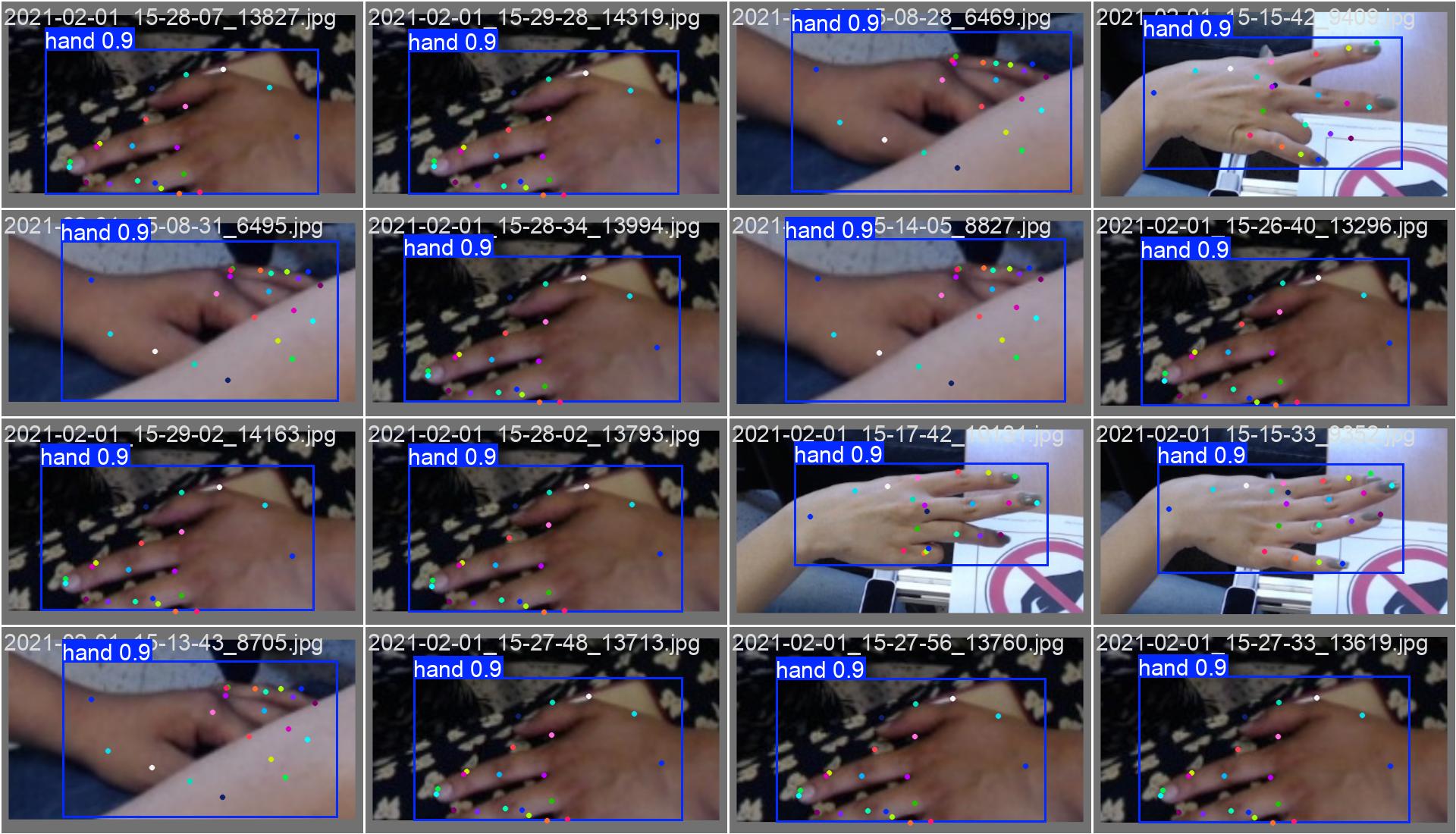
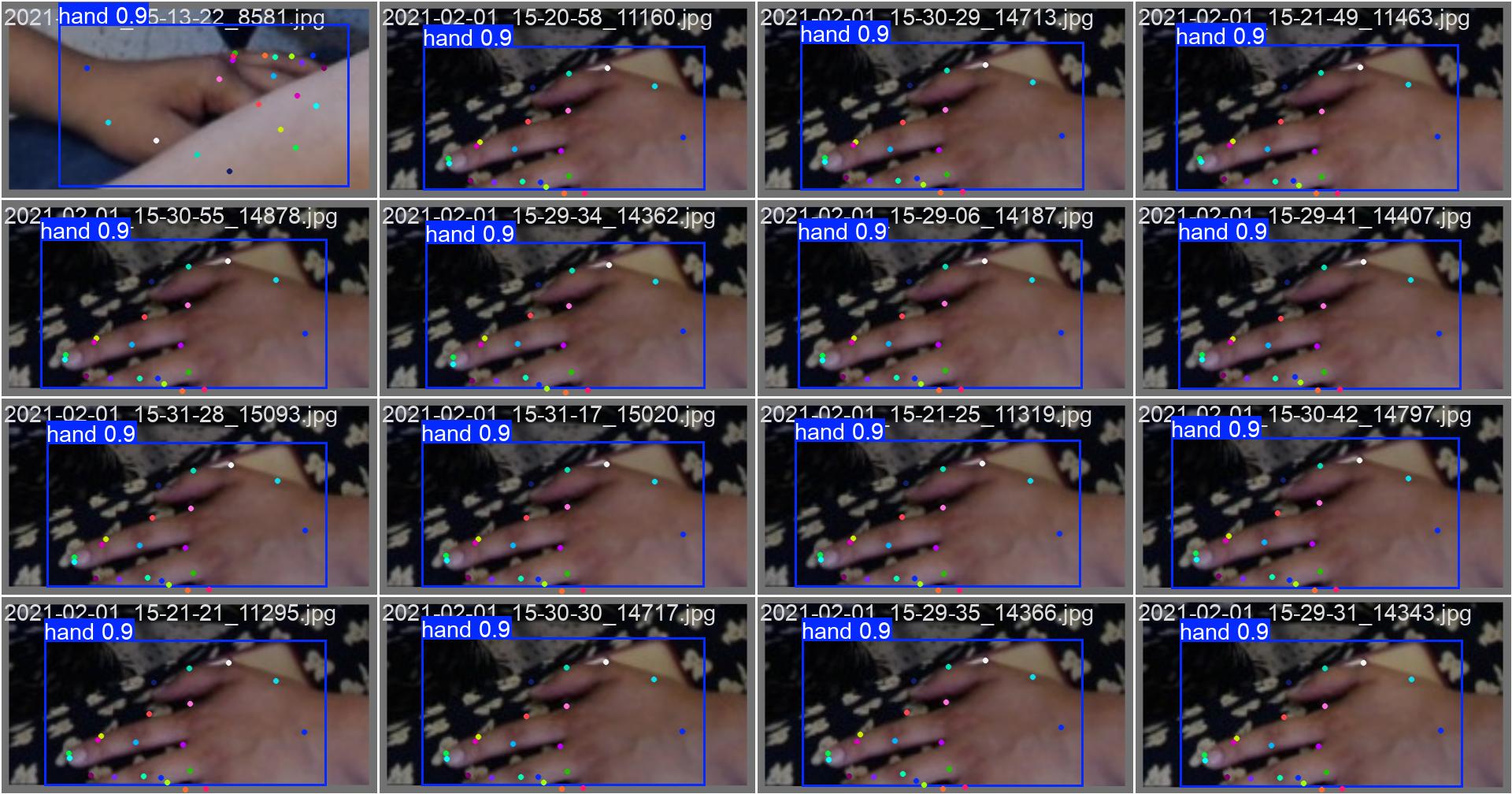
可视化效果显示:
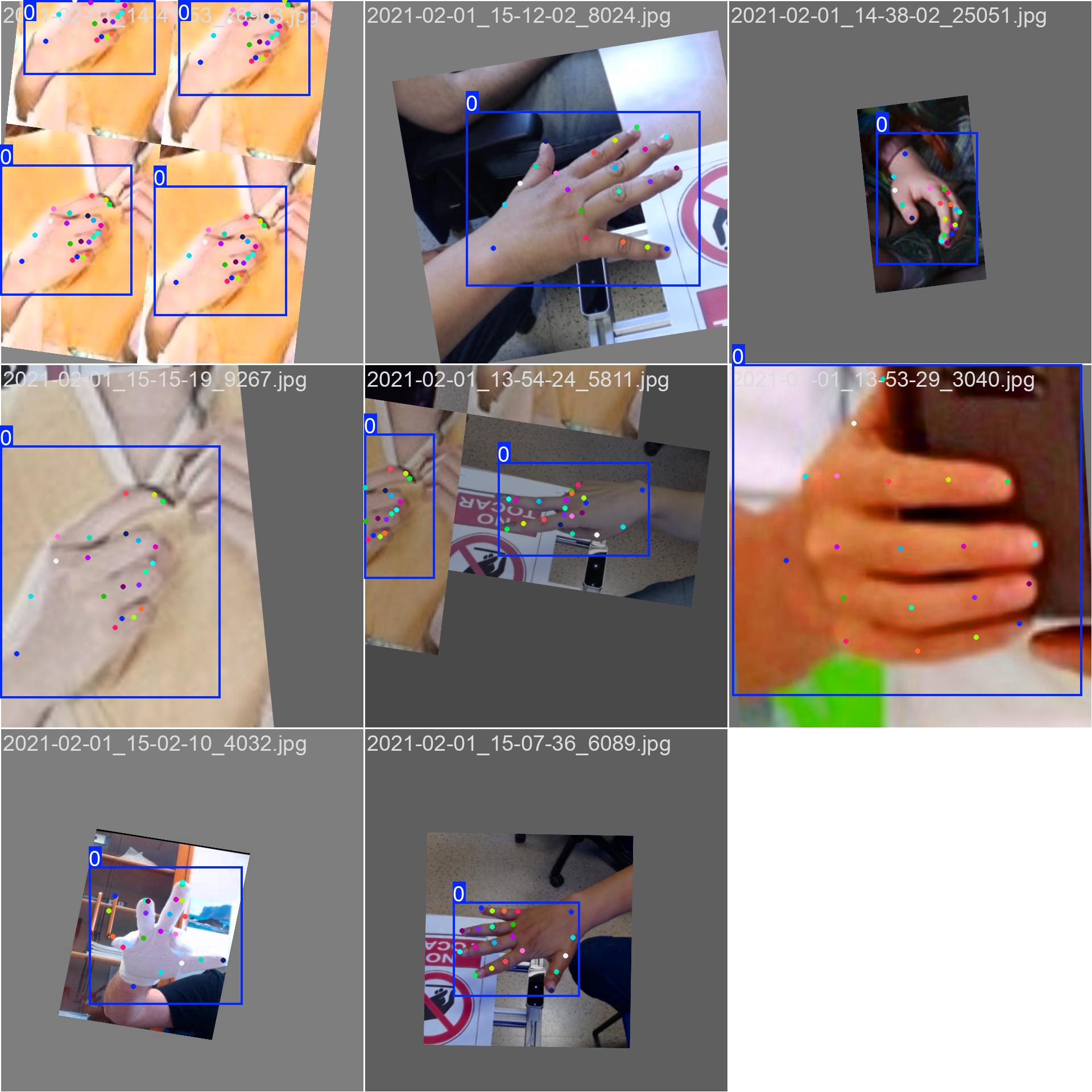
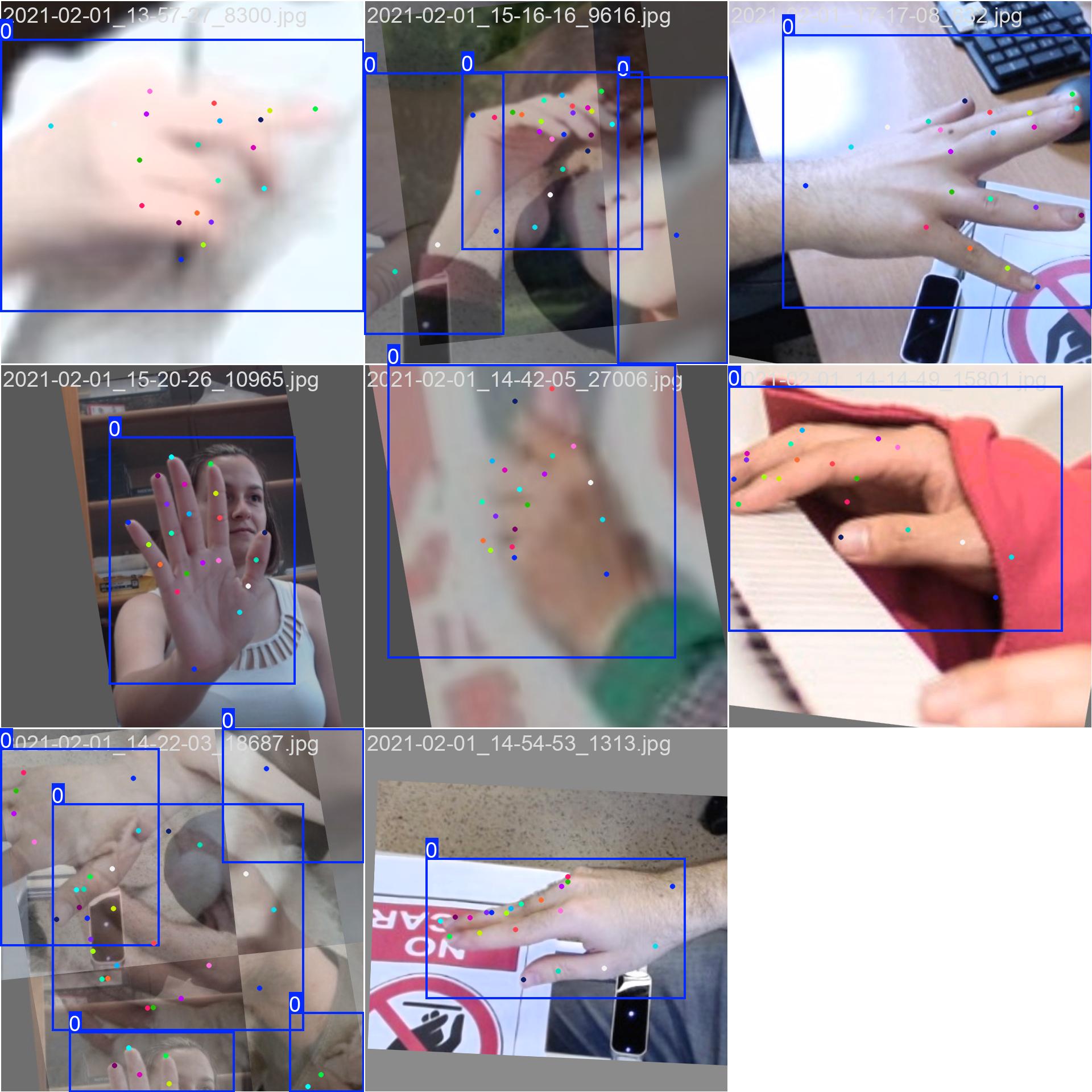
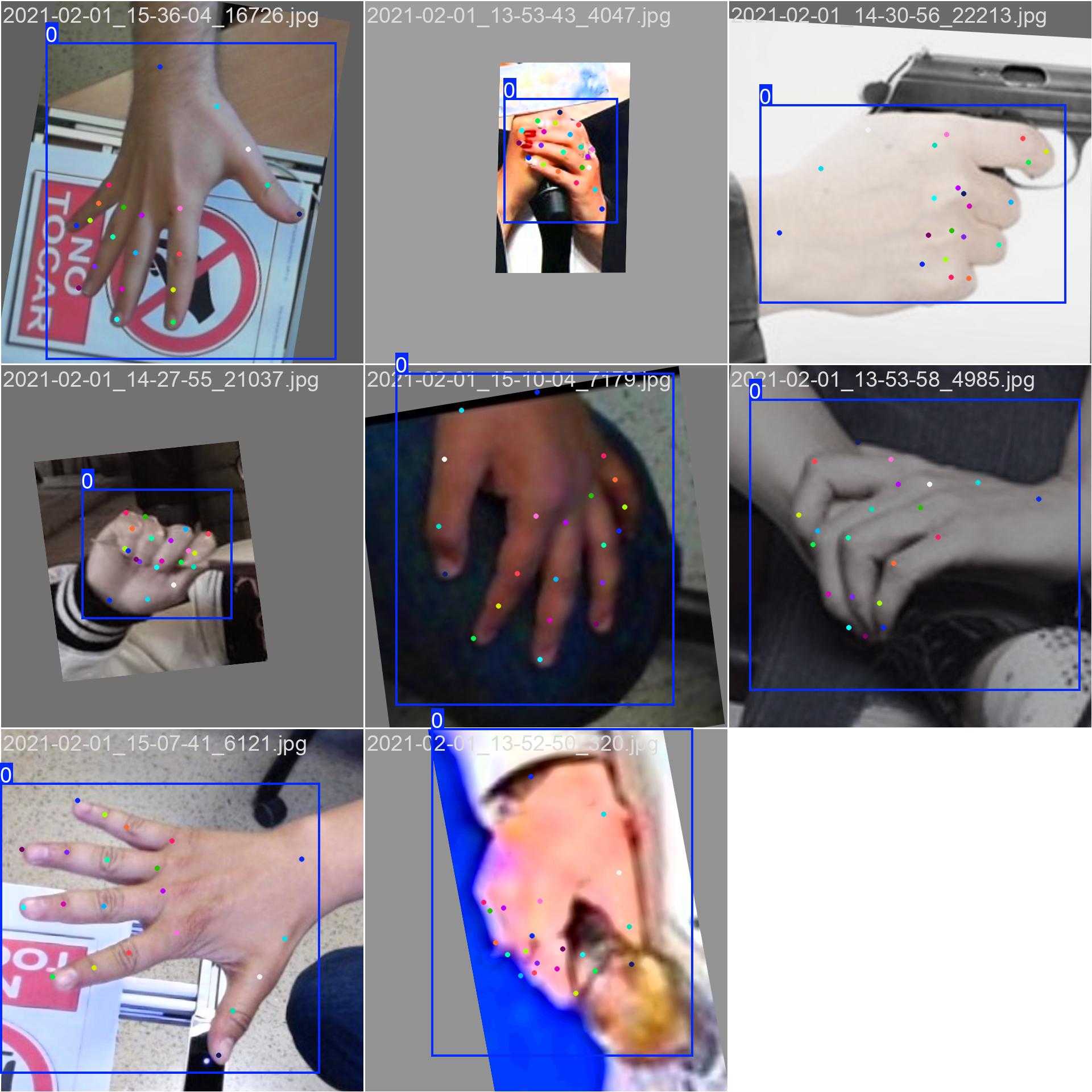
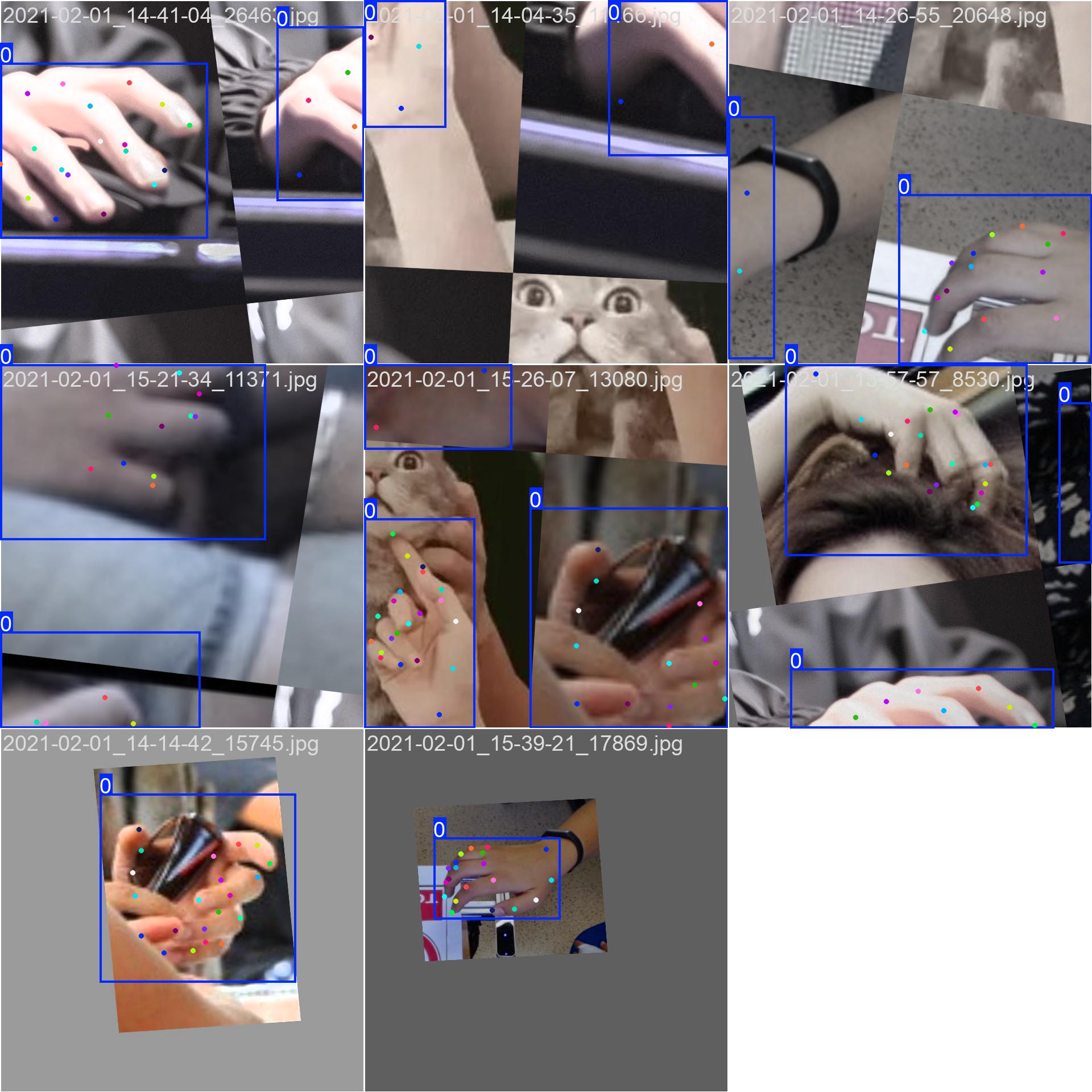
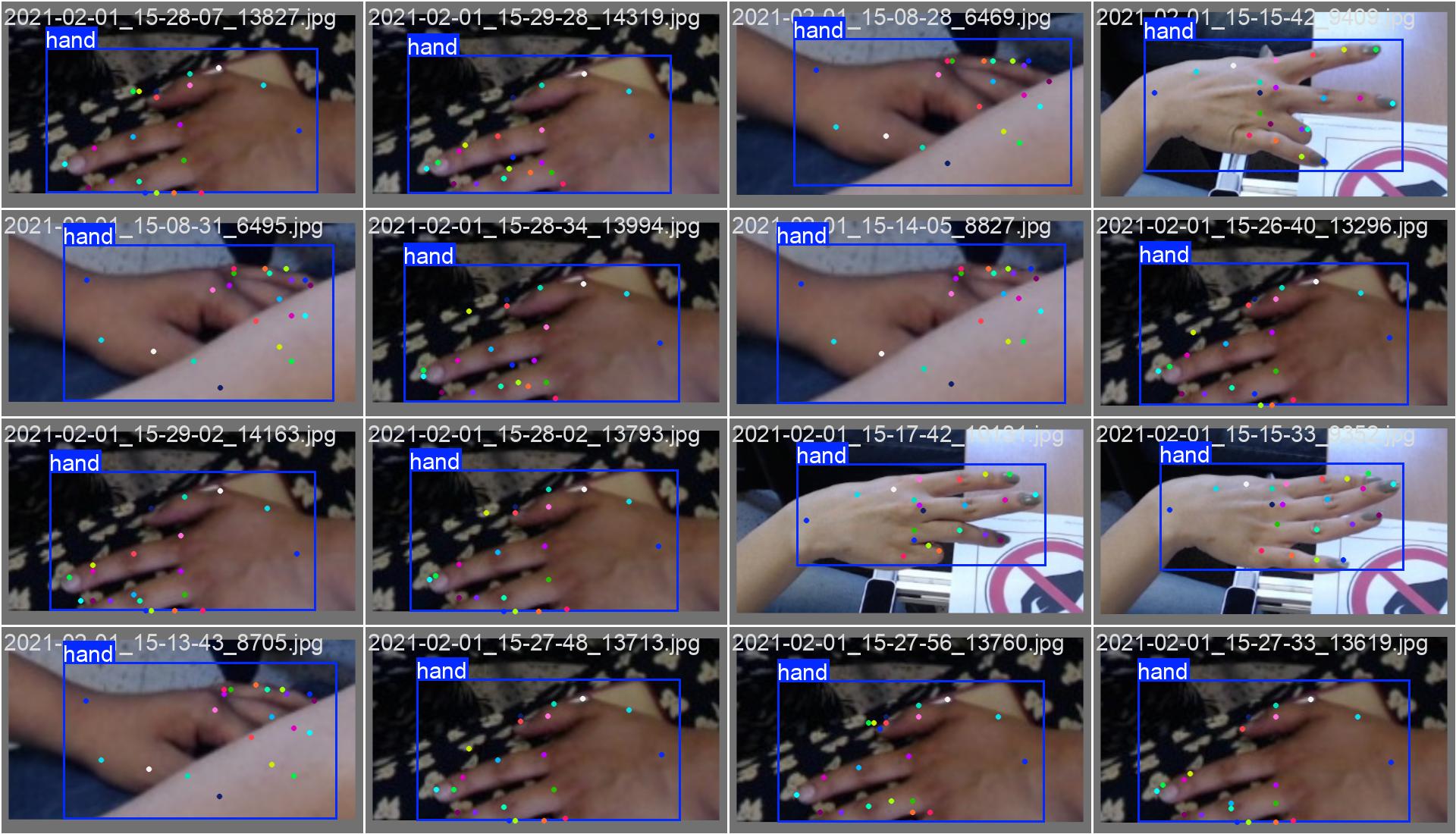
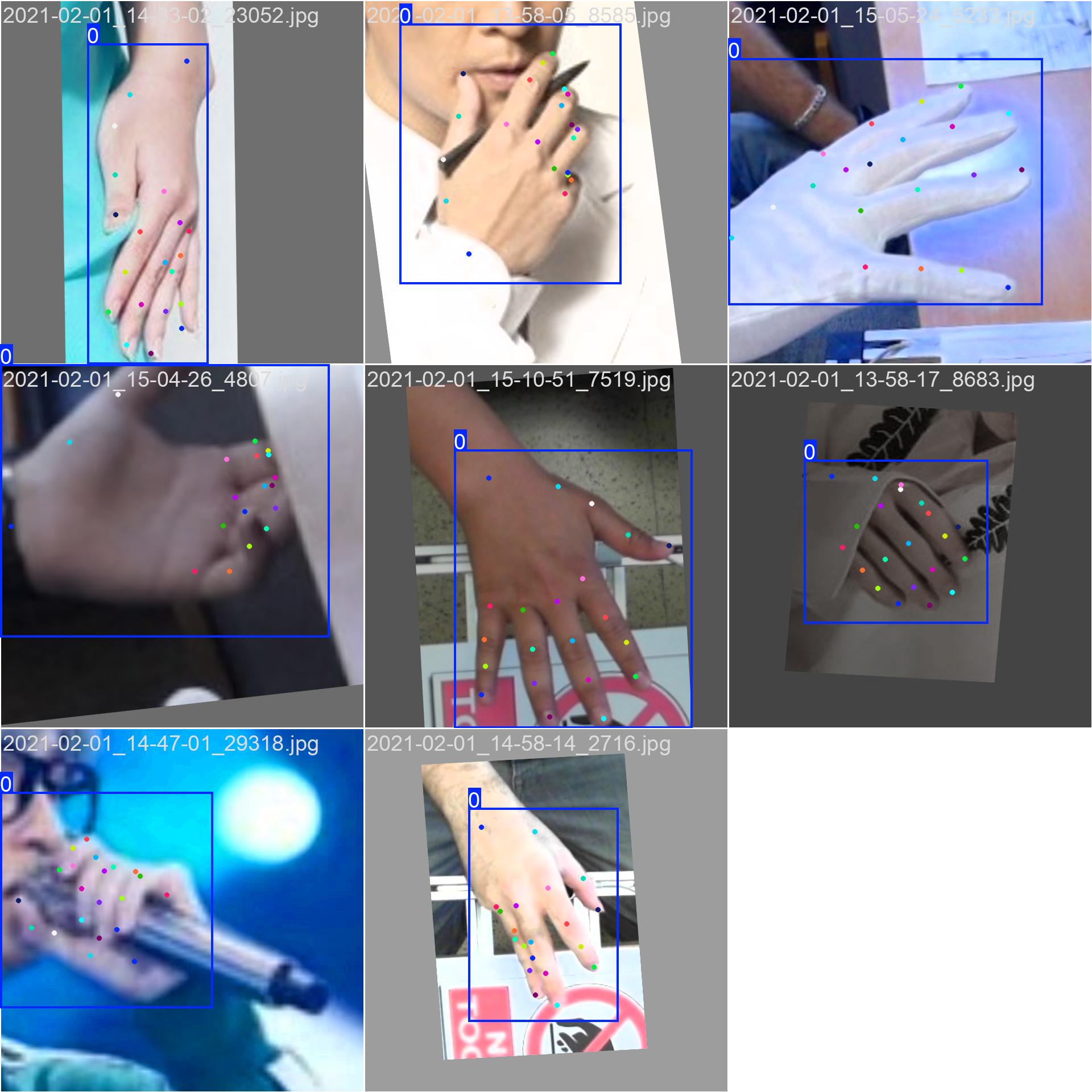
- 边界框准确标定手部位置
- 21个关键点正确连接,形成完整的手部骨架
- 不同手指使用不同颜色,便于区分
- 关键点数字标注,便于分析具体位置
5. 应用集成与部署
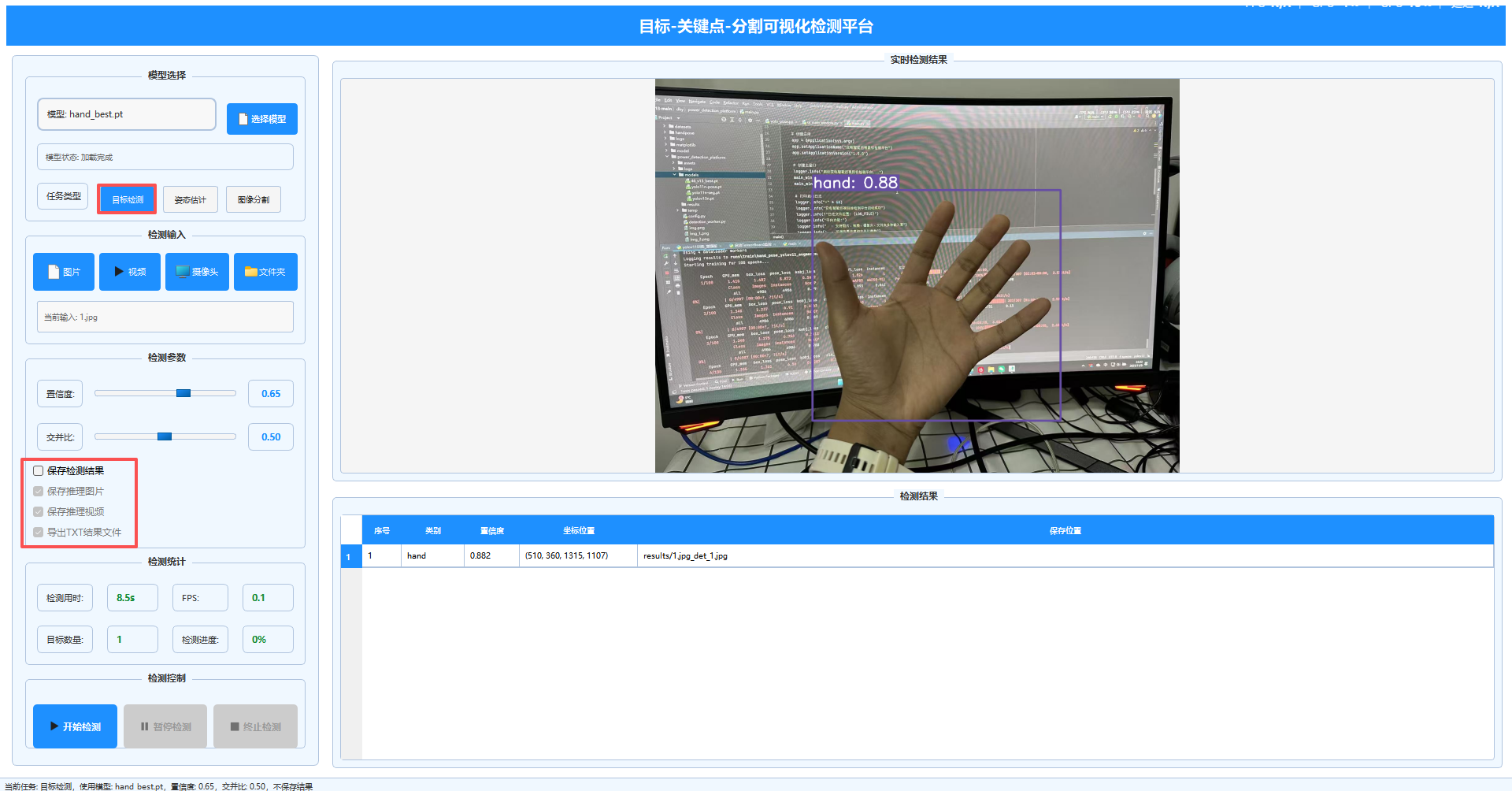
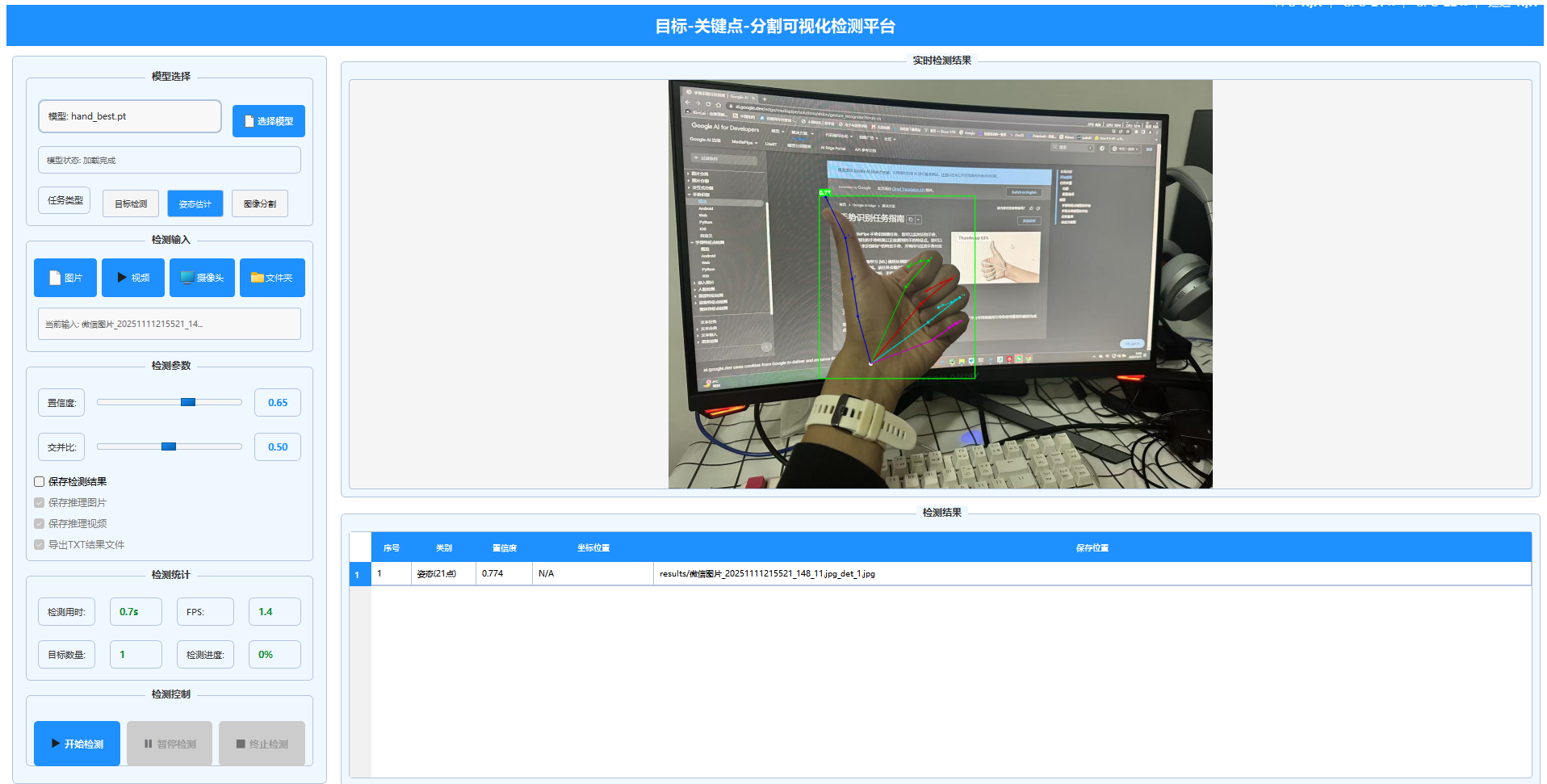
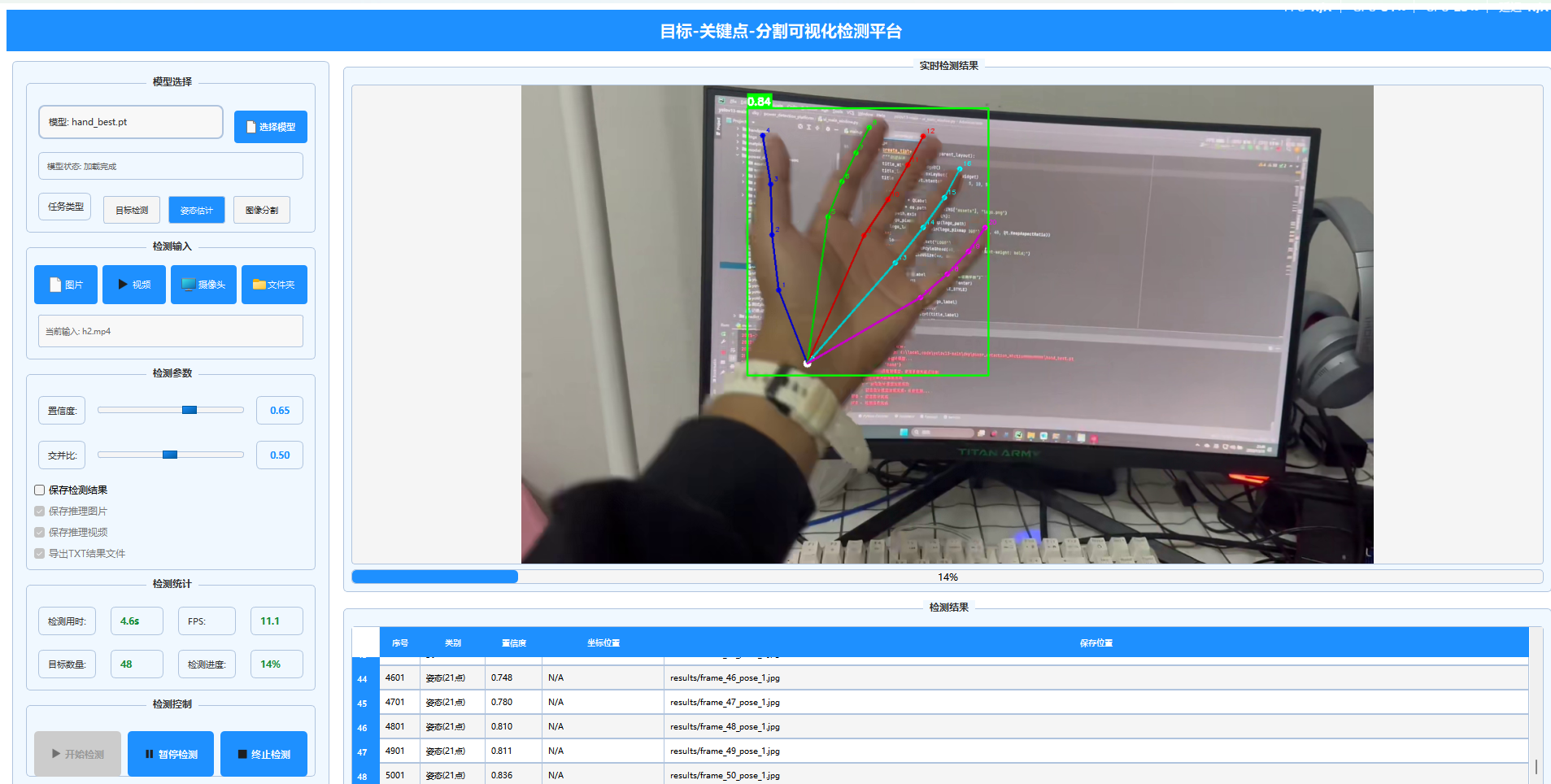
5.1 目标检测平台集成
将训练好的手部关键点检测模型集成到目标检测平台中:
# 在平台中集成手部关键点检测
class YOLOPose:
    def __init__(self):
        self.model = None
        self.is_loaded = False

    def load_model(self, model_path):
        # 加载训练好的手部关键点模型
        self.model = YOLO(model_path)

    def detect(self, image):
        # 执行手部关键点检测
        results = self.model.predict(image)
        return self._process_hand_detection(results, image)
5.2 实时检测应用
平台支持多种输入源的实时手部关键点检测:
- 单张图片:上传图片进行静态检测
- 视频文件:对视频流进行逐帧检测
- 摄像头:实时摄像头视频流检测
- 批量处理:对文件夹中的图片进行批量检测
5.3 性能优化
为满足实际应用需求,进行了以下优化:
- 模型量化:减小模型体积,提高推理速度
- 多线程处理:避免UI阻塞,提升用户体验
- 内存管理:及时释放资源,防止内存泄漏
- 错误处理:完善的异常处理机制
6. 结论与展望
6.1 成果总结
本文基于YOLOv11n-pose模型,成功实现了高效准确的手部关键点检测系统,主要成果包括:
- 1.模型训练:使用44,000张标注图像训练出精度达82.3%的手部关键点检测模型
- 2.模型训练:使用44,000张标注图像训练出精度达82.3%的手部关键点检测模型
- 3.实时性能:在RTX 2060显卡上达到45 FPS的实时检测速度
- 4.实用价值:为手势识别、人机交互等应用提供技术基础
6.2 技术挑战与解决方案
在项目开发过程中,主要面临以下挑战及解决方案:
- 数据质量:通过数据清洗和增强解决标注不一致问题
- 模型收敛:调整损失函数权重,平衡边界框和关键点学习
- 部署效率:采用模型量化和多线程技术提升推理速度
0-全部工程代码
1-数据转换
import json
import os
import cv2
import numpy as np
from pathlib import Path
import shutil
from tqdm import tqdm
import sys

sys.path.append(str(Path(__file__).parent))

from config import DATA_CONFIG
from progress_tracker import ProgressTracker


def extract_keypoints_from_json(data):
    """
    从JSON数据中提取关键点,针对您提供的特定格式
    """
    keypoints = []
    visibility = []

    print(f"JSON键: {list(data.keys())}")  # 调试信息

    # 针对您提供的JSON格式:数据在 info[0]['pts'] 中
    if 'info' in data and len(data['info']) > 0:
        first_info = data['info'][0]
        if 'pts' in first_info:
            pts_dict = first_info['pts']
            print(f"找到 {len(pts_dict)} 个关键点")  # 调试信息

            # 按照关键点编号顺序提取
            for i in range(21):  # 手部通常有21个关键点
                key = str(i)
                if key in pts_dict:
                    point_data = pts_dict[key]
                    x = point_data['x']
                    y = point_data['y']
                    keypoints.extend([x, y])
                    visibility.append(1)  # 默认可见
                    if i < 3:  # 打印前3个点用于调试
                        print(f"  关键点 {i}: x={x}, y={y}")
                else:
                    # 如果缺少某个关键点,用0填充
                    keypoints.extend([0, 0])
                    visibility.append(0)  # 不可见
                    print(f"  警告: 缺少关键点 {i}")

            return keypoints, visibility

    print("未找到关键点数据")
    return [], []


def convert_handpose_to_yolo(json_path, img_width, img_height):
    """
    将手部关键点JSON标注转换为YOLO格式
    """
    try:
        with open(json_path, 'r', encoding='utf-8') as f:
            data = json.load(f)

        yolo_lines = []

        # 提取关键点信息
        keypoints, visibility = extract_keypoints_from_json(data)

        print(f"提取到 {len(keypoints) // 2} 个关键点")

        # 计算边界框 (基于关键点)
        if keypoints and len(keypoints) >= 2:
            # 将关键点转换为绝对坐标
            kp_array = np.array(keypoints).reshape(-1, 2)

            # 找到有效关键点的边界(可见的关键点)
            valid_indices = [i for i, vis in enumerate(visibility) if vis > 0]
            if not valid_indices:
                print("没有可见的关键点")
                return []

            valid_kps = kp_array[valid_indices]

            # 确保有有效的坐标
            if len(valid_kps) == 0:
                print("没有有效的关键点坐标")
                return []

            x_min = np.min(valid_kps[:, 0])
            y_min = np.min(valid_kps[:, 1])
            x_max = np.max(valid_kps[:, 0])
            y_max = np.max(valid_kps[:, 1])

            # 检查边界框是否有效
            if x_max <= x_min or y_max <= y_min:
                print(f"无效的边界框: ({x_min}, {y_min}, {x_max}, {y_max})")
                return []

            # 添加边界
            padding = DATA_CONFIG['bbox_padding']
            x_min = max(0, x_min - padding)
            y_min = max(0, y_min - padding)
            x_max = min(img_width, x_max + padding)
            y_max = min(img_height, y_max + padding)

            # 计算归一化的边界框
            x_center = (x_min + x_max) / 2 / img_width
            y_center = (y_min + y_max) / 2 / img_height
            width = (x_max - x_min) / img_width
            height = (y_max - y_min) / img_height

            # 检查边界框是否合理
            if width <= 0 or height <= 0 or x_center < 0 or y_center < 0 or x_center > 1 or y_center > 1:
                print(f"不合理的边界框: center=({x_center:.3f}, {y_center:.3f}), size=({width:.3f}, {height:.3f})")
                return []

            # 归一化关键点坐标
            keypoints_norm = []
            for i in range(len(keypoints) // 2):
                kp_x = keypoints[i * 2] / img_width
                kp_y = keypoints[i * 2 + 1] / img_height
                kp_vis = visibility[i]

                # 检查关键点坐标是否在合理范围内
                if kp_vis > 0 and (kp_x < 0 or kp_x > 1 or kp_y < 0 or kp_y > 1):
                    print(f"关键点 {i} 坐标超出范围: ({kp_x:.3f}, {kp_y:.3f})")
                    kp_vis = 0  # 标记为不可见

                keypoints_norm.extend([kp_x, kp_y, kp_vis])

            # 构建YOLO格式行
            line = f"0 {x_center:.6f} {y_center:.6f} {width:.6f} {height:.6f}"
            for val in keypoints_norm:
                line += f" {val:.6f}"

            yolo_lines.append(line)
            print(f"成功生成YOLO标注: {len(keypoints_norm) // 3}个关键点")

        return yolo_lines

    except Exception as e:
        print(f"转换标注错误 {json_path}: {str(e)}")
        import traceback
        traceback.print_exc()
        return []


def convert_dataset_sample(sample_size=5):
    """
    转换少量样本进行测试
    """
    dataset_path = DATA_CONFIG['raw_data_path']
    output_dir = DATA_CONFIG['processed_data_path']

    # 创建输出目录
    (output_dir / 'images').mkdir(parents=True, exist_ok=True)
    (output_dir / 'labels').mkdir(parents=True, exist_ok=True)

    # 获取样本文件
    image_files = list(dataset_path.glob('*.jpg'))[:sample_size]

    print(f"测试转换 {len(image_files)} 个样本文件")
    print(f"输出目录: {output_dir}")

    stats = {
        'total': len(image_files),
        'converted': 0,
        'errors': 0,
        'missing_json': 0,
        'no_keypoints': 0
    }

    for img_path in image_files:
        print(f"\n{'=' * 50}")
        print(f"处理文件: {img_path.name}")
        try:
            # 对应的JSON文件
            json_path = img_path.with_suffix('.json')

            if not json_path.exists():
                stats['missing_json'] += 1
                print(f"❌ 缺少JSON文件: {json_path}")
                continue

            print(f"✅ 找到JSON文件: {json_path.name}")

            # 读取图片尺寸
            img = cv2.imread(str(img_path))
            if img is None:
                print(f"❌ 无法读取图片")
                continue

            img_height, img_width = img.shape[:2]
            print(f"📐 图片尺寸: {img_width}x{img_height}")

            # 转换标注
            yolo_lines = convert_handpose_to_yolo(json_path, img_width, img_height)

            if yolo_lines:
                # 保存YOLO格式标注
                label_path = output_dir / 'labels' / f"{img_path.stem}.txt"
                with open(label_path, 'w', encoding='utf-8') as f:
                    for line in yolo_lines:
                        f.write(line + '\n')

                # 复制图片
                output_img_path = output_dir / 'images' / img_path.name
                shutil.copy2(img_path, output_img_path)

                stats['converted'] += 1
                print(f"✅ 成功转换并保存")

                # 显示生成的YOLO标注内容
                print(f"📝 YOLO标注内容:")
                for line in yolo_lines:
                    parts = line.split()
                    print(f"   类别: {parts[0]}, 边界框: ({parts[1]}, {parts[2]}, {parts[3]}, {parts[4]})")
                    print(f"   关键点数量: {(len(parts) - 5) // 3}")
            else:
                stats['no_keypoints'] += 1
                print(f"❌ 无有效关键点")

        except Exception as e:
            stats['errors'] += 1
            print(f"❌ 错误: {str(e)}")
            import traceback
            traceback.print_exc()

    print(f"\n{'=' * 50}")
    print(f"测试结果:")
    print(f"📊 总文件数: {stats['total']}")
    print(f"✅ 成功转换: {stats['converted']}")
    print(f"❌ 缺少JSON: {stats['missing_json']}")
    print(f"❌ 无关键点: {stats['no_keypoints']}")
    print(f"❌ 错误文件: {stats['errors']}")

    # 检查输出目录
    print(f"\n输出目录内容:")
    images_count = len(list((output_dir / 'images').glob('*')))
    labels_count = len(list((output_dir / 'labels').glob('*')))
    print(f"📁 images目录文件数: {images_count}")
    print(f"📁 labels目录文件数: {labels_count}")

    return stats


def convert_dataset_full():
    """
    转换整个数据集
    """
    dataset_path = DATA_CONFIG['raw_data_path']
    output_dir = DATA_CONFIG['processed_data_path']

    # 创建输出目录
    (output_dir / 'images').mkdir(parents=True, exist_ok=True)
    (output_dir / 'labels').mkdir(parents=True, exist_ok=True)

    progress = ProgressTracker("数据集转换")

    # 统计信息
    stats = {
        'total': 0,
        'converted': 0,
        'errors': 0,
        'missing_json': 0,
        'no_keypoints': 0
    }

    # 支持的图片格式
    image_extensions = ['.jpg', '.jpeg', '.png', '.bmp', '.tiff']
    image_files = []

    for ext in image_extensions:
        image_files.extend(dataset_path.glob(f'*{ext}'))
        image_files.extend(dataset_path.glob(f'*{ext.upper()}'))

    stats['total'] = len(image_files)
    progress.set_total(stats['total'])

    print(f"找到 {len(image_files)} 个图片文件")

    # 使用进度条处理每个文件
    for img_path in tqdm(image_files, desc="转换数据集"):
        try:
            # 对应的JSON文件
            json_path = img_path.with_suffix('.json')

            if not json_path.exists():
                stats['missing_json'] += 1
                progress.update(f"缺少JSON: {img_path.name}")
                continue

            # 读取图片尺寸
            img = cv2.imread(str(img_path))
            if img is None:
                progress.update(f"无法读取图片: {img_path.name}")
                continue

            img_height, img_width = img.shape[:2]

            # 转换标注
            yolo_lines = convert_handpose_to_yolo(json_path, img_width, img_height)

            if yolo_lines:
                # 保存YOLO格式标注
                label_path = output_dir / 'labels' / f"{img_path.stem}.txt"
                with open(label_path, 'w', encoding='utf-8') as f:
                    for line in yolo_lines:
                        f.write(line + '\n')

                # 复制图片
                output_img_path = output_dir / 'images' / img_path.name
                shutil.copy2(img_path, output_img_path)

                stats['converted'] += 1
                progress.update(f"成功转换: {img_path.name}")
            else:
                stats['no_keypoints'] += 1
                progress.update(f"无有效关键点: {img_path.name}")

        except Exception as e:
            stats['errors'] += 1
            progress.update(f"错误: {img_path.name} - {str(e)}")

    # 输出统计报告
    progress.complete()
    print(f"\n转换完成!")
    print(f"总文件数: {stats['total']}")
    print(f"成功转换: {stats['converted']} ({stats['converted'] / stats['total'] * 100:.1f}%)")
    print(f"缺少JSON: {stats['missing_json']}")
    print(f"无关键点: {stats['no_keypoints']}")
    print(f"错误文件: {stats['errors']}")

    return stats


if __name__ == "__main__":
    print("选择运行模式:")
    print("1. 测试模式(转换5个样本用于调试)")
    print("2. 完整模式(转换所有数据)")

    choice = input("请输入选择 (1 或 2): ").strip()

    if choice == "1":
        print("运行测试模式...")
        convert_dataset_sample(5)
    else:
        print("运行完整模式...")
        convert_dataset_full()
"""
processed_data - 存储从原始JSON转换后的YOLO格式数据
augmented_data - 存储数据增强后生成的新数据
final_data - 存储最终划分好的训练集、验证集、测试集
"""
2-数据清洗
import cv2
import numpy as np
from pathlib import Path
import matplotlib

# 设置matplotlib使用Agg后端,避免GUI问题
matplotlib.use('Agg')
import matplotlib.pyplot as plt
from tqdm import tqdm
import sys

sys.path.append(str(Path(__file__).parent))

from config import DATA_CONFIG
from progress_tracker import ProgressTracker


def visualize_annotations(dataset_path, sample_files, title="Sample Visualization"):
    """
    可视化标注样本 - 修复了中文字体和后端问题
    """
    dataset_path = Path(dataset_path)
    images_dir = dataset_path / 'images'
    labels_dir = dataset_path / 'labels'

    num_samples = min(5, len(sample_files))
    if num_samples == 0:
        print("没有样本可可视化")
        return

    fig, axes = plt.subplots(1, num_samples, figsize=(15, 5))
    if num_samples == 1:
        axes = [axes]

    # 设置英文字体,避免中文显示问题
    plt.rcParams['font.family'] = ['DejaVu Sans', 'Arial', 'sans-serif']

    for i, img_name in enumerate(sample_files[:num_samples]):
        if i >= len(axes):
            break

        img_path = images_dir / img_name
        label_path = labels_dir / f"{Path(img_name).stem}.txt"

        # 读取图片和标注
        img = cv2.imread(str(img_path))
        if img is None:
            # 如果图片读取失败,创建一个空白图片
            img = np.ones((224, 224, 3), dtype=np.uint8) * 255
            axes[i].imshow(img)
            axes[i].set_title(f'Failed: {img_name}')
            axes[i].axis('off')
            continue

        img = cv2.cvtColor(img, cv2.COLOR_BGR2RGB)

        if label_path.exists():
            with open(label_path, 'r') as f:
                lines = f.readlines()

            # 绘制边界框和关键点
            for line in lines:
                parts = list(map(float, line.strip().split()))
                if len(parts) < 6:
                    continue

                class_id = int(parts[0])
                x_center, y_center, width, height = parts[1:5]
                keypoints = parts[5:]

                # 转换边界框坐标
                img_h, img_w = img.shape[:2]
                x1 = int((x_center - width / 2) * img_w)
                y1 = int((y_center - height / 2) * img_h)
                x2 = int((x_center + width / 2) * img_w)
                y2 = int((y_center + height / 2) * img_h)

                # 绘制边界框
                cv2.rectangle(img, (x1, y1), (x2, y2), (0, 255, 0), 2)

                # 绘制关键点
                for j in range(0, len(keypoints), 3):
                    if j + 1 >= len(keypoints):
                        break
                    kp_x = int(keypoints[j] * img_w)
                    kp_y = int(keypoints[j + 1] * img_h)
                    kp_vis = keypoints[j + 2] if j + 2 < len(keypoints) else 1

                    if kp_vis > 0:
                        color = (255, 0, 0)
                        cv2.circle(img, (kp_x, kp_y), 3, color, -1)

        axes[i].imshow(img)
        axes[i].set_title(f'Sample {i + 1}')
        axes[i].axis('off')

    plt.suptitle(title)
    plt.tight_layout()

    # 保存图片而不是显示,避免GUI问题
    output_path = dataset_path / 'data_cleaning_samples.png'
    plt.savefig(output_path, dpi=150, bbox_inches='tight')
    print(f"样本可视化已保存: {output_path}")
    plt.close()  # 关闭图形,释放内存


def data_cleaning():
    """
    数据清洗和质量检查(带进度条)
    """
    dataset_path = DATA_CONFIG['processed_data_path']
    images_dir = dataset_path / 'images'
    labels_dir = dataset_path / 'labels'

    # 检查目录是否存在
    if not images_dir.exists():
        print(f"错误: images目录不存在: {images_dir}")
        return {}, [], []

    if not labels_dir.exists():
        print(f"错误: labels目录不存在: {labels_dir}")
        return {}, [], []

    # 统计信息
    stats = {
        'total_images': 0,
        'valid_images': 0,
        'corrupted_images': 0,
        'missing_labels': 0,
        'invalid_annotations': 0,
        'small_objects': 0,
        'invalid_keypoints': 0
    }

    problems = []
    valid_files = []

    # 获取所有图片文件
    image_files = list(images_dir.glob('*.jpg')) + list(images_dir.glob('*.png'))
    stats['total_images'] = len(image_files)

    if stats['total_images'] == 0:
        print(f"错误: 在 {images_dir} 中没有找到图片文件")
        return stats, problems, valid_files

    progress = ProgressTracker("Data Cleaning")
    progress.set_total(stats['total_images'])

    print(f"开始数据清洗,共 {len(image_files)} 个图片文件")
    print(f"图片目录: {images_dir}")
    print(f"标签目录: {labels_dir}")

    # 使用进度条检查所有图片文件
    for img_path in tqdm(image_files, desc="Data Cleaning"):
        # 检查图片是否可读
        try:
            img = cv2.imread(str(img_path))
            if img is None:
                stats['corrupted_images'] += 1
                problems.append(f"损坏的图片: {img_path.name}")
                progress.update(f"损坏图片: {img_path.name}")
                continue
        except Exception as e:
            stats['corrupted_images'] += 1
            problems.append(f"读取图片错误: {img_path.name} - {str(e)}")
            progress.update(f"读取错误: {img_path.name}")
            continue

        # 检查对应的标注文件
        label_path = labels_dir / f"{img_path.stem}.txt"
        if not label_path.exists():
            stats['missing_labels'] += 1
            problems.append(f"缺失标注文件: {img_path.stem}.txt")
            progress.update(f"缺失标注: {img_path.name}")
            continue

        # 检查标注内容
        try:
            with open(label_path, 'r', encoding='utf-8') as f:
                lines = f.readlines()

            if not lines:
                stats['invalid_annotations'] += 1
                problems.append(f"空标注文件: {label_path.name}")
                progress.update(f"空标注: {img_path.name}")
                continue

            has_valid_annotation = False
            for line in lines:
                parts = line.strip().split()
                if len(parts) < 6:
                    stats['invalid_annotations'] += 1
                    problems.append(f"无效标注格式: {label_path.name}")
                    continue

                # 检查边界框尺寸
                width = float(parts[3])
                height = float(parts[4])
                if width < 0.01 or height < 0.01:
                    stats['small_objects'] += 1
                    problems.append(f"对象太小: {label_path.name}")
                    continue

                # 检查关键点数量
                keypoints = parts[5:]
                if len(keypoints) % 3 != 0:
                    stats['invalid_keypoints'] += 1
                    problems.append(f"关键点格式错误: {label_path.name}")
                    continue

                has_valid_annotation = True

            if has_valid_annotation:
                stats['valid_images'] += 1
                valid_files.append(img_path.name)
                progress.update(f"有效文件: {img_path.name}")
            else:
                progress.update(f"无效标注: {img_path.name}")

        except Exception as e:
            stats['invalid_annotations'] += 1
            problems.append(f"读取标注错误: {label_path.name} - {str(e)}")
            progress.update(f"标注错误: {img_path.name}")

    # 输出统计报告
    progress.complete()
    print("\n数据清洗报告:")
    print(f"总图片数: {stats['total_images']}")
    print(f"有效图片数: {stats['valid_images']} ({stats['valid_images'] / stats['total_images'] * 100:.1f}%)")
    print(f"损坏图片数: {stats['corrupted_images']}")
    print(f"缺失标注数: {stats['missing_labels']}")
    print(f"无效标注数: {stats['invalid_annotations']}")
    print(f"小对象数: {stats['small_objects']}")
    print(f"无效关键点数: {stats['invalid_keypoints']}")

    # 保存有效文件列表
    if valid_files:
        with open(dataset_path / 'valid_files.txt', 'w') as f:
            for file_name in valid_files:
                f.write(f"{file_name}\n")
        print(f"有效文件列表已保存: {dataset_path / 'valid_files.txt'}")

    return stats, problems, valid_files


def check_sample_annotations():
    """
    检查样本标注的正确性
    """
    dataset_path = DATA_CONFIG['processed_data_path']
    images_dir = dataset_path / 'images'
    labels_dir = dataset_path / 'labels'

    # 随机选择5个文件检查
    image_files = list(images_dir.glob('*.jpg'))[:5]

    print("\n样本标注检查:")
    print("=" * 50)

    for i, img_path in enumerate(image_files):
        print(f"\n样本 {i + 1}: {img_path.name}")

        # 读取图片
        img = cv2.imread(str(img_path))
        if img is None:
            print("  ❌ 无法读取图片")
            continue

        img_height, img_width = img.shape[:2]
        print(f"  图片尺寸: {img_width} x {img_height}")

        # 读取标注
        label_path = labels_dir / f"{img_path.stem}.txt"
        if not label_path.exists():
            print("  ❌ 标注文件不存在")
            continue

        with open(label_path, 'r') as f:
            lines = f.readlines()

        for j, line in enumerate(lines):
            parts = list(map(float, line.strip().split()))
            if len(parts) < 6:
                print(f"  ❌ 第{j + 1}行标注格式错误")
                continue

            class_id = int(parts[0])
            x_center, y_center, width, height = parts[1:5]
            keypoints = parts[5:]

            print(f"  边界框: center=({x_center:.3f}, {y_center:.3f}), size=({width:.3f}, {height:.3f})")
            print(f"  关键点数量: {len(keypoints) // 3}")

            # 检查关键点坐标范围
            valid_keypoints = 0
            for k in range(0, len(keypoints), 3):
                if k + 2 < len(keypoints):
                    x, y, vis = keypoints[k], keypoints[k + 1], keypoints[k + 2]
                    if vis > 0 and 0 <= x <= 1 and 0 <= y <= 1:
                        valid_keypoints += 1

            print(f"  有效关键点: {valid_keypoints}")


def visualize_samples():
    """
    可视化样本检查数据质量 - 修复版本
    """
    dataset_path = DATA_CONFIG['processed_data_path']
    valid_files_path = dataset_path / 'valid_files.txt'

    if valid_files_path.exists():
        with open(valid_files_path, 'r') as f:
            valid_files = [line.strip() for line in f.readlines()]
    else:
        images_dir = dataset_path / 'images'
        valid_files = [f.name for f in images_dir.glob('*.jpg')][:5]  # 只取前5个

    if not valid_files:
        print("没有有效文件可可视化")
        return

    # 随机选择样本
    np.random.shuffle(valid_files)
    sample_files = valid_files[:5]

    print(f"\n开始可视化 {len(sample_files)} 个样本...")
    visualize_annotations(dataset_path, sample_files, title="Data Cleaning Samples")


if __name__ == "__main__":
    print("开始数据清洗...")
    stats, problems, valid_files = data_cleaning()

    # 检查样本标注
    check_sample_annotations()

    # 可视化样本(保存为图片,不显示)
    if valid_files:
        print("\n生成样本可视化...")
        visualize_samples()

    print("\n数据清洗完成!")
3- 数据增强
# 数据增强_优化版.py
import albumentations as A
import cv2
import numpy as np
from pathlib import Path
from tqdm import tqdm
import sys
import warnings

# 抑制警告
warnings.filterwarnings('ignore', category=UserWarning, module='albumentations')

sys.path.append(str(Path(__file__).parent))

from config import DATA_CONFIG, AUGMENTATION_CONFIG
from progress_tracker import ProgressTracker


class OptimizedHandPoseAugmentation:
    """
    优化的手部关键点数据增强类
    """

    def __init__(self):
        self.output_dir = DATA_CONFIG['augmented_data_path']
        self.output_dir.mkdir(parents=True, exist_ok=True)

        # 使用Affine变换替代ShiftScaleRotate避免警告
        self.train_transform = A.Compose([
            # 几何变换
            A.OneOf([
                A.Rotate(limit=15, p=0.5),
                A.Affine(
                    scale=(0.95, 1.05),  # 缩放
                    translate_percent=(0.05, 0.05),  # 平移
                    rotate=(-15, 15),  # 旋转
                    p=0.5
                ),
            ], p=0.5),

            # 颜色变换
            A.OneOf([
                A.HueSaturationValue(
                    hue_shift_limit=10,
                    sat_shift_limit=20,
                    val_shift_limit=10,
                    p=0.5
                ),
                A.RandomBrightnessContrast(
                    brightness_limit=0.1,
                    contrast_limit=0.1,
                    p=0.5
                ),
            ], p=0.5),

            # 模糊
            A.OneOf([
                A.GaussianBlur(blur_limit=3, p=0.3),
                A.MotionBlur(blur_limit=3, p=0.2),
            ], p=0.3),

        ], keypoint_params=A.KeypointParams(format='xy', remove_invisible=False))

    def parse_yolo_annotation(self, label_line, img_width, img_height):
        """解析YOLO格式标注为关键点"""
        parts = list(map(float, label_line.strip().split()))
        if len(parts) < 6:
            return None, None, None

        class_id = int(parts[0])
        bbox = parts[1:5]
        keypoints = parts[5:]

        # 转换关键点为绝对坐标
        keypoints_abs = []
        for i in range(0, len(keypoints), 3):
            if i + 1 >= len(keypoints):
                break
            x = keypoints[i] * img_width
            y = keypoints[i + 1] * img_height
            vis = keypoints[i + 2] if i + 2 < len(keypoints) else 1
            keypoints_abs.append((x, y, vis))

        return class_id, bbox, keypoints_abs

    def convert_to_yolo_format(self, class_id, bbox, keypoints, img_width, img_height):
        """将关键点转换回YOLO格式"""
        x_center, y_center, width, height = bbox

        # 归一化关键点
        keypoints_norm = []
        for x, y, vis in keypoints:
            x_norm = x / img_width
            y_norm = y / img_height
            keypoints_norm.extend([x_norm, y_norm, vis])

        # 构建YOLO格式行
        line = f"{class_id} {x_center:.6f} {y_center:.6f} {width:.6f} {height:.6f}"
        for val in keypoints_norm:
            line += f" {val:.6f}"

        return line

    def augment_single_image(self, image_path, label_path):
        """对单张图片进行数据增强"""
        try:
            # 读取图片
            image = cv2.imread(str(image_path))
            if image is None:
                return None, []

            image = cv2.cvtColor(image, cv2.COLOR_BGR2RGB)
            img_height, img_width = image.shape[:2]

            # 读取标注
            with open(label_path, 'r', encoding='utf-8') as f:
                lines = f.readlines()

            augmented_data = []

            for line in lines:
                class_id, bbox, keypoints = self.parse_yolo_annotation(line, img_width, img_height)
                if class_id is None:
                    continue

                # 准备关键点数据
                keypoints_list = [(x, y) for x, y, vis in keypoints if vis > 0]
                keypoint_visibility = [vis for x, y, vis in keypoints]

                if not keypoints_list:
                    continue

                # 应用增强
                transformed = self.train_transform(
                    image=image,
                    keypoints=keypoints_list
                )

                transformed_image = transformed['image']
                transformed_keypoints = transformed['keypoints']

                # 重建关键点列表
                new_keypoints = []
                for i in range(len(keypoint_visibility)):
                    if i < len(transformed_keypoints):
                        new_keypoints.append(
                            (transformed_keypoints[i][0], transformed_keypoints[i][1], keypoint_visibility[i]))
                    else:
                        new_keypoints.append((0, 0, 0))

                # 更新边界框
                visible_points = [(x, y) for x, y, vis in new_keypoints if vis > 0]
                if visible_points:
                    x_coords = [p[0] for p in visible_points]
                    y_coords = [p[1] for p in visible_points]

                    x_min, x_max = min(x_coords), max(x_coords)
                    y_min, y_max = min(y_coords), max(y_coords)

                    padding = DATA_CONFIG['bbox_padding']
                    x_min = max(0, x_min - padding)
                    y_min = max(0, y_min - padding)
                    x_max = min(img_width, x_max + padding)
                    y_max = min(img_height, y_max + padding)

                    if x_max <= x_min or y_max <= y_min:
                        continue

                    new_x_center = (x_min + x_max) / 2 / img_width
                    new_y_center = (y_min + y_max) / 2 / img_height
                    new_width = (x_max - x_min) / img_width
                    new_height = (y_max - y_min) / img_height

                    if (new_width <= 0 or new_height <= 0 or
                            new_x_center < 0 or new_y_center < 0 or
                            new_x_center > 1 or new_y_center > 1):
                        continue

                    new_bbox = [new_x_center, new_y_center, new_width, new_height]

                    yolo_line = self.convert_to_yolo_format(
                        class_id, new_bbox, new_keypoints, img_width, img_height
                    )
                    augmented_data.append(yolo_line)

            return transformed_image, augmented_data

        except Exception as e:
            return None, []

    def augment_dataset_batch(self, augmentation_factor=2, batch_size=10000):
        """
        分批处理数据增强,避免内存问题
        """
        dataset_path = DATA_CONFIG['processed_data_path']
        images_dir = dataset_path / 'images'
        labels_dir = dataset_path / 'labels'

        # 创建增强数据目录
        aug_images_dir = self.output_dir / 'images'
        aug_labels_dir = self.output_dir / 'labels'
        aug_images_dir.mkdir(parents=True, exist_ok=True)
        aug_labels_dir.mkdir(parents=True, exist_ok=True)

        # 获取有效文件列表
        valid_files_path = dataset_path / 'valid_files.txt'
        if valid_files_path.exists():
            with open(valid_files_path, 'r') as f:
                valid_files = [line.strip() for line in f.readlines()]
            image_files = [images_dir / f for f in valid_files]
        else:
            image_files = list(images_dir.glob('*.jpg')) + list(images_dir.glob('*.png'))

        total_files = len(image_files)
        print(f"找到 {total_files} 个有效图片文件")
        print(f"每个文件增强 {augmentation_factor} 次")
        print(f"分批处理,每批 {batch_size} 个文件")

        # 分批处理
        total_augmented = 0
        for batch_start in range(0, total_files, batch_size):
            batch_end = min(batch_start + batch_size, total_files)
            batch_files = image_files[batch_start:batch_end]

            print(f"\n处理批次 {batch_start // batch_size + 1}/{(total_files - 1) // batch_size + 1}")

            progress = ProgressTracker(f"批次 {batch_start // batch_size + 1}")
            progress.set_total(len(batch_files) * augmentation_factor)

            batch_augmented = 0
            for img_path in batch_files:
                label_path = labels_dir / f"{img_path.stem}.txt"

                if not label_path.exists():
                    continue

                for i in range(augmentation_factor):
                    try:
                        augmented_img, augmented_labels = self.augment_single_image(img_path, label_path)

                        if augmented_img is not None and augmented_labels:
                            aug_img_path = aug_images_dir / f"{img_path.stem}_aug_{i}.jpg"
                            cv2.imwrite(str(aug_img_path),
                                        cv2.cvtColor(augmented_img, cv2.COLOR_RGB2BGR))

                            aug_label_path = aug_labels_dir / f"{img_path.stem}_aug_{i}.txt"
                            with open(aug_label_path, 'w', encoding='utf-8') as f:
                                for line in augmented_labels:
                                    f.write(line + '\n')

                            batch_augmented += 1
                            progress.update(f"成功")
                        else:
                            progress.update(f"失败")

                    except Exception:
                        progress.update(f"错误")

            progress.complete()
            total_augmented += batch_augmented
            print(f"本批生成: {batch_augmented} 个增强样本")
            print(f"累计生成: {total_augmented} 个增强样本")

        print(f"\n数据增强完成! 总共生成 {total_augmented} 个增强样本")
        return total_augmented


if __name__ == "__main__":
    print("开始优化版数据增强...")
    augmentor = OptimizedHandPoseAugmentation()
    augmentor.augment_dataset_batch(augmentation_factor=2, batch_size=50000)
4-数据集划分
# 数据增强_优化版.py
import albumentations as A
import cv2
import numpy as np
from pathlib import Path
from tqdm import tqdm
import sys
import warnings

# 抑制警告
warnings.filterwarnings('ignore', category=UserWarning, module='albumentations')

sys.path.append(str(Path(__file__).parent))

from config import DATA_CONFIG, AUGMENTATION_CONFIG
from progress_tracker import ProgressTracker


class OptimizedHandPoseAugmentation:
    """
    优化的手部关键点数据增强类
    """

    def __init__(self):
        self.output_dir = DATA_CONFIG['augmented_data_path']
        self.output_dir.mkdir(parents=True, exist_ok=True)

        # 使用Affine变换替代ShiftScaleRotate避免警告
        self.train_transform = A.Compose([
            # 几何变换
            A.OneOf([
                A.Rotate(limit=15, p=0.5),
                A.Affine(
                    scale=(0.95, 1.05),  # 缩放
                    translate_percent=(0.05, 0.05),  # 平移
                    rotate=(-15, 15),  # 旋转
                    p=0.5
                ),
            ], p=0.5),

            # 颜色变换
            A.OneOf([
                A.HueSaturationValue(
                    hue_shift_limit=10,
                    sat_shift_limit=20,
                    val_shift_limit=10,
                    p=0.5
                ),
                A.RandomBrightnessContrast(
                    brightness_limit=0.1,
                    contrast_limit=0.1,
                    p=0.5
                ),
            ], p=0.5),

            # 模糊
            A.OneOf([
                A.GaussianBlur(blur_limit=3, p=0.3),
                A.MotionBlur(blur_limit=3, p=0.2),
            ], p=0.3),

        ], keypoint_params=A.KeypointParams(format='xy', remove_invisible=False))

    def parse_yolo_annotation(self, label_line, img_width, img_height):
        """解析YOLO格式标注为关键点"""
        parts = list(map(float, label_line.strip().split()))
        if len(parts) < 6:
            return None, None, None

        class_id = int(parts[0])
        bbox = parts[1:5]
        keypoints = parts[5:]

        # 转换关键点为绝对坐标
        keypoints_abs = []
        for i in range(0, len(keypoints), 3):
            if i + 1 >= len(keypoints):
                break
            x = keypoints[i] * img_width
            y = keypoints[i + 1] * img_height
            vis = keypoints[i + 2] if i + 2 < len(keypoints) else 1
            keypoints_abs.append((x, y, vis))

        return class_id, bbox, keypoints_abs

    def convert_to_yolo_format(self, class_id, bbox, keypoints, img_width, img_height):
        """将关键点转换回YOLO格式"""
        x_center, y_center, width, height = bbox

        # 归一化关键点
        keypoints_norm = []
        for x, y, vis in keypoints:
            x_norm = x / img_width
            y_norm = y / img_height
            keypoints_norm.extend([x_norm, y_norm, vis])

        # 构建YOLO格式行
        line = f"{class_id} {x_center:.6f} {y_center:.6f} {width:.6f} {height:.6f}"
        for val in keypoints_norm:
            line += f" {val:.6f}"

        return line

    def augment_single_image(self, image_path, label_path):
        """对单张图片进行数据增强"""
        try:
            # 读取图片
            image = cv2.imread(str(image_path))
            if image is None:
                return None, []

            image = cv2.cvtColor(image, cv2.COLOR_BGR2RGB)
            img_height, img_width = image.shape[:2]

            # 读取标注
            with open(label_path, 'r', encoding='utf-8') as f:
                lines = f.readlines()

            augmented_data = []

            for line in lines:
                class_id, bbox, keypoints = self.parse_yolo_annotation(line, img_width, img_height)
                if class_id is None:
                    continue

                # 准备关键点数据
                keypoints_list = [(x, y) for x, y, vis in keypoints if vis > 0]
                keypoint_visibility = [vis for x, y, vis in keypoints]

                if not keypoints_list:
                    continue

                # 应用增强
                transformed = self.train_transform(
                    image=image,
                    keypoints=keypoints_list
                )

                transformed_image = transformed['image']
                transformed_keypoints = transformed['keypoints']

                # 重建关键点列表
                new_keypoints = []
                for i in range(len(keypoint_visibility)):
                    if i < len(transformed_keypoints):
                        new_keypoints.append(
                            (transformed_keypoints[i][0], transformed_keypoints[i][1], keypoint_visibility[i]))
                    else:
                        new_keypoints.append((0, 0, 0))

                # 更新边界框
                visible_points = [(x, y) for x, y, vis in new_keypoints if vis > 0]
                if visible_points:
                    x_coords = [p[0] for p in visible_points]
                    y_coords = [p[1] for p in visible_points]

                    x_min, x_max = min(x_coords), max(x_coords)
                    y_min, y_max = min(y_coords), max(y_coords)

                    padding = DATA_CONFIG['bbox_padding']
                    x_min = max(0, x_min - padding)
                    y_min = max(0, y_min - padding)
                    x_max = min(img_width, x_max + padding)
                    y_max = min(img_height, y_max + padding)

                    if x_max <= x_min or y_max <= y_min:
                        continue

                    new_x_center = (x_min + x_max) / 2 / img_width
                    new_y_center = (y_min + y_max) / 2 / img_height
                    new_width = (x_max - x_min) / img_width
                    new_height = (y_max - y_min) / img_height

                    if (new_width <= 0 or new_height <= 0 or
                            new_x_center < 0 or new_y_center < 0 or
                            new_x_center > 1 or new_y_center > 1):
                        continue

                    new_bbox = [new_x_center, new_y_center, new_width, new_height]

                    yolo_line = self.convert_to_yolo_format(
                        class_id, new_bbox, new_keypoints, img_width, img_height
                    )
                    augmented_data.append(yolo_line)

            return transformed_image, augmented_data

        except Exception as e:
            return None, []

    def augment_dataset_batch(self, augmentation_factor=2, batch_size=10000):
        """
        分批处理数据增强,避免内存问题
        """
        dataset_path = DATA_CONFIG['processed_data_path']
        images_dir = dataset_path / 'images'
        labels_dir = dataset_path / 'labels'

        # 创建增强数据目录
        aug_images_dir = self.output_dir / 'images'
        aug_labels_dir = self.output_dir / 'labels'
        aug_images_dir.mkdir(parents=True, exist_ok=True)
        aug_labels_dir.mkdir(parents=True, exist_ok=True)

        # 获取有效文件列表
        valid_files_path = dataset_path / 'valid_files.txt'
        if valid_files_path.exists():
            with open(valid_files_path, 'r') as f:
                valid_files = [line.strip() for line in f.readlines()]
            image_files = [images_dir / f for f in valid_files]
        else:
            image_files = list(images_dir.glob('*.jpg')) + list(images_dir.glob('*.png'))

        total_files = len(image_files)
        print(f"找到 {total_files} 个有效图片文件")
        print(f"每个文件增强 {augmentation_factor} 次")
        print(f"分批处理,每批 {batch_size} 个文件")

        # 分批处理
        total_augmented = 0
        for batch_start in range(0, total_files, batch_size):
            batch_end = min(batch_start + batch_size, total_files)
            batch_files = image_files[batch_start:batch_end]

            print(f"\n处理批次 {batch_start // batch_size + 1}/{(total_files - 1) // batch_size + 1}")

            progress = ProgressTracker(f"批次 {batch_start // batch_size + 1}")
            progress.set_total(len(batch_files) * augmentation_factor)

            batch_augmented = 0
            for img_path in batch_files:
                label_path = labels_dir / f"{img_path.stem}.txt"

                if not label_path.exists():
                    continue

                for i in range(augmentation_factor):
                    try:
                        augmented_img, augmented_labels = self.augment_single_image(img_path, label_path)

                        if augmented_img is not None and augmented_labels:
                            aug_img_path = aug_images_dir / f"{img_path.stem}_aug_{i}.jpg"
                            cv2.imwrite(str(aug_img_path),
                                        cv2.cvtColor(augmented_img, cv2.COLOR_RGB2BGR))

                            aug_label_path = aug_labels_dir / f"{img_path.stem}_aug_{i}.txt"
                            with open(aug_label_path, 'w', encoding='utf-8') as f:
                                for line in augmented_labels:
                                    f.write(line + '\n')

                            batch_augmented += 1
                            progress.update(f"成功")
                        else:
                            progress.update(f"失败")

                    except Exception:
                        progress.update(f"错误")

            progress.complete()
            total_augmented += batch_augmented
            print(f"本批生成: {batch_augmented} 个增强样本")
            print(f"累计生成: {total_augmented} 个增强样本")

        print(f"\n数据增强完成! 总共生成 {total_augmented} 个增强样本")
        return total_augmented


if __name__ == "__main__":
    print("开始优化版数据增强...")
    augmentor = OptimizedHandPoseAugmentation()
    augmentor.augment_dataset_batch(augmentation_factor=2, batch_size=50000)
5- config
"""
配置文件 - 包含所有路径和参数配置
"""

import os
from pathlib import Path

# 基础路径配置 - 所有处理后的数据都保存在原始数据目录下
RAW_DATA_DIR = Path(r"E:\handpose_datasets_v1-2021-01-31\handpose_datasets_v1")

# 数据配置
DATA_CONFIG = {
    'raw_data_path': RAW_DATA_DIR,
    'processed_data_path': RAW_DATA_DIR / "processed_data",
    'augmented_data_path': RAW_DATA_DIR / "augmented_data",
    'final_data_path': RAW_DATA_DIR / "final_data",
    'bbox_padding': 10,
}

# 数据增强配置
AUGMENTATION_CONFIG = {
    'augmentation_factor': 3,
    'rotate_limit': 30,
    'shift_limit': 0.1,
    'scale_limit': 0.1,
    'geom_prob': 0.7,
    'perspective_scale': (0.05, 0.1),
    'perspective_prob': 0.3,
    'hue_shift': 20,
    'sat_shift': 30,
    'val_shift': 20,
    'brightness_limit': 0.2,
    'contrast_limit': 0.2,
    'color_prob': 0.7,
    'blur_prob': 0.4,
    'quality_prob': 0.3,
    'max_holes': 8,
    'max_hole_height': 32,
    'max_hole_width': 32,
    'occlusion_prob': 0.4,
}

# 训练配置
TRAINING_CONFIG = {
    'model_name': 'yolo11n-pose.pt',
    'epochs': 100,
    'imgsz': 640,
    'batch_size': 16,
    'patience': 15,  # 早停耐心值
    'save_period': 10,
    'project': 'runs/train',
    'name': 'hand_pose_v1',
    'conf_threshold': 0.5,
    'iou_threshold': 0.45,
    'optimizer': 'auto',
    'lr0': 0.01,  # 初始学习率
    'lrf': 0.01,  # 最终学习率
    'weight_decay': 0.0005,
    'warmup_epochs': 3.0,
    'warmup_momentum': 0.8,
}

# 检测配置
DETECTION_CONFIG = {
    'conf_threshold': 0.5,
    'iou_threshold': 0.45,
    'keypoint_connections': [
        (0, 1), (1, 2), (2, 3), (3, 4),        # 拇指
        (0, 5), (5, 6), (6, 7), (7, 8),        # 食指
        (0, 9), (9, 10), (10, 11), (11, 12),   # 中指
        (0, 13), (13, 14), (14, 15), (15, 16), # 无名指
        (0, 17), (17, 18), (18, 19), (19, 20)  # 小指
    ]
}

# 确保所有目录存在
for path in DATA_CONFIG.values():
    if isinstance(path, Path):
        path.mkdir(parents=True, exist_ok=True)
6-目录检查
# 目录检查.py
"""
目录检查脚本 - 用于诊断目录结构问题
"""

from pathlib import Path
from config import DATA_CONFIG


def check_directory_structure():
    """
    检查目录结构
    """
    print("=== 目录结构检查 ===")

    # 检查原始数据目录
    raw_path = DATA_CONFIG['raw_data_path']
    print(f"\n1. 原始数据目录: {raw_path}")
    if raw_path.exists():
        files = list(raw_path.glob('*'))
        jpg_files = list(raw_path.glob('*.jpg'))
        json_files = list(raw_path.glob('*.json'))
        print(f"   存在: 是")
        print(f"   总文件数: {len(files)}")
        print(f"   JPG文件数: {len(jpg_files)}")
        print(f"   JSON文件数: {len(json_files)}")
    else:
        print(f"   存在: 否")

    # 检查处理后的数据目录
    processed_path = DATA_CONFIG['processed_data_path']
    print(f"\n2. 处理后数据目录: {processed_path}")
    if processed_path.exists():
        images_dir = processed_path / 'images'
        labels_dir = processed_path / 'labels'
        print(f"   存在: 是")
        print(f"   images目录: {images_dir} - 存在: {images_dir.exists()}")
        if images_dir.exists():
            image_files = list(images_dir.glob('*.jpg')) + list(images_dir.glob('*.png'))
            print(f"     文件数: {len(image_files)}")
        print(f"   labels目录: {labels_dir} - 存在: {labels_dir.exists()}")
        if labels_dir.exists():
            label_files = list(labels_dir.glob('*.txt'))
            print(f"     文件数: {len(label_files)}")

        # 检查有效文件列表
        valid_files_path = processed_path / 'valid_files.txt'
        if valid_files_path.exists():
            with open(valid_files_path, 'r') as f:
                valid_files = [line.strip() for line in f.readlines()]
            print(f"   有效文件列表: {len(valid_files)} 个文件")
    else:
        print(f"   存在: 否")

    # 检查最终数据目录
    final_path = DATA_CONFIG['final_data_path']
    print(f"\n3. 最终数据目录: {final_path}")
    if final_path.exists():
        for split in ['train', 'val', 'test']:
            split_images = final_path / split / 'images'
            split_labels = final_path / split / 'labels'
            print(f"   {split}集:")
            print(f"     images: {len(list(split_images.glob('*')))} 文件")
            print(f"     labels: {len(list(split_labels.glob('*')))} 文件")

        # 检查配置文件
        config_path = final_path / 'handpose.yaml'
        print(f"   配置文件: {config_path} - 存在: {config_path.exists()}")
    else:
        print(f"   存在: 否")

    # 检查增强数据目录(虽然我们跳过了,但还是检查一下)
    aug_path = DATA_CONFIG['augmented_data_path']
    print(f"\n4. 增强数据目录: {aug_path}")
    print(f"   存在: {aug_path.exists()}")
    if aug_path.exists():
        aug_images = aug_path / 'images'
        aug_labels = aug_path / 'labels'
        if aug_images.exists():
            print(f"   images: {len(list(aug_images.glob('*')))} 文件")
        if aug_labels.exists():
            print(f"   labels: {len(list(aug_labels.glob('*')))} 文件")


def check_training_readiness():
    """
    检查训练准备状态
    """
    print("\n=== 训练准备状态检查 ===")

    final_path = DATA_CONFIG['final_data_path']
    config_path = final_path / 'handpose.yaml'

    requirements = {
        'final_data目录存在': final_path.exists(),
        '训练集存在': (final_path / 'train' / 'images').exists(),
        '验证集存在': (final_path / 'val' / 'images').exists(),
        '测试集存在': (final_path / 'test' / 'images').exists(),
        '配置文件存在': config_path.exists(),
        '训练集有文件': len(list((final_path / 'train' / 'images').glob('*'))) > 0,
        '验证集有文件': len(list((final_path / 'val' / 'images').glob('*'))) > 0,
    }

    all_ready = True
    for req, status in requirements.items():
        status_str = "✅" if status else "❌"
        print(f"  {status_str} {req}")
        if not status:
            all_ready = False

    if all_ready:
        print("\n🎉 所有检查通过,可以开始训练!")
    else:
        print("\n⚠️  有些检查未通过,请先解决问题再开始训练")

    return all_ready


if __name__ == "__main__":
    check_directory_structure()
    check_training_readiness()
7-环境检查
# 环境检查.py
import torch
import ultralytics
import sys
from pathlib import Path


def check_environment():
    print("=" * 50)
    print("环境兼容性检查")
    print("=" * 50)

    # Python版本
    print(f"Python版本: {sys.version}")

    # PyTorch信息
    print(f"PyTorch版本: {torch.__version__}")
    print(f"CUDA可用: {torch.cuda.is_available()}")
    if torch.cuda.is_available():
        print(f"CUDA版本: {torch.version.cuda}")
        print(f"GPU设备: {torch.cuda.get_device_name(0)}")
        print(f"GPU数量: {torch.cuda.device_count()}")

    # Ultralytics信息
    print(f"Ultralytics版本: {ultralytics.__version__}")

    # 检查关键依赖
    try:
        import cv2
        print(f"OpenCV版本: {cv2.__version__}")
    except ImportError:
        print("OpenCV: 未安装")

    try:
        import numpy as np
        print(f"NumPy版本: {np.__version__}")
    except ImportError:
        print("NumPy: 未安装")


def test_model_loading():
    print("\n" + "=" * 50)
    print("模型加载测试")
    print("=" * 50)

    try:
        from ultralytics import YOLO
        model = YOLO('yolo11n-pose.pt')
        print("✅ 模型加载成功")

        # 测试推理
        print("测试推理...")
        results = model.predict('https://ultralytics.com/images/bus.jpg', verbose=False)
        print("✅ 推理测试成功")
        return True
    except Exception as e:
        print(f"❌ 模型测试失败: {e}")
        return False


def test_training_capability():
    print("\n" + "=" * 50)
    print("训练能力测试")
    print("=" * 50)

    try:
        # 创建一个简单的测试配置
        test_config = """
# 测试配置
path: ./test_data
train: images
val: images

nc: 1
names: ['test']

kpt_shape: [21, 3]
"""

        # 创建测试目录
        test_dir = Path("./test_data")
        test_dir.mkdir(exist_ok=True)
        (test_dir / "images").mkdir(exist_ok=True)

        # 保存测试配置
        with open(test_dir / "test.yaml", "w") as f:
            f.write(test_config)

        print("✅ 训练环境基础测试通过")
        return True

    except Exception as e:
        print(f"❌ 训练环境测试失败: {e}")
        return False


if __name__ == "__main__":
    check_environment()
    test_model_loading()
    test_training_capability()
8-训练
# yolov11训练.py
import torch
import os
from pathlib import Path
import sys


def setup_environment():
    """设置训练环境"""
    # 添加当前目录到Python路径
    current_dir = Path(__file__).parent
    sys.path.append(str(current_dir))

    try:
        from ultralytics import YOLO
        print("✅ Ultralytics导入成功")
        return YOLO
    except ImportError as e:
        print(f"❌ Ultralytics导入失败: {e}")
        return None


def check_dependencies():
    """检查依赖"""
    print("检查依赖...")

    # 检查PyTorch和CUDA
    print(f"PyTorch版本: {torch.__version__}")
    print(f"CUDA可用: {torch.cuda.is_available()}")

    if torch.cuda.is_available():
        print(f"GPU: {torch.cuda.get_device_name(0)}")
        # 测试CUDA
        try:
            x = torch.tensor([1.0]).cuda()
            print("✅ CUDA测试通过")
        except Exception as e:
            print(f"❌ CUDA测试失败: {e}")
    else:
        print("⚠️ 使用CPU训练,速度会较慢")


def create_dataset_config():
    """创建数据集配置文件"""
    config_content = """# HandPose Dataset Configuration
path: E:/handpose_datasets_v2-2022-04-16/handpose_datasets_v2/final_data
train: train/images
val: val/images
test: test/images

# Keypoints configuration
kpt_shape: [21, 3]  # 21 keypoints, each with (x, y, visibility)

# Class names
names:
  0: hand

# Number of classes
nc: 1
"""

    config_path = Path("handpose_yolov11.yaml")
    with open(config_path, 'w', encoding='utf-8') as f:
        f.write(config_content)

    print(f"✅ 数据集配置已创建: {config_path}")
    return config_path


def train_yolov11():
    """训练YOLOv11姿态估计模型"""
    print("🚀 开始YOLOv11训练")

    # 设置环境
    YOLO = setup_environment()
    if YOLO is None:
        return

    # 检查依赖
    check_dependencies()

    # 创建数据集配置
    config_path = create_dataset_config()

    # 检查配置文件是否存在
    if not Path(config_path).exists():
        print(f"❌ 配置文件不存在: {config_path}")
        return

    try:
        # 加载模型
        print("📥 加载YOLOv11n-pose模型...")
        model = YOLO('yolo11n-pose.pt')
        print("✅ 模型加载成功")

        # 训练参数
        train_args = {
            'data': str(config_path),
            'epochs': 100,
            'imgsz': 640,
            'batch': 8,  # 如果显存不足可以减小
            'device': 'cuda' if torch.cuda.is_available() else 'cpu',
            'workers': 4,
            'patience': 15,
            'save_period': 10,
            'project': 'runs/train',
            'name': 'hand_pose_yolov11',
            'exist_ok': True,
            'optimizer': 'auto',
            'lr0': 0.01,
            'lrf': 0.01,
            'weight_decay': 0.0005,
        }

        print("📊 训练参数:")
        for key, value in train_args.items():
            print(f"  {key}: {value}")

        # 开始训练
        print("\n🎬 开始训练...")
        results = model.train(**train_args)

        print("✅ 训练完成!")
        return results

    except Exception as e:
        print(f"❌ 训练失败: {e}")
        import traceback
        traceback.print_exc()

        # 提供具体解决方案
        print("\n🔧 解决方案:")
        if "CUDA" in str(e):
            print("1. CUDA内存不足 - 尝试减小batch size")
            print("2. 检查CUDA和PyTorch版本兼容性")
        elif "DataLoader" in str(e):
            print("1. 数据加载问题 - 检查数据集路径和格式")
        elif "keypoint" in str(e).lower():
            print("1. 关键点配置问题 - 检查kpt_shape设置")

        return None


def minimal_training_test():
    """最小化训练测试"""
    print("\n🧪 运行最小化训练测试...")

    try:
        from ultralytics import YOLO

        # 使用官方示例数据进行快速测试
        model = YOLO('yolo11n-pose.pt')

        # 极简参数
        results = model.train(
            data='coco8-pose.yaml',  # 使用官方示例数据
            epochs=3,
            imgsz=256,
            batch=4,
            device='cpu',  # 强制使用CPU避免CUDA问题
            verbose=True
        )
        print("✅ 最小化训练测试通过")
        return True
    except Exception as e:
        print(f"❌ 最小化训练测试失败: {e}")
        return False


if __name__ == "__main__":
    print("=" * 60)
    print("🤚 YOLOv11 手部关键点检测训练")
    print("=" * 60)

    # 先运行环境检查
    from 环境检查 import check_environment

    check_environment()

    # 运行最小化测试
    if minimal_training_test():
        print("\n🎯 最小化测试通过,开始正式训练...")
        train_yolov11()
    else:
        print("\n❌ 最小化测试失败,请先解决环境问题")

北京人形旗下天工造物具身智能开源社区,聚焦具身天工与慧思开物两大平台
更多推荐
 26
26 0
0- 0


 已为社区贡献1条内容

所有评论(0)