Carsim与Simulink联合仿真实现弯道变道:从路径规划到轨迹跟踪
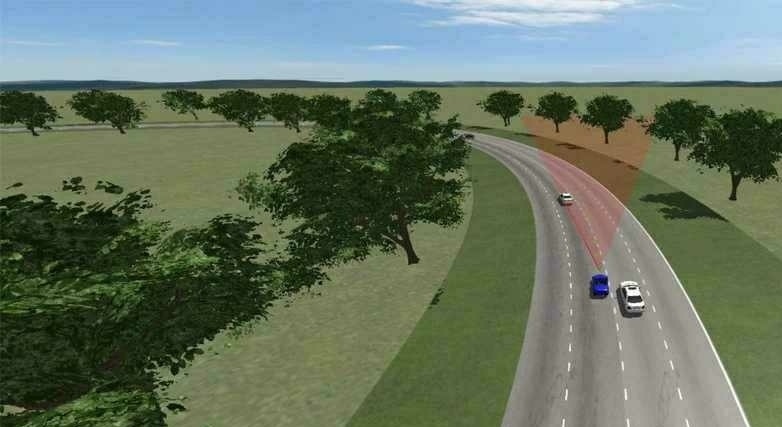
carsim+simulink联合仿真实现变道 包含路径规划 carsim+simulink联合仿真实现变道 包含路径规划算法+mpc轨迹跟踪算法 可选simulink版本和c++版本算法 可以适用于弯道道路,弯道车道保持,弯道变道 carsim内规划轨迹可视化 Carsim2020.0 Matlab2017b
在自动驾驶领域,车辆的变道操作是一个关键研究点,特别是在弯道场景下,需要精确的路径规划和轨迹跟踪算法。本文将探讨如何利用Carsim 2020.0与Matlab 2017b的Simulink进行联合仿真,实现弯道变道功能,其中涵盖路径规划算法以及MPC(模型预测控制)轨迹跟踪算法,并提供Simulink版本和C++版本算法示例。
一、联合仿真环境搭建
首先,确保我们安装了Carsim 2020.0和Matlab 2017b。在Carsim中,可以设置车辆的各种参数,包括动力学模型、轮胎特性等。而Simulink则用于构建控制系统模型,实现路径规划和轨迹跟踪算法。
二、路径规划算法
路径规划算法的目的是为车辆在弯道上规划出一条合理的变道路径。以A*算法为例,这是一种常用的启发式搜索算法,在复杂地图环境中寻找最优路径非常有效。以下是简化的Python实现代码示例(虽然题目要求C++,但思路类似,有助于理解):
import heapq


def heuristic(a, b):
    return abs(a[0] - b[0]) + abs(a[1] - b[1])


def astar(array, start, goal):
    open_set = []
    heapq.heappush(open_set, (0, start))
    came_from = {}
    g_score = {node: float('inf') for node in array}
    g_score[start] = 0
    f_score = {node: float('inf') for node in array}
    f_score[start] = heuristic(start, goal)

    while open_set:
        current = heapq.heappop(open_set)[1]
        if current == goal:
            path = []
            while current in came_from:
                path.append(current)
                current = came_from[current]
            path.append(start)
            path.reverse()
            return path

        for neighbor in [(0, 1), (0, -1), (1, 0), (-1, 0), (1, 1), (1, -1), (-1, 1), (-1, -1)]:
            neighbor_node = (current[0] + neighbor[0], current[1] + neighbor[1])
            tentative_g_score = g_score[current] + 1

            if 0 <= neighbor_node[0] < len(array) and 0 <= neighbor_node[1] < len(array[0]):
                if tentative_g_score < g_score[neighbor_node]:
                    came_from[neighbor_node] = current
                    g_score[neighbor_node] = tentative_g_score
                    f_score[neighbor_node] = tentative_g_score + heuristic(neighbor_node, goal)
                    if neighbor_node not in [i[1] for i in open_set]:
                        heapq.heappush(open_set, (f_score[neighbor_node], neighbor_node))

return None在这段代码中,heuristic函数计算两点之间的曼哈顿距离作为启发式函数,用于估计从当前节点到目标节点的距离。astar函数则实现了A*算法的核心逻辑,通过维护一个优先队列open_set,不断探索最优路径。
carsim+simulink联合仿真实现变道 包含路径规划 carsim+simulink联合仿真实现变道 包含路径规划算法+mpc轨迹跟踪算法 可选simulink版本和c++版本算法 可以适用于弯道道路,弯道车道保持,弯道变道 carsim内规划轨迹可视化 Carsim2020.0 Matlab2017b
在C++版本中,同样需要定义节点结构体、启发式函数和A*算法主体,只是语法上有所不同。
#include <iostream>
#include <vector>
#include <queue>
#include <cmath>
#include <algorithm>

using namespace std;

struct Node {
    int x;
    int y;
    int g_score;
    int f_score;
    Node* came_from;

    Node(int _x, int _y) : x(_x), y(_y), g_score(INT_MAX), f_score(INT_MAX), came_from(nullptr) {}

    bool operator<(const Node& other) const {
        return f_score > other.f_score;
    }
};

int heuristic(Node* a, Node* b) {
    return abs(a->x - b->x) + abs(a->y - b->y);
}

vector<Node*> astar(vector<vector<int>>& array, Node* start, Node* goal) {
    priority_queue<Node*> open_set;
    start->g_score = 0;
    start->f_score = heuristic(start, goal);
    open_set.push(start);

    while (!open_set.empty()) {
        Node* current = open_set.top();
        open_set.pop();

        if (current->x == goal->x && current->y == goal->y) {
            vector<Node*> path;
            while (current) {
                path.push_back(current);
                current = current->came_from;
            }
            reverse(path.begin(), path.end());
            return path;
        }

        vector<pair<int, int>> neighbors = { {0, 1}, {0, -1}, {1, 0}, {-1, 0}, {1, 1}, {1, -1}, {-1, 1}, {-1, -1} };
        for (const auto& neighbor : neighbors) {
            int new_x = current->x + neighbor.first;
            int new_y = current->y + neighbor.second;

            if (new_x >= 0 && new_x < array.size() && new_y >= 0 && new_y < array[0].size()) {
                Node* neighbor_node = new Node(new_x, new_y);
                int tentative_g_score = current->g_score + 1;

                if (tentative_g_score < neighbor_node->g_score) {
                    neighbor_node->came_from = current;
                    neighbor_node->g_score = tentative_g_score;
                    neighbor_node->f_score = tentative_g_score + heuristic(neighbor_node, goal);

                    open_set.push(neighbor_node);
                }
            }
        }
    }

    return {};
}在C++代码中,我们定义了Node结构体来存储节点信息,包括位置、代价等。heuristic函数与Python版本类似,astar函数则使用优先队列来实现A*算法。
三、MPC轨迹跟踪算法
MPC轨迹跟踪算法通过预测车辆未来的状态,并根据预测结果不断调整控制输入,使车辆尽可能地跟踪规划好的路径。在Simulink中,可以使用Stateflow和Simscape等模块构建MPC控制器。以下是一个简单的基于线性模型的MPC控制器在Matlab中的代码示例:
% 定义车辆模型参数
A = [1 0.1; 0 1];
B = [0.05; 0.1];
Q = [1 0; 0 1];
R = 1;

% 预测时域和控制时域
Np = 10;
Nu = 5;

% 初始化状态和输入
x = [0; 0];
u = 0;

% 参考轨迹
ref = [1; 1];

for k = 1:100
    % 构建MPC优化问题
    H = 2 * (B' * Q * B + R) * eye(Nu) + 2 * (B' * Q * A * repmat(B, [1, Nu - 1])) * toeplitz(ones(Nu - 1, 1), [1, zeros(1, Nu - 2)]) + 2 * (B' * Q * A * repmat(B, [1, Nu - 1]))' * toeplitz(ones(Nu - 1, 1), [1, zeros(1, Nu - 2)]) + 2 * (A' * Q * A * repmat(B, [1, Nu - 1])) * toeplitz(ones(Nu - 1, 1), [1, zeros(1, Nu - 2)]) * toeplitz(ones(Nu - 1, 1), [1, zeros(1, Nu - 2)])';
    f = -2 * [B' * Q * (ref - A * x); (B' * Q * A * repmat(B, [1, Nu - 1])) * toeplitz(ones(Nu - 1, 1), [1, zeros(1, Nu - 2)]) * (ref - A * x)];

    % 求解优化问题
    options = optimoptions('quadprog', 'Display', 'off');
    u_opt = quadprog(H, f, [], [], [], [], [], [], [], options);

    % 获取当前控制输入
    u = u_opt(1);

    % 更新车辆状态
    x = A * x + B * u;
end在这段Matlab代码中,我们首先定义了车辆的线性模型(A和B矩阵),以及性能指标矩阵Q和R。然后设置预测时域Np和控制时域Nu。在循环中,构建MPC的二次规划优化问题,并通过quadprog函数求解得到最优控制输入u_opt,取第一个控制输入用于更新车辆状态。
四、Carsim内规划轨迹可视化
在Carsim中,可以通过其自带的绘图功能对规划好的轨迹进行可视化。在车辆模型设置完成后,将路径规划得到的轨迹点作为输入,传递给Carsim。Carsim会根据这些点绘制出车辆的行驶轨迹,方便我们直观地观察车辆在弯道上的变道过程是否符合预期。同时,结合Simulink中的MPC轨迹跟踪算法,我们可以实时看到车辆如何调整行驶状态以跟踪规划轨迹。
通过Carsim与Simulink的联合仿真,结合路径规划算法和MPC轨迹跟踪算法,我们能够有效地实现车辆在弯道上的变道操作,并且通过不同版本的算法实现,满足不同的应用场景和开发需求。无论是在Simulink环境下利用其丰富的模块库快速搭建控制系统,还是使用C++进行底层算法优化,都为自动驾驶技术的研究和开发提供了有力的支持。

北京人形旗下天工造物具身智能开源社区,聚焦具身天工与慧思开物两大平台
更多推荐
 19
19 0
0- 0


 已为社区贡献7条内容

所有评论(0)