基于微信小程序的校园导航系统设计与实现
目录
前言
社会前进的步伐带动信息化的发展,信息化的建设使得人们生活的节奏加快,至使人们更加注重信息的时效性。陈旧的管理获取信息方式将无法满足人们的需求。从而人们更加关注微信小程序[3]。微信小程序可以满足现代人们获取信息实时、便捷等特点,只要有网络的地方,就能迅速查找到想要的信息。
计算机技术已成为人们管理信息的重要工具。能解决人们获取信息更加有效快捷,提高人们的工作效率为重要手段[4]。
通过对校园导航管理内容的学习研究,进而设计并实现一个校园导航微信小程序。微信小程序能实现的主要功能应包括校园简介、建筑速看等一些操作。还有可以正确的为用户服务,准确显示当前信息[5]。
在校园导航微信小程序的前期,即需求分析阶段,我们对用户的需求进行了详细的描述,并且在需求规范中有详细的描述和阐明。根据系统需求的分析,对校园简介的管理进行了整体的设计。着重对软件模块的设计进行了详细的分析,以达到对系统的需求。重点阐述了系统的划分、接口的确定、各模块间的数据传输、数据结构与模块结构的设计[6]。在下面的概要设计中,将会详细地描述这个阶段中的系统。
一、技术栈
末尾获取源码
Spring Boot+JS+ jQuery+Ajax...
二、系统功能介绍
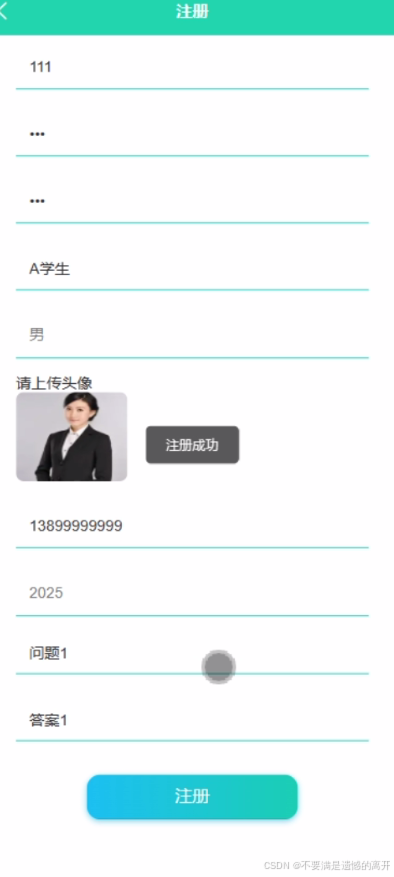
注册界面,第一次使用本小程序的使用者,首先是要进行注册,点击“注册”,然后就会进入到注册的页面里面,将学生信息录入注册表,确认信息正确后,页面才会跳转到登录界面,学生登录成功后可使用本小程序所提供的所有功能,如图5-1所示。
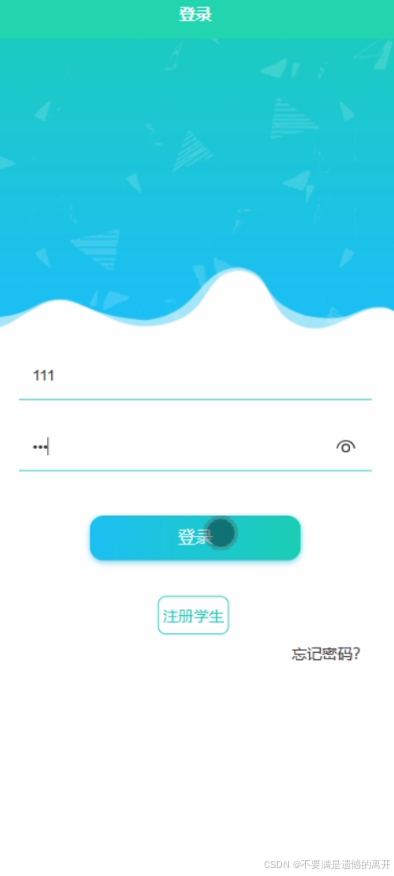
登录界面,首先双击打开微信小程序端系统,连上网络之后会显示出本系统的登录界面,这是进入小程序的第初始页面“登录”,能成功进入到该登录界面则代表小程序的开启是成功的,接下来就可以操作本系统所带有的其他所有的功能,如图5-2所示。
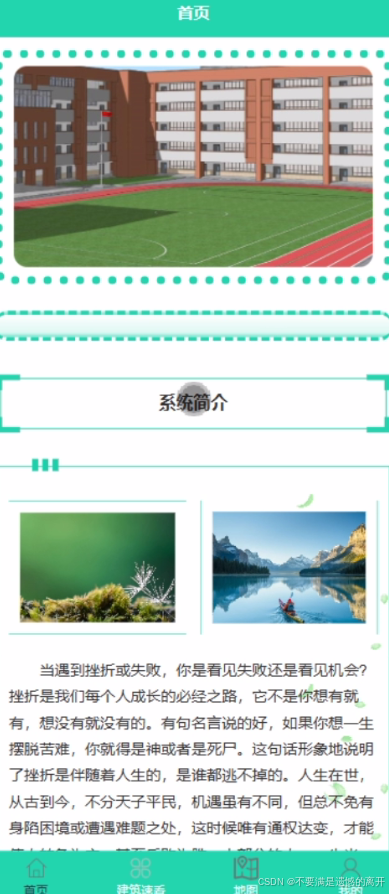
系统首页是学生注册登录后进入的第一个界面,学生可通过小程序端首页进入对应的页面或者通过小程序最下面的那一行导航栏中的“首页、建筑速看、地图、校园公告、我的”,也可以点击“我的”进入我的页面,在我的页面可以对校园简介、我的收藏管理、留言咨询等进行详细操作,如图5-3所示。
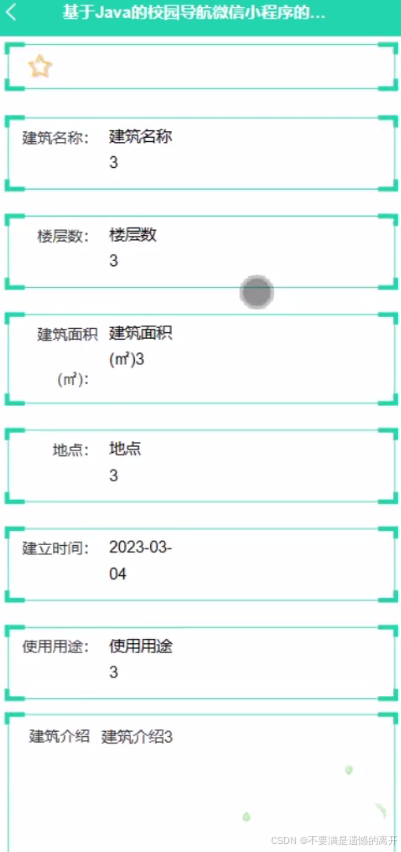
学生点击建筑速看,在建筑速看页面的搜索栏输入建筑名称,进行查询,还可以查看建筑名称、照片、楼层数、建筑面积、地点、建立时间、使用用途等详情,按照提示即可收藏等。如图5-4所示。
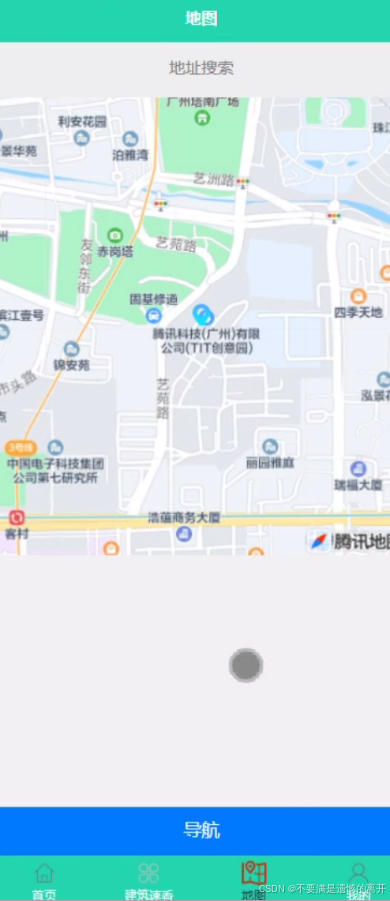
学生点击地图,然后页面跳到地址搜索等详情,按照提示即可导航等操作。如图5-5所示。
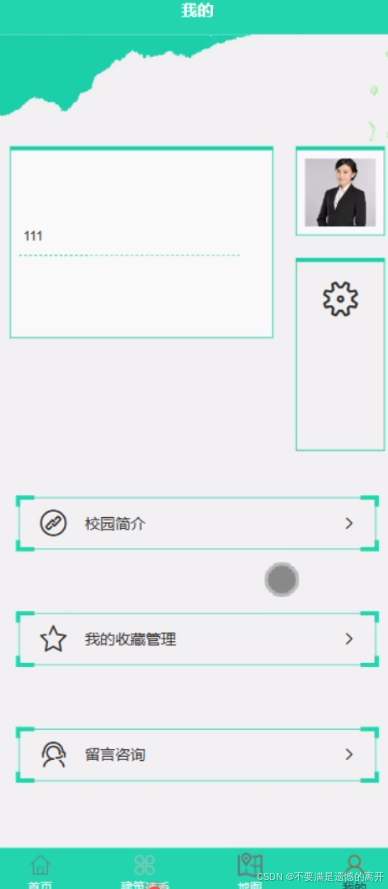
在我的功能界面,学生点击“我的”进入我的页面,在我的页面可以对校园简介、我的收藏管理、留言咨询等进行详细操作,如图5-6所示。
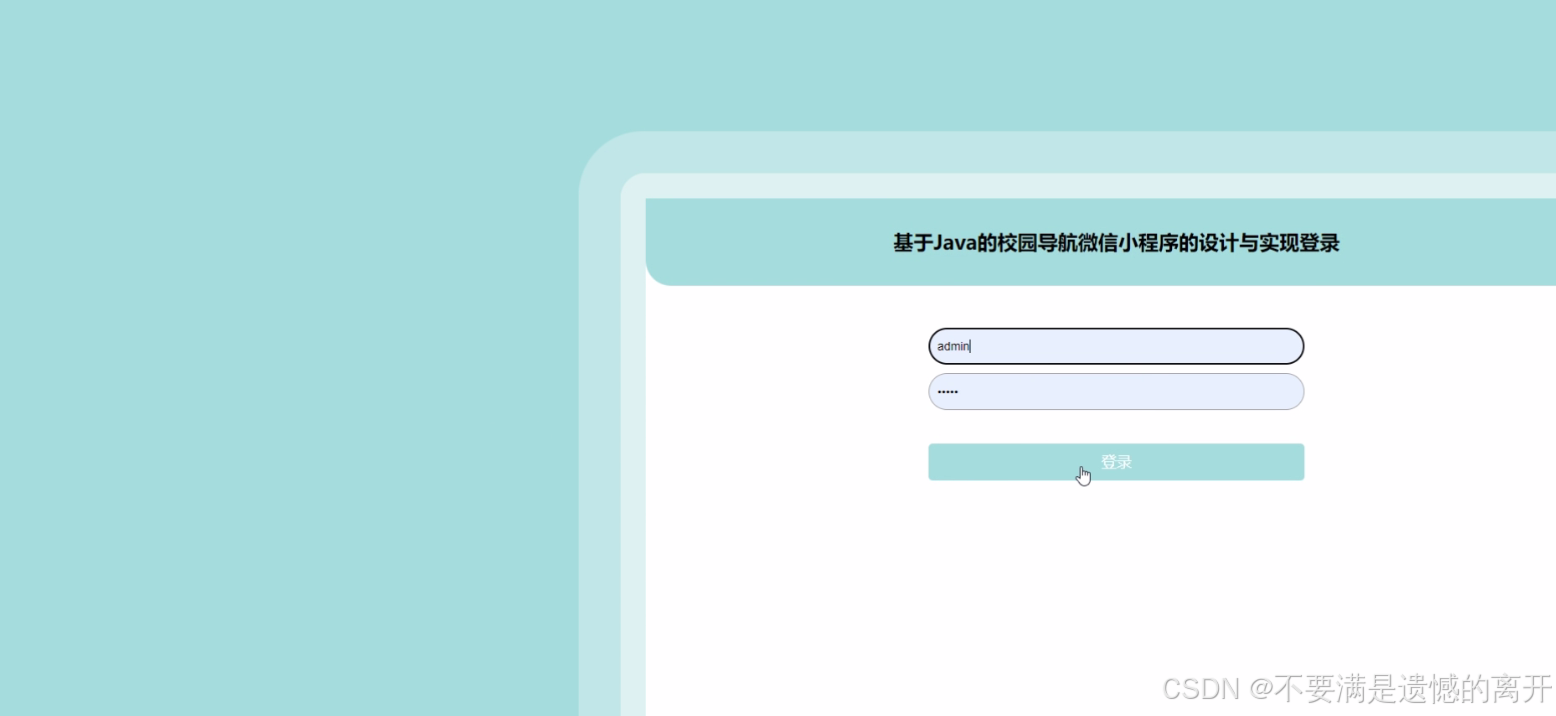
管理员的登陆界面包括管理员的账号、密码,其中就是已有的账号,还有需要注册的账号。只要管理员在账号上注册,注册信息就会被录入 MySQL数据库,有一个资料库,只要输入成功,就可以登陆,然后进入主页的管理。管理员登录界面如图5-7所示。
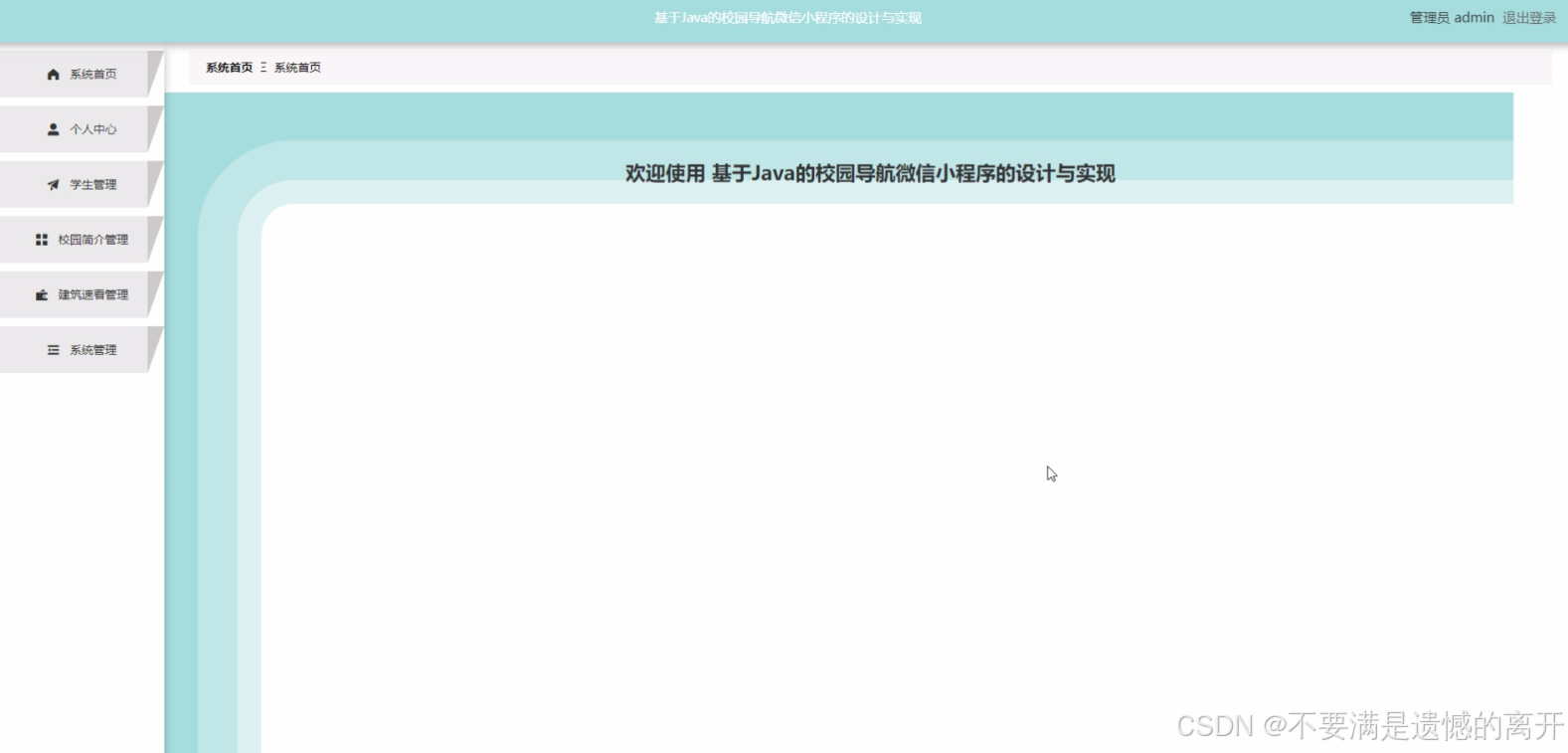
 管理员登录到校园导航微信小程序可以查看系统首页、个人中心、学生管理、校园简介管理、建筑速看管理、系统管理等功能进行详细操作,如图5-8所示。
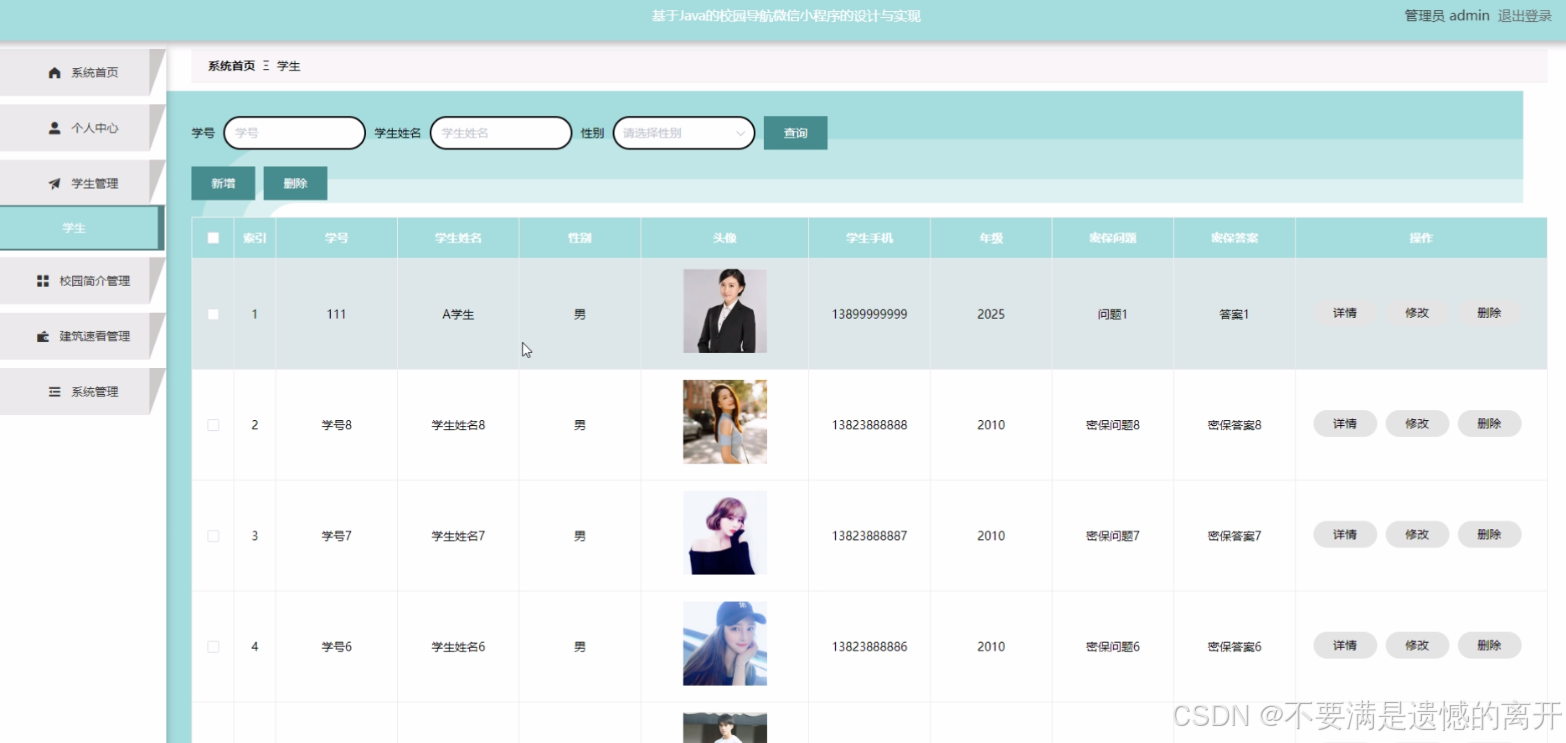
 管理员点击学生管理;在学生管理页面输入学号、学生姓名、性别、头像、学生手机、年级、密保问题、密保答案等信息,进行查询,新增或删除学生信息等操作;如图5-9所示。
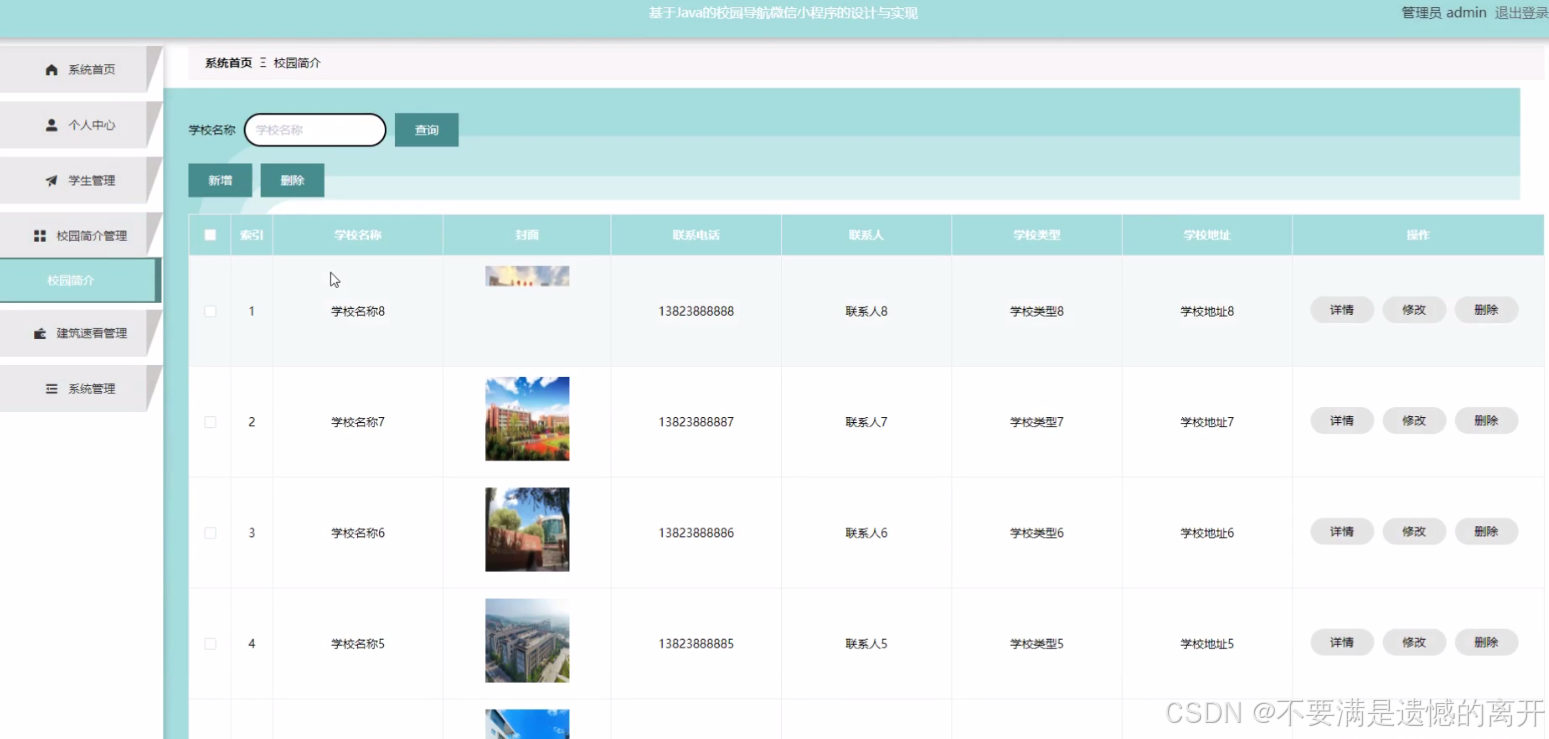
 管理员点击校园简介管理;在校园简介管理页面输入学校名称、封面、联系电话、联系人、学校类型、学校地址等信息,进行查询,新增或删除校园简介等操作;如图5-10所示。
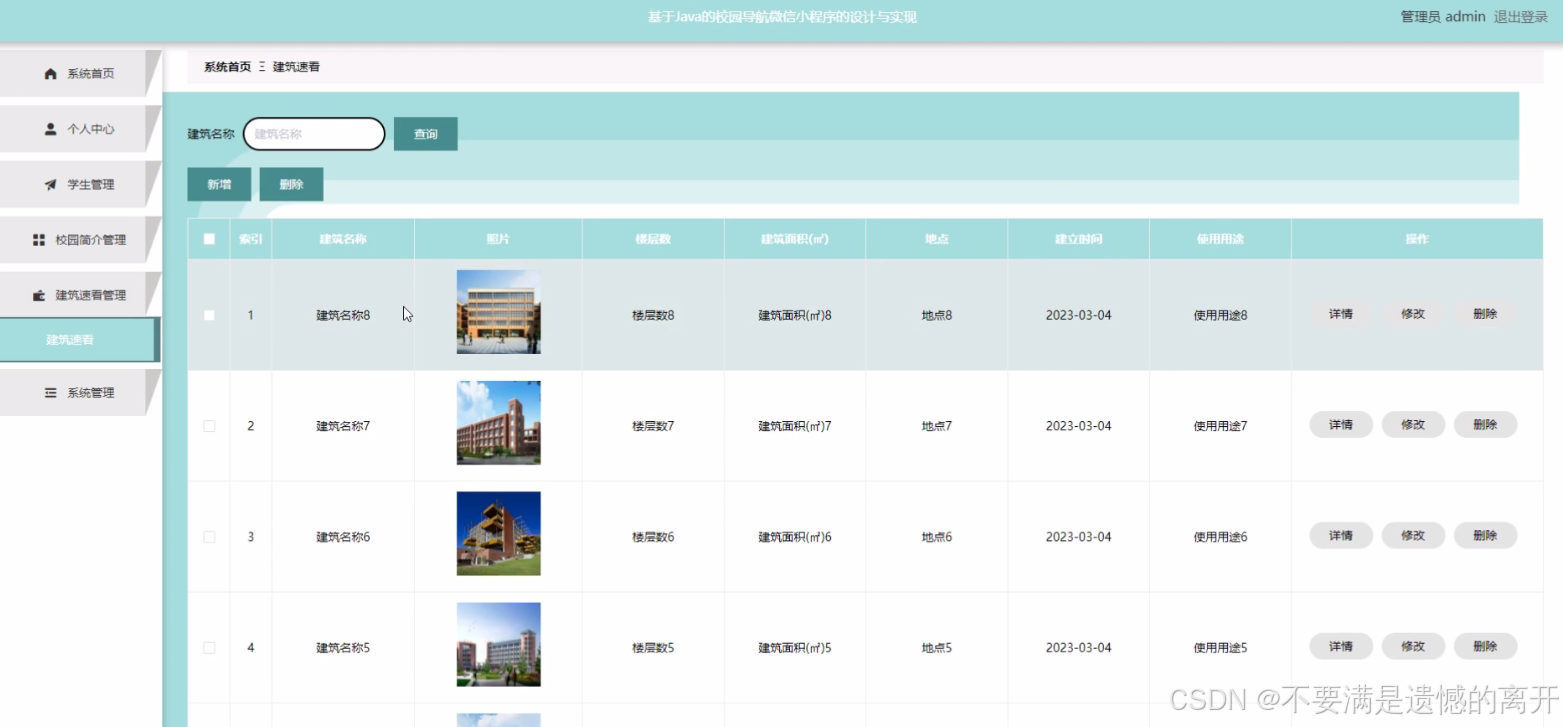
 管理员点击建筑速看管理;在建筑速看管理页面输入建筑名称、照片、楼层数、建筑面积、地点、建立时间、使用用途等信息,进行查询或删除建筑速看等操作;如图5-11所示。
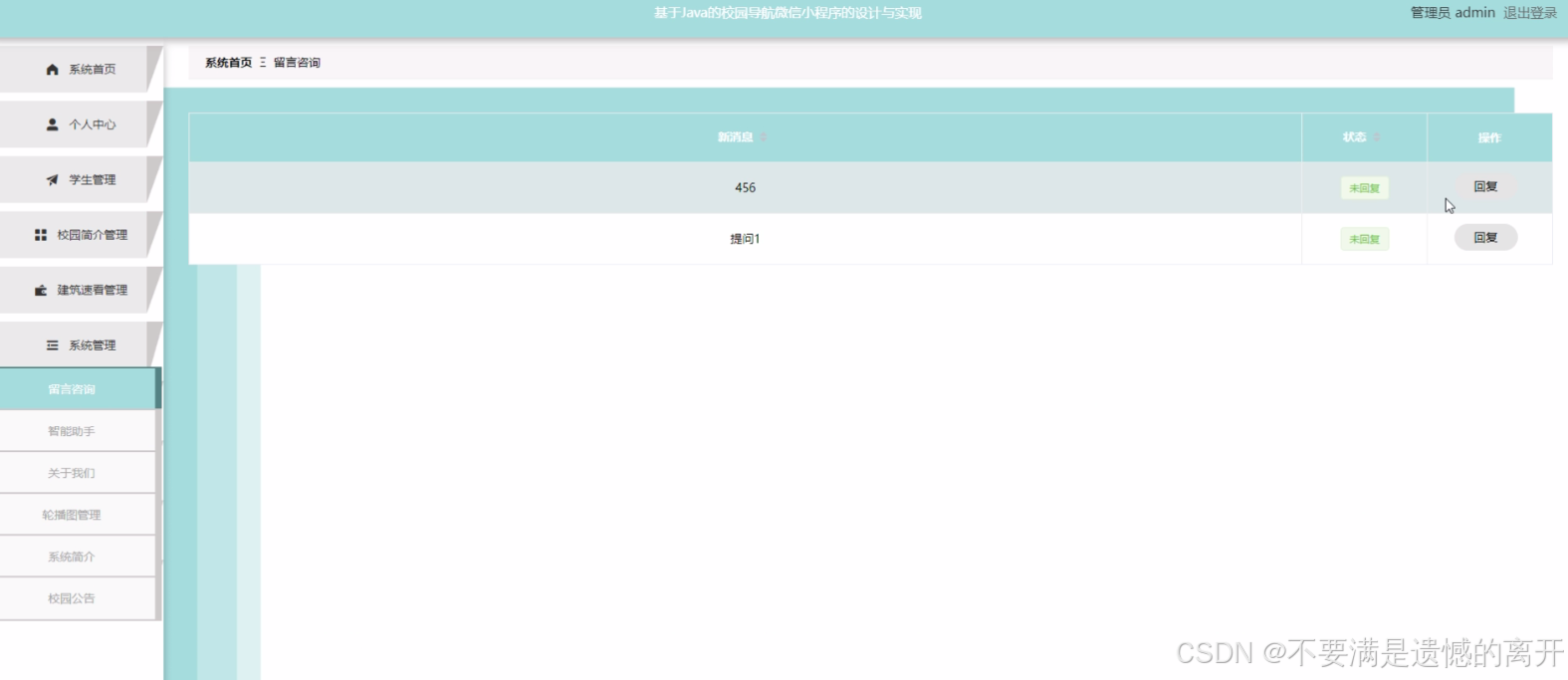
 管理员点击系统管理;在系统管理页面输入留言咨询、智能助手、关于我们、轮播图管理、系统简介、校园公告等信息,进行查询或删除系统信息等操作;如图5-12所示。
三、核心代码
1、登录模块
package com.controller;


import java.util.Arrays;
import java.util.Calendar;
import java.util.Date;
import java.util.Map;

import javax.servlet.http.HttpServletRequest;

import org.springframework.beans.factory.annotation.Autowired;
import org.springframework.stereotype.Controller;
import org.springframework.web.bind.annotation.GetMapping;
import org.springframework.web.bind.annotation.PathVariable;
import org.springframework.web.bind.annotation.PostMapping;
import org.springframework.web.bind.annotation.RequestBody;
import org.springframework.web.bind.annotation.RequestMapping;
import org.springframework.web.bind.annotation.RequestParam;
import org.springframework.web.bind.annotation.ResponseBody;
import org.springframework.web.bind.annotation.RestController;

import com.annotation.IgnoreAuth;
import com.baomidou.mybatisplus.mapper.EntityWrapper;
import com.entity.TokenEntity;
import com.entity.UserEntity;
import com.service.TokenService;
import com.service.UserService;
import com.utils.CommonUtil;
import com.utils.MD5Util;
import com.utils.MPUtil;
import com.utils.PageUtils;
import com.utils.R;
import com.utils.ValidatorUtils;

/**
 * 登录相关
 */
@RequestMapping("users")
@RestController
public class UserController{

	@Autowired
	private UserService userService;

	@Autowired
	private TokenService tokenService;

	/**
	 * 登录
	 */
	@IgnoreAuth
	@PostMapping(value = "/login")
	public R login(String username, String password, String captcha, HttpServletRequest request) {
		UserEntity user = userService.selectOne(new EntityWrapper<UserEntity>().eq("username", username));
		if(user==null || !user.getPassword().equals(password)) {
			return R.error("账号或密码不正确");
		}
		String token = tokenService.generateToken(user.getId(),username, "users", user.getRole());
		return R.ok().put("token", token);
	}

	/**
	 * 注册
	 */
	@IgnoreAuth
	@PostMapping(value = "/register")
	public R register(@RequestBody UserEntity user){
//    	ValidatorUtils.validateEntity(user);
    	if(userService.selectOne(new EntityWrapper<UserEntity>().eq("username", user.getUsername())) !=null) {
    		return R.error("用户已存在");
    	}
        userService.insert(user);
        return R.ok();
    }

	/**
	 * 退出
	 */
	@GetMapping(value = "logout")
	public R logout(HttpServletRequest request) {
		request.getSession().invalidate();
		return R.ok("退出成功");
	}

	/**
     * 密码重置
     */
    @IgnoreAuth
	@RequestMapping(value = "/resetPass")
    public R resetPass(String username, HttpServletRequest request){
    	UserEntity user = userService.selectOne(new EntityWrapper<UserEntity>().eq("username", username));
    	if(user==null) {
    		return R.error("账号不存在");
    	}
    	user.setPassword("123456");
        userService.update(user,null);
        return R.ok("密码已重置为:123456");
    }

	/**
     * 列表
     */
    @RequestMapping("/page")
    public R page(@RequestParam Map<String, Object> params,UserEntity user){
        EntityWrapper<UserEntity> ew = new EntityWrapper<UserEntity>();
    	PageUtils page = userService.queryPage(params, MPUtil.sort(MPUtil.between(MPUtil.allLike(ew, user), params), params));
        return R.ok().put("data", page);
    }

	/**
     * 列表
     */
    @RequestMapping("/list")
    public R list( UserEntity user){
       	EntityWrapper<UserEntity> ew = new EntityWrapper<UserEntity>();
      	ew.allEq(MPUtil.allEQMapPre( user, "user"));
        return R.ok().put("data", userService.selectListView(ew));
    }

    /**
     * 信息
     */
    @RequestMapping("/info/{id}")
    public R info(@PathVariable("id") String id){
        UserEntity user = userService.selectById(id);
        return R.ok().put("data", user);
    }

    /**
     * 获取用户的session用户信息
     */
    @RequestMapping("/session")
    public R getCurrUser(HttpServletRequest request){
    	Long id = (Long)request.getSession().getAttribute("userId");
        UserEntity user = userService.selectById(id);
        return R.ok().put("data", user);
    }

    /**
     * 保存
     */
    @PostMapping("/save")
    public R save(@RequestBody UserEntity user){
//    	ValidatorUtils.validateEntity(user);
    	if(userService.selectOne(new EntityWrapper<UserEntity>().eq("username", user.getUsername())) !=null) {
    		return R.error("用户已存在");
    	}
        userService.insert(user);
        return R.ok();
    }

    /**
     * 修改
     */
    @RequestMapping("/update")
    public R update(@RequestBody UserEntity user){
//        ValidatorUtils.validateEntity(user);
        userService.updateById(user);//全部更新
        return R.ok();
    }

    /**
     * 删除
     */
    @RequestMapping("/delete")
    public R delete(@RequestBody Long[] ids){
        userService.deleteBatchIds(Arrays.asList(ids));
        return R.ok();
    }
}
2、文件上传模块
package com.controller;

import java.io.File;
import java.io.FileNotFoundException;
import java.io.IOException;
import java.util.Arrays;
import java.util.Date;
import java.util.HashMap;
import java.util.List;
import java.util.Map;
import java.util.Random;
import java.util.UUID;

import org.apache.commons.io.FileUtils;
import org.apache.commons.lang3.StringUtils;
import org.springframework.beans.factory.annotation.Autowired;
import org.springframework.http.HttpHeaders;
import org.springframework.http.HttpStatus;
import org.springframework.http.MediaType;
import org.springframework.http.ResponseEntity;
import org.springframework.util.ResourceUtils;
import org.springframework.web.bind.annotation.PathVariable;
import org.springframework.web.bind.annotation.RequestBody;
import org.springframework.web.bind.annotation.RequestMapping;
import org.springframework.web.bind.annotation.RequestParam;
import org.springframework.web.bind.annotation.RestController;
import org.springframework.web.multipart.MultipartFile;

import com.annotation.IgnoreAuth;
import com.baomidou.mybatisplus.mapper.EntityWrapper;
import com.entity.ConfigEntity;
import com.entity.EIException;
import com.service.ConfigService;
import com.utils.R;

/**
 * 上传文件映射表
 */
@RestController
@RequestMapping("file")
@SuppressWarnings({"unchecked","rawtypes"})
public class FileController{
	@Autowired
    private ConfigService configService;
	/**
	 * 上传文件
	 */
	@RequestMapping("/upload")
	public R upload(@RequestParam("file") MultipartFile file,String type) throws Exception {
		if (file.isEmpty()) {
			throw new EIException("上传文件不能为空");
		}
		String fileExt = file.getOriginalFilename().substring(file.getOriginalFilename().lastIndexOf(".")+1);
		File path = new File(ResourceUtils.getURL("classpath:static").getPath());
		if(!path.exists()) {
		    path = new File("");
		}
		File upload = new File(path.getAbsolutePath(),"/upload/");
		if(!upload.exists()) {
		    upload.mkdirs();
		}
		String fileName = new Date().getTime()+"."+fileExt;
		File dest = new File(upload.getAbsolutePath()+"/"+fileName);
		file.transferTo(dest);
		FileUtils.copyFile(dest, new File("C:\\Users\\Desktop\\jiadian\\springbootl7own\\src\\main\\resources\\static\\upload"+"/"+fileName));
		if(StringUtils.isNotBlank(type) && type.equals("1")) {
			ConfigEntity configEntity = configService.selectOne(new EntityWrapper<ConfigEntity>().eq("name", "faceFile"));
			if(configEntity==null) {
				configEntity = new ConfigEntity();
				configEntity.setName("faceFile");
				configEntity.setValue(fileName);
			} else {
				configEntity.setValue(fileName);
			}
			configService.insertOrUpdate(configEntity);
		}
		return R.ok().put("file", fileName);
	}

	/**
	 * 下载文件
	 */
	@IgnoreAuth
	@RequestMapping("/download")
	public ResponseEntity<byte[]> download(@RequestParam String fileName) {
		try {
			File path = new File(ResourceUtils.getURL("classpath:static").getPath());
			if(!path.exists()) {
			    path = new File("");
			}
			File upload = new File(path.getAbsolutePath(),"/upload/");
			if(!upload.exists()) {
			    upload.mkdirs();
			}
			File file = new File(upload.getAbsolutePath()+"/"+fileName);
			if(file.exists()){
				/*if(!fileService.canRead(file, SessionManager.getSessionUser())){
					getResponse().sendError(403);
				}*/
				HttpHeaders headers = new HttpHeaders();
			    headers.setContentType(MediaType.APPLICATION_OCTET_STREAM);
			    headers.setContentDispositionFormData("attachment", fileName);
			    return new ResponseEntity<byte[]>(FileUtils.readFileToByteArray(file),headers, HttpStatus.CREATED);
			}
		} catch (IOException e) {
			e.printStackTrace();
		}
		return new ResponseEntity<byte[]>(HttpStatus.INTERNAL_SERVER_ERROR);
	}

}
3、代码封装
package com.utils;

import java.util.HashMap;
import java.util.Map;

/**
 * 返回数据
 */
public class R extends HashMap<String, Object> {
	private static final long serialVersionUID = 1L;

	public R() {
		put("code", 0);
	}

	public static R error() {
		return error(500, "未知异常,请联系管理员");
	}

	public static R error(String msg) {
		return error(500, msg);
	}

	public static R error(int code, String msg) {
		R r = new R();
		r.put("code", code);
		r.put("msg", msg);
		return r;
	}

	public static R ok(String msg) {
		R r = new R();
		r.put("msg", msg);
		return r;
	}

	public static R ok(Map<String, Object> map) {
		R r = new R();
		r.putAll(map);
		return r;
	}

	public static R ok() {
		return new R();
	}

	public R put(String key, Object value) {
		super.put(key, value);
		return this;
	}
}
北京人形旗下天工造物具身智能开源社区,聚焦具身天工与慧思开物两大平台
更多推荐
 85
85 0
0- 0


 已为社区贡献3条内容

所有评论(0)