Python基于YOLOv8的车牌识别系统 PyQt5可视化 蓝绿牌识别 注意力机制优化 毕业设计(建议收藏)✅
·
博主介绍:✌全网粉丝50W+,前互联网大厂软件研发、集结硕博英豪成立软件开发工作室,专注于计算机相关专业项目实战6年之久,累计开发项目作品上万套。凭借丰富的经验与专业实力,已帮助成千上万的学生顺利毕业,选择我们,就是选择放心、选择安心毕业✌
> 🍅想要获取完整文章或者源码,或者代做,拉到文章底部即可与我联系了。🍅🍅感兴趣的可以先收藏起来,点赞、关注不迷路,大家在毕设选题,项目以及论文编写等相关问题都可以给我留言咨询,希望帮助同学们顺利毕业 。🍅
1、毕业设计:2026年计算机专业毕业设计选题汇总(建议收藏)✅
1、项目介绍
环境:Python 3.8、深度学习 PyTorch、PyQt5 图形化界面、LPRNet 车牌识别算法、YOLOv8
技术栈:本车牌识别系统基于深度学习技术,使用 YOLOX 进行车牌检测,再通过 LPRNet 进行车牌识别。车牌检测模型包含 YOLOX 和 YOLOv8,其中 YOLOv8 集成了注意力机制作为创新点;车牌 OCR 识别模型采用 LPRNet。数据集使用 CCPD2019 与 CCPD2020,相关工具涵盖 Python、PyCharm、CUDA 与 Torch。
研究背景:传统车牌识别技术在复杂光照、遮挡场景下准确率低且速度慢。YOLOv8 与 LPRNet 在保持高帧率的同时显著提升检测与识别精度,配合 PyQt5 轻量化界面,可在交通监控、停车场出入口等边缘场景完成“图片-视频-摄像头”三通道实时识别,为智能交通提供低成本技术方案。
研究意义:系统自带 CCPD 数据集并完成科学划分,支持图片、视频、摄像头三通道检测与批量处理,适合作为“深度学习”“计算机视觉”课程实践与毕业设计模板,推动车牌识别技术在教学与产业中的快速落地。
2、项目界面
(1)上传图片进行车牌检测识别

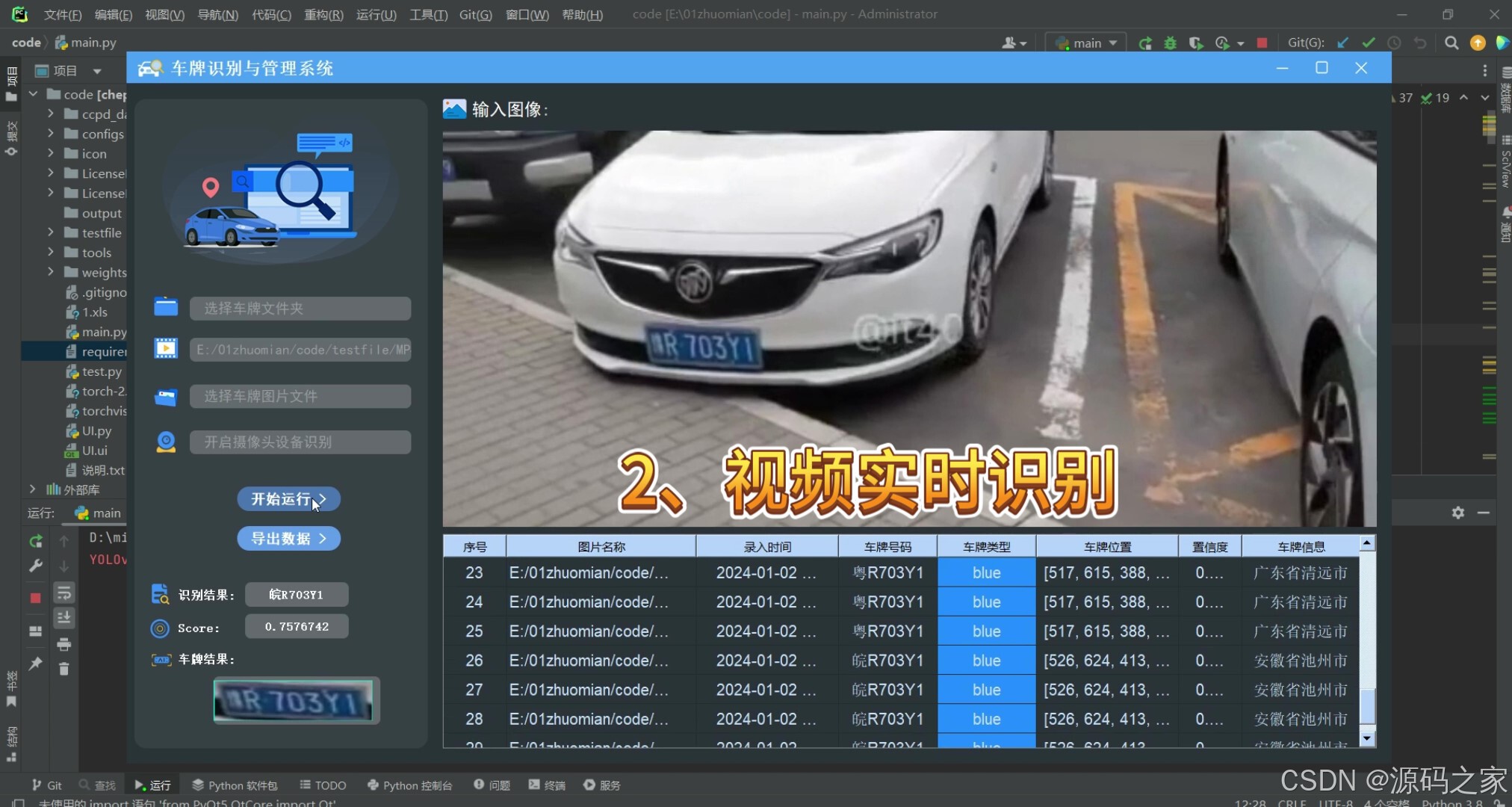
(2)上传视频进行车牌检测识别
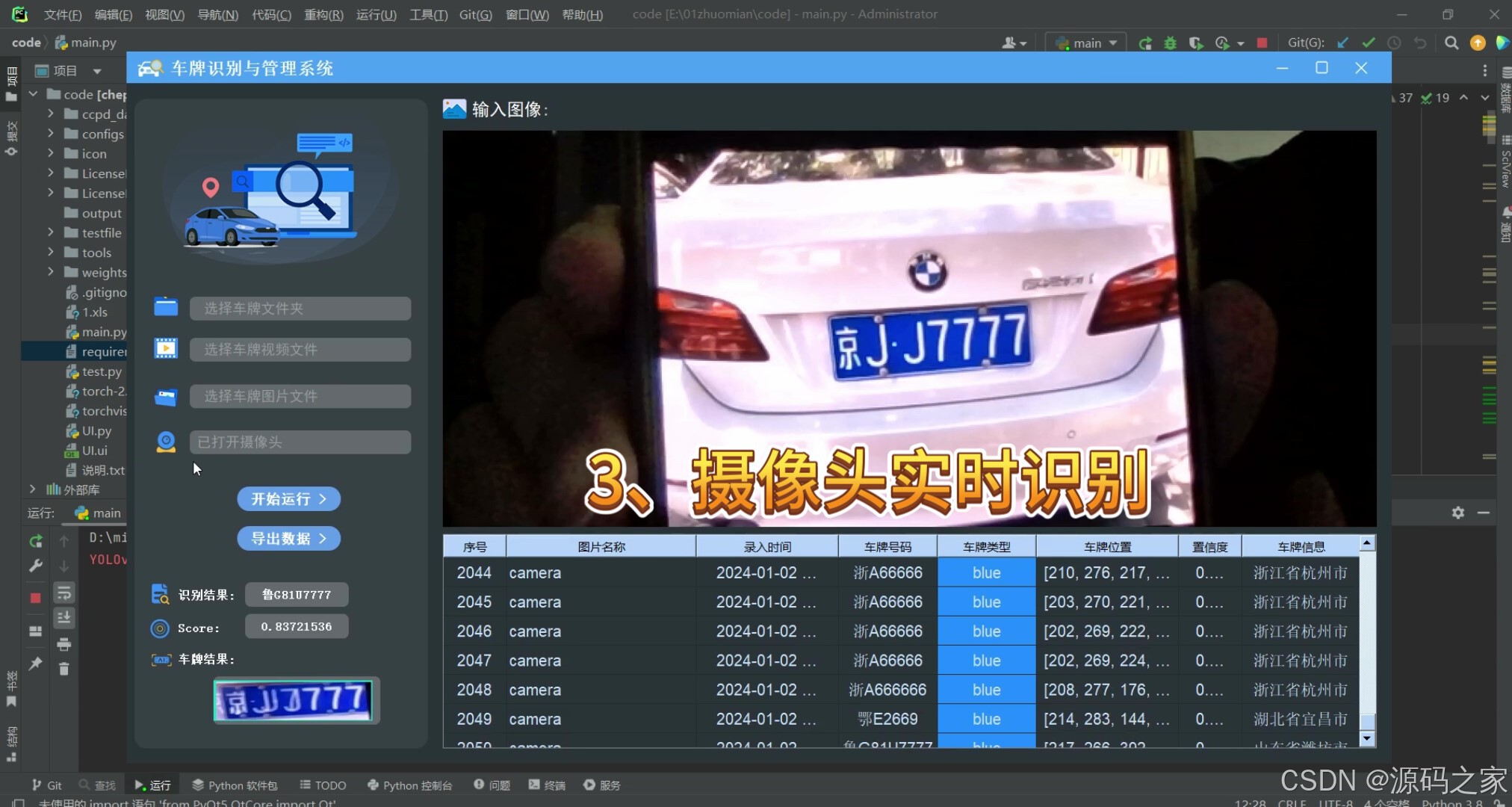
(3)连接摄像头进行车牌检测识别
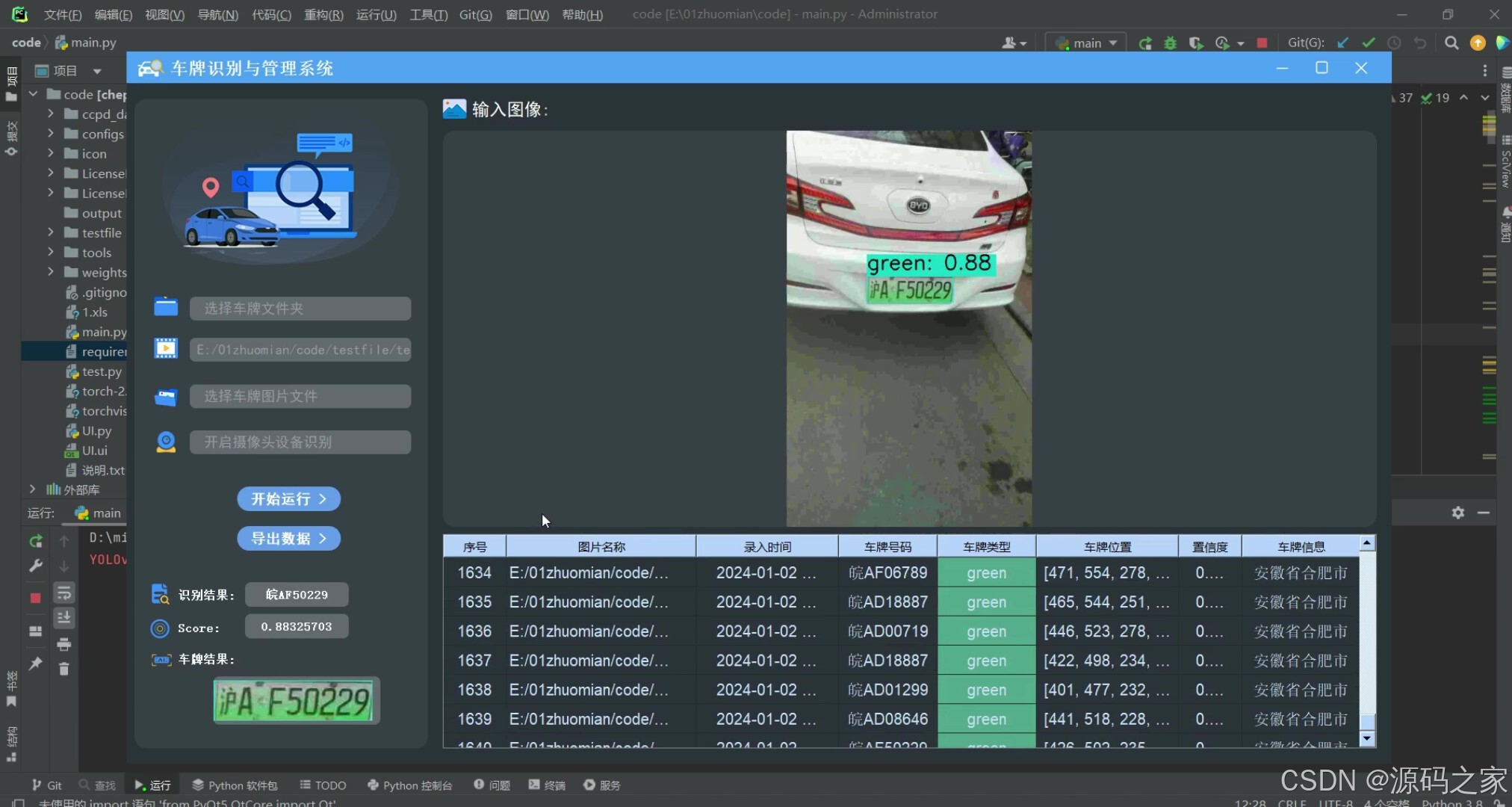
(4)批量图片检测识别
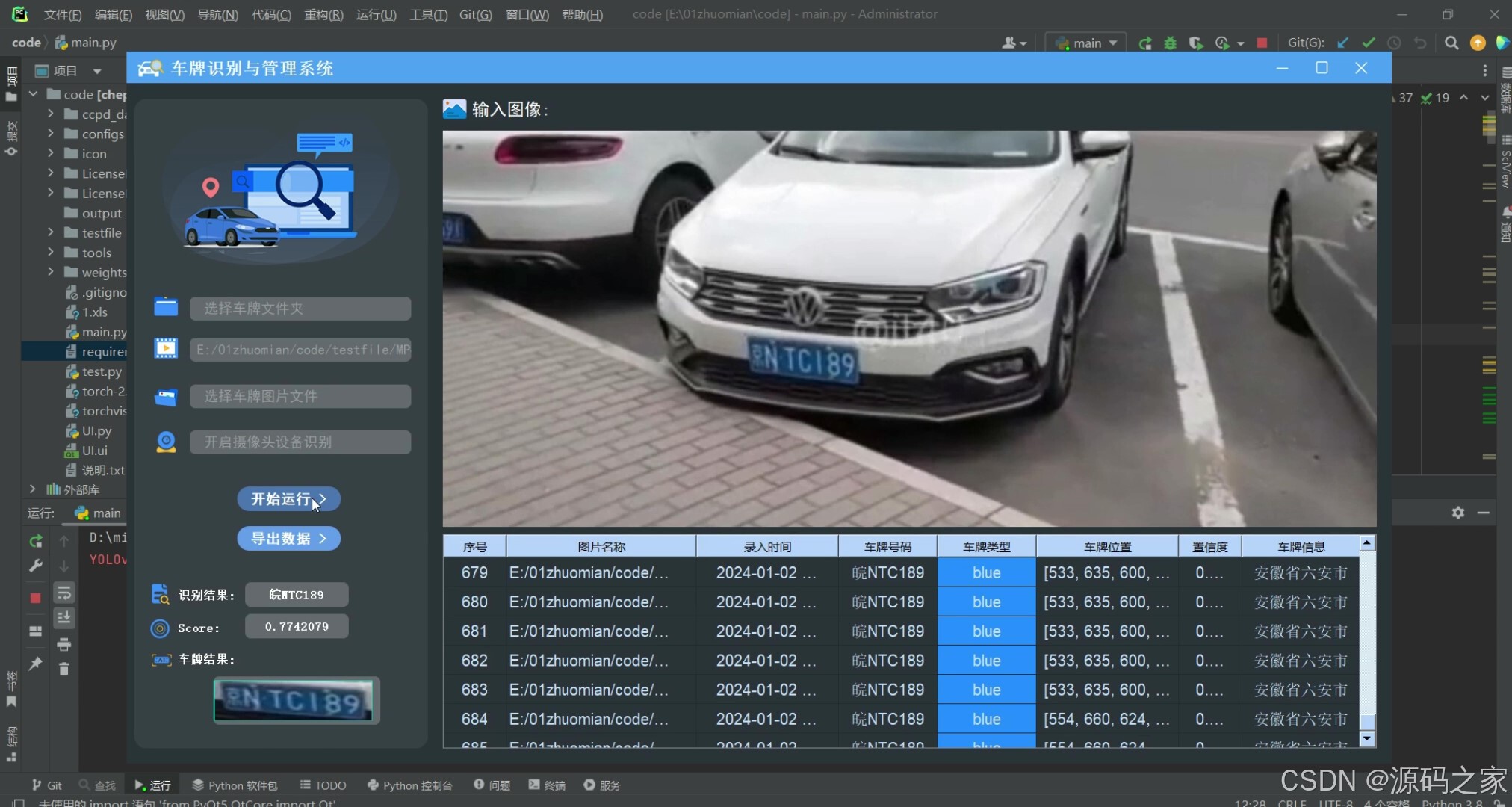
(5)车牌检测识别记录
(6)车牌检测识别记录导出
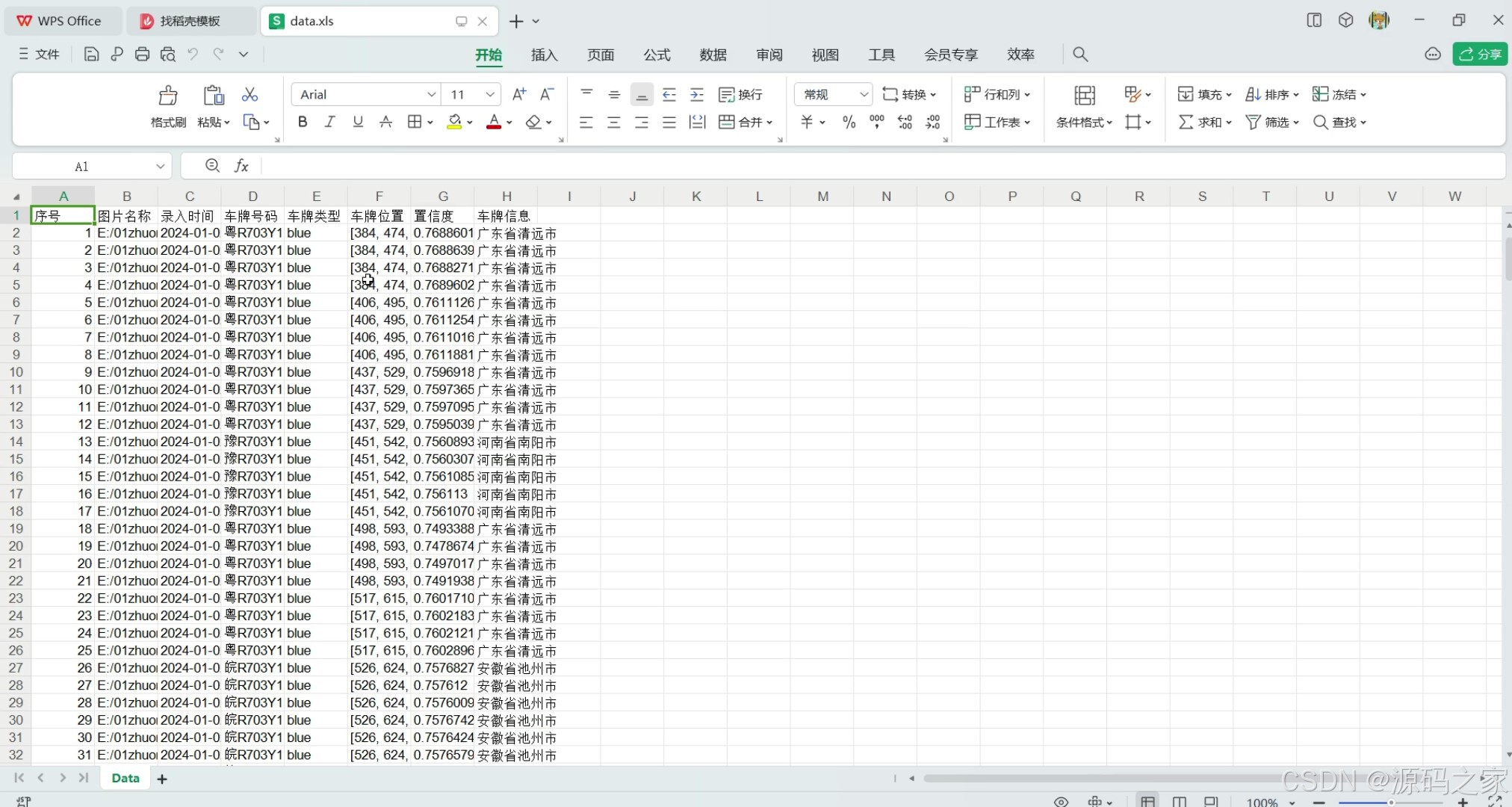
3、项目说明
本车牌识别系统基于 Python 3.8、PyTorch 深度学习框架与 PyQt5 图形化界面,采用 YOLOX 与 YOLOv8(含自研注意力机制版本)进行车牌检测,结合 LPRNet 车牌 OCR 识别。数据集选用 CCPD2019 和 CCPD2020,支持蓝绿牌识别,黄牌因数据缺失暂不支持。系统功能覆盖单张图片、文件夹批量图片、视频及摄像头实时车牌检测识别,识别结果可导出为 CSV 或 XLS 格式,方便后续管理。
技术实现层面,车牌检测模块集成 YOLOX 与 YOLOv8,后者通过注意力机制优化,性能提升显著;LPRNet 负责车牌字符识别,整体流程无需调用外部 API,适配本地部署场景。系统可通过更换权重文件适应不同数据集,代码开源且注释详尽,配套训练教程,方便用户根据需求修改模型架构或训练新数据,可作为“深度学习”“计算机视觉”课程与毕业设计模板,推动车牌识别技术在教学与产业中的落地应用。
4、核心代码
from PyQt5.QtWidgets import QApplication, QMainWindow
from UI import Ui_MainWindow
import sys
from datetime import datetime
from PyQt5 import QtCore, QtGui, QtWidgets
from PyQt5.QtWidgets import QFileDialog, QMessageBox, QScrollBar
from PyQt5.QtGui import QBrush, QColor, QFont, QDesktopServices
from PyQt5.QtCore import QThread, pyqtSignal
from PyQt5.QtCore import Qt
# 添加yolox目标检测路径
import time
import os
import torch
from torch.autograd import Variable
sys.path.append('LicensePlate_detect/yolox_pytorch')
from LicensePlate_OCR.lpr_net.models.LPRNet import LPRNet, CHARS
from configs import config
import cv2
import sys, os, xlwt
import numpy as np
from PIL import Image
import threading

from LicensePlate_detect.yolox_pytorch.yolo import YOLOX_infer
from LicensePlate_detect.ultralytics.inferer import YOLOV8_infer

class MyMainWindow(QMainWindow, Ui_MainWindow):
    def __init__(self):
        super().__init__()
        self.setupUi(self)

        self.RowLength = 0
        self.Data = [['序号', '图片名称', '录入时间', '车牌号码', '车牌类型', '车牌位置', '置信度', '车牌信息']]
        self.number = 1
        self.img_dirs_name = None
        self.start_type = None
        self.img = None
        self.video = None
        self.dir = None
        self.img_path = None
        self.img_path_dir = None
        self.video_path = None
        self.cam = None

        self.output_dir = './output'
        if not os.path.exists(self.output_dir):
            os.mkdir(self.output_dir)

        # 绑定退出程序
        self.toolButton_exit.clicked.connect(QApplication.quit)
        # 绑定打开文件夹
        self.pushButton_dir.clicked.connect(self.open_dir)
        # 打开视频
        self.pushButton_video.clicked.connect(self.open_video)
        # 打开cam
        self.pushButton_cam.clicked.connect(self.open_cam)
        # 绑定打开文件
        self.pushButton_img.clicked.connect(self.open_dir_file)
        # 绑定开始运行
        self.pushButton_start.clicked.connect(self.start)
        # 导出数据
        self.pushButton_export.clicked.connect(self.writeFiles)
        # 表格点击事件绑定
        self.tableWidget_info.cellClicked.connect(self.cell_clicked)

    # 连接单元格点击事件
    def cell_clicked(self, row, column):
        # 检查是否点击的是第一列(序号)
        # if column:
        # 获取第二列(图片名称)下的路径
        image_name_item = self.tableWidget_info.item(row, 1)
        if image_name_item is not None:
            image_path = image_name_item.text()
            img = cv2.imdecode(np.fromfile(image_path, dtype=np.uint8), -1)
            self.show_frame(img)

    def show_frame(self, img):
        if img is not None:
            # 尺寸适配
            size = img.shape
            if size[0] / size[1] > 1.0907:
                w = size[1] * self.label_img.height() / size[0]
                h = self.label_img.height()
            elif size[0] / size[1] < 1.0907:
                w = self.label_img.width()
                h = size[0] * self.label_img.width() / size[1]
            else:
                w, h = self.label_img.width(), self.label_img.height()
            shrink = cv2.resize(img, (int(w), int(h)), interpolation=cv2.INTER_AREA)
            shrink = cv2.cvtColor(shrink, cv2.COLOR_BGR2RGB)
            QtImg = QtGui.QImage(shrink[:], shrink.shape[1], shrink.shape[0], shrink.shape[1] * 3,
                                 QtGui.QImage.Format_RGB888)
            self.label_img.setPixmap(QtGui.QPixmap.fromImage(QtImg))

    def det_OCR_show(self):
        if self.img is None:
            return 0
        try:
            yolo_res, img_res = yolo.infer(self.img)
            # 进行车牌识别
            lpr_res = self.LPR_infer(self.img, yolo_res)
            if len(lpr_res) > 0:
                for result in lpr_res:
                    self.Data.append(
                        [self.number, self.img_path, result['InputTime'], result['Number'], result['Type'],
                         str(result['location']), str(result['Conf']), result['From']])
                    # 显示识别信息
                    self.__show(result, self.img_path, img_res)
                    self.number += 1
            # else:
            #     QMessageBox.warning(None, "Error", "无法识别此图像!", QMessageBox.Yes)
        except:
            pass

    def open_dir(self):
        self.img_path_dir = QFileDialog.getExistingDirectory(None, "选择文件夹")
        if self.img_path_dir == '':
            self.start_type = None
            return 0

        self.start_type = 'dir'

        # 显示路径
        self.label.setText(self.img_path_dir)
        self.label_3.setText(" 选择车牌图片文件")
        self.label_2.setText(" 选择车牌视频文件")
        self.label_4.setText(" 开启摄像头设备识别")

        # 默认显示第一张
        self.img_path = os.path.join(self.img_path_dir, os.listdir(self.img_path_dir)[0])
        self.img = cv2.imdecode(np.fromfile(self.img_path, dtype=np.uint8), cv2.IMREAD_COLOR)
        # 显示原图
        self.show_frame(self.img)

    def open_video(self):
        try:
            # 选择文件
            self.video_path, filetype = QFileDialog.getOpenFileName(None, "选择文件", self.ProjectPath,
                                                                    "Video Files (*.mp4 *.avi)")
            if self.video_path == "":  # 未选择文件
                self.start_type = None
                return 0
            self.start_type = 'video'
            self.label_2.setText(self.video_path)
            self.label.setText(" 选择车牌文件夹")
            self.label_3.setText(" 选择车牌图片文件")
            # self.label_2.setText(" 选择车牌视频文件")
            self.label_4.setText(" 开启摄像头设备识别")

            cap = cv2.VideoCapture(self.video_path)
            # 读取第一帧
            ret, self.img = cap.read()
            # 显示原图
            self.show_frame(self.img)
        except Exception as e:
            print(e)

    def open_cam(self):
        # 点击一次打开摄像头,再点击关闭摄像头
        if self.label_4.text() == '已打开摄像头':
            self.label_4.setText("已关闭摄像头")
            self.start_type = None
        else:
            self.label_4.setText("已打开摄像头")
            self.label.setText(" 选择车牌文件夹")
            self.label_3.setText(" 选择车牌图片文件")
            self.label_2.setText(" 选择车牌视频文件")
            # self.label_4.setText(" 开启摄像头设备识别")

            self.cam = 0
            self.start_type = 'cam'
            cap = cv2.VideoCapture(self.cam)
            # 读取第一帧
            ret, self.img = cap.read()
            # 显示原图
            self.show_frame(self.img)

    def open_dir_file(self):
        try:
            # 选择文件
            self.img_path, filetype = QFileDialog.getOpenFileName(None, "选择文件", self.ProjectPath,
                                                                  "JPEG Image (*.jpg);;PNG Image (*.png);;JFIF Image (*.jfif)")  # ;;All Files (*)
            if self.img_path == "":  # 未选择文件
                self.start_type = None
                return 0
            self.start_type = 'img'
            self.label_3.setText(self.img_path)
            self.label.setText(" 选择车牌文件夹")
            # self.label_3.setText(" 选择车牌图片文件")
            self.label_2.setText(" 选择车牌视频文件")
            self.label_4.setText(" 已关闭摄像头")
            self.img = cv2.imdecode(np.fromfile(self.img_path, dtype=np.uint8), cv2.IMREAD_COLOR)
            # 显示原图
            self.show_frame(self.img)

        except Exception as e:
            print(e)

    def LPR_infer(self, img_ori, yolo_res):

        lst_result = []
        # 根据yolox结果进行切图
        for res in yolo_res:
            dic_LP = {}
            LP_color = res[0]
            LP_conf = res[1]
            LP_box = res[2]
            dic_LP['InputTime'] = datetime.now().strftime("%Y-%m-%d %H:%M:%S")
            dic_LP['Type'] = LP_color
            dic_LP['Picture'] = img_ori[LP_box[1]:LP_box[3], LP_box[0]:LP_box[2]]
            # 车牌位置
            dic_LP['location'] = [LP_box[1], LP_box[3], LP_box[0], LP_box[2]]

            img = img_ori[LP_box[1]:LP_box[3], LP_box[0]:LP_box[2]]
            img = cv2.resize(img, lpr_size)
            img = img.astype('float32')
            img -= 127.5
            img *= 0.0078125
            img = np.transpose(img, (2, 0, 1))

            img = torch.from_numpy(img)
            img = img.unsqueeze(0)
            img = Variable(img.cuda())
            prebs = lprnet(img)
            prebs = prebs.cpu().detach().numpy()

            for i in range(prebs.shape[0]):
                preb = prebs[i, :, :]  # 对每张图片 [68, 18]
                preb_label = []
                for j in range(preb.shape[1]):  # 18  返回序列中每个位置最大的概率对应的字符idx  其中'-'是67
                    preb_label.append(np.argmax(preb[:, j], axis=0))
                no_repeat_blank_label = list()
                pre_c = preb_label[0]
                if pre_c != len(CHARS) - 1:  # 记录重复字符
                    no_repeat_blank_label.append(CHARS[pre_c])
                for c in preb_label:  # 去除重复字符和空白字符'-'
                    if (pre_c == c) or (c == len(CHARS) - 1):
                        if c == len(CHARS) - 1:
                            pre_c = c
                        continue
                    no_repeat_blank_label.append(CHARS[c])
                    pre_c = c
                LP_num = ''.join(no_repeat_blank_label)
                provinces = no_repeat_blank_label[0]
                shi = no_repeat_blank_label[1]

                dic_LP['Number'] = LP_num
                dic_LP['Conf'] = LP_conf
                try:
                    dic_LP['From'] = ''.join(config.Prefecture[provinces][shi])
                    lst_result.append(dic_LP)
                except:
                    pass

        return lst_result

    def start(self):
        try:
            # 判断当前要识别的类型
            if self.start_type == 'img':
                self.det_OCR_show()

            elif self.start_type == 'dir':
                # 开启线程,否则界面会卡死
                self.t1 = threading.Thread(target=self.start_dir)
                # 启动线程
                self.t1.start()

            elif self.start_type == 'video':
                # 开启线程,否则界面会卡死
                self.t1 = threading.Thread(target=self.start_video, args=(self.video_path,))
                # 启动线程
                self.t1.start()

            elif self.start_type == 'cam':
                # 开启线程,否则界面会卡死
                self.t1 = threading.Thread(target=self.start_video, args=(self.cam,))
                # 启动线程
                self.t1.start()

        except Exception as e:
            print(e)

    def start_dir(self):
        for img_name in os.listdir(self.img_path_dir):
            if img_name.lower().endswith(
                    ('.bmp', '.dib', '.png', '.jpg', '.jpeg', '.pbm', '.pgm', '.ppm', '.tif', '.tiff')):
                self.img_path = os.path.join(self.img_path_dir, img_name)
                self.img = cv2.imdecode(np.fromfile(self.img_path, dtype=np.uint8), -1)

                # 显示原图
                self.show_frame(self.img)
                # 进行识别和显示
                self.det_OCR_show()

    def start_video(self, path):
        cap = cv2.VideoCapture(path)
        if not cap.isOpened():
            raise ValueError("Unable to open video file or cam")
        if path == 0:
            self.img_path = 'camera'
        else:
            self.img_path = path
        while True:
            ret, self.img = cap.read()
            if not ret or self.start_type is None:
                break
            # 显示原图
            self.show_frame(self.img)
            # 进行识别和显示
            self.det_OCR_show()

    def writexls(self, DATA, path):
        wb = xlwt.Workbook()
        ws = wb.add_sheet('Data')
        for i, Data in enumerate(DATA):
            for j, data in enumerate(Data):
                ws.write(i, j, data)
        wb.save(path)
        QMessageBox.information(None, "成功", "数据已保存!", QMessageBox.Yes)

    def writecsv(self, DATA, path):
        try:
            f = open(path, 'w', encoding='utf8')
            for data in DATA:
                f.write(','.join('%s' % dat for dat in data) + '\n')
            f.close()
        except Exception as e:
            print(e)
        QMessageBox.information(None, "成功", "数据已保存!", QMessageBox.Yes)

    def writeFiles(self):
        path, filetype = QFileDialog.getSaveFileName(None, "另存为", self.ProjectPath,
                                                     "Excel 工作簿(*.xls);;CSV (逗号分隔)(*.csv)")
        if path == "":  # 未选择
            return
        if filetype == 'Excel 工作簿(*.xls)':
            self.writexls(self.Data, path)
        elif filetype == 'CSV (逗号分隔)(*.csv)':
            self.writecsv(self.Data, path)

if __name__ == "__main__":
    # 检测模型 可以取值 yolov8、yolov8_SE、yolox
    yolo_model = 'yolov8'
    yolox_weight = 'weights/best_epoch_weights.pth'
    # 可更换同yolv8相关的模型,包括基于yolov8修改的
    yolov8_weights = 'weights/yolov8/weights/best.pt'
    # yolov8_weights = 'weights/yolov8s-attention-SE/weights/best.pt'
    lpr_weights = 'weights/lpr_best.pth'
    classes_path = 'configs/LP_classes.txt'
    input_shape = [640, 640]
    phi = 's'
    confidence = 0.5
    nms_iou = 0.3
    letterbox_image = True
    cuda = 'cuda:0'
    lpr_size = [94, 24]
    # 目标检测模型初始化
    if yolo_model in ['yolov8', 'yolov8_SE']:
        yolo = YOLOV8_infer(yolov8_weights, cuda, False)
    elif yolo_model == 'yolox':
        yolo = YOLOX_infer(model_path=yolox_weight, classes_path=classes_path, input_shape=input_shape,
                            phi=phi, confidence=confidence, nms_iou=nms_iou, cuda=cuda)


    # LPR模型初始化
    lprnet = LPRNet(lpr_max_len=8, class_num=len(CHARS), dropout_rate=0)
    device = torch.device(cuda)
    # 模型初始化
    lprnet.load_state_dict(torch.load(lpr_weights))
    lprnet = lprnet.eval()
    lprnet.to(device)

    # 创建QApplication实例
    app = QApplication([])
    # 创建自定义的主窗口对象
    window = MyMainWindow()
    # 显示窗口
    window.show()
    # 运行应用程序
    app.exec_()
🍅✌感兴趣的可以先收藏起来,点赞关注不迷路,想学习更多项目可以查看主页,大家在毕设选题,项目编程以及论文编写等相关问题都可以给我留言咨询,希望可以帮助同学们顺利毕业!🍅✌
5、源码获取方式
🍅由于篇幅限制,获取完整文章或源码、代做项目的,拉到文章底部即可看到个人联系方式。🍅
点赞、收藏、关注,不迷路,下方查看👇🏻获取联系方式👇🏻

北京人形旗下天工造物具身智能开源社区,聚焦具身天工与慧思开物两大平台
更多推荐
 54
54 0
0- 0


 已为社区贡献1条内容

所有评论(0)