android自定义百度地图导航,Android百度定位导航之基于百度地图移动获取位置和自动定位...
一、问题描述
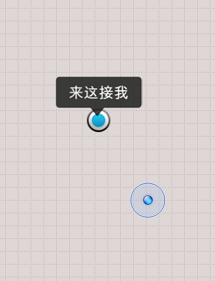
使用百度地图实现如图所示应用,首先自动定位当前我起始位置(小圆点位置),并跟随移动不断自动定位我的当前位置
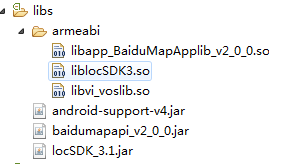
百度Api不同版本使用会有些差异,本例中加入lib如下:
二、编写MyApplication类
public class MyApplication extends Application {
static MyApplication myApplication;
BMapManager mBMapManager = null;
String mStrKey = "7ZfuRcOx1G3oZ8TKuTNGm4sO";
boolean m_bKeyRight = true; // 授权Key正确,验证通过
private List activityList = new LinkedList();
@Override
public void onCreate() {
myApplication = this;
initEngineManager(this);
super.onCreate();
}
public void initEngineManager(Context context) {
if (mBMapManager == null) {
mBMapManager = new BMapManager(context);
Toast.makeText(MyApplication.getInstance().getApplicationContext(),
"BMapManager 初始化SUCSUC!", Toast.LENGTH_LONG).show();
}
if (!mBMapManager.init(mStrKey, new MyGeneralListener())) {
Toast.makeText(MyApplication.getInstance().getApplicationContext(),
"BMapManager 初始化错误!", Toast.LENGTH_LONG).show();
}
}
public static MyApplication getInstance() {
if (myApplication == null) {
myApplication = new MyApplication();
}
return myApplication;
}
public void addActivity(Activity activity) {
activityList.add(activity);
}
public void exit() {
for (Activity activity : activityList) {
activity.finish();
}
System.exit(0);
}
// 常用事件监听,用来处理通常的网络错误,授权验证错误等
static class MyGeneralListener implements MKGeneralListener {
public void onGetNetworkState(int iError) {
if (iError == MKEvent.ERROR_NETWORK_CONNECT) {
Toast.makeText(
MyApplication.getInstance().getApplicationContext(),
"您的网络出错啦!", Toast.LENGTH_LONG).show();
} else if (iError == MKEvent.ERROR_NETWORK_DATA) {
Toast.makeText(
MyApplication.getInstance().getApplicationContext(),
"输入正确的检索条件!", Toast.LENGTH_LONG).show();
}
// ...
}
public void onGetPermissionState(int iError) {
if (iError == MKEvent.ERROR_PERMISSION_DENIED) {
// 授权Key错误:
Toast.makeText(
MyApplication.getInstance().getApplicationContext(),
"请输入正确的授权Key!",
Toast.LENGTH_LONG).show();
MyApplication.getInstance().m_bKeyRight = false;
}
}
}
}
三、编写主程序MainActivity,显示当前所处位置
主程序MainActity:
public class MainActivity extends Activity {
public MyApplication app;
static MapView mMapView = null;
public MKMapViewListener mMapListener = null;
MyLocationOverlay myLocationOverlay = null;
// 定位相关
LocationClient mLocClient;
public NotifyLister mNotifyer = null;
public MyLocationListenner myListener = new MyLocationListenner();
LocationData locData = null;
private MapController mMapController = null;
static MKSearch mkSerach;
Handler mHandler = new Handler() {
public void handleMessage(android.os.Message msg) {
Toast.makeText(MainActivity.this, "msg:" + msg.what,
Toast.LENGTH_SHORT).show();
};
};
static TextView showAddr;
@Override
protected void onCreate(Bundle savedInstanceState) {
super.onCreate(savedInstanceState);
setContentView(R.layout.activity_main);
showAddr = (TextView) findViewById(R.id.showAddr);
MyIcon mi = new MyIcon(this);
//在屏幕中心点添加接我图标
getWindow().addContentView(
mi,
new LayoutParams(LayoutParams.FILL_PARENT,
LayoutParams.FILL_PARENT));
MyIcon2 m2 = new MyIcon2(this);
getWindow().addContentView(
m2,
new LayoutParams(LayoutParams.FILL_PARENT,
LayoutParams.FILL_PARENT));
mMapView = (MapView) findViewById(R.id.bmapsView);
mMapController = mMapView.getController();
initMapView();
app = MyApplication.getInstance();
mLocClient = new LocationClient(this);
mLocClient.registerLocationListener(myListener);
//搜索初始化
mkSerach = new MKSearch();
mkSerach.init(app.mBMapManager, new MKSearchListener() {
@Override
public void onGetWalkingRouteResult(MKWalkingRouteResult arg0,
int arg1) {
// TODO Auto-generated method stub
}
@Override
public void onGetTransitRouteResult(MKTransitRouteResult arg0,
int arg1) {
// TODO Auto-generated method stub
}
@Override
public void onGetSuggestionResult(MKSuggestionResult arg0, int arg1) {
// TODO Auto-generated method stub
}
@Override
public void onGetPoiResult(MKPoiResult arg0, int arg1, int arg2) {
// TODO Auto-generated method stub
}
@Override
public void onGetPoiDetailSearchResult(int arg0, int arg1) {
// TODO Auto-generated method stub
}
@Override
public void onGetDrivingRouteResult(MKDrivingRouteResult arg0,
int arg1) {
// TODO Auto-generated method stub
}
@Override
public void onGetBusDetailResult(MKBusLineResult arg0, int arg1) {
// TODO Auto-generated method stub
}
@Override
public void onGetAddrResult(MKAddrInfo info, int arg1) {
showAddr.setText(info.strAddr);
}
});
//设置地图相关
LocationClientOption option = new LocationClientOption();
option.setOpenGps(true);
option.setCoorType("bd09ll");
option.setScanSpan(300000);
mLocClient.setLocOption(option);
mLocClient.start();
mMapView.getController().setZoom(16);
mMapView.getController().enableClick(true);
mMapView.displayZoomControls(true);
mMapListener = new MKMapViewListener() {
public void onMapMoveFinish() {
}
public void onClickMapPoi(MapPoi mapPoiInfo) {
// TODO Auto-generated method stub
String title = "";
if (mapPoiInfo != null) {
title = mapPoiInfo.strText;
Toast.makeText(MainActivity.this, title, Toast.LENGTH_SHORT)
.show();
}
}
};
mMapView.regMapViewListener(MyApplication.getInstance().mBMapManager,
mMapListener);
myLocationOverlay = new MyLocationOverlay(mMapView);
locData = new LocationData();
myLocationOverlay.setData(locData);
mMapView.getOverlays().add(myLocationOverlay);
myLocationOverlay.enableCompass();
mMapView.refresh();
}
private void initMapView() {
mMapView.setLongClickable(true);
}
/**
* 监听函数,又新位置的时候,格式化成字符串,输出到屏幕中
*/
public class MyLocationListenner implements BDLocationListener {
public void onReceiveLocation(BDLocation location) {
if (location == null)
return;
locData.latitude = location.getLatitude();
locData.longitude = location.getLongitude();
locData.direction = 2.0f;
locData.accuracy = location.getRadius();
locData.direction = location.getDerect();
Log.d("loctest",
String.format("before: lat: %f lon: %f",
location.getLatitude(), location.getLongitude()));
myLocationOverlay.setData(locData);
mMapView.refresh();
mMapController
.animateTo(new GeoPoint((int) (locData.latitude * 1e6),
(int) (locData.longitude * 1e6)), mHandler
.obtainMessage(1));
}
public void onReceivePoi(BDLocation poiLocation) {
if (poiLocation == null) {
return;
}
}
}
public class NotifyLister extends BDNotifyListener {
public void onNotify(BDLocation mlocation, float distance) {
}
}
@Override
protected void onPause() {
mMapView.onPause();
super.onPause();
}
@Override
protected void onResume() {
mMapView.onResume();
super.onResume();
}
@Override
protected void onSaveInstanceState(Bundle outState) {
super.onSaveInstanceState(outState);
mMapView.onSaveInstanceState(outState);
}
@Override
protected void onRestoreInstanceState(Bundle savedInstanceState) {
super.onRestoreInstanceState(savedInstanceState);
mMapView.onRestoreInstanceState(savedInstanceState);
}
public static void getPosition(GeoPoint g) {
mkSerach.reverseGeocode(g);
showAddr.setText("获取位置中...");
}
}
Xml布局:
xmlns:tools="http://schemas.android.com/tools"
android:layout_width="fill_parent"
android:layout_height="fill_parent"
android:orientation="vertical"
>
android:id="@+id/showAddr"
android:gravity="center"
android:layout_width="fill_parent"
android:layout_height="wrap_content"
android:text="选择地点"
android:textSize="20dp"
/>
android:id="@+id/bmapsView"
android:layout_width="fill_parent"
android:layout_height="fill_parent"
android:clickable="true" />
三、绘制图形
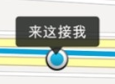
MyIcon 的onDraw实现绘制中心点的图标,MyIcon2绘制指示器图标,如图所示
public class MyIcon extends View {
public static int w;
public static int h;
public static Bitmap mBitmap;
public MyIcon(Context context) {
super(context);
mBitmap = BitmapFactory.decodeResource(getResources(), R.drawable.me);
}
@Override
protected void onDraw(Canvas canvas) {
super.onDraw(canvas);
w = this.getWidth() / 2 - mBitmap.getWidth() / 2;
h = this.getHeight() / 2 - mBitmap.getHeight() / 2;
canvas.drawBitmap(mBitmap, w, h, null);
}
}
public class MyIcon2 extends View{
public static int w;
public static int h;
private Bitmap mBitmap;
public MyIcon2(Context context) {
super(context);
mBitmap = BitmapFactory.decodeResource(getResources(), R.drawable.jiewo);
}
@Override
protected void onDraw(Canvas canvas) {
super.onDraw(canvas);
w = this.getWidth() / 2 - mBitmap.getWidth() / 2;
h = (this.getHeight() / 2 - mBitmap.getHeight() / 2) - ( MyIcon.mBitmap.getHeight()/2);
canvas.drawBitmap(mBitmap, w, h, null);
}
}
以上所述是小编给大家分享Android百度定位导航之基于百度地图移动获取位置和自动定位的相关知识,希望对大家有所帮助。

北京人形旗下天工造物具身智能开源社区,聚焦具身天工与慧思开物两大平台
更多推荐
 0
0 0
0- 0


 已为社区贡献2条内容

所有评论(0)