
autoware.universe安装过程中的各种错误和解决办法(ros2 galactic)
安装
小鱼一键安装ros:
wget http://fishros.com/install -O fishros && bash fishros
源代码安装打开链接:autoware安装说明地址(galactic)
github如果上不去,可以参考这个
为了直接一些,直接gitcode下载:
git clone https://gitcode.com/gh_mirrors/au/autoware.git -b galactic```
如果没安装cuda,直接进入autoware目录,运行./setup.env.sh,接下来的时间比较长。如果发生了错误,那就手动安装吧。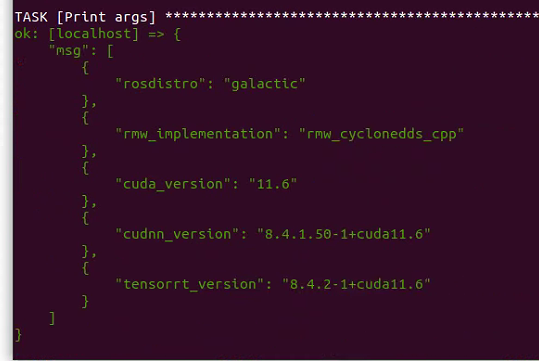
安装cuda11.6
wget https://developer.download.nvidia.com/compute/cuda/11.6.2/local_installers/cuda_11.6.2_510.47.03_linux_sbsa.run
sudo sh cuda_11.6.2_510.47.03_linux_sbsa.run
如果在update或者upgrade过程中遇到了error processing archive /var/cache/apt/archives/nvidia=xxx.deb(unpack):trying to overwrite等问题,可以参考链接
各种错误和解决办法
autoware.universe安装完成
卸载cudnn
problem:
AttributeError: module 'importlib_metadata' has no attribute 'EntryPoints'
solution: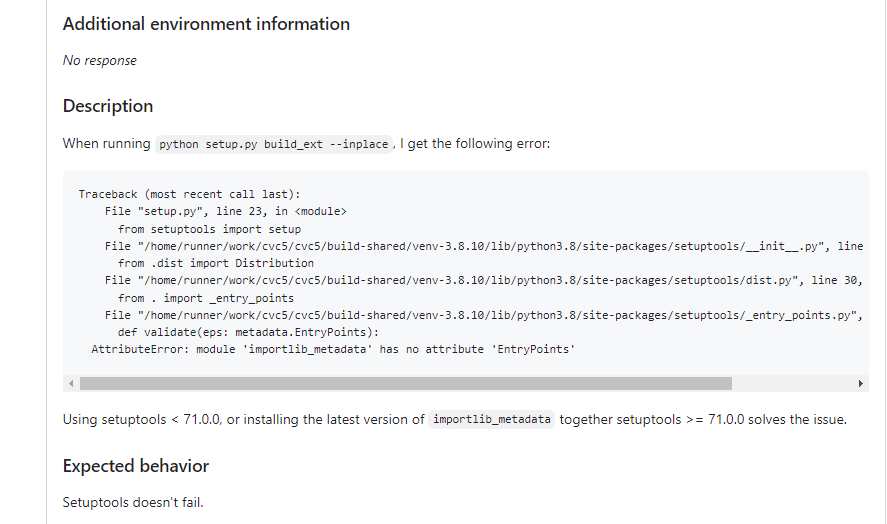
解决办法就是把setuptools的版本降低
problem: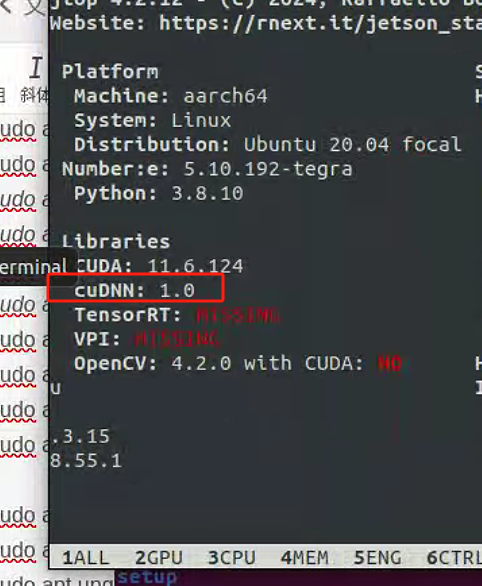
cudnn版本号显示1.0
problem:
--- stderr: pacmod_interface
In file included from /home/admin/ssd_disk/work/adws/src/ccteg_assisted_driving_warning_system/vehicle/external/pacmod_interface/pacmod_interface/src/pacmod_dynamic_parameter_changer/pacmod_dynamic_parameter_changer_node.cpp:15:
/home/admin/ssd_disk/work/adws/src/ccteg_assisted_driving_warning_system/vehicle/external/pacmod_interface/pacmod_interface/include/pacmod_dynamic_parameter_changer/pacmod_dynamic_parameter_changer_node.hpp:21:10: fatal error: pacmod3_msgs/msg/system_rpt_float.hpp: No such file or directory
   21 | #include <pacmod3_msgs/msg/system_rpt_float.hpp>
      |          ^~~~~~~~~~~~~~~~~~~~~~~~~~~~~~~~~~~~~~~
compilation terminated.
solution:
用这个办法
problem:
tensorrt_yolo无法完成目标识别。
solution:
找到engine文件,重新生成一下,一般都是这个文件的问题。
problem:
提示找不到argsParser.h 等.h文件。
solution:
用locate命令先看看这个缺少的文件在哪个文件夹里面有,有的话用cp命令复制过来即可。
problem:
future: <Task finished name='Task-2' coro=<LaunchService._process_one_event() done, defined at /opt/ros/galactic/lib/python3.8/site-packages/launch/launch_service.py:226> exception=SubstitutionFailure("file not found: [Errno 2] No such file or directory: 'xacro'")>
Traceback (most recent call last):
  File "/opt/ros/galactic/lib/python3.8/site-packages/launch/substitutions/command.py", line 108, in perform
    result = subprocess.run(
  File "/usr/lib/python3.8/subprocess.py", line 493, in run
    with Popen(*popenargs, **kwargs) as process:
  File "/usr/lib/python3.8/subprocess.py", line 858, in __init__
    self._execute_child(args, executable, preexec_fn, close_fds,
  File "/usr/lib/python3.8/subprocess.py", line 1704, in _execute_child
    raise child_exception_type(errno_num, err_msg, err_filename)
FileNotFoundError: [Errno 2] No such file or directory: 'xacro'

During handling of the above exception, another exception occurred:

Traceback (most recent call last):
  File "/opt/ros/galactic/lib/python3.8/site-packages/launch/launch_service.py", line 228, in _process_one_event
    await self.__process_event(next_event)
  File "/opt/ros/galactic/lib/python3.8/site-packages/launch/launch_service.py", line 248, in __process_event
    visit_all_entities_and_collect_futures(entity, self.__context))
  File "/opt/ros/galactic/lib/python3.8/site-packages/launch/utilities/visit_all_entities_and_collect_futures_impl.py", line 45, in visit_all_entities_and_collect_futures
    futures_to_return += visit_all_entities_and_collect_futures(sub_entity, context)
  File "/opt/ros/galactic/lib/python3.8/site-packages/launch/utilities/visit_all_entities_and_collect_futures_impl.py", line 45, in visit_all_entities_and_collect_futures
    futures_to_return += visit_all_entities_and_collect_futures(sub_entity, context)
  File "/opt/ros/galactic/lib/python3.8/site-packages/launch/utilities/visit_all_entities_and_collect_futures_impl.py", line 45, in visit_all_entities_and_collect_futures
    futures_to_return += visit_all_entities_and_collect_futures(sub_entity, context)
  [Previous line repeated 8 more times]
  File "/opt/ros/galactic/lib/python3.8/site-packages/launch/utilities/visit_all_entities_and_collect_futures_impl.py", line 38, in visit_all_entities_and_collect_futures
    sub_entities = entity.visit(context)
  File "/opt/ros/galactic/lib/python3.8/site-packages/launch/action.py", line 108, in visit
    return self.execute(context)
  File "/opt/ros/galactic/lib/python3.8/site-packages/launch_ros/actions/node.py", line 465, in execute
    self._perform_substitutions(context)
  File "/opt/ros/galactic/lib/python3.8/site-packages/launch_ros/actions/node.py", line 420, in _perform_substitutions
    evaluated_parameters = evaluate_parameters(context, self.__parameters)
  File "/opt/ros/galactic/lib/python3.8/site-packages/launch_ros/utilities/evaluate_parameters.py", line 164, in evaluate_parameters
    output_params.append(evaluate_parameter_dict(context, param))
  File "/opt/ros/galactic/lib/python3.8/site-packages/launch_ros/utilities/evaluate_parameters.py", line 133, in evaluate_parameter_dict
    evaluated_value = value.evaluate(context)
  File "/opt/ros/galactic/lib/python3.8/site-packages/launch_ros/parameter_descriptions.py", line 91, in evaluate
    self.__evaluated_parameter_value = perform_typed_substitution(
  File "/opt/ros/galactic/lib/python3.8/site-packages/launch/utilities/type_utils.py", line 546, in perform_typed_substitution
    perform_substitutions(context, cast(List[Substitution], value)),
  File "/opt/ros/galactic/lib/python3.8/site-packages/launch/utilities/perform_substitutions_impl.py", line 26, in perform_substitutions
    return ''.join([context.perform_substitution(sub) for sub in subs])
  File "/opt/ros/galactic/lib/python3.8/site-packages/launch/utilities/perform_substitutions_impl.py", line 26, in <listcomp>
    return ''.join([context.perform_substitution(sub) for sub in subs])
  File "/opt/ros/galactic/lib/python3.8/site-packages/launch/launch_context.py", line 232, in perform_substitution
    return substitution.perform(self)
  File "/opt/ros/galactic/lib/python3.8/site-packages/launch/substitutions/command.py", line 114, in perform
    raise SubstitutionFailure(f'file not found: {ex}')
launch.substitutions.substitution_failure.SubstitutionFailure: file not found: [Errno 2] No such file or directory: 'xacro'
solution:
sudo apt-get install ros-galactic-xacro
problem:
autoware/src/sensor_component/external/tamagawa_imu_driver/src/tag_can_driver.cpp:49:10: fatal error: can_msgs/msg/frame.hpp: 没有那个文件或目录 49 | #include "can_msgs/msg/frame.hpp"
solution:
sudo apt-get install ros-galactic-can-msgs*
problem:
--- stderr: trtexec_vendor
CMake Error at CMakeLists.txt:15 (find_package):
  By not providing "Findcudnn_cmake_module.cmake" in CMAKE_MODULE_PATH this
  project has asked CMake to find a package configuration file provided by
  "cudnn_cmake_module", but CMake did not find one.

  Could not find a package configuration file provided by
  "cudnn_cmake_module" with any of the following names:

    cudnn_cmake_moduleConfig.cmake
    cudnn_cmake_module-config.cmake

  Add the installation prefix of "cudnn_cmake_module" to CMAKE_PREFIX_PATH or
  set "cudnn_cmake_module_DIR" to a directory containing one of the above
  files.  If "cudnn_cmake_module" provides a separate development package or
  SDK, be sure it has been installed.


---
Failed   <<< trtexec_vendor [0.13s, exited with code 1]
solution:
sudo apt-get install ros-galactic-cudnn-cmake-module
problem:
--- stderr: velodyne_driver
In file included from /home/znks/work/autoware/src/sensor_component/external/velodyne_vls/velodyne_driver/src/lib/input.cc:34:
/home/znks/work/autoware/src/sensor_component/external/velodyne_vls/velodyne_driver/include/velodyne_driver/input.h:37:10: fatal error: pcap.h: 没有那个文件或目录
   37 | #include <pcap.h>
      |          ^~~~~~~~
compilation terminated.
solution:
sudo apt-get install libpcap-dev
problem:
In file included from /home/znks/work/autoware/src/universe/autoware.universe/system/bluetooth_monitor/src/bluetooth_monitor.cpp:15:
/home/znks/work/autoware/src/universe/autoware.universe/system/bluetooth_monitor/include/bluetooth_monitor/bluetooth_monitor.hpp:20:10: fatal error: diagnostic_updater/diagnostic_updater.hpp: 没有那个文件或目录
   20 | #include <diagnostic_updater/diagnostic_updater.hpp>
      |          ^~~~~~~~~~~~~~~~~~~~~~~~~~~~~~~~~~~~~~~~~~~
compilation terminated.
solution:
sudo apt-get install ros-galactic-diagnostic-updater*
problem:
  By not providing "Findnav2_costmap_2d.cmake" in CMAKE_MODULE_PATH this
  project has asked CMake to find a package configuration file provided by
  "nav2_costmap_2d", but CMake did not find one.

  Could not find a package configuration file provided by "nav2_costmap_2d"
  with any of the following names:

    nav2_costmap_2dConfig.cmake
    nav2_costmap_2d-config.cmake

  Add the installation prefix of "nav2_costmap_2d" to CMAKE_PREFIX_PATH or
  set "nav2_costmap_2d_DIR" to a directory containing one of the above files.
  If "nav2_costmap_2d" provides a separate development package or SDK, be
  sure it has been installed.
solution:
sudo apt-get install ros-galactic-nav2-costmap-2d*
problem:
Starting >>> grid_map_cv
--- stderr: grid_map_cv
CMake Error at CMakeLists.txt:7 (find_package):
  By not providing "Findfilters.cmake" in CMAKE_MODULE_PATH this project has
  asked CMake to find a package configuration file provided by "filters", but
  CMake did not find one.

  Could not find a package configuration file provided by "filters" with any
  of the following names:

    filtersConfig.cmake
    filters-config.cmake
solution:
sudo apt-get install ros-galactic-filters
problem:
Starting >>> grid_map_octomap
--- stderr: grid_map_octomap
CMake Error at CMakeLists.txt:8 (find_package):
  By not providing "FindOCTOMAP.cmake" in CMAKE_MODULE_PATH this project has
  asked CMake to find a package configuration file provided by "OCTOMAP", but
  CMake did not find one.

  Could not find a package configuration file provided by "OCTOMAP" with any
  of the following names:

    OCTOMAPConfig.cmake
    octomap-config.cmake

  Add the installation prefix of "OCTOMAP" to CMAKE_PREFIX_PATH or set
  "OCTOMAP_DIR" to a directory containing one of the above files.  If
  "OCTOMAP" provides a separate development package or SDK, be sure it has
  been installed.


---
Failed   <<< grid_map_octomap [0.10s, exited with code 1]
solution:
sudo apt-get install ros-galactic-octomap*
problem:
Starting >>> osqp_interface
--- stderr: osqp_interface
CMake Error at CMakeLists.txt:10 (find_package):
  By not providing "Findosqp.cmake" in CMAKE_MODULE_PATH this project has
  asked CMake to find a package configuration file provided by "osqp", but
  CMake did not find one.

  Could not find a package configuration file provided by "osqp" with any of
  the following names:

    osqpConfig.cmake
    osqp-config.cmake

  Add the installation prefix of "osqp" to CMAKE_PREFIX_PATH or set
  "osqp_DIR" to a directory containing one of the above files.  If "osqp"
  provides a separate development package or SDK, be sure it has been
  installed.


---
Failed   <<< osqp_interface [0.48s, exited with code 1]
solution:
sudo apt install ros-galactic-osqp-vendor*
problem:
Starting >>> radar_threshold_filter
--- stderr: radar_threshold_filter
In file included from /home/znks/work/autoware/src/universe/autoware.universe/sensing/radar_threshold_filter/src/radar_threshold_filter_node/radar_threshold_filter_node.cpp:15:
/home/znks/work/autoware/src/universe/autoware.universe/sensing/radar_threshold_filter/include/radar_threshold_filter/radar_threshold_filter_node.hpp:20:10: fatal error: radar_msgs/msg/radar_scan.hpp: 没有那个文件或目录
   20 | #include <radar_msgs/msg/radar_scan.hpp>
      |          ^~~~~~~~~~~~~~~~~~~~~~~~~~~~~~~
compilation terminated.
make[2]: *** [CMakeFiles/radar_threshold_filter_node_component.dir/build.make:63:CMakeFiles/radar_threshold_filter_node_component.dir/src/radar_threshold_filter_node/radar_threshold_filter_node.cpp.o] 错误 1
make[1]: *** [CMakeFiles/Makefile2:107:CMakeFiles/radar_threshold_filter_node_component.dir/all] 错误 2
make: *** [Makefile:141:all] 错误 2
---
Failed   <<< radar_threshold_filter [0.17s, exited with code 2]
solution:
sudo apt install ros-galactic-radar-msgs*
problem:
Starting >>> tier4_pcl_extensions
--- stderr: tier4_pcl_extensions
In file included from /home/znks/work/autoware/src/universe/autoware.universe/sensing/tier4_pcl_extensions/src/voxel_grid_nearest_centroid.cpp:52:
/home/znks/work/autoware/src/universe/autoware.universe/sensing/tier4_pcl_extensions/include/tier4_pcl_extensions/voxel_grid_nearest_centroid_impl.hpp:66:10: fatal error: range/v3/all.hpp: 没有那个文件或目录
   66 | #include <range/v3/all.hpp>
      |          ^~~~~~~~~~~~~~~~~~
compilation terminated.
make[2]: *** [CMakeFiles/tier4_pcl_extensions.dir/build.make:63:CMakeFiles/tier4_pcl_extensions.dir/src/voxel_grid_nearest_centroid.cpp.o] 错误 1
make[1]: *** [CMakeFiles/Makefile2:78:CMakeFiles/tier4_pcl_extensions.dir/all] 错误 2
make: *** [Makefile:141:all] 错误 2
---
Failed   <<< tier4_pcl_extensions [0.89s, exited with code 2]
solution:
sudo apt-get install librange-v3-dev
problem:
Starting >>> gnss_poser
--- stderr: gnss_poser
In file included from /home/znks/work/autoware/src/universe/autoware.universe/sensing/gnss_poser/include/gnss_poser/gnss_poser_core.hpp:17,
                 from /home/znks/work/autoware/src/universe/autoware.universe/sensing/gnss_poser/src/gnss_poser_core.cpp:15:
/home/znks/work/autoware/src/universe/autoware.universe/sensing/gnss_poser/include/gnss_poser/convert.hpp:19:10: fatal error: GeographicLib/Geoid.hpp: 没有那个文件或目录
   19 | #include <GeographicLib/Geoid.hpp>
      |          ^~~~~~~~~~~~~~~~~~~~~~~~~
compilation terminated.
make[2]: *** [CMakeFiles/gnss_poser_node.dir/build.make:63:CMakeFiles/gnss_poser_node.dir/src/gnss_poser_core.cpp.o] 错误 1
make[1]: *** [CMakeFiles/Makefile2:80:CMakeFiles/gnss_poser_node.dir/all] 错误 2
make[1]: *** 正在等待未完成的任务....
make: *** [Makefile:141:all] 错误 2
---
Failed   <<< gnss_poser [1.91s, exited with code 2]
solution:
sudo apt-get install geographiclib-*
problem:
Starting >>> ekf_localizer
--- stderr: ekf_localizer
/home/znks/work/autoware/src/universe/autoware.universe/localization/ekf_localizer/src/ekf_localizer.cpp:31:10: fatal error: fmt/core.h: 没有那个文件或目录
   31 | #include <fmt/core.h>
      |          ^~~~~~~~~~~~
compilation terminated.
make[2]: *** [CMakeFiles/ekf_localizer_lib.dir/build.make:63:CMakeFiles/ekf_localizer_lib.dir/src/ekf_localizer.cpp.o] 错误 1
make[2]: *** 正在等待未完成的任务....
make[1]: *** [CMakeFiles/Makefile2:136:CMakeFiles/ekf_localizer_lib.dir/all] 错误 2
make[1]: *** 正在等待未完成的任务....
make: *** [Makefile:141:all] 错误 2
---
Failed   <<< ekf_localizer [5.11s, exited with code 2]
solution:
sudo apt-get install libfmt-*
problem:
Starting >>> freespace_planning_algorithms
--- stderr: freespace_planning_algorithms
/home/znks/work/autoware/src/universe/autoware.universe/planning/freespace_planning_algorithms/src/rrtstar_core.cpp:17:10: fatal error: nlohmann/json.hpp: 没有那个文件或目录
   17 | #include <nlohmann/json.hpp>
      |          ^~~~~~~~~~~~~~~~~~~
compilation terminated.
make[2]: *** [CMakeFiles/rrtstar_core.dir/build.make:63:CMakeFiles/rrtstar_core.dir/src/rrtstar_core.cpp.o] 错误 1
make[1]: *** [CMakeFiles/Makefile2:192:CMakeFiles/rrtstar_core.dir/all] 错误 2
make: *** [Makefile:141:all] 错误 2
---
Failed   <<< freespace_planning_algorithms [0.30s, exited with code 2]
solution:
sudo apt install nlohmann-json3-dev
problem:
Starting >>> front_vehicle_velocity_estimator
--- stderr: front_vehicle_velocity_estimator
In file included from /home/znks/work/autoware/src/universe/autoware.universe/perception/front_vehicle_velocity_estimator/src/front_vehicle_velocity_estimator_node/front_vehicle_velocity_estimator.cpp:15:
/home/znks/work/autoware/src/universe/autoware.universe/perception/front_vehicle_velocity_estimator/include/front_vehicle_velocity_estimator/front_vehicle_velocity_estimator.hpp:18:10: fatal error: pcl/point_cloud.h: 没有那个文件或目录
   18 | #include "pcl/point_cloud.h"
      |          ^~~~~~~~~~~~~~~~~~~
In file included from /home/znks/work/autoware/src/universe/autoware.universe/perception/front_vehicle_velocity_estimator/include/front_vehicle_velocity_estimator/front_vehicle_velocity_estimator_node.hpp:18,
solution:
sudo apt install ros-galactic-pcl-*
problem:
In file included from /home/znks/work/autoware/src/universe/autoware.universe/system/velodyne_monitor/src/velodyne_monitor_node.cpp:20:
/home/znks/work/autoware/src/universe/autoware.universe/system/velodyne_monitor/include/velodyne_monitor/velodyne_monitor.hpp:32:10: fatal error: cpprest/http_client.h: 没有那个文件或目录
   32 | #include <cpprest/http_client.h>
      |          ^~~~~~~~~~~~~~~~~~~~~~~
compilation terminated.
solution:
sudo apt-get install libcpprest*
problem:
--- stderr: gnss_poser
In file included from /home/znks/work/autoware/src/universe/autoware.universe/sensing/gnss_poser/include/gnss_poser/gnss_poser_core.hpp:17,
                 from /home/znks/work/autoware/src/universe/autoware.universe/sensing/gnss_poser/src/gnss_poser_core.cpp:15:
/home/znks/work/autoware/src/universe/autoware.universe/sensing/gnss_poser/include/gnss_poser/convert.hpp:19:10: fatal error: GeographicLib/Geoid.hpp: 没有那个文件或目录
   19 | #include <GeographicLib/Geoid.hpp>
      |          ^~~~~~~~~~~~~~~~~~~~~~~~~
compilation terminated.
solution:
sudo apt-get install ros-galactic-geographic-*
problem:
--- stderr: autoware_auto_geometry
CMake Error at /opt/ros/galactic/share/ament_cmake_target_dependencies/cmake/ament_target_dependencies.cmake:77 (message):
  ament_target_dependencies() the passed package name
  'osrf_testing_tools_cpp' was not found before
Call Stack (most recent call first):
  CMakeLists.txt:29 (ament_target_dependencies)


---
Failed   <<< autoware_auto_geometry [3.26s, exited with code 1]
solution:
sudo apt-get install ros-galactic-osrf-testing-tools-cpp*
problem:
Starting >>> raw_vehicle_cmd_converter
--- stderr: fault_injection
In file included from /home/znks/work/autoware/src/universe/autoware.universe/simulator/fault_injection/include/fault_injection/fault_injection_node.hpp:18,
                 from /home/znks/work/autoware/src/universe/autoware.universe/simulator/fault_injection/src/fault_injection_node/fault_injection_node.cpp:15:
/home/znks/work/autoware/src/universe/autoware.universe/simulator/fault_injection/include/fault_injection/diagnostic_storage.hpp:18:10: fatal error: diagnostic_aggregator/status_item.hpp: 没有那个文件或目录
   18 | #include <diagnostic_aggregator/status_item.hpp>
      |          ^~~~~~~~~~~~~~~~~~~~~~~~~~~~~~~~~~~~~~~
compilation terminated.
make[2]: *** [CMakeFiles/fault_injection_node_component.dir/build.make:63:CMakeFiles/fault_injection_node_component.dir/src/fault_injection_node/fault_injection_node.cpp.o] 错误 1
make[1]: *** [CMakeFiles/Makefile2:159:CMakeFiles/fault_injection_node_component.dir/all] 错误 2
make[1]: *** 正在等待未完成的任务....
make: *** [Makefile:141:all] 错误 2
---
Failed   <<< fault_injection [2.45s, exited with code 2]
solution:
sudo apt-get install ros-galactic-diagnostic-aggregator*
problem:
CMake Error at CMakeLists.txt:17 (find_package):
  By not providing "Findtensorrt_cmake_module.cmake" in CMAKE_MODULE_PATH
  this project has asked CMake to find a package configuration file provided
  by "tensorrt_cmake_module", but CMake did not find one.

  Could not find a package configuration file provided by
  "tensorrt_cmake_module" with any of the following names:

    tensorrt_cmake_moduleConfig.cmake
    tensorrt_cmake_module-config.cmake

  Add the installation prefix of "tensorrt_cmake_module" to CMAKE_PREFIX_PATH
  or set "tensorrt_cmake_module_DIR" to a directory containing one of the
  above files.  If "tensorrt_cmake_module" provides a separate development
  package or SDK, be sure it has been installed.


---
Failed   <<< trtexec_vendor [0.84s, exited with code 1]
solution:
sudo apt-get install ros-galactic-tensorrt-cmake-module
problem:
Finished <<< traffic_light_classifier [0.62s]
--- stderr: gnss_poser
In file included from /home/znks/work/autoware/src/universe/autoware.universe/sensing/gnss_poser/include/gnss_poser/gnss_poser_core.hpp:17,
                 from /home/znks/work/autoware/src/universe/autoware.universe/sensing/gnss_poser/src/gnss_poser_core.cpp:15:
/home/znks/work/autoware/src/universe/autoware.universe/sensing/gnss_poser/include/gnss_poser/convert.hpp:19:10: fatal error: GeographicLib/Geoid.hpp: 没有那个文件或目录
   19 | #include <GeographicLib/Geoid.hpp>
      |          ^~~~~~~~~~~~~~~~~~~~~~~~~
compilation terminated.
make[2]: *** [CMakeFiles/gnss_poser_node.dir/build.make:63:CMakeFiles/gnss_poser_node.dir/src/gnss_poser_core.cpp.o] 错误 1
make[1]: *** [CMakeFiles/Makefile2:80:CMakeFiles/gnss_poser_node.dir/all] 错误 2
make: *** [Makefile:141:all] 错误 2
---
Failed   <<< gnss_poser [0.38s, exited with code 2]
solution:
sudo apt-get install libgeograph*
problem:
--- stderr: pacmod_interface
In file included from /home/znks/work/autoware/src/vehicle/external/pacmod_interface/pacmod_interface/src/pacmod_dynamic_parameter_changer/pacmod_dynamic_parameter_changer_node.cpp:15:
/home/znks/work/autoware/src/vehicle/external/pacmod_interface/pacmod_interface/include/pacmod_dynamic_parameter_changer/pacmod_dynamic_parameter_changer_node.hpp:21:10: fatal error: pacmod3_msgs/msg/system_rpt_float.hpp: 没有那个文件或目录
   21 | #include <pacmod3_msgs/msg/system_rpt_float.hpp>
      |          ^~~~~~~~~~~~~~~~~~~~~~~~~~~~~~~~~~~~~~~
compilation terminated.
solution:
sudo apt-get install ros-galactic-pacmod3*
problem:
--- stderr: trajectory_follower_nodes
CMake Error at /home/znks/work/autoware/install/autoware_testing/share/autoware_testing/cmake/autoware_testing-extras.cmake:15 (find_package):
  By not providing "Findros_testing.cmake" in CMAKE_MODULE_PATH this project
  has asked CMake to find a package configuration file provided by
  "ros_testing", but CMake did not find one.

  Could not find a package configuration file provided by "ros_testing" with
  any of the following names:

    ros_testingConfig.cmake
    ros_testing-config.cmake

  Add the installation prefix of "ros_testing" to CMAKE_PREFIX_PATH or set
  "ros_testing_DIR" to a directory containing one of the above files.  If
  "ros_testing" provides a separate development package or SDK, be sure it
  has been installed.
solution:
sudo apt-get install ros-galactic-ros-testing
problem:
CMake Error at /usr/local/share/cmake-3.30/Modules/FindPkgConfig.cmake:645 (message):
  The following required packages were not found:

   - yaml-cpp

Call Stack (most recent call first):
  /usr/local/share/cmake-3.30/Modules/FindPkgConfig.cmake:873 (_pkg_check_modules_internal)
  CMakeLists.txt:29 (pkg_check_modules)
solution:
sudo apt-get install ros-galactic-point-cloud-msg-wrapper
problem:
CMake Error at CMakeLists.txt:40 (find_package):
  Could not find a package configuration file provided by "tvm_runtime" with
  any of the following names:

    tvm_runtimeConfig.cmake
    tvm_runtime-config.cmake

  Add the installation prefix of "tvm_runtime" to CMAKE_PREFIX_PATH or set
  "tvm_runtime_DIR" to a directory containing one of the above files.  If
  "tvm_runtime" provides a separate development package or SDK, be sure it
  has been installed.


---
Failed   <<< tvm_utility [0.77s, exited with code 1]
solution:
sudo apt-get install ros-galactic-tvm-vendor*
problem:
CMake Error at CMakeLists.txt:125 (find_library):
  Could not find NLGENL3 using the following names: nl-genl-3
solution:
CMake Error at CMakeLists.txt:125 (find_library):
  Could not find NLGENL3 using the following names: nl-genl-3
problem:
  10 packages failed: crosswalk_traffic_light_estimator lanelet2_map_preprocessor map_based_prediction map_loader map_tf_generator pointcloud_preprocessor route_handler simulator_compatibility_test trajectory_follower_nodes trtexec_vendor
  25 packages had stderr output: costmap_generator crosswalk_traffic_light_estimator detected_object_validation elevation_map_loader image_projection_based_fusion lane_departure_checker lanelet2_extension lanelet2_map_preprocessor lidar_centerpoint map_based_prediction map_loader map_tf_generator obstacle_cruise_planner obstacle_velocity_limiter pointcloud_preprocessor route_handler simulator_compatibility_test system_monitor tensorrt_yolo tier4_system_launch tier4_traffic_light_rviz_plugin traffic_light_map_based_detector traffic_light_visualization trajectory_follower_nodes trtexec_vendor
  19 packages not processed
Expected ['/usr/bin/python3', '-W', 'ignore:setup.py install is deprecated', 'setup.py', '--help-commands'] to pass: Traceback (most recent call last):
  File "setup.py", line 1, in <module>
    from setuptools import setup
  File "/home/znks/.local/lib/python3.8/site-packages/setuptools/__init__.py", line 27, in <module>
    from .dist import Distribution
  File "/home/znks/.local/lib/python3.8/site-packages/setuptools/dist.py", line 30, in <module>
    from . import (
  File "/home/znks/.local/lib/python3.8/site-packages/setuptools/_entry_points.py", line 45, in <module>
    def validate(eps: metadata.EntryPoints):
AttributeError: module 'importlib_metadata' has no attribute 'EntryPoints'
solution:
pip install --upgrade importlib-metadata
problem:
CMake Error at CMakeLists.txt:15 (find_package):
  By not providing "FindCGAL.cmake" in CMAKE_MODULE_PATH this project has
  asked CMake to find a package configuration file provided by "CGAL", but
  CMake did not find one.

  Could not find a package configuration file provided by "CGAL" with any of
  the following names:

    CGALConfig.cmake
    cgal-config.cmake

  Add the installation prefix of "CGAL" to CMAKE_PREFIX_PATH or set
  "CGAL_DIR" to a directory containing one of the above files.  If "CGAL"
  provides a separate development package or SDK, be sure it has been
  installed.
problem:
nce_module.cpp:15:
/home/znks/work/autoware/src/universe/autoware.universe/planning/behavior_path_planner/include/behavior_path_planner/scene_module/scene_module_interface.hpp:35:10: fatal error: behaviortree_cpp_v3/basic_types.h: 没有那个文件或目录
   35 | #include <behaviortree_cpp_v3/basic_types.h>
      |          ^~~~~~~~~~~~~~~~~~~~~~~~~~~~~~~~~~~
compilation terminated.
In file included from /home/znks/work/autoware/src/universe/autoware.universe/planning/behavior_path_planner/include/behavior_path_planner/scene_module/scene_module_bt_node_interface.hpp:18,
                 from /home/znks/work/autoware/src/universe/autoware.universe/planning/behavior_path_planner/include/behavior_path_planner/behavior_tree_manager.hpp:19,
                 from /home/znks/work/autoware/src/universe/autoware.universe/planning/behavior_path_planner/include/behavior_path_planner/behavior_path_planner_node.hpp:18,
                 from /home/znks/work/autoware/src/universe/autoware.universe/planning/behavior_path_planner/src/behavior_path_planner_node.cpp:15:
/home/znks/work/autoware/src/universe/autoware.universe/planning/behavior_path_planner/include/behavior_path_planner/scene_module/scene_module_interface.hpp:35:10: fatal error: behaviortree_cpp_v3/basic_types.h: 没有那个文件或目录
   35 | #include <behaviortree_cpp_v3/basic_types.h>
solution:
sudo apt-get install ros-galactic-behaviortree-cpp-v3*
problem:
!!
  easy_install.initialize_options(self)
Traceback (most recent call last):
  File "setup.py", line 11, in <module>
    setup(
  File "/home/znks/.local/lib/python3.8/site-packages/setuptools/__init__.py", line 117, in setup
    return distutils.core.setup(**attrs)
  File "/home/znks/.local/lib/python3.8/site-packages/setuptools/_distutils/core.py", line 183, in setup
    return run_commands(dist)
  File "/home/znks/.local/lib/python3.8/site-packages/setuptools/_distutils/core.py", line 199, in run_commands
    dist.run_commands()
  File "/home/znks/.local/lib/python3.8/site-packages/setuptools/_distutils/dist.py", line 954, in run_commands
    self.run_command(cmd)
  File "/home/znks/.local/lib/python3.8/site-packages/setuptools/dist.py", line 999, in run_command
    super().run_command(command)
  File "/home/znks/.local/lib/python3.8/site-packages/setuptools/_distutils/dist.py", line 972, in run_command
    cmd_obj.ensure_finalized()
  File "/home/znks/.local/lib/python3.8/site-packages/setuptools/_distutils/cmd.py", line 111, in ensure_finalized
    self.finalize_options()
  File "/home/znks/.local/lib/python3.8/site-packages/setuptools/command/develop.py", line 51, in finalize_options
    easy_install.finalize_options(self)
  File "/home/znks/.local/lib/python3.8/site-packages/setuptools/command/easy_install.py", line 253, in finalize_options
    'dist_fullname': self.distribution.get_fullname(),
  File "/home/znks/.local/lib/python3.8/site-packages/setuptools/_core_metadata.py", line 267, in get_fullname
    return _distribution_fullname(self.get_name(), self.get_version())
  File "/home/znks/.local/lib/python3.8/site-packages/setuptools/_core_metadata.py", line 285, in _distribution_fullname
    canonicalize_version(version, strip_trailing_zero=False),
TypeError: canonicalize_version() got an unexpected keyword argument 'strip_trailing_zero'
---
Failed   <<< simulator_compatibility_test [0.88s, exited with code 1]
solution:
problem:
In file included from /home/znks/work/autoware/src/universe/autoware.universe/planning/planning_error_monitor/src/planning_error_monitor_node.cpp:15:
/home/znks/work/autoware/src/universe/autoware.universe/planning/planning_error_monitor/include/planning_error_monitor/planning_error_monitor_node.hpp:20:10: fatal error: diagnostic_updater/diagnostic_updater.hpp: 没有那个文件或目录
   20 | #include <diagnostic_updater/diagnostic_updater.hpp>
      |          ^~~~~~~~~~~~~~~~~~~~~~~~~~~~~~~~~~~~~~~~~~~
compilation terminated.
make[2]: *** [CMakeFiles/planning_error_monitor_node.dir/build.make:76:CMakeFiles/planning_error_monitor_node.dir/src/planning_error_monitor_node.cpp.o] 错误 1
make[1]: *** [CMakeFiles/Makefile2:163:CMakeFiles/planning_error_monitor_node.dir/all] 错误 2
make: *** [Makefile:146:all] 错误 2
---
Failed   <<< planning_error_monitor [0.49s, exited with code 2]
Starting >>> ad_api_adaptors
Finished <<< ndt_scan_matcher [0.58s]
Starting >>> autoware_auto_msgs
Finished <<< motion_utils [0.54s]
--- stderr: tier4_api_msgs
CMake Warning (dev) at /opt/ros/ga
solution:
sudo apt-get install ros-galactic-diagnostic-updater*
problem:
compilation terminated.
make[2]: *** [CMakeFiles/lanelet2_extension_lib.dir/build.make:132:CMakeFiles/lanelet2_extension_lib.dir/lib/message_conversion.cpp.o] 错误 1
In file included from /home/znks/work/autoware/src/core/autoware_common/tmp/lanelet2_extension/lib/utilities.cpp:19:
/home/znks/work/autoware/src/core/autoware_common/tmp/lanelet2_extension/include/lanelet2_extension/utility/utilities.hpp:27:10: fatal error: lanelet2_routing/Route.h: 没有那个文件或目录
   27 | #include <lanelet2_routing/Route.h>
      |          ^~~~~~~~~~~~~~~~~~~~~~~~~~
solution:
sudo apt-get install ros-galactic-lanelet2-routing
problem:
make[2]: *** 没有规则可制作目标“/usr/lib//libnvparsers.so”,由“distracted_driver_detection_node” 需求。 停止。
make[1]: *** [CMakeFiles/Makefile2:137:CMakeFiles/distracted_driver_detection_node.dir/all] 错误 2
make: *** [Makefile:146:all] 错误 2
solution:
意思是在/usr/lib//这个文件夹里面找不到libnvparsers.so这个库,这时候在计算机里面大范围搜索一下,用locate命令:
locate libnvparsers.so
查找结果如下,发现在这个文件夹里面:
/usr/lib/x86_64-linux-gnu/libcudnn.so.8.4.1
直接把这个文件夹里面的文件复制到提示错误中需要的文件夹中就可以了:
cp -r /usr/lib/x86_64-linux-gnu/libcudnn.so.8.4.1 /usr/local/cuda-11.6/targets/x86_64-linux/lib/
有问题可以私信交流。
更多推荐
 11
11 0
0- 0


 已为社区贡献2条内容

所有评论(0)