
使用 RoboStack在 MacOS(M4)下安装 ros2,windows 应该也适用
RoboStack is a bundling of ROS for Linux, macOS and Windows using the Conda package manager, based on top of conda-forge. We have also extended support to the Pixi package manager, which builds upon the foundations of, and maintains compatability with the Conda ecosystem. Here is a comparison of how Pixi works when compared to Conda/Mamba.
You can install Robostack using either Micromamba or Pixi. We recommend using Pixi for any new installations. Note that the instructions for Conda and Micromamba are virtually identical apart from the installation.
环境准备
- pixi
Linux/MacOS
curl -fsSL https://pixi.sh/install.sh | bashwindows
- Windows users need Visual Studio 2022 with C++ support
- You can download them here: https://docs.microsoft.com/en-us/cpp/build/vscpp-step-0-installation?view=msvc-170
winget install prefix-dev.pixi- 访问国际互联网的代理
使用Pixi 安装 RoboStack
初始化
pixi init robostack
cd robostack
安装
此时在robostack 路径下自动生成了一个名为pixi.toml的文件,用下面的内容去覆盖这个文件
[workspace]
name = "robostack"
description = "Development environment for RoboStack ROS packages"
channels = ["https://prefix.dev/conda-forge"]
platforms = ["linux-64", "win-64", "osx-64", "osx-arm64", "linux-aarch64"]

# This will automatically activate the ros workspace on activation
[target.win.activation]
scripts = ["install/setup.bat"]

[target.unix.activation]
# For activation scripts, we use bash for Unix-like systems
scripts = ["install/setup.bash"]

# To build you can use - `pixi run -e <ros distro> build <Any other temporary args>`
[feature.build.target.win-64.tasks]
build = "colcon build --merge-install --cmake-args -DCMAKE_EXPORT_COMPILE_COMMANDS=ON -DPython_FIND_VIRTUALENV=ONLY -DPython3_FIND_VIRTUALENV=ONLY"

[feature.build.target.unix.tasks]
build = "colcon build --symlink-install --cmake-args -DCMAKE_EXPORT_COMPILE_COMMANDS=ON -DPython_FIND_VIRTUALENV=ONLY -DPython3_FIND_VIRTUALENV=ONLY"

# Dependencies used by all environments
[dependencies]
python = "*"
# Build tools
compilers = "*"
cmake = "*"
pkg-config = "*"
make = "*"
ninja = "*"
# ROS specific tools
rosdep = "*"
colcon-common-extensions = "*"

[target.linux.dependencies]
libgl-devel = "*"

# Define all the different ROS environments
# Each environment corresponds to a different ROS distribution
# and can be activated using the `pixi run/shell -e <environment>` command.
[environments]
noetic = { features = ["noetic", "build"] }
humble = { features = ["humble", "build"] }
jazzy = { features = ["jazzy", "build"] }
kilted = { features = ["kilted", "build"] }

### ROS Noetic ####
[feature.noetic]
channels = ["https://prefix.dev/robostack-noetic"]

[feature.noetic.dependencies]
ros-noetic-desktop = "*"
catkin_tools = "*"

### ROS Humble ####
[feature.humble]
channels = ["https://prefix.dev/robostack-humble"]

[feature.humble.dependencies]
ros-humble-desktop = "*"

### ROS Jazzy ####
[feature.jazzy]
channels = ["https://prefix.dev/robostack-jazzy"]

[feature.jazzy.dependencies]
ros-jazzy-desktop = "*"

### ROS Kilted ####
[feature.kilted]
channels = ["https://prefix.dev/robostack-kilted"]

[feature.kilted.dependencies]
ros-kilted-desktop = "*"
保存退出,随后执行
# 安装
pixi install

# 想激活哪个 ros 版本就执行哪条命令

# ROS noetic
pixi shell -e noetic

# ROS humble
pixi shell -e humble

# ROS jazzy
pixi shell -e jazzy #我用的是jazzy

# ROS kilted
pixi shell -e kilted
由于我已经安装好了,所以并没有显示安装过程
要是遇到以下错误,执行 ulimit -n 16384 即可
Error:   × failed to write zstd-1.5.7-h6491c7d_2.json

  ╰─▶ Failed to create temporary file in '/Users/zhiangqi/robostack/.pixi/envs/jazzy/conda-meta': Too many open files (os error 24) at path "/

      Users/zhiangqi/robostack/.pixi/envs/jazzy/conda-meta/prefix_record_gG6hmW"
ulimit -n 16384
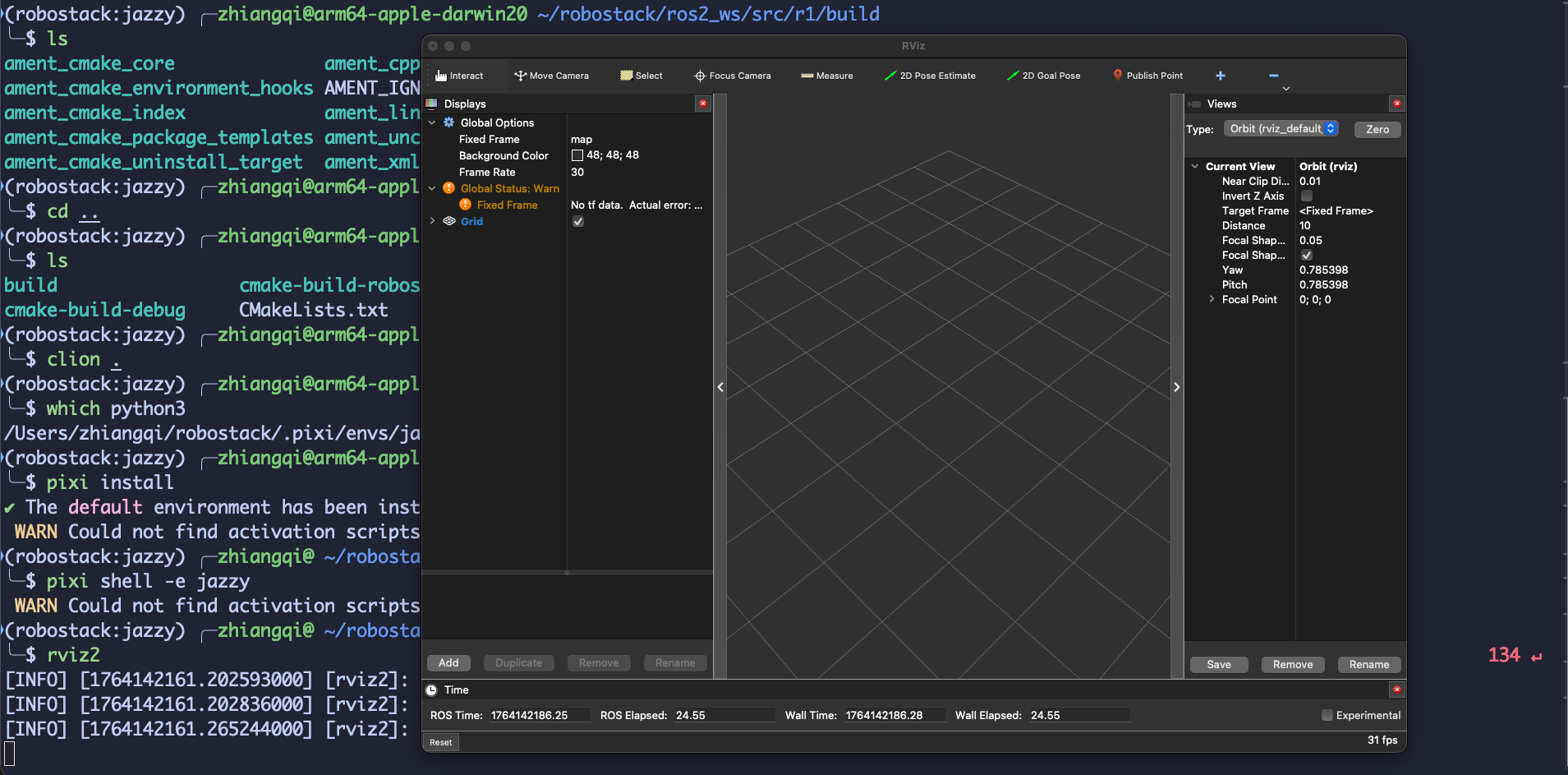
现在输入 rviz2 ,安装成功,到这里 ros2 环境就配置完成了。
替换 dds
默认的 Fast DDS 试图强行控制 CPU 核心调度,而 macOS 不允许或不支持这种特定的调用方式,所以当你打开 RViz 或者RQt时会出现如下的 SYSTEM Error,解决方法就是使用Eclipse Cyclone DDS
Problem to set affinity of thread with id [0x16bc4b000,dds.log] to value 0. Error 'Protocol family not supported'

2025-11-26 14:07:48.036 [SYSTEM Error] Problem to set affinity of thread with id [0x16bbbf000,dds.shm.wdog] to value 0. Error 'Protocol family not supported' -> Function configure_current_thread_affinity

2025-11-26 14:07:48.038 [SYSTEM Error] Problem to set affinity of thread with id [0x16bcd7000,dds.ev.0] to value 0. Error 'Protocol family not supported' -> Function configure_current_thread_affinity

2025-11-26 14:07:48.038 [SYSTEM Error] Problem to set affinity of thread with id [0x16bd63000,dds.udp.7410] to value 0. Error 'Protocol family not supported' -> Function configure_current_thread_affinity

2025-11-26 14:07:48.038 [SYSTEM Error] Problem to set affinity of thread with id [0x16bdef000,dds.udp.7400] to value 0. Error 'Protocol family not supported' -> Function configure_current_thread_affinity

2025-11-26 14:07:48.040 [SYSTEM Error] Problem to set affinity of thread with id [0x16be7b000,dds.shm.7411] to value 0. Error 'Protocol family not supported' -> Function configure_current_thread_affinity

2025-11-26 14:07:48.040 [SYSTEM Error] Problem to set affinity of thread with id [0x16bf07000,dds.udp.7411] to value 0. Error 'Protocol family not supported' -> Function configure_current_thread_affinity

2025-11-26 14:07:48.040 [SYSTEM Error] Problem to set affinity of thread with id [0x16bf93000,dds.asyn.0.0] to value 0. Error 'Protocol family not supported' -> Function configure_current_thread_affinity

2025-11-26 14:07:48.054 [SYSTEM Error] Problem to set affinity of thread with id [0x16c01f000,dds.shm.7000] to value 0. Error 'Protocol family not supported' -> Function configure_current_thread_affinity

2025-11-26 14:07:48.054 [SYSTEM Error] Problem to set affinity of thread with id [0x16c0ab000,dds.udp.7000] to value 0. Error 'Protocol family not supported' -> Function configure_current_thread_affinity
更新 pixi.toml
执行
pixi add ros-jazzy-rmw-cyclonedds-cpp --feature jazzy安装完成后,告诉 ROS 2 使用 Cyclone DDS 而不是默认的 Fast DDS
在 pixi.toml 里添加
[feature.jazzy.activation.env]
RMW_IMPLEMENTATION = "rmw_cyclonedds_cpp"
完整的 pixi.toml文件
[workspace]
name = "robostack"
description = "Development environment for RoboStack ROS packages"
channels = ["https://prefix.dev/conda-forge"]
platforms = ["linux-64", "win-64", "osx-64", "osx-arm64", "linux-aarch64"]

# This will automatically activate the ros workspace on activation
[target.win.activation]
scripts = ["install/setup.bat"]

[target.unix.activation]
# For activation scripts, we use bash for Unix-like systems
scripts = ["install/setup.bash"]

# To build you can use - `pixi run -e <ros distro> build <Any other temporary args>`
[feature.build.target.win-64.tasks]
build = "colcon build --merge-install --cmake-args -DCMAKE_EXPORT_COMPILE_COMMANDS=ON -DPython_FIND_VIRTUALENV=ONLY -DPython3_FIND_VIRTUALENV=ONLY"

[feature.build.target.unix.tasks]
build = "colcon build --symlink-install --cmake-args -DCMAKE_EXPORT_COMPILE_COMMANDS=ON -DPython_FIND_VIRTUALENV=ONLY -DPython3_FIND_VIRTUALENV=ONLY"

# Dependencies used by all environments
[dependencies]
python = "*"
# Build tools
compilers = "*"
cmake = "*"
pkg-config = "*"
make = "*"
ninja = "*"
# ROS specific tools
rosdep = "*"
colcon-common-extensions = "*"

[target.linux.dependencies]
libgl-devel = "*"

# Define all the different ROS environments
# Each environment corresponds to a different ROS distribution
# and can be activated using the `pixi run/shell -e <environment>` command.
[environments]
noetic = { features = ["noetic", "build"] }
humble = { features = ["humble", "build"] }
jazzy = { features = ["jazzy", "build"] }
kilted = { features = ["kilted", "build"] }

### ROS Noetic ####
[feature.noetic]
channels = ["https://prefix.dev/robostack-noetic"]

[feature.noetic.dependencies]
ros-noetic-desktop = "*"
catkin_tools = "*"

### ROS Humble ####
[feature.humble]
channels = ["https://prefix.dev/robostack-humble"]

[feature.humble.dependencies]
ros-humble-desktop = "*"

### ROS Jazzy ####
[feature.jazzy]
channels = ["https://prefix.dev/robostack-jazzy"]

[feature.jazzy.dependencies]
ros-jazzy-desktop = "*"
ros-jazzy-rmw-cyclonedds-cpp = ">=2.2.3,<3"

[feature.jazzy.activation.env]
RMW_IMPLEMENTATION = "rmw_cyclonedds_cpp"

### ROS Kilted ####
[feature.kilted]
channels = ["https://prefix.dev/robostack-kilted"]

[feature.kilted.dependencies]
ros-kilted-desktop = "*"
重新加载环境
pixi shell -e jazzy确认是否生效
echo $RMW_IMPLEMENTATION
再次打开 RViz 就不会报 SYSTEM Error 了
配置 CLion 静态分析代码与调试
获得 C/C++编译器、Python3 解释器、cmake路径
先在 ros2 环境下创建一个
ros2 pkg create r2 --build-type ament_cmake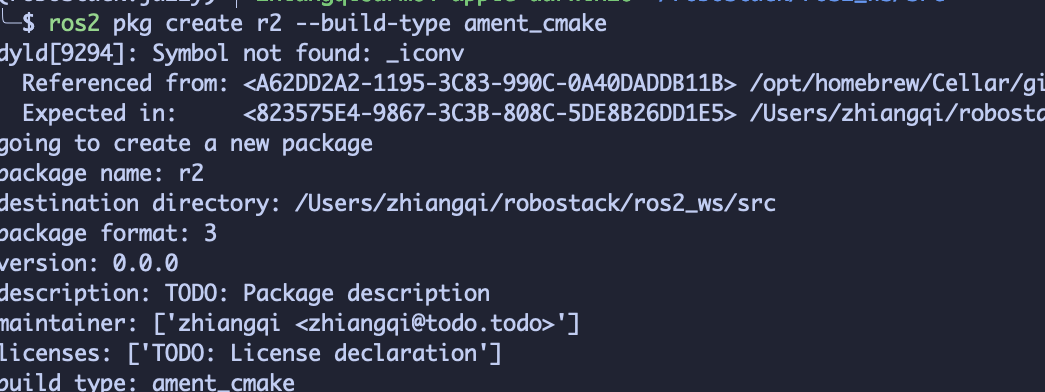
进到r2项目里,新建 build 文件夹,然后执行cmake ..
mkdir build
cd build
cmake ..
在输出的日志里有对应的地址,记录下来
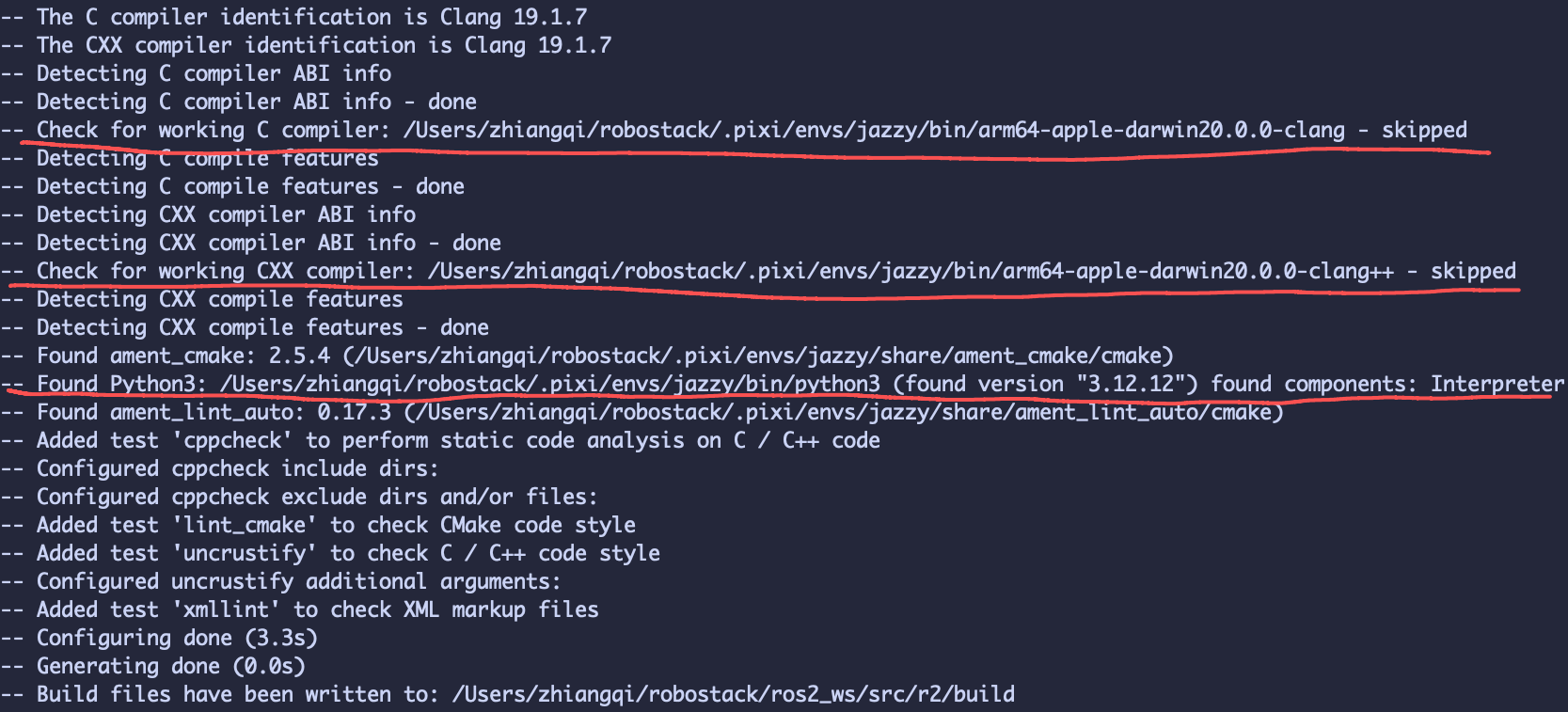
获得 cmake 地址
where cmake其中一个是系统 cmake,一个是 ros2 jazzy 环境的 cmake,我们记录下 ros2 jazzy 的 cmake 路径

配置CMakePresets.json
在项目根目录创建 CMakePresets.json填写对应的地址,这样 CLion 就能找到 ROS2 的库
{
  "version": 6,
  "cmakeMinimumRequired": {
    "major": 3,
    "minor": 25,
    "patch": 0
  },
  "configurePresets": [
    {
      "name": "pixi-jazzy",
      "displayName": "ROS 2 Jazzy (Pixi)",
      "generator": "Ninja",
      "binaryDir": "${sourceDir}/build",
      "environment": {
        "AMENT_PREFIX_PATH": "/Users/zhiangqi/robostack/.pixi/envs/jazzy",
        "CMAKE_PREFIX_PATH": "/Users/zhiangqi/robostack/.pixi/envs/jazzy",
        "PYTHONPATH": "/Users/zhiangqi/robostack/.pixi/envs/jazzy/lib/python3.12/site-packages",
        "LD_LIBRARY_PATH": "/Users/zhiangqi/robostack/.pixi/envs/jazzy/lib"
      },
      "cacheVariables": {
        "CMAKE_C_COMPILER": "/Users/zhiangqi/robostack/.pixi/envs/jazzy/bin/arm64-apple-darwin20.0.0-clang",
        "CMAKE_CXX_COMPILER": "/Users/zhiangqi/robostack/.pixi/envs/jazzy/bin/arm64-apple-darwin20.0.0-clang++",
        "PYTHON_EXECUTABLE": "/Users/zhiangqi/robostack/.pixi/envs/jazzy/bin/python3"
      }
    }
  ]
}
右键这个文件,点击重新加载 CMake 项目
配置 CMake
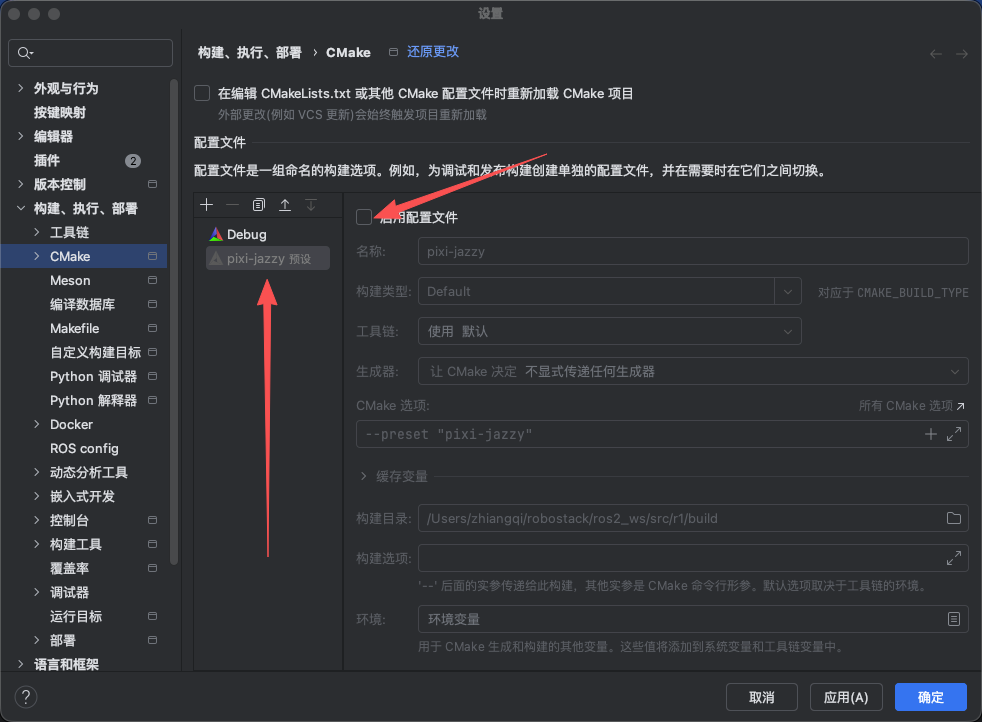
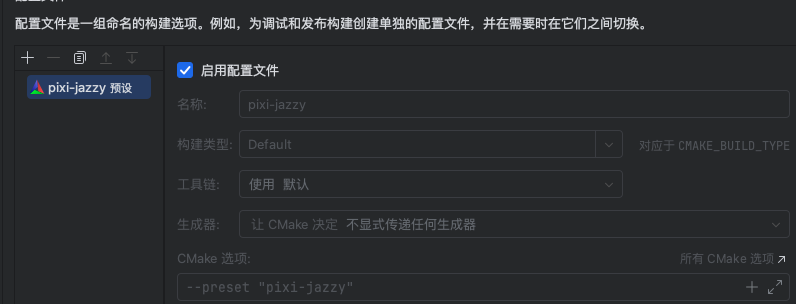
完成上面的操作后,在构建、执行、部署里的 CMake 会出现一个 CMake 预设,点击启用配置文件,然后把 Debug 的配置删除
测试
使用的 ROS2 官方的 C++ 发布者示例
创建配置 CMakeLists.txt
编辑好后,右键,重新加载 CMake项目
cmake_minimum_required(VERSION 3.8)
project(r1)

if(CMAKE_COMPILER_IS_GNUCXX OR CMAKE_CXX_COMPILER_ID MATCHES "Clang")
  add_compile_options(-Wall -Wextra -Wpedantic)
endif()

find_package(ament_cmake REQUIRED)
find_package(rclcpp REQUIRED)
find_package(std_msgs REQUIRED)

add_executable(talker src/r1.cpp)

ament_target_dependencies(talker
        rclcpp
        std_msgs
)
install(TARGETS
        talker
        DESTINATION lib/${PROJECT_NAME}
)
编写代码
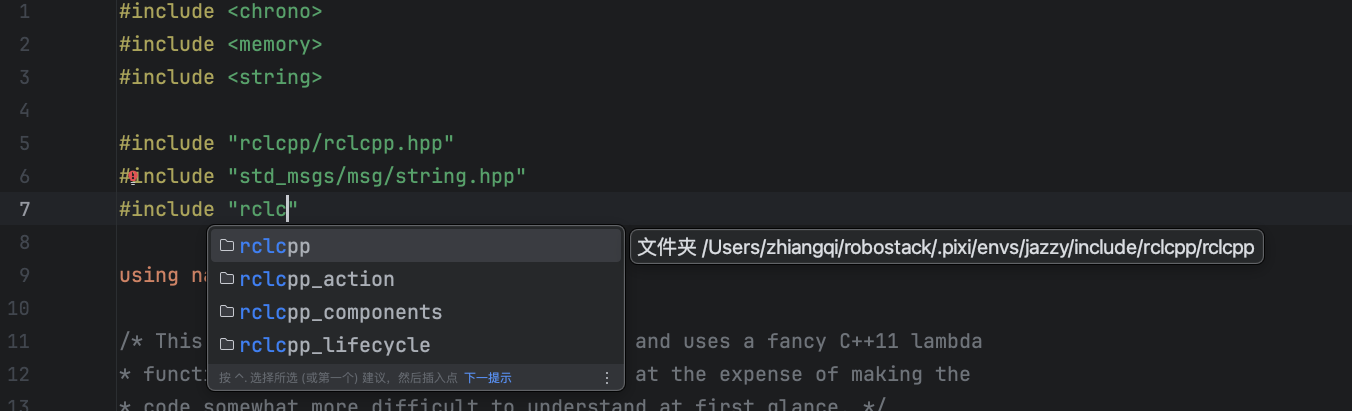
这时候我们就有代码提示了
#include <chrono>
#include <memory>
#include <string>

#include "rclcpp/rclcpp.hpp"
#include "std_msgs/msg/string.hpp"

using namespace std::chrono_literals;

/* This example creates a subclass of Node and uses a fancy C++11 lambda
* function to shorten the callback syntax, at the expense of making the
* code somewhat more difficult to understand at first glance. */

class MinimalPublisher : public rclcpp::Node
{
public:
    MinimalPublisher()
    : Node("minimal_publisher"), count_(0)
    {
        publisher_ = this->create_publisher<std_msgs::msg::String>("topic", 10);
        auto timer_callback =
          [this]() -> void {
              auto message = std_msgs::msg::String();
              message.data = "Hello, world! " + std::to_string(this->count_++);
              RCLCPP_INFO(this->get_logger(), "Publishing: '%s'", message.data.c_str());
              this->publisher_->publish(message);
        };
        timer_ = this->create_wall_timer(500ms, timer_callback);
    }

private:
    rclcpp::TimerBase::SharedPtr timer_;
    rclcpp::Publisher<std_msgs::msg::String>::SharedPtr publisher_;
    size_t count_;
};

int main(int argc, char * argv[])
{
    rclcpp::init(argc, argv);
    rclcpp::spin(std::make_shared<MinimalPublisher>());
    rclcpp::shutdown();
    return 0;
}
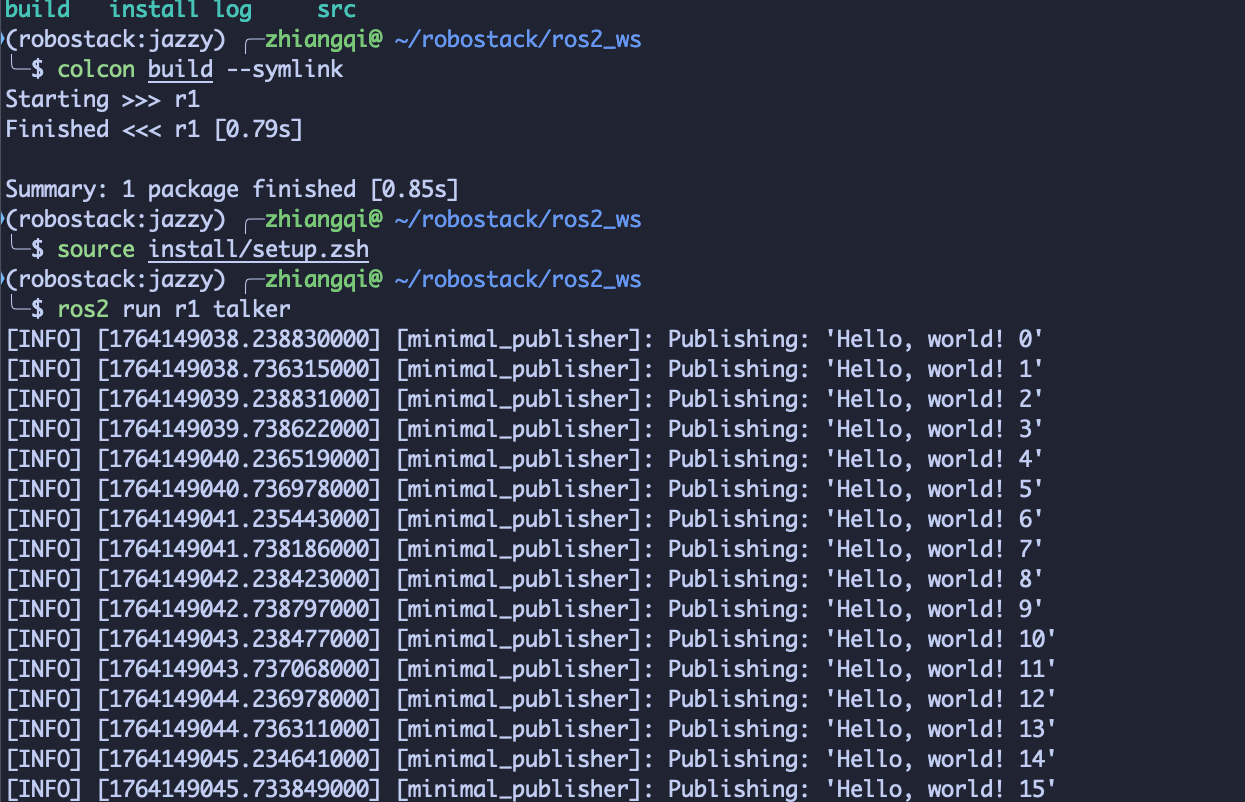
构建、运行
联系方式:QQ:2746647599
更多推荐
 19
19 0
0- 0


 已为社区贡献1条内容

所有评论(0)