
在Robosuite中如何使用Xbox游戏手柄操控mujoco仿真中的机械臂?
·
在Robosuite中使用Xbox游戏手柄采集机械臂数据
Robosuite是一个基于MuJoCo物理引擎的机器人学习模拟框架,它提供了丰富的基准环境,用于机器人学习研究。作为一个开源项目,它支持多种输入设备,如键盘和SpaceMouse,但默认并不支持Xbox游戏手柄。在实际应用中,尤其是数据采集时,使用游戏手柄可以提供更直观的控制体验,特别是对于3D操作。
在Robosuite的collect_human_demonstrations.py脚本,添加了对Xbox手柄的支持。
为什么需要修改?
Robosuite的原脚本位于robosuite/scripts/collect_human_demonstrations.py,它允许用户通过键盘或SpaceMouse采集人类演示数据,用于后续的模仿学习或强化学习。但Xbox手柄(或类似游戏控制器)在机器人控制中很常见,因为它有模拟摇杆和触发器,能更好地模拟6自由度(6-DoF)操作。
原脚本不支持pygame驱动的游戏手柄,因此需要:
- 创建一个新的设备类,封装Xbox手柄的输入映射。
- 修改主脚本的设备初始化部分,添加对"xbox"的支持。
参考了Robosuite的spacemouse.py和keyboard.py,我确保了新类的兼容性,包括位置敏感度、旋转敏感度、抓取控制等。
修改步骤
步骤1: 创建Xbox设备类
在robosuite/devices/目录下创建一个新文件xbox.py。这个类继承自Device,使用pygame库读取手柄输入。
- 初始化pygame并检测手柄。
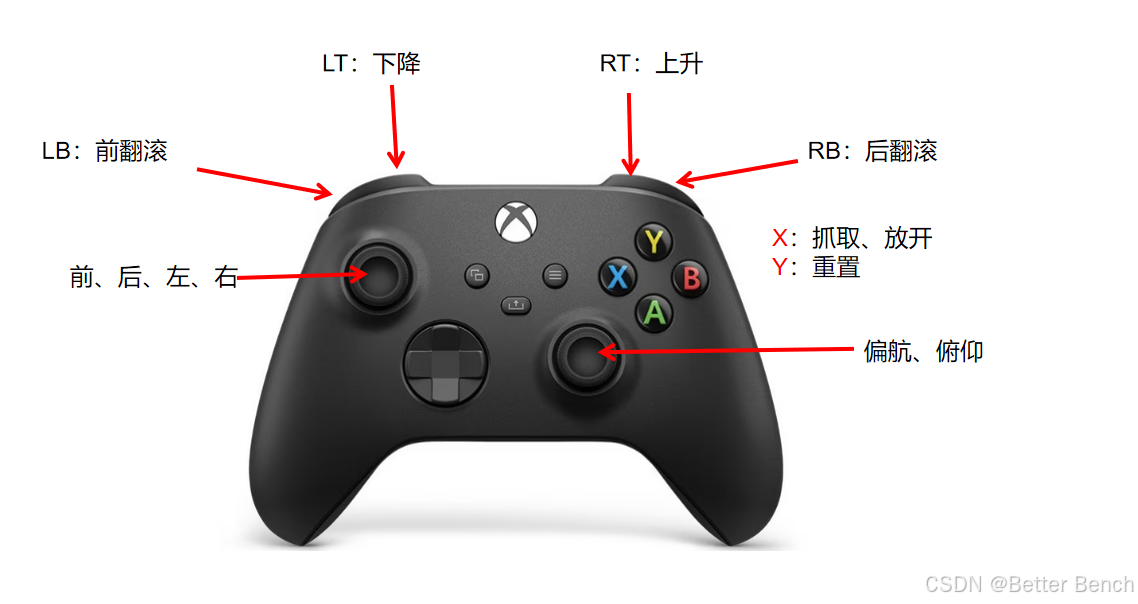
- 映射手柄轴和按钮到6-DoF控制:左摇杆控制x-y平面移动,LT/RT触发器控制z轴,右摇杆控制俯仰和偏航,LB/RB控制滚转。
- 处理抓取:使用X按钮按一次切换开/合(类似于键盘的空格键)。
- 处理重置:Y按钮按一次重置模拟。
- 添加键盘辅助控制(如切换臂或机器人)。
步骤2: 修改主脚本
在robosuite/scripts/collect_human_demonstrations.py中,修改设备初始化部分:
- 添加
elif args.device == "xbox":分支,导入并实例化Xbox类。 - 确保其他部分(如动作处理)兼容新设备。
修改后,运行脚本时可以使用--device xbox参数。
修改后的完整代码
collect_human_demonstrations.py
"""
A script to collect a batch of human demonstrations.

The demonstrations can be played back using the `playback_demonstrations_from_hdf5.py` script.
"""

import argparse
import datetime
import json
import os
import time
from glob import glob

import h5py
import numpy as np

import robosuite as suite
from robosuite.controllers import load_composite_controller_config
from robosuite.controllers.composite.composite_controller import WholeBody
from robosuite.wrappers import DataCollectionWrapper, VisualizationWrapper


def collect_human_trajectory(env, device, arm, max_fr):
    """
    Use the device (keyboard or SpaceNav 3D mouse) to collect a demonstration.
    The rollout trajectory is saved to files in npz format.
    Modify the DataCollectionWrapper wrapper to add new fields or change data formats.

    Args:
        env (MujocoEnv): environment to control
        device (Device): to receive controls from the device
        arms (str): which arm to control (eg bimanual) 'right' or 'left'
        max_fr (int): if specified, pause the simulation whenever simulation runs faster than max_fr
    """

    env.reset()
    env.render()

    task_completion_hold_count = -1  # counter to collect 10 timesteps after reaching goal
    device.start_control()

    for robot in env.robots:
        robot.print_action_info_dict()

    # Keep track of prev gripper actions when using since they are position-based and must be maintained when arms switched
    all_prev_gripper_actions = [
        {
            f"{robot_arm}_gripper": np.repeat([0], robot.gripper[robot_arm].dof)
            for robot_arm in robot.arms
            if robot.gripper[robot_arm].dof > 0
        }
        for robot in env.robots
    ]

    # Loop until we get a reset from the input or the task completes
    while True:
        start = time.time()

        # Set active robot
        active_robot = env.robots[device.active_robot]

        # Get the newest action
        input_ac_dict = device.input2action()

        # If action is none, then this a reset so we should break
        if input_ac_dict is None:
            break

        from copy import deepcopy

        action_dict = deepcopy(input_ac_dict)  # {}
        # set arm actions
        for arm in active_robot.arms:
            if isinstance(active_robot.composite_controller, WholeBody):  # input type passed to joint_action_policy
                controller_input_type = active_robot.composite_controller.joint_action_policy.input_type
            else:
                controller_input_type = active_robot.part_controllers[arm].input_type

            if controller_input_type == "delta":
                action_dict[arm] = input_ac_dict[f"{arm}_delta"]
            elif controller_input_type == "absolute":
                action_dict[arm] = input_ac_dict[f"{arm}_abs"]
            else:
                raise ValueError

        # Maintain gripper state for each robot but only update the active robot with action
        env_action = [robot.create_action_vector(all_prev_gripper_actions[i]) for i, robot in enumerate(env.robots)]
        env_action[device.active_robot] = active_robot.create_action_vector(action_dict)
        env_action = np.concatenate(env_action)
        for gripper_ac in all_prev_gripper_actions[device.active_robot]:
            all_prev_gripper_actions[device.active_robot][gripper_ac] = action_dict[gripper_ac]

        env.step(env_action)
        env.render()

        # Also break if we complete the task
        if task_completion_hold_count == 0:
            break

        # state machine to check for having a success for 10 consecutive timesteps
        if env._check_success():
            if task_completion_hold_count > 0:
                task_completion_hold_count -= 1  # latched state, decrement count
            else:
                task_completion_hold_count = 10  # reset count on first success timestep
        else:
            task_completion_hold_count = -1  # null the counter if there's no success

        # limit frame rate if necessary
        if max_fr is not None:
            elapsed = time.time() - start
            diff = 1 / max_fr - elapsed
            if diff > 0:
                time.sleep(diff)

    # cleanup for end of data collection episodes
    env.close()


def gather_demonstrations_as_hdf5(directory, out_dir, env_info):
    """
    Gathers the demonstrations saved in @directory into a
    single hdf5 file.

    The strucure of the hdf5 file is as follows.

    data (group)
        date (attribute) - date of collection
        time (attribute) - time of collection
        repository_version (attribute) - repository version used during collection
        env (attribute) - environment name on which demos were collected

        demo1 (group) - every demonstration has a group
            model_file (attribute) - model xml string for demonstration
            states (dataset) - flattened mujoco states
            actions (dataset) - actions applied during demonstration

        demo2 (group)
        ...

    Args:
        directory (str): Path to the directory containing raw demonstrations.
        out_dir (str): Path to where to store the hdf5 file.
        env_info (str): JSON-encoded string containing environment information,
            including controller and robot info
    """

    hdf5_path = os.path.join(out_dir, "demo.hdf5")
    f = h5py.File(hdf5_path, "w")

    # store some metadata in the attributes of one group
    grp = f.create_group("data")

    num_eps = 0
    env_name = None  # will get populated at some point

    for ep_directory in os.listdir(directory):

        state_paths = os.path.join(directory, ep_directory, "state_*.npz")
        states = []
        actions = []
        success = False

        for state_file in sorted(glob(state_paths)):
            dic = np.load(state_file, allow_pickle=True)
            env_name = str(dic["env"])

            states.extend(dic["states"])
            for ai in dic["action_infos"]:
                actions.append(ai["actions"])
            success = success or dic["successful"]

        if len(states) == 0:
            continue

        # Add only the successful demonstration to dataset
        if success:
            print("Demonstration is successful and has been saved")
            # Delete the last state. This is because when the DataCollector wrapper
            # recorded the states and actions, the states were recorded AFTER playing that action,
            # so we end up with an extra state at the end.
            del states[-1]
            assert len(states) == len(actions)

            num_eps += 1
            ep_data_grp = grp.create_group("demo_{}".format(num_eps))

            # store model xml as an attribute
            xml_path = os.path.join(directory, ep_directory, "model.xml")
            with open(xml_path, "r") as f:
                xml_str = f.read()
            ep_data_grp.attrs["model_file"] = xml_str

            # write datasets for states and actions
            ep_data_grp.create_dataset("states", data=np.array(states))
            ep_data_grp.create_dataset("actions", data=np.array(actions))
        else:
            print("Demonstration is unsuccessful and has NOT been saved")

    # write dataset attributes (metadata)
    now = datetime.datetime.now()
    grp.attrs["date"] = "{}-{}-{}".format(now.month, now.day, now.year)
    grp.attrs["time"] = "{}:{}:{}".format(now.hour, now.minute, now.second)
    grp.attrs["repository_version"] = suite.__version__
    grp.attrs["env"] = env_name
    grp.attrs["env_info"] = env_info

    f.close()


if __name__ == "__main__":
    # Arguments
    parser = argparse.ArgumentParser()
    parser.add_argument(
        "--directory",
        type=str,
        default=os.path.join(suite.models.assets_root, "demonstrations_private"),
    )
    parser.add_argument("--environment", type=str, default="Lift")
    parser.add_argument("--robots", nargs="+", type=str, default="Panda", help="Which robot(s) to use in the env")
    parser.add_argument(
        "--config", type=str, default="default", help="Specified environment configuration if necessary"
    )
    parser.add_argument("--arm", type=str, default="right", help="Which arm to control (eg bimanual) 'right' or 'left'")
    parser.add_argument("--camera", type=str, default="agentview", help="Which camera to use for collecting demos")
    parser.add_argument(
        "--controller",
        type=str,
        default=None,
        help="Choice of controller. Can be generic (eg. 'BASIC' or 'WHOLE_BODY_MINK_IK') or json file (see robosuite/controllers/config for examples)",
    )
    parser.add_argument("--device", type=str, default="keyboard")
    parser.add_argument("--pos-sensitivity", type=float, default=1.0, help="How much to scale position user inputs")
    parser.add_argument("--rot-sensitivity", type=float, default=1.0, help="How much to scale rotation user inputs")
    parser.add_argument(
        "--renderer",
        type=str,
        default="mjviewer",
        help="Use Mujoco's builtin interactive viewer (mjviewer) or OpenCV viewer (mujoco)",
    )
    parser.add_argument(
        "--max_fr",
        default=20,
        type=int,
        help="Sleep when simluation runs faster than specified frame rate; 20 fps is real time.",
    )
    args = parser.parse_args()

    # Get controller config
    controller_config = load_composite_controller_config(
        controller=args.controller,
        robot=args.robots[0],
    )

    if controller_config["type"] == "WHOLE_BODY_MINK_IK":
        # mink-speicific import. requires installing mink
        from robosuite.examples.third_party_controller.mink_controller import WholeBodyMinkIK

    # Create argument configuration
    config = {
        "env_name": args.environment,
        "robots": args.robots,
        "controller_configs": controller_config,
    }

    # Check if we're using a multi-armed environment and use env_configuration argument if so
    if "TwoArm" in args.environment:
        config["env_configuration"] = args.config

    # Create environment
    env = suite.make(
        **config,
        has_renderer=True,
        renderer=args.renderer,
        has_offscreen_renderer=False,
        render_camera=args.camera,
        ignore_done=True,
        use_camera_obs=False,
        reward_shaping=True,
        control_freq=20,
    )

    # Wrap this with visualization wrapper
    env = VisualizationWrapper(env)

    # Grab reference to controller config and convert it to json-encoded string
    env_info = json.dumps(config)

    # wrap the environment with data collection wrapper
    tmp_directory = "/tmp/{}".format(str(time.time()).replace(".", "_"))
    env = DataCollectionWrapper(env, tmp_directory)

    # initialize device
    if args.device == "keyboard":
        from robosuite.devices import Keyboard

        device = Keyboard(env=env, pos_sensitivity=args.pos_sensitivity, rot_sensitivity=args.rot_sensitivity)
    elif args.device == "spacemouse":
        from robosuite.devices import SpaceMouse

        device = SpaceMouse(env=env, pos_sensitivity=args.pos_sensitivity, rot_sensitivity=args.rot_sensitivity)
    elif args.device == "xbox":
        from robosuite.devices.xbox import Xbox

        device = Xbox(env=env, pos_sensitivity=args.pos_sensitivity, rot_sensitivity=args.rot_sensitivity)
    elif args.device == "mjgui":
        assert args.renderer == "mjviewer", "Mocap is only supported with the mjviewer renderer"
        from robosuite.devices.mjgui import MJGUI

        device = MJGUI(env=env)
    else:
        raise Exception("Invalid device choice: choose either 'keyboard', 'spacemouse', 'xbox' or 'mjgui'.")

    # make a new timestamped directory
    t1, t2 = str(time.time()).split(".")
    new_dir = os.path.join(args.directory, "{}_{}".format(t1, t2))
    os.makedirs(new_dir)

    # collect demonstrations
    while True:
        collect_human_trajectory(env, device, args.arm, args.max_fr)
        gather_demonstrations_as_hdf5(tmp_directory, new_dir, env_info)
xbox.py
"""Driver class for Xbox controller.

This class provides driver support for Xbox controllers using pygame.
Assumes a standard Xbox controller mapping.

"""

import threading
import time
from collections import namedtuple

import numpy as np
from pynput.keyboard import Controller, Key, Listener

import pygame

from robosuite.utils.log_utils import ROBOSUITE_DEFAULT_LOGGER

from robosuite.devices import Device
from robosuite.utils.transform_utils import rotation_matrix


def scale_to_control(x, min_v=-1.0, max_v=1.0):
    """
    Normalize raw readings to target range. For pygame axes, already -1 to 1, so minimal scaling.
    """
    x = min(max(x, min_v), max_v)
    return x


class Xbox(Device):
    """
    A minimalistic driver class for Xbox controller using pygame.

    Args:
        env (RobotEnv): The environment which contains the robot(s) to control
                        using this device.
        pos_sensitivity (float): Magnitude of input position command scaling
        rot_sensitivity (float): Magnitude of scale input rotation commands scaling
    """

    def __init__(
        self,
        env,
        pos_sensitivity=1.0,
        rot_sensitivity=1.0,
    ):
        super().__init__(env)

        print("Opening Xbox device")
        self.pos_sensitivity = pos_sensitivity
        self.rot_sensitivity = rot_sensitivity

        pygame.init()
        pygame.joystick.init()
        if pygame.joystick.get_count() == 0:
            raise Exception("No joystick connected. Please connect an Xbox controller.")
        self.joystick = pygame.joystick.Joystick(0)
        self.joystick.init()

        print("Joystick: %s" % self.joystick.get_name())

        # 6-DOF variables
        self.x, self.y, self.z = 0, 0, 0
        self.roll, self.pitch, self.yaw = 0, 0, 0

        self._display_controls()

        self.grasp_active = False

        self._control = [0.0, 0.0, 0.0, 0.0, 0.0, 0.0]
        self._reset_state = 0
        self.rotation = np.array([[-1.0, 0.0, 0.0], [0.0, 1.0, 0.0], [0.0, 0.0, -1.0]])
        self._enabled = False

        # Track previous button states for edge detection
        self.prev_y = 0
        self.prev_x = 0

        # launch a new listener thread to listen to Xbox
        self.thread = threading.Thread(target=self.run)
        self.thread.daemon = True
        self.thread.start()

        # also add a keyboard for aux controls
        self.listener = Listener(on_press=self.on_press, on_release=self.on_release)

        # start listening
        self.listener.start()

    @staticmethod
    def _display_controls():
        """
        Method to pretty print controls.
        """

        def print_command(char, info):
            char += " " * (30 - len(char))
            print("{}\t{}".format(char, info))

        print("")
        print_command("Control", "Command")
        print_command("Y button", "reset simulation")
        print_command("X button (press)", "toggle gripper")
        print_command("Left stick (lateral)", "move arm horizontally in x-y plane")
        print_command("LT / RT triggers", "move arm vertically (RT up, LT down)")
        print_command("Right stick (lateral)", "rotate arm yaw / pitch")
        print_command("LB / RB buttons", "rotate arm roll")
        print_command("Control+C", "quit")
        print_command("b", "toggle arm/base mode (if applicable)")
        print_command("s", "switch active arm (if multi-armed robot)")
        print_command("=", "switch active robot (if multi-robot environment)")
        print("")

    def _reset_internal_state(self):
        """
        Resets internal state of controller, except for the reset signal.
        """
        super()._reset_internal_state()

        self.rotation = np.array([[-1.0, 0.0, 0.0], [0.0, 1.0, 0.0], [0.0, 0.0, -1.0]])
        # Reset 6-DOF variables
        self.x, self.y, self.z = 0, 0, 0
        self.roll, self.pitch, self.yaw = 0, 0, 0
        # Reset control
        self._control = np.zeros(6)
        # Reset grasp
        self.grasp_active = False

    def start_control(self):
        """
        Method that should be called externally before controller can
        start receiving commands.
        """
        self._reset_internal_state()
        self._reset_state = 0
        self._enabled = True

    def get_controller_state(self):
        """
        Grabs the current state of the controller.

        Returns:
            dict: A dictionary containing dpos, orn, unmodified orn, grasp, and reset
        """
        dpos = self.control[:3] * 0.005 * self.pos_sensitivity
        roll, pitch, yaw = self.control[3:] * 0.005 * self.rot_sensitivity

        # convert RPY to an absolute orientation
        drot1 = rotation_matrix(angle=-pitch, direction=[1.0, 0, 0], point=None)[:3, :3]
        drot2 = rotation_matrix(angle=roll, direction=[0, 1.0, 0], point=None)[:3, :3]
        drot3 = rotation_matrix(angle=yaw, direction=[0, 0, 1.0], point=None)[:3, :3]

        self.rotation = self.rotation.dot(drot1.dot(drot2.dot(drot3)))

        return dict(
            dpos=dpos,
            rotation=self.rotation,
            raw_drotation=np.array([roll, pitch, yaw]),
            grasp=self.control_gripper,
            reset=self._reset_state,
            base_mode=int(self.base_mode),
        )

    def run(self):
        """Listener method that keeps pulling new messages."""

        while True:
            time.sleep(0.01)
            if self._enabled:
                pygame.event.pump()

                self.x = scale_to_control(self.joystick.get_axis(1))
                self.y = scale_to_control(self.joystick.get_axis(0))
                lt = self.joystick.get_axis(2)
                rt = self.joystick.get_axis(5)
                self.z = scale_to_control(rt - lt)
                self.roll = self.joystick.get_button(5) - self.joystick.get_button(4)  # RB - LB
                self.pitch = scale_to_control(-self.joystick.get_axis(4))
                self.yaw = scale_to_control(self.joystick.get_axis(3))

                self._control = [
                    self.x,
                    self.y,
                    self.z,
                    self.roll,
                    self.pitch,
                    self.yaw,
                ]

                # Gripper toggle
                curr_x = self.joystick.get_button(2)  # X button
                if curr_x == 1 and self.prev_x == 0:
                    self.grasp_active = not self.grasp_active
                self.prev_x = curr_x

                # Reset on Y press (edge detection)
                curr_y = self.joystick.get_button(3)
                if curr_y == 1 and self.prev_y == 0:
                    self._reset_state = 1
                    self._enabled = False
                    self._reset_internal_state()
                self.prev_y = curr_y

    @property
    def control(self):
        """
        Grabs current pose of controller

        Returns:
            np.array: 6-DoF control value
        """
        return np.array(self._control)

    @property
    def control_gripper(self):
        """
        Maps internal states into gripper commands.

        Returns:
            float: Whether we're using single click and hold or not
        """
        if self.grasp_active:
            return 1.0
        return 0

    def on_press(self, key):
        """
        Key handler for key presses.
        Args:
            key (str): key that was pressed
        """
        pass

    def on_release(self, key):
        """
        Key handler for key releases.
        Args:
            key (str): key that was pressed
        """
        try:
            # controls for mobile base (only applicable if mobile base present)
            if key.char == "b":
                self.base_modes[self.active_robot] = not self.base_modes[self.active_robot]  # toggle mobile base
            elif key.char == "s":
                self.active_arm_index = (self.active_arm_index + 1) % len(self.all_robot_arms[self.active_robot])
            elif key.char == "=":
                self.active_robot = (self.active_robot + 1) % self.num_robots

        except AttributeError as e:
            pass

    def _postprocess_device_outputs(self, dpos, drotation):
        drotation = drotation * 50
        dpos = dpos * 125

        dpos = np.clip(dpos, -1, 1)
        drotation = np.clip(drotation, -1, 1)

        return dpos, drotation


if __name__ == "__main__":

    xbox = Xbox()
    for i in range(100):
        print(xbox.control, xbox.control_gripper)
        time.sleep(0.02)
使用说明
- 安装依赖:确保安装了pygame(
pip install pygame),以及Robosuite的其他依赖。 - 运行脚本:使用命令如
python collect_human_demonstrations.py --device xbox --environment Lift --robots Panda启动采集。 - 控制映射:
- 左摇杆:x-y平面移动(前后左右)。
- LT/RT:z轴上下。
- 右摇杆:偏航和俯仰。
- LB/RB:滚转。
- X按钮:切换抓取状态。
- Y按钮:重置。
参考资料:Robosuite GitHub仓库(https://github.com/ARISE-Initiative/robosuite)。
更多推荐
 9
9 0
0- 0


 已为社区贡献6条内容

所有评论(0)