2022年-基于ubuntu16.04系统-在gazebo环境下-探索机械臂(视觉抓取未成功)
·
(本文用anaconda创建基于python2的虚拟环境,在其中完成所有工作)
1、 完成UR5的基本配置
参考ROS上的UR5机械臂仿真安装UR5
编译和运行过程中遇到的报错参考https://blog.csdn.net/xiaodingqq/article/details/87083510
采用sudo apt-get install ros-kinetic-***进行安装
而后即可按照ROS上的UR5机械臂仿真中的内容进行机械臂拖拽
启动仿真程序,终端1输入
source activate py27
cd ~/auv_ws
source devel/setup.bash
roslaunch ur_gazebo ur5.launch
终端2输入
source activate py27
cd ~/auv_ws
source devel/setup.bash
roslaunch ur5_moveit_config ur5_moveit_planning_execution.launch sim:=true
终端3输入
source activate py27
cd ~/auv_ws
source devel/setup.bash
roslaunch ur5_moveit_config moveit_rviz.launch config:=true
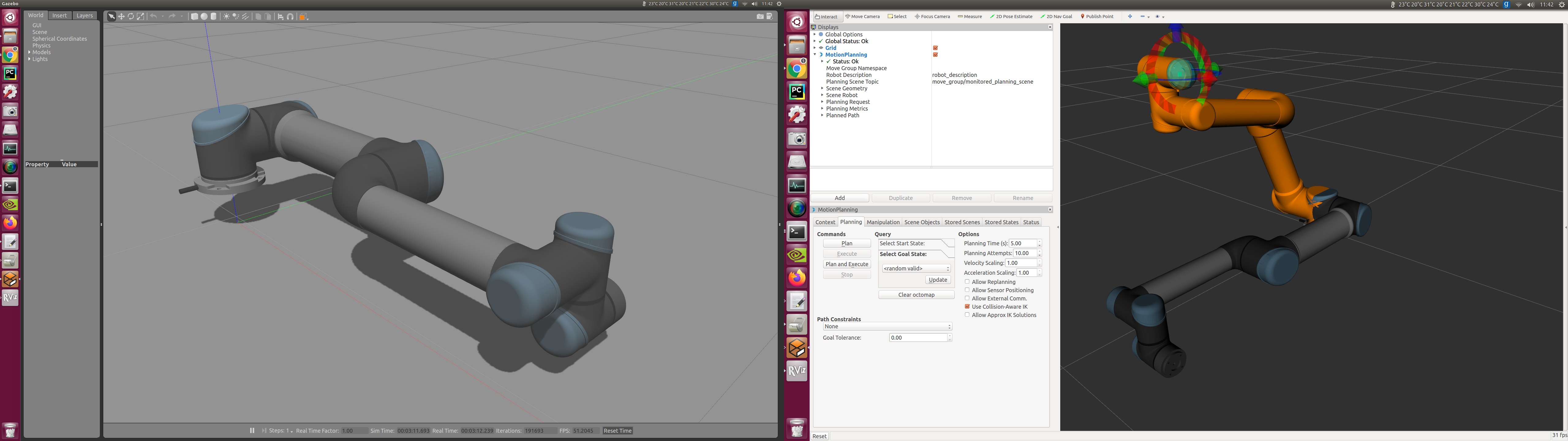
在Rviz中拖动机械臂到某个位置,并选择“planned and excute”就可以观察到机械臂在Rviz和Gazebo中同时运动
2、 开始配置视觉和抓取功能
参考
UR5+robotiq_85_gripper GAZEBO模拟视觉抓取平台仿真-1
UR5+robotiq_85_gripper GAZEBO模拟视觉抓取平台仿真-2
参照https://blog.csdn.net/boyhoodme/article/details/89059888来安装kinect V2,最后编译时失败
CMake Error at iai_kinect2/kinect2_bridge/CMakeLists.txt:22 (find_package):
  Could not find a package configuration file provided by "freenect2" with
  any of the following names:

    freenect2Config.cmake
    freenect2-config.cmake

  Add the installation prefix of "freenect2" to CMAKE_PREFIX_PATH or set
  "freenect2_DIR" to a directory containing one of the above files.  If
  "freenect2" provides a separate development package or SDK, be sure it has
  been installed.
暂时解决不了,先搁置…
https://github.com/code-iai/iai_kinect2/commit/fa55624ea7074ad66693582f53defb05ab14564b
https://github.com/code-iai/iai_kinect2/issues/231

北京人形旗下天工造物具身智能开源社区,聚焦具身天工与慧思开物两大平台
更多推荐
 1
1 0
0- 0


 已为社区贡献8条内容

所有评论(0)