
PX4+ros+gazebo仿真
·
多旋翼控制架构(Multicopter Control Architecture)
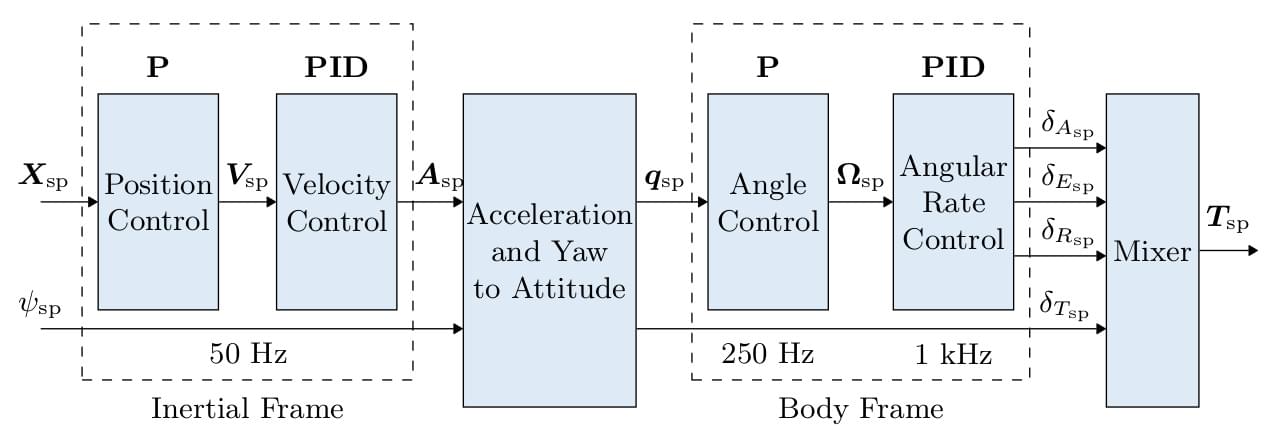 对于四旋翼:

- Angular Rate Controller( 1000 Hz ):最内层、最关键的回路,使用带陀螺仪反馈的 PID 控制来稳定角速率。该回路直接向控制分配系统发出角加速度指令,决定了整个系统的稳定性裕度。
- Attitude Controller( 250 Hz ): 中间回路,实现基于四元数的比例控制,将姿态误差转换为速率设定点。使用通过Lyapunov 分析证明的全局渐近稳定控制律。
- Velocity Controller( 50 Hz ): PID 控制器,将速度误差转换为加速度设定点,具有防积分饱和机制和独立的水平 / 垂直处理功能。
- Position Controller( 50 Hz ): 最外层回路,使用简单的比例控制将位置误差转换为速度设定点。
上层控制器对飞控发布指令
位置控制
给/iris_0/mavros/setpoint_raw/local这个话题发布mavros_msgs::PositionTarget类型的消息,就可以让飞机到达指定位置。
关于mavros_msgs::PositionTarget这个数据结构,它既可以用来做位置控制,也可以用来做速度和加速度的控制,以下是我我从这个网站copy过来的这个数据结构的定义
Raw Message Definition
# Message for SET_POSITION_TARGET_LOCAL_NED
#
# Some complex system requires all feautures that mavlink
# message provide. See issue #402.

std_msgs/Header header

uint8 coordinate_frame
uint8 FRAME_LOCAL_NED = 1
uint8 FRAME_LOCAL_OFFSET_NED = 7
uint8 FRAME_BODY_NED = 8
uint8 FRAME_BODY_OFFSET_NED = 9

uint16 type_mask
uint16 IGNORE_PX = 1 # Position ignore flags
uint16 IGNORE_PY = 2
uint16 IGNORE_PZ = 4
uint16 IGNORE_VX = 8 # Velocity vector ignore flags
uint16 IGNORE_VY = 16
uint16 IGNORE_VZ = 32
uint16 IGNORE_AFX = 64 # Acceleration/Force vector ignore flags
uint16 IGNORE_AFY = 128
uint16 IGNORE_AFZ = 256
uint16 FORCE = 512 # Force in af vector flag
uint16 IGNORE_YAW = 1024
uint16 IGNORE_YAW_RATE = 2048

geometry_msgs/Point position
geometry_msgs/Vector3 velocity
geometry_msgs/Vector3 acceleration_or_force
float32 yaw
float32 yaw_rate
Compact Message Definition
uint8 FRAME_LOCAL_NED=1
uint8 FRAME_LOCAL_OFFSET_NED=7
uint8 FRAME_BODY_NED=8
uint8 FRAME_BODY_OFFSET_NED=9
uint16 IGNORE_PX=1
uint16 IGNORE_PY=2
uint16 IGNORE_PZ=4
uint16 IGNORE_VX=8
uint16 IGNORE_VY=16
uint16 IGNORE_VZ=32
uint16 IGNORE_AFX=64
uint16 IGNORE_AFY=128
uint16 IGNORE_AFZ=256
uint16 FORCE=512
uint16 IGNORE_YAW=1024
uint16 IGNORE_YAW_RATE=2048
std_msgs/Header header
uint8 coordinate_frame
uint16 type_mask
geometry_msgs/Point position
geometry_msgs/Vector3 velocity
geometry_msgs/Vector3 acceleration_or_force
float32 yaw
float32 yaw_rate
这是我编写的完整的位置控制的仿真(感谢Qwen3-coder的自动补齐功能😎),如果有需要,也可以稍微改一下type_mode,就能进行速度或者加速度的控制。主要的思路也不复杂,先预热,再设置offboard和arming让无人机启动起来,然后发布位置控制的消息,无人机就会到我设置的一系列指定点去,还有一个land函数,让它降落用的。(这里面其实我还有好多细节没去深入理解😭,后面我还会补充姿态控制相关的仿真)
#include <ros/ros.h>
#include <mavros_msgs/State.h>
#include <mavros_msgs/CommandBool.h>
#include <mavros_msgs/SetMode.h>
#include <mavros_msgs/PositionTarget.h>
#include <geometry_msgs/PoseStamped.h>
#include <vector>


mavros_msgs::State current_state;

void state_cd(const mavros_msgs::State::ConstPtr& msg)
{
    current_state = *msg;
}

mavros_msgs::PositionTarget create_poseMsg(double x, double y, double z)
{
    mavros_msgs::PositionTarget pose;
    pose.header.stamp = ros::Time::now();
    pose.coordinate_frame = mavros_msgs::PositionTarget::FRAME_LOCAL_NED;
    pose.position.x = x;
    pose.position.y = y;
    pose.position.z = z;

    pose.type_mask = mavros_msgs::PositionTarget::IGNORE_VX |
                     mavros_msgs::PositionTarget::IGNORE_VY |
                     mavros_msgs::PositionTarget::IGNORE_VZ |
                     mavros_msgs::PositionTarget::IGNORE_AFX |
                     mavros_msgs::PositionTarget::IGNORE_AFY |
                     mavros_msgs::PositionTarget::IGNORE_AFZ |
                     mavros_msgs::PositionTarget::IGNORE_YAW_RATE;
    pose.yaw = 0;
    return pose;
}

void set_flight_mode(mavros_msgs::State& current_state, ros::Publisher& local_pos_pub,
            ros::ServiceClient& arming_client, ros::ServiceClient& set_mode_client)
{
    ROS_INFO("wait for Mavros to connect...");
    while(ros::ok() && !current_state.connected)
    {
        ros::spinOnce();
        ros::Duration(1).sleep();
    }
    ROS_INFO("Mavros connected");

    mavros_msgs::PositionTarget target_pose = create_poseMsg(0, 0, 1);
    for(int i = 0; i < 10 && ros::ok(); i++) //电机预热
    {
        ros::spinOnce();
        local_pos_pub.publish(target_pose);
        ros::Duration(0.1).sleep();
    }
    local_pos_pub.publish(target_pose); // 再发送一次确保连续性

    ROS_INFO("setting offboard mode...");
    mavros_msgs::SetMode offb_set_mode;
    offb_set_mode.request.custom_mode = "OFFBOARD";
    offb_set_mode.request.base_mode = 0;
    while(!set_mode_client.call(offb_set_mode) || !offb_set_mode.response.mode_sent)
    {
        ros::spinOnce();
        local_pos_pub.publish(target_pose); // 在等待期间继续发送位置指令
        ros::Duration(1).sleep();
    }
    ROS_INFO("offboard mode set...");

    ROS_INFO("trying to arm...");
    mavros_msgs::CommandBool arm_cmd;
    arm_cmd.request.value = true;
    while(!arming_client.call(arm_cmd) || !arm_cmd.response.success)
    {
        ros::spinOnce();
        local_pos_pub.publish(target_pose); // 在等待期间继续发送位置指令
        ros::Duration(1).sleep();
    }
    ROS_INFO("armed...");
}

void fly_waypoint(std::vector<std::array<double, 3>>& waypoints, ros::Publisher& local_pos_pub)
{
    for (const auto& pt : waypoints)
    {
        ROS_INFO("trying to fly to waypoint: (%f, %f, %f)", pt[0], pt[1], pt[2]);
        mavros_msgs::PositionTarget pose = create_poseMsg(pt[0], pt[1], pt[2]);
        auto start_time = ros::Time::now();
        auto rate = ros::Rate(10);
        while(ros::Time::now() - start_time < ros::Duration(5))
        {
            ros::spinOnce();
            local_pos_pub.publish(pose);
            rate.sleep();
        }
    }
}

void land(ros::Publisher& local_pos_pub, ros::ServiceClient& set_mode_client)
{
    ROS_INFO("landing");
    auto land_pose = create_poseMsg(0, 0, 0.2);
    auto rate = ros::Rate(10);
    for(int i = 0; i < 30; i++)
    {
        rate.sleep();
        local_pos_pub.publish(land_pose);
        ros::spinOnce();
    }

    // 先发送降落位置指令一段时间,再切换到降落模式
    ros::Duration(2.0).sleep();
    local_pos_pub.publish(land_pose);
    ros::spinOnce();

    mavros_msgs::SetMode land_set_mode;
    land_set_mode.request.custom_mode = "AUTO.LAND";
    while(!set_mode_client.call(land_set_mode) || !land_set_mode.response.mode_sent)
    {
        ROS_INFO("Failed to send land mode command, retrying...");
        ros::spinOnce();
        rate.sleep();
    }

}

int main(int argc, char **argv)
{
    ros::init(argc, argv, "position_control");
    ros::NodeHandle nh;


    ros::Subscriber state_sub = nh.subscribe<mavros_msgs::State>("/iris_0/mavros/state", 10, state_cd);
    ros::Publisher local_pos_pub = nh.advertise<mavros_msgs::PositionTarget>("/iris_0/mavros/setpoint_raw/local", 10);

    ros::service::waitForService("/iris_0/mavros/cmd/arming");
    ros::service::waitForService("/iris_0/mavros/set_mode");
    ros::ServiceClient arming_client = nh.serviceClient<mavros_msgs::CommandBool>("/iris_0/mavros/cmd/arming");
    ros::ServiceClient set_mode_client = nh.serviceClient<mavros_msgs::SetMode>("/iris_0/mavros/set_mode");

    set_flight_mode(current_state, local_pos_pub, arming_client, set_mode_client);

    std::vector<std::array<double, 3>> way_points = {
        {{0, 0, 1}},
        {{0, 5, 1}},
        {{2, 5, 1}},
        {{2, 0, 1}},
        {{0, 0, 1}}
    };

    fly_waypoint(way_points, local_pos_pub);
    land(local_pos_pub, set_mode_client);

    return 0;
}
我在做这段代码的仿真时,感觉这种方法看起来很简单,但是后面想想,这样的操作如果想让无人机的yaw角与无人机的速度方向保持一致,还得添加许多逻辑,也就是得知道无人机但前的位置或者当前的速度。
更多推荐
 4
4 0
0- 0


 已为社区贡献2条内容

所有评论(0)