
gazebo的bumper使用
·
本文解决gazebo的bumper碰撞的时候传感器数据为空的问题。
注意:只有把contact中的collision名字取对了才能有碰撞数据!
1.gazebo的机器人模型中加入bumper
使用步骤:
(1)在.urdf.xacro文件中加入link和joint,并且加上碰撞,如给collision命名base_collision
<link name="bumper_link">
    <inertial>
        <origin xyz="0.0 0.0 0.0" rpy="0 1.0 0"/>
        <mass value="0.0000000001"/>
        <inertia ixx="0.00000001" ixy="0.00000001" ixz="0.00000001" iyy="0.00000001" iyz="0.00000001" izz="0.00000001"/>
    </inertial>
    <visual>
        <origin xyz="0.0 0.0 0.0" rpy="0.0 1.0 0"/>
        <geometry>
            <cylinder radius="0.01" length="0.01"/>
        </geometry>
        <material name="red">
            <color rgba="1.0 0.0 0.0 1.0"/>
        </material>
    </visual>
    <collision name="base_collision">
        <origin xyz="0.0 0.0 0.0" rpy="0.0 1.0 0.0"/>
        <geometry>
            <cylinder radius="0.01" length="0.01"/>
        </geometry>
    </collision>
  </link>
  <joint name="bumper_joint" type="fixed">
      <origin xyz="0.4 0.0 0.1" rpy="0.0 0.0 0.0"/>
      <parent link="base_link"/>
      <child link="bumper_link"/>
  </joint>
(2)在.gazebo.xacro中加入
<gazebo reference="bumper_link">
    <sensor name="contacts" type="contact">
        <contact>
          <collision>base_footprint_fixed_joint_lump__base_collision_collision_1</collision>
        </contact>
        <plugin name="gazebo_ros_bumper_controller" filename="libgazebo_ros_bumper.so">
          <always_on>true</always_on>
          <robotNamespace>/robot</robotNamespace>
          <bumperTopicName>bumper_states</bumperTopicName>
          <frameName>bumper</frameName>
          <visualize>true</visualize>
          <update_rate>50.0</update_rate>
        </plugin>
    </sensor>
    <material>Gazebo/Red</material>
    <mu1>0.1</mu1>
    <mu2>0.1</mu2>
    <gravity>true</gravity>
    <selfCollide>false</selfCollide>
  </gazebo>
注意这一行一定要命名为如下
<collision>base_footprint_fixed_joint_lump__base_collision_collision_1</collision>
可以看出命名规则。
如果实在不知道怎么取名字,就用以下命令,在最后生成的urdf文件中找这个名字(如base_collision)
source devel/setup.bash
rosrun xacro xacro --inorder turtlebot3_waffle.urdf.xacro > model.urdf
gz sdf -p model.urdf >model.sdf
碰撞的时候rostopic echo 结果如图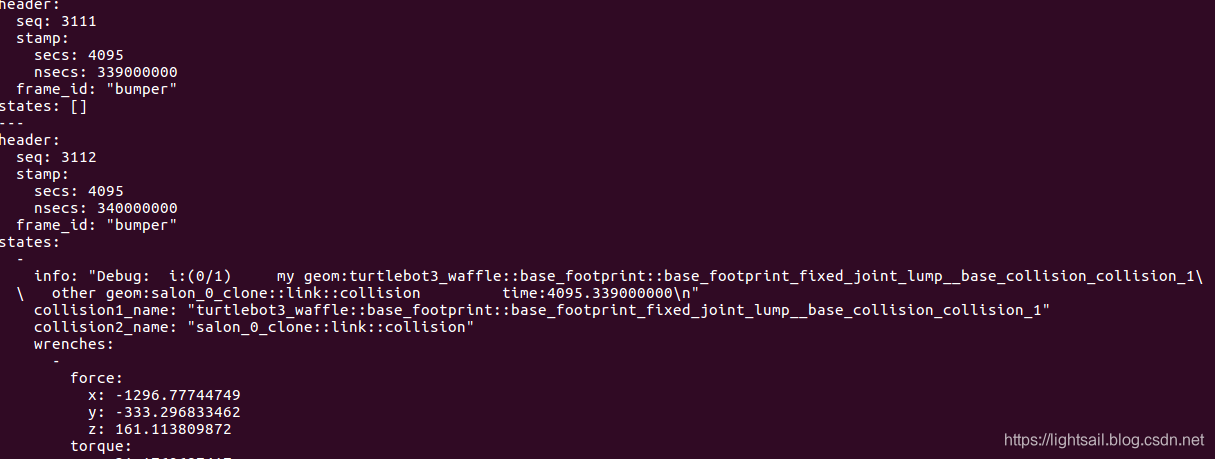
2.订阅bumper话题
(1)消息类型
bumper插件发出的topic消息类型是gazebo_msgs/ContactsState,定义如下:
std_msgs/Header header
gazebo_msgs/ContactState[] states
其中的gazebo_msgs/ContactState类型定义如下:
string info
string collision1_name
string collision2_name
geometry_msgs/Wrench[] wrenches
geometry_msgs/Wrench total_wrench
geometry_msgs/Vector3[] contact_positions
geometry_msgs/Vector3[] contact_normals
float64[] depths
(2)修改ros工程配置
修改CmakeList.txt
加入
find_package(catkin REQUIRED COMPONENTS
  gazebo_msgs
)
修改package.xml,加入
<build_depend>gazebo_msgs</build_depend>
(3)包含头文件和订阅话题
#include <gazebo_msgs/ContactsState.h>
 ros::Subscriber sub_bumper = node.subscribe("/robot/bumper_states", 2000, bumper_callback,ros::TransportHints().tcpNoDelay());
(4)加入回调函数
void bumper_callback(const gazebo_msgs::ContactsState::ConstPtr& msg)
参考文献
https://blog.csdn.net/wubaobao1993/article/details/91890839
http://answers.gazebosim.org/question/20432/ros-gazebo-detecting-collision-with-a-static-object-using-contact-sensor/
https://blog.csdn.net/xp1994816/article/details/101539131
更多推荐
 4
4 0
0- 0


 已为社区贡献5条内容

所有评论(0)